
Primea ReviewsAll Reviews

Primea Reviews is reader-supported. When you buy through our Amazon links we may earn a commission, at no extra cost to you. Rankings are set by our editors and never sold. Learn more

Ranked & Reviewed by Primea Reviews

The 8 Best 5-Port Network Switches of 2026, Ranked & Reviewed

By the Primea Editorial TeamUpdated November 1, 202610 min read8 products ranked
The 8 Best 5-Port Network Switches of 2026, Ranked & Reviewed

The short answer

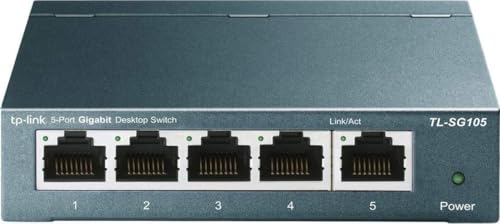
The TP-Link TL-SG105 is the best 5-port switch for most buyers: five gigabit ports, QoS, a metal case and a three-year warranty. The NETGEAR GS305 is the silent pick, and the TL-SG1005P is the best PoE option with a 65W budget. Pick the TL-SG105S-M2 for 2.5G and the TL-SX105 for 10G.

The Primea Scoreboard

Ranked & Reviewed

  1. The safe default for turning one wall jack into five gigabit ports.

    95Outstanding
    Check price
  2. A silent, energy-aware gigabit switch for bedrooms and quiet desks.

    93Outstanding
    Check price
  3. Plain gigabit with the strongest warranty promise in the group.

    91Excellent
    Check price
  4. The affordable step up when your internet is faster than gigabit.

    89Excellent
    Check price
  5. Full 10G on every port for workstations and fast storage.

    87Excellent
    Check price
  6. Powers four devices over the cable with a clear 65W budget.

    85Excellent
    Check price
  7. A fanless PoE switch that reallocates power between ports.

    83Very Good
    Check price
  8. A tiny, fanless budget switch for travel or tight spots.

    81Very Good
    Check price

Port count is the least useful number on a five-port switch. Two boxes with five identical sockets can differ by a factor of ten in speed, and one may quietly power your cameras over the cable while the other will not. Decide what each port needs to do before you compare any model, and the shortlist shrinks fast.

We reviewed eight unmanaged five-port switches on paper, using the spec lines for port speed, PoE budget, cooling, mounting and warranty. We ranked them for general home and small-office use, then spread out the PoE and multi-gig models so a reader with cameras, a NAS or a 2.5G router can jump straight to the one that matches their gear instead of reading past it. Where a listing is silent on a spec such as warranty, we treat that as unknown.

Before you buy

What Actually Matters

01

Port speed

Port speed is how fast each socket can move data, usually 1G, 2.5G or 10G. It matters because a fast router or NAS is held back by a slower switch between them. Check the speed printed next to the port count in the product title, not just the word gigabit in a bullet, and confirm every port matches.

02

PoE power budget

Power over Ethernet sends electricity down the same cable that carries data, which is how cameras and access points run without a wall adapter. The budget is a total shared across all PoE ports, so 65W does not mean 65W each. Add up the wattage of your devices and compare it with the listed total before you buy.

03

Cooling and noise

A fanless switch cools through its case, so it makes no sound at all. That matters if the switch lives in a bedroom or beside your desk. Look for the word fanless in the feature list, since a missing mention usually means the spec sheet does not promise it. Leave air around the case either way.

04

Mounting options

Some switches include wall-mount slots, which frees desk space and keeps cables tidy. It matters most in small rooms and cabinets. Check the listing for the words wall mount and look at the dimensions to be sure it fits your spot. The TL-SG105 and NETGEAR models allow it, while the LS1005G is tiny.

05

Warranty and features

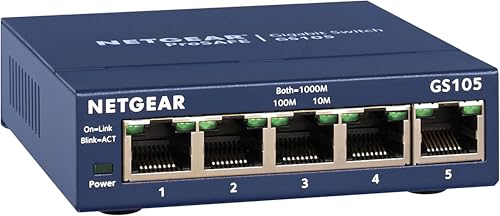
A longer warranty protects a switch that will run around the clock for years. QoS and IGMP snooping help when streaming and calls share the line. Read the bullet points for a warranty term, and treat a missing term as unknown rather than as good news. NETGEAR's GS105NA lists lifetime coverage.

In-depth reviews

Our Ranked Picks, Reviewed

2

Best Fanless Pick

NETGEAR GS305 5-Port Gigabit Unmanaged Switch

Our verdict: A silent, energy-aware gigabit switch for bedrooms and quiet desks.

The NETGEAR GS305 has five gigabit ports, a fanless design, 802.3az energy-efficient Ethernet and desktop or wall mounting, in the under $25 bucket. Without a fan it makes no noise at all, and 802.3az lowers power draw when a link is idle.

It ranks second because it lists no QoS, so the TL-SG105 edges it for busy shared networks. It wins for a quiet room, though, and it costs the same.

Buy it for a bedroom or living room where silence matters more than traffic shaping. Skip it if you want prioritization features on the box. A fanless case cools itself through the metal, so leave the vents clear and avoid burying it under cables.

Ports
5 x Gigabit
Cooling
Fanless
Efficiency
802.3az
Mounting
Desktop or wall

What we like

  • +Fanless and silent
  • +802.3az energy savings
  • +Wall mount option
  • +Five gigabit ports

Watch out for

  • −No QoS listed
  • −No PoE output

Buy it if: Bedroom, living-room or quiet desk setups.

Skip it if: You want traffic prioritisation features on the box.

3

Best Warranty

NETGEAR GS105NA 5-Port Gigabit Switch

Our verdict: Plain gigabit with the strongest warranty promise in the group.

The NETGEAR GS105NA is a five-port gigabit switch with a fanless design, desktop or wall mounting and the NETGEAR Lifetime Warranty, in the $25 to $50 bucket. A lifetime promise is rare on networking gear and suits a switch you want to forget in a cabinet.

It ranks third because it costs more than the GS305 for the same ports, and it lists no extra traffic features. The warranty is what you pay for, and it is the strongest in the group.

Buy it for a closet or cabinet install that will run for years. Skip it if you want the lowest price. Compare it with the TL-SG105, which carries a three-year warranty and QoS, before paying the premium for the lifetime term.

Ports
5 x Gigabit
Cooling
Fanless
Warranty
NETGEAR Lifetime
Mounting
Desktop or wall

What we like

  • +Lifetime warranty
  • +Fanless design
  • +Five gigabit ports
  • +Wall mount option

Watch out for

  • −Costs more than GS305
  • −No PoE output

Buy it if: Set-and-forget installs in cabinets and closets.

Skip it if: You want the lowest price or extra traffic features.

7

Best Smart PoE Budgeting

NETGEAR GS305P 5-Port PoE Gigabit Switch

Our verdict: A fanless PoE switch that reallocates power between ports.

The NETGEAR GS305P has four PoE+ ports sharing 63W, dynamic PoE power reallocation, a fanless unmanaged design and plug and play setup. Dynamic reallocation hands unused wattage from a quiet port to a busy one, which stretches a small budget across a mixed set of devices.

It ranks seventh because the 63W budget is slightly smaller than the TL-SG1005P's 65W and no warranty term is listed. The listing's silence on the warranty is a minor gap.

Buy it for a quiet room with a mix of PoE devices. Skip it if you want the biggest PoE budget at this size. Fanless cooling means silence, but check that the case has room to breathe.

PoE ports
4 x PoE+
PoE budget
63W total
Power feature
Dynamic reallocation
Cooling
Fanless, unmanaged

What we like

  • +Dynamic PoE reallocation
  • +Fanless and quiet
  • +Four PoE+ ports
  • +Plug and play

Watch out for

  • −63W budget is slightly smaller
  • −No warranty term listed

Buy it if: Quiet rooms with a mix of PoE devices.

Skip it if: You want the biggest PoE budget at this size.

Methodology

How We Ranked These

Port speed

We checked whether each switch runs gigabit, 2.5G or 10G on its ports, since that sets the ceiling for every device behind it.

PoE capability

We noted whether PoE is offered and how large the shared power budget is, because that limits how many devices can be powered.

Cooling and noise

We favoured fanless designs, as a switch often sits in a bedroom or on a desk.

Mounting and size

We looked at desktop and wall mounting options and overall footprint for small spaces.

Warranty and extras

We compared warranty terms and listed features such as QoS, IGMP snooping and energy efficiency.

Every Primea Score uses the same weights: Performance 30% · Build & Materials 20% · Everyday Usability 20% · Value 20% · Owner Satisfaction 10%. Full scoring rules

Buyer's guide

How to Pick the Right One for You

By Network Speed

Match the switch to the fastest device it will serve.

Your networkOur pick
Standard gigabit home networkTP-Link TL-SG105
Quiet bedroom or deskNETGEAR GS305
Router or NAS at 2.5GTP-Link TL-SG105S-M2
Workstation or NAS at 10GTP-Link TL-SX105

By Budget

SpendOur pick
Under $25TP-Link TL-SG105
Under $25, smallest sizeTP-Link LS1005G Litewave
$25 to $50, gigabitNETGEAR GS105NA
$25 to $50, 2.5G or PoETP-Link TL-SG105S-M2 or TP-Link TL-SG1005P
$200 to $500TP-Link TL-SX105

Plain Switch vs PoE Switch

Plain switch

Moves data only, and devices need their own power adapters. The TP-Link TL-SG105, NETGEAR GS305, NETGEAR GS105NA and TP-Link LS1005G fall here.

PoE switch

Carries power and data on one cable, so cameras and access points need no wall plug. The TP-Link TL-SG1005P and NETGEAR GS305P do this with a shared budget of about 63W to 65W.

Most buyers should pick a plain switch unless a specific device needs PoE.

By Mounting and Size

SituationOur pick
Wall mount in a cabinetNETGEAR GS105NA
Desk with limited roomTP-Link LS1005G Litewave
Metal case for a desk or wallTP-Link TL-SG105
Compact multi-gig boxTP-Link TL-SG105S-M2

For Home Camera Setups Specifically

Look for

PoE+ ports and a total budget that covers every camera's wattage with some spare.

In this ranking

The TP-Link TL-SG1005P lists 65W across four ports, and the NETGEAR GS305P lists 63W with dynamic reallocation.

When to Spend More

Spend more if

You own a 2.5G router or a NAS, in which case the TP-Link TL-SG105S-M2 or TP-Link TL-SX105 stops the switch being the bottleneck.

Save if

Everything is gigabit, where the TP-Link TL-SG105 or NETGEAR GS305 does the whole job.

Questions

Frequently Asked Questions

Will a 5-port switch slow down my internet?+

Not if its ports are at least as fast as your connection. A gigabit switch can cap a faster plan, so match the switch speed to your fastest device. The TL-SG105S-M2 handles 2.5G internet, and the TL-SX105 handles 10G.

Do I need a managed switch?+

These are unmanaged, meaning you plug them in and they work. That is enough for most homes and small offices, including the TL-SG105 and GS305. Only buy managed if you need VLANs or per-port controls, which none of the picks here provide.

Is the TP-Link TL-SG105S-M2 worth it over the TL-SG105?+

Only if you have a 2.5G router, NAS or computer to use the extra speed. Otherwise the gigabit TL-SG105 does the same job for less, and its three-year warranty is comparable.

How do I set up a PoE switch?+

Plug the uplink into your router, then connect each PoE device directly. Check that the combined wattage of your devices fits the total budget, such as 65W on the TL-SG1005P or 63W on the NETGEAR GS305P.

Do these switches need maintenance?+

No software updates are needed on an unmanaged switch. Keep the vents clear and dust it occasionally, especially fanless models like the GS305 that cool through the case, and avoid stacking gear on top.

Can I use the 10G switch with older gear?+

Yes, the TL-SX105 lists auto-negotiation from 100Mb up to 10G, so older devices still connect at their own speed. Only 10G devices use the full speed of the link, so a mixed network works fine.

Final take

The TP-Link TL-SG105 is the right five-port switch for most people: five gigabit ports, QoS and a solid warranty for very little money. Choose the NETGEAR GS305 for silence and the TL-SG1005P if cameras need power. Buy 2.5G or 10G only when your devices can use it. Match the speed to your fastest device first.

More Ranked & Reviewed Guides