
Primea ReviewsAll Reviews

Primea Reviews is reader-supported. When you buy through our Amazon links we may earn a commission, at no extra cost to you. Rankings are set by our editors and never sold. Learn more

Ranked & Reviewed by Primea Reviews

The 6 Best Tablets for Reading of 2026, Ranked & Reviewed

By the Primea Editorial TeamUpdated November 1, 20269 min read6 products ranked
The 6 Best Tablets for Reading of 2026, Ranked & Reviewed

The short answer

The Kindle Paperwhite is the best reading device for book lovers, with a 7 inch screen and 16GB of storage. The Fire HD 8 is a flexible budget tablet, and the Fire HD 10 offers a bigger screen for PDFs and magazines. The basic Kindle is the portable option, the NOOK suits Barnes & Noble readers, and the iPad is for people who want one device for everything.

The Primea Scoreboard

Ranked & Reviewed

  1. A 7 inch e-reader with 16GB for book-first readers.

    94Outstanding
    Check price
  2. 02
    Amazon Fire HD 8 tablet

    Best Budget Tablet

    Amazon Fire HD 8 tablet

    A 64GB tablet that reads and does a bit more.

    90Excellent
    Check price
  3. 03
    Amazon Fire HD 10 tablet

    A 10.1 inch screen with stylus support for magazines and PDFs.

    87Excellent
    Check price
  4. The lightest, most compact Kindle with 16GB.

    84Very Good
    Check price
  5. A 7.8 inch e-reader outside the Kindle ecosystem.

    81Very Good
    Check price
  6. An 11 inch tablet that reads and does everything else.

    78Very Good
    Check price

Reading on a screen is really two different jobs. One is sitting with a novel for an hour, where glare and distraction are the enemies. The other is flipping through magazines, PDFs and comics, where a bigger canvas and color matter more than anything else. A single device rarely wins both, and the regret usually comes from picking the wrong category.

We ranked six devices from their listings, looking at screen size, storage and price bucket. Where a listing is thin we say so and avoid claims it does not make. The question behind every placement is simple: what do you actually read, and does this device fit that habit.

Before you buy

What Actually Matters

01

E-ink versus tablet

An e-reader is built for text, with a screen that looks like paper and a battery that is meant to last. A tablet shows color and runs apps. Choose by how you read. Check the listing for the device category, since the Kindle Paperwhite and iPad are very different tools.

02

Screen size

Screen size changes how pages look. Small screens suit novels, and large ones suit PDFs and magazines. Sizes here run from 7 inches on the Paperwhite to 11 inches on the iPad. Compare the stated inches in the title, and think about whether you read prose or page layouts.

03

Storage

Storage is how many books, apps and files the device can hold. Sixteen gigabytes holds many books, while apps, video and comics need more. The NOOK lists 32GB and the iPad 128GB. Check the storage in the title, and note that most of these devices do not take memory cards.

04

Stylus and keyboard

Stylus and keyboard support turn a reading device into a note-taking one. The Fire HD 10 lists stylus support and the iPad lists keyboard compatibility. Look for those lines in the bullets. If you only read, they do not matter, but they help students and anyone who marks up documents.

05

Ecosystem

Ecosystem is the store and file system a device ties you to. Kindle books buy from Amazon, while the NOOK uses Barnes & Noble. Moving a library across is difficult. Decide where you will buy books, and check which file formats the device can open.

In-depth reviews

Our Ranked Picks, Reviewed

1

Best Overall

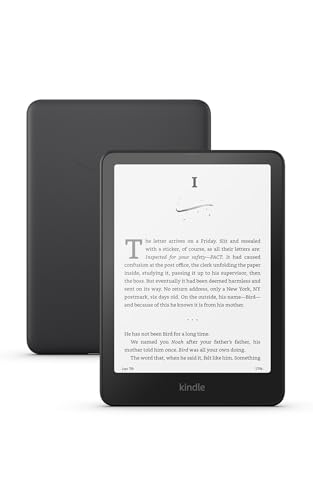
Amazon Kindle Paperwhite 16GB (newest model)

Our verdict: A 7 inch e-reader with 16GB for book-first readers.

The Amazon Kindle Paperwhite has a 7 inch display and 16GB of storage, and Amazon describes the newest model as 20% faster than the prior one. It falls in the $100 to $200 bucket.

It takes first place because it is built around the one task most readers care about. Without apps, video or notifications competing for attention, a novel gets your full focus, and the 16GB of storage holds a large library. The Fire tablets below do more, but they are not as good at being a book.

Buy it if you mostly read novels and want an uncluttered device. The caveat is that it is not a general tablet, so skip it if you want apps and video. It is also small for PDFs, and if you read non-Kindle files, check which formats the device supports before you buy.

Screen
7 in
Storage
16GB
Type
E-reader
Price
$100-200

What we like

  • +7 inch reading screen
  • +16GB storage
  • +20% faster than prior model
  • +Reading-focused design

Watch out for

  • −Not a general tablet
  • −Small for PDFs

Buy it if: Readers who mostly read novels.

Skip it if: You want apps and video.

2

Best Budget Tablet

Amazon Fire HD 8 tablet

Our verdict: A 64GB tablet that reads and does a bit more.

The Amazon Fire HD 8 is a general-purpose tablet with 64GB of storage, in the $100 to $200 bucket. It reads books and comics, but also runs apps and plays video.

It ranks second because it offers flexibility at the same price bucket as the Kindles, with far more storage than the Fire HD 10. The listing gives few display details, though, and the screen is backlit rather than e-ink, which tires some eyes during long reading sessions.

Buy it if you read casually and also stream shows or play games on the same device. Skip it if you want a screen that behaves like paper. Against the Paperwhite, it trades reading comfort for versatility, and for a single-purpose reader that is a poor deal. As a family tablet that also handles books, it is a reasonable pick.

Storage
64GB
Type
Tablet
Price
$100-200
Brand
Amazon Fire

What we like

  • +64GB storage
  • +General tablet use
  • +$100-200 bucket
  • +Comics and apps

Watch out for

  • −Backlit screen
  • −Few listing details

Buy it if: Casual readers who also stream.

Skip it if: You want an e-ink screen.

3

Best Big Screen

Amazon Fire HD 10 tablet

Our verdict: A 10.1 inch screen with stylus support for magazines and PDFs.

The Amazon Fire HD 10 has a 10.1 inch display, 32GB of storage and stylus support, in the $100 to $200 bucket.

It ranks third because the larger screen is a real advantage for magazines, comics and PDFs, where a 7 inch device forces constant zooming. The storage is half that of the Fire HD 8, which matters if you load many apps or downloaded issues. Stylus support adds note taking for people who annotate documents.

Buy it if you read documents and graphic content more than novels. Skip it if you want something pocketable, since a 10.1 inch tablet is heavier than the e-readers above and below. As with the smaller Fire, the screen is backlit, so long novel sessions are less comfortable. For PDFs, though, it is the most affordable large-screen option on the list.

Screen
10.1 in
Storage
32GB
Input
Stylus support
Price
$100-200

What we like

  • +10.1 inch screen
  • +Stylus support
  • +Good for PDFs
  • +$100-200 bucket

Watch out for

  • −32GB storage
  • −Heavier than e-readers

Buy it if: Magazine and PDF readers.

Skip it if: You want a pocketable device.

4

Best Compact Kindle

Amazon Kindle 16 GB (newest model)

Our verdict: The lightest, most compact Kindle with 16GB.

The Amazon Kindle is the lightest and most compact model in Amazon's lineup, with 16GB of storage, in the $100 to $200 bucket.

Fourth place comes from its spot a step below the Paperwhite in the range while costing a similar amount, so there is less reason to choose it unless size is your top priority. The listing gives fewer details than the Paperwhite's, which makes the comparison harder. What it offers is portability, with a body that slips into a coat pocket or small bag.

Buy it if you commute and want a reader that weighs almost nothing. Skip it if you want a larger text view, in which case the Paperwhite is the better call. Like the Paperwhite, it is a book device only, with no apps, so do not expect tablet features.

Storage
16GB
Type
E-reader
Size
Lightest, most compact Kindle
Price
$100-200

What we like

  • +Lightest Kindle
  • +16GB storage
  • +Pocketable size
  • +Reading-focused

Watch out for

  • −Fewer details listed
  • −Not a general tablet

Buy it if: Commuters who want portability.

Skip it if: You want larger text view.

5

Best Non-Kindle

Barnes & Noble NOOK GlowLight 4 Plus eReader 7.8-inch 32GB

Our verdict: A 7.8 inch e-reader outside the Kindle ecosystem.

The Barnes & Noble NOOK GlowLight 4 Plus has a 7.8 inch screen and 32GB of storage, in the $50 to $100 bucket. It is the cheapest e-reader in the ranking.

It ranks fifth because its store ecosystem is smaller than Amazon's, and the listing gives few details beyond the screen and storage. Yet the screen is larger than the Paperwhite's 7 inches and the storage is double, which is a strong argument for readers who do not need Kindle books.

Buy it if you already buy from Barnes & Noble or want to stay outside the Amazon ecosystem. Skip it if your library lives on Kindle, since moving books across is not simple. The NOOK is a sensible choice for a reader who values screen size and price over catalog breadth. Check the supported file formats before ordering.

Screen
7.8 in
Storage
32GB
Type
E-reader
Price
$50-100

What we like

  • +7.8 inch screen
  • +32GB storage
  • +$50-100 bucket
  • +Non-Amazon ecosystem

Watch out for

  • −Smaller store ecosystem
  • −Fewer details listed

Buy it if: Barnes & Noble readers.

Skip it if: You buy books from Amazon.

6

Best All-Purpose

Apple iPad 11-inch: A16 chip

Our verdict: An 11 inch tablet that reads and does everything else.

The Apple iPad 11-inch has an A16 chip, 128GB of storage and keyboard compatibility, in the $200 to $500 bucket.

It lands last for reading alone because it is the most expensive device here and overkill for novels. A backlit screen and a long list of distractions make it a worse book than the Paperwhite. But it handles PDFs, comics, apps and work with ease, and it runs just about any reading app you might want.

Buy it if you want one device for reading, notes and everything else. Skip it if you only read novels, since you would pay for power you never use. The 128GB of storage and 11 inch display make it the best option here for large documents and magazines. For pure reading comfort, a dedicated e-reader beats it.

Screen
11 in
Storage
128GB
Chip
A16
Price
$200-500

What we like

  • +11 inch display
  • +128GB storage
  • +Keyboard compatible
  • +Runs many reading apps

Watch out for

  • −$200-500 bucket
  • −Overkill for novels

Buy it if: Readers who want a do-everything device.

Skip it if: You only read novels.

Methodology

How We Ranked These

Screen type

We separated e-readers from backlit tablets.

Screen size

We compared sizes from 7 to 11 inches.

Storage

We compared 16GB to 128GB.

Versatility

We weighed apps, stylus, and keyboard support.

Price bucket

We scored each device against its price bucket.

Every Primea Score uses the same weights: Performance 30% · Build & Materials 20% · Everyday Usability 20% · Value 20% · Owner Satisfaction 10%. Full scoring rules

Buyer's guide

How to Pick the Right One for You

By Reading Type

Match the device to what you read.

You readOur pick
Mostly novelsAmazon Kindle Paperwhite 16GB
Magazines and PDFsAmazon Fire HD 10 tablet
Novels on a budgetBarnes & Noble NOOK GlowLight 4 Plus
Everything including workApple iPad 11-inch: A16 chip

By Budget

SpendOur pick
$50-100Barnes & Noble NOOK GlowLight 4 Plus eReader
$100-200 e-readerAmazon Kindle Paperwhite 16GB
$100-200 tabletAmazon Fire HD 8 tablet
$200-500Apple iPad 11-inch: A16 chip

E-Reader vs Tablet

E-reader

Built for text. The Kindle Paperwhite, Kindle 16GB, and NOOK are e-readers.

Tablet

Color and apps. The Fire HD 8, Fire HD 10, and iPad are tablets.

Most buyers should choose an e-reader if they mostly read books.

By Screen Size

SizeOur pick
7 inchAmazon Kindle Paperwhite 16GB
7.8 inchBarnes & Noble NOOK GlowLight 4 Plus
10.1 inchAmazon Fire HD 10 tablet
11 inchApple iPad 11-inch: A16 chip

For Commuters Specifically

Look for

A light, compact device with ample storage.

In this ranking

The Amazon Kindle 16 GB is the lightest and most compact Kindle.

When to Spend More

Spend more if

You want one device for work and reading. The iPad 11-inch has 128GB and keyboard support.

Save if

You read mainly books. The NOOK sits in the $50-100 bucket.

Questions

Frequently Asked Questions

Is an e-reader better than a tablet for reading?+

For novels, many readers prefer an e-reader like the Kindle Paperwhite, which has no distractions. Tablets such as the Fire HD 10 suit color content, PDFs and magazines better.

What mistake do buyers make?+

Buying a tablet for novels or an e-reader for PDFs. A backlit Fire HD 8 tires some eyes during long reading, while the small Kindle Paperwhite makes large documents hard to follow.

Is the iPad worth it over a Kindle?+

Only if you want a do-everything device. The iPad handles PDFs, apps and work, but costs more and distracts from books. For reading alone, the Paperwhite is better.

How do I load books?+

Use the device's store app or transfer files. Check the supported formats first, especially on the NOOK or the Kindle, since not every file type opens without conversion.

How much storage do I need?+

Sixteen gigabytes holds many books, as on the Kindle Paperwhite. Apps and video need more, so choose the Fire HD 8 at 64GB or the iPad at 128GB if you want to keep them on board.

Can I use a stylus?+

The Fire HD 10 lists stylus support, so it is the one to pick for annotating documents. The iPad lists keyboard compatibility, and the e-readers do not list stylus input.

Final take

The Kindle Paperwhite is the best reading device for most book lovers, with a focused design and plenty of storage. The Fire HD 10 is the pick for PDFs and magazines, and the Fire HD 8 serves as a budget do-it-all. Choose the NOOK for Barnes & Noble, and the iPad only if reading is one job among many.

More Ranked & Reviewed Guides