
Primea ReviewsAll Reviews

Primea Reviews is reader-supported. When you buy through our Amazon links we may earn a commission, at no extra cost to you. Rankings are set by our editors and never sold. Learn more

Ranked & Reviewed by Primea Reviews

The 8 Best Digital Notebook Tablets of 2026, Ranked & Reviewed

By the Primea Editorial TeamUpdated November 1, 202611 min read8 products ranked
The 8 Best Digital Notebook Tablets of 2026, Ranked & Reviewed

The short answer

The BOOX Note Air 5 C is the best digital notebook tablet for most people, with a 10.3 inch color ePaper display, 6GB RAM and 64GB of storage on Android. The older Air 4 C is nearly as capable. The reMarkable Paper Pro wins on focus, and the Kindle Scribe Colorsoft suits readers who also take notes.

The Primea Scoreboard

Ranked & Reviewed

  1. 10.3 inch color ePaper, 6GB RAM and 64GB storage with Android. The most capable here.

    95Outstanding
    Check price
  2. The previous-generation color BOOX, with the same 6GB RAM and 64GB storage.

    93Outstanding
    Check price
  3. A color e-paper slate with a polished single-purpose interface and Marker Plus.

    91Excellent
    Check price
  4. An 11 inch color display with a Pen included that doubles as a full e-reader.

    89Excellent
    Check price
  5. An older black and white BOOX with Android 10, a front light and G-sensor.

    87Excellent
    Check price
  6. A black and white slate with a genuinely paper-like writing feel and weeks of battery.

    85Excellent
    Check price
  7. The Paper Pro with Marker Plus and a folio. The most expensive device here.

    83Very Good
    Check price
  8. The reMarkable 2 with Marker Plus and a Basalt folio in one box.

    81Very Good
    Check price

Digital notebook tablet is a label that stretches over two very different products. One is a paper-like writing slate with almost no software, built so nothing interrupts the page. The other is an e-ink tablet running a full Android app store, which can pull you back into notifications. They share a screen technology and a stylus, and little else, so buying the wrong kind is easy and expensive.

We reviewed eight devices and ranked them from most flexible to most focused. Scoring covered RAM and storage where listed, display type, what ships in the box and how tied each device is to a single ecosystem. Where a listing leaves out a spec, such as a price or a screen size, we left it out rather than guess.

Before you buy

What Actually Matters

01

Decide between Android and a closed slate

Android e-ink tablets such as the BOOX Note Air 5 C install apps, which adds flexibility and distraction. Closed slates like the reMarkable stay focused and simple. This choice shapes daily habits more than any spec. Check the operating system line on the listing and decide how much temptation you can tolerate beside your notes.

02

Look at RAM and storage

RAM and storage decide how many PDFs and note apps you can keep open. The BOOX Note Air 4 C and 5 C list 6GB RAM and 64GB storage, enough for multitasking and a large library. Closed slates do not list RAM the same way. Check the numbers on the listing, and confirm storage before buying a bundle.

03

Color is a premium

Color e-paper costs more and refreshes differently from black and white, with a slightly slower response and muted tones. It earns its place if you annotate in several colors or read illustrated books. Otherwise save the money. Check the display line in the title for color or black and white before comparing prices, and look for a front light if you read at night.

04

Check what ships in the box

Some bundles include a Marker Plus and a folio, others only a pen. A case bought later can erase an apparent bargain, and some devices ship without the stylus at all. Compare bundles before comparing prices, and check the title for words like Marker Plus, Pen included or Basalt Book Folio, plus whether spare pen tips come in the box.

05

Mind the ecosystem

The Kindle Scribe ties you to the Kindle store, and the reMarkable ties you to its own cloud, while an Android BOOX is the most open. The ecosystem decides which books and files open easily. Choose according to the library you already own, and check supported file formats on the listing, since EPUB, PDF and Kindle files do not all open everywhere.

In-depth reviews

Our Ranked Picks, Reviewed

1

Best Overall

BOOX Tablet 10.3in Note Air 5 C, 6G 64G E Ink Tablet Color ePaper Notebook

Our verdict: 10.3 inch color ePaper, 6GB RAM and 64GB storage with Android. The most capable here.

The Note Air 5 C is the broadest tool here. A 10.3 inch color ePaper display sits on top of 6GB of RAM, 64GB of storage and Android, so it multitasks, opens large PDFs and installs reading and note apps. The newer hardware also brings software refinement, which matters on e-ink where page turns and ink latency define how pleasant a device feels.

It wins because no other pick combines color, memory and an open app store. Against the reMarkable Paper Pro, it opens the Android world and costs less, even in the $500+ tier. Compared with the Air 4 C right behind it, you pay for newer silicon and refinement rather than extra RAM, since both list 6GB.

Buy it for notes, reading and apps in one device. Skip it if you want a distraction-free slate, because Android notifications and apps can undo the purpose of a notebook.

Display
10.3 inch color ePaper
Memory
6GB RAM, 64GB storage
System
Android
Generation
Newer hardware

What we like

  • +Color ePaper display
  • +6GB RAM and 64GB storage
  • +Android app flexibility
  • +Mid-range price for color e-ink

Watch out for

  • −Less focused than a reMarkable
  • −Android adds complexity

Buy it if: People who want notes, reading and apps in one e-ink device.

Skip it if: You want a distraction-free slate.

2

Best Mid-Tier Color

BOOX Tablet Note Air 4C, 6G 64G E Ink Tablet Color ePaper Notebook

Our verdict: The previous-generation color BOOX, with the same 6GB RAM and 64GB storage.

The Note Air 4 C is the same idea one generation back. It carries a color ePaper display, 6GB of RAM, 64GB of storage and Android, in an established BOOX line. That much memory is enough to keep a few PDFs open and flip between a reader and a note app without reloading.

It sits behind the Air 5 C because it is the older design, and the listing gives no price to weigh against it. On paper the memory and storage match the 5 C exactly, so the difference lies in processing speed and software polish, which you cannot see in the spec table. If the older model is meaningfully cheaper when you shop, it is the smarter buy.

Choose it if you want color and Android on a lower budget. Skip it if you want the newest hardware, and remember that Android adds the same complexity as the 5 C.

Display
Color ePaper
Memory
6GB RAM, 64GB storage
System
Android
Line
Established BOOX

What we like

  • +Color ePaper display
  • +6GB RAM and 64GB storage
  • +Android app flexibility
  • +Established BOOX line

Watch out for

  • −Older generation
  • −Android adds complexity

Buy it if: App-minded buyers shopping for color.

Skip it if: You want the newest hardware.

3

Best Focused Color

reMarkable Paper Pro with Marker Plus

Our verdict: A color e-paper slate with a polished single-purpose interface and Marker Plus.

The reMarkable Paper Pro is the focused color option. It has a color e-paper display, a polished single-purpose interface and a Marker Plus in the box. There is no app store, which is the point: nothing competes with the page for attention, so writing and reading feel closer to paper than on an Android tablet.

It ranks third because it is the BOOX models' opposite. It costs far more than either BOOX in the $500+ tier and cannot install apps, so you give up flexibility for focus. It beats the Kindle Scribe on a pure writing experience, but the Scribe offers a bigger screen and a large reading library.

Buy it if focus matters more than flexibility and you want color. No folio is bundled here, which keeps it cheaper than the bundle version. Skip it if you want to install apps.

Display
Color e-paper
Stylus
Marker Plus included
Interface
Single-purpose
Folio
Not included

What we like

  • +Color e-paper display
  • +Marker Plus included
  • +Polished, focused interface
  • +Cheaper than the folio bundle

Watch out for

  • −No app store
  • −Costs far more than BOOX

Buy it if: Writers who want focus in color.

Skip it if: You want to install apps.

4

Best for Kindle Readers

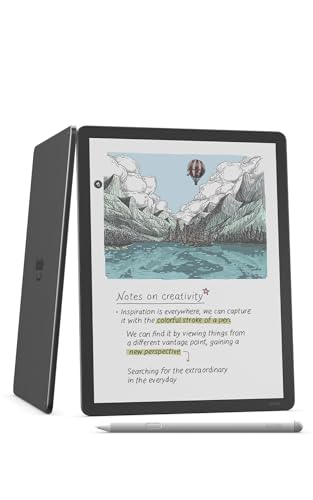
Amazon Kindle Scribe Colorsoft 64GB, 11 inch paper-like color display with front light, Pen included, Graphite

Our verdict: An 11 inch color display with a Pen included that doubles as a full e-reader.

The Kindle Scribe Colorsoft is the reader's pick. An 11 inch color paper-like display is the largest writing surface in the ranking, 64GB of storage is on the listing and a Pen ships in the box. It combines a notebook with the full Kindle library, so annotating a book you already own takes a tap.

It ranks fourth because it ties you to Amazon's ecosystem and has no open app store like a BOOX. Against the Paper Pro, it is stronger at reading and weaker as a pure notebook. The larger screen helps with comics, textbooks and wide PDFs, but it also makes the device heavier to hold.

Buy it if you read a lot on Kindle and want margin notes. Skip it if you want to install other apps or read outside Amazon's formats. The premium price is the other caveat.

Display
11 inch color
Storage
64GB
Pen
Included
Library
Kindle store

What we like

  • +Largest writing surface listed at 11 inches
  • +Pen included in the box
  • +Doubles as a full e-reader
  • +Color display on the listing

Watch out for

  • −Tied to Amazon's ecosystem
  • −Premium price

Buy it if: Kindle readers who also take notes.

Skip it if: You want an open app store.

5

Best Older Android

BOOX Note Air 10.3 E Ink Tablet, ePaper, Android 10, Front Light, G-Sensor, Digital Paper, E Ink Notepad

Our verdict: An older black and white BOOX with Android 10, a front light and G-sensor.

The BOOX Note Air 10.3 is the older Android option. It lists a 10.3 inch ePaper display, Android 10, a front light and a G-sensor for auto-rotation. The front light makes it usable in dim rooms, and Android 10 still opens common reading and note apps.

It ranks fifth because it is an earlier generation with no color. Against the Air 5 C and 4 C above, it gives up memory detail and a color panel, though the app flexibility is the same. Android 10 is also dated, and the listing gives no price to justify the downgrade.

Choose it if you read in black and white and want an open system for less. Skip it if you want color, newer software or long update support. Check memory and storage on the exact listing, because the spec table here is thin.

Display
10.3 inch ePaper
System
Android 10
Light
Front light
Sensor
G-sensor

What we like

  • +Runs Android
  • +Front light for dim rooms
  • +Established line
  • +G-sensor auto-rotation

Watch out for

  • −Older generation
  • −No color panel

Buy it if: Android users who read in black and white.

Skip it if: You want a newer device.

6

Best Writing Feel

reMarkable 2 with Marker Plus

Our verdict: A black and white slate with a genuinely paper-like writing feel and weeks of battery.

The reMarkable 2 is the quiet writer. A black and white e-paper display, a Marker Plus in the box and weeks of battery life define it. The paper-like writing feel is the whole sale: low latency and a textured surface make handwriting feel closer to a pen on a pad than any tablet here.

It ranks sixth in a tablet guide because it has no app store and no color. It does cost less than the color e-ink tablets, in the $200 to $500 tier, and it undercuts the Paper Pro by a wide margin. Its weeks of battery life also beat Android devices that need charging more often.

Buy it if you want to write and nothing else. Skip it if you want apps, color or a front light, since none are listed. For pure note-taking it is the leanest buy in the list.

Display
Black and white e-paper
Stylus
Marker Plus included
Battery
Weeks
System
Single-purpose

What we like

  • +Weeks of battery life
  • +Marker Plus included
  • +Paper-like writing feel
  • +Lower price than color e-ink

Watch out for

  • −No color
  • −No app store

Buy it if: Writers who want a quiet notebook.

Skip it if: You want apps or color.

7

Premium Bundle

reMarkable Paper Pro with Marker Plus and Basalt Book Folio

Our verdict: The Paper Pro with Marker Plus and a folio. The most expensive device here.

This is the Paper Pro with a Marker Plus and a Basalt Book Folio, the most expensive bundle in the guide. It keeps the color e-paper display and a focused interface, and the listing calls out the largest screen in the guide. The folio protects the display and doubles as a stand.

It ranks seventh because you pay extra for the folio and still get no app store. Against the base Paper Pro, the folio is the only difference, so the ranking tracks the price of a case. A folio bought separately later could cost less, which makes this bundle a convenience purchase.

Buy it if you want the complete premium kit in one box and use the folio daily. Skip it if you already have a case or plan to shop for a cheaper one. At the highest price here, it is only worth it for buyers who are certain about the reMarkable approach.

Display
Color e-paper
Stylus
Marker Plus included
Case
Basalt Book Folio
Interface
Single-purpose

What we like

  • +Color e-paper display
  • +Folio included
  • +Focused interface
  • +Marker Plus included

Watch out for

  • −Highest price here
  • −No app store

Buy it if: Buyers who want the complete premium kit.

Skip it if: You do not need a folio.

8

Complete Kit

reMarkable 2 with Marker Plus and Basalt Book Folio

Our verdict: The reMarkable 2 with Marker Plus and a Basalt folio in one box.

This bundle includes the reMarkable 2, a Marker Plus and a Basalt Book Folio in one box. The black and white panel and weeks of battery life are unchanged from the base kit, and the folio adds a protective cover for travel.

It ranks last because it has the fewest features of any pick: no color, no app store, no front light. The folio is the only reason to choose it over the base reMarkable 2, which costs less. The Paper Pro bundle above offers color, so this one only wins when you want the cheaper black and white writer with a case.

Buy it if you want the case from day one and prefer writing to reading. Skip it if you want any app support or color. The caveat is straightforward: you are paying extra for protection you could add later.

Display
Black and white e-paper
Stylus
Marker Plus included
Case
Basalt Book Folio
Battery
Weeks

What we like

  • +Folio included
  • +Weeks of battery
  • +Paper-like writing feel
  • +Marker Plus included

Watch out for

  • −No color or apps
  • −Costs more than the base kit

Buy it if: Writers who want the case in the box.

Skip it if: You want any app support.

Methodology

How We Ranked These

Flexibility

We ranked Android devices with more RAM and storage above single-purpose slates, since a tablet should do more than one thing.

Display type

Color and black and white panels were compared by what they add and what they cost.

Memory and storage

RAM and storage were weighed where the listing states them.

Ecosystem lock-in

Amazon and reMarkable ecosystems were noted since they limit what you can install.

Value in the field

Each device was weighed against its price tier relative to the other seven.

Every Primea Score uses the same weights: Performance 30% · Build & Materials 20% · Everyday Usability 20% · Value 20% · Owner Satisfaction 10%. Full scoring rules

Buyer's guide

How to Pick the Right One for You

By Main Use

Tablet is a broad word, so start with your job.

Your main useOur pick
Notes, reading and appsBOOX Tablet 10.3in Note Air 5 C, 6G 64G E Ink Tablet Color ePaper Notebook
Color on a smaller budgetBOOX Tablet Note Air 4C, 6G 64G E Ink Tablet Color ePaper Notebook
Distraction-free writing in colorreMarkable Paper Pro with Marker Plus
Kindle books with margin notesAmazon Kindle Scribe Colorsoft 64GB, 11 inch paper-like color display with front light, Pen included, Graphite
Plain writing, black and whitereMarkable 2 with Marker Plus

By Budget

SpendOur pick
$400 to $500reMarkable 2 with Marker Plus
$500 to $600BOOX Tablet 10.3in Note Air 5 C, 6G 64G E Ink Tablet Color ePaper Notebook
$650 to $700reMarkable Paper Pro with Marker Plus
$750 and upreMarkable Paper Pro with Marker Plus and Basalt Book Folio

Android vs Closed Slate

Android

Install your own apps, accept complexity. Picks: BOOX Note Air 5 C, Note Air 4C, Note Air 10.3.

Closed slate

Fewer features and fewer distractions. Picks: both reMarkable 2 listings and both Paper Pro listings, plus the Kindle Scribe for the Kindle store.

Most buyers who want a tablet should default to Android, and writers should pick a closed slate.

By Display

You wantOur pick
Color with 6GB RAMBOOX Tablet Note Air 4C, 6G 64G E Ink Tablet Color ePaper Notebook
Largest writing surfaceAmazon Kindle Scribe Colorsoft 64GB, 11 inch paper-like color display with front light, Pen included, Graphite
Front light, black and whiteBOOX Note Air 10.3 E Ink Tablet, ePaper, Android 10, Front Light, G-Sensor, Digital Paper, E Ink Notepad
Weeks of battery, black and whitereMarkable 2 with Marker Plus and Basalt Book Folio

For Students Specifically

Look for

Enough storage for textbooks, a stylus in the box and an app store for note tools.

In this comparison

The BOOX Tablet Note Air 4C offers 6GB RAM and 64GB storage with Android.

When to Spend More

Spend more if

You want color and focus. The reMarkable Paper Pro with Marker Plus is the polished option.

Save if

Black and white is fine. The reMarkable 2 with Marker Plus costs far less.

Questions

Frequently Asked Questions

Is a digital notebook tablet better than an iPad?+

For writing and reading with less distraction, yes. For video and color apps, a regular tablet still wins. The BOOX Note Air 5 C narrows the gap with Android, but e-ink refresh will not match an LCD.

Do digital notebook tablets run apps?+

BOOX models run Android, so yes. The reMarkable Paper Pro and the Kindle Scribe Colorsoft are more closed, with the Scribe limited to the Kindle store and the reMarkable to its own software.

Is color e-ink worth it?+

Only if you annotate in color. The BOOX Note Air 5 C and reMarkable Paper Pro use color panels, while black and white devices like the reMarkable 2 cost less and behave more like paper.

How much RAM do I need?+

6GB, as on the BOOX Note Air 4 C and 5 C, is enough for multitasking and large PDF libraries. Closed slates like the reMarkable 2 do not advertise RAM, so judge them on the writing feel.

Is the Kindle Scribe Colorsoft good for notes?+

It has an 11 inch color display and a Pen included, and suits Kindle readers who want to mark up books. It is tied to the Kindle ecosystem, so it is weaker as a general notebook than the Paper Pro.

Do I need the folio?+

It protects the screen, but you can buy a case later. Bundles with a Basalt Book Folio, like the Paper Pro and reMarkable 2 kits, cost more up front, so skip it unless you commute with the device.

Final take

For most buyers, the BOOX Note Air 5 C is the best digital notebook tablet, pairing a color ePaper screen with 6GB RAM and 64GB storage on Android. Choose the reMarkable Paper Pro for pure focus, the Kindle Scribe Colorsoft if you live in the Kindle library, and the reMarkable 2 if black and white writing is all you need.

More Ranked & Reviewed Guides