

Primea ReviewsAll Reviews

Primea Reviews is reader-supported. When you buy through our Amazon links we may earn a commission, at no extra cost to you. Rankings are set by our editors and never sold. Learn more

Ranked & Reviewed by Primea Reviews

The 8 Best Drawing Tablets Under $200 for Beginners and Hobbyists, Ranked & Reviewed

By the Primea Editorial TeamUpdated November 3, 202610 min read8 products ranked
The 8 Best Drawing Tablets Under $200 for Beginners and Hobbyists, Ranked & Reviewed

The short answer

The UGEE UE12 is the best drawing tablet under $200 if you want to draw on a screen, with a zero-parallax 11.6 inch display and 124% sRGB. The XP-PEN Artist12 is the more established pen display, the Xencelabs Small is the best wireless pen tablet, and the XPPen Deco 01 V3 is the best large screenless tablet for the money.

The Primea Scoreboard

Ranked & Reviewed

  1. An 11.6 inch zero-parallax display with 124% sRGB, a 16K pressure stylus and one-cable connection.

    94Outstanding
    Check price
  2. An 11.6 inch FHD display with 8192 pressure levels and a screen protector pre-installed.

    92Outstanding
    Check price
  3. A thin wireless tablet with a true 16:9 area, two pens and 16 hours of use per charge.

    90Excellent
    Check price
  4. A 10 by 6.25 inch tablet with 16,384 pressure levels, 60 degrees of tilt and eight shortcut keys.

    88Excellent
    Check price
  5. A 10 by 6.25 inch tablet with 12 plus 16 hot keys and a battery-free stylus with tilt.

    86Excellent
    Check price
  6. A 6 by 4 inch, 0.3 inch thick tablet with 8192 pressure levels and wide platform support.

    83Very Good
    Check price
  7. A 6 by 4 inch, 2mm thin tablet with a battery-free stylus that works with Chromebooks.

    81Very Good
    Check price
  8. A wired Wacom tablet with an EMR battery-free pen and a creative software bundle.

    79Very Good
    Check price

The surprise for most first-time buyers is the learning curve of a screenless tablet. Your hand moves on the desk while your eyes follow a cursor on the monitor, and it takes a week or two before the connection feels natural. Many people quit before that point. If you can stretch to the $100 to $200 range, a pen display that lets you draw directly on the image removes that hurdle entirely.

This ranking mixes both types, sorting eight tablets by what a beginner or hobbyist actually feels: drawing surface, pen pressure and tilt, connection and software compatibility. We reviewed the listing specifications supplied for each model, and we judge all of them against the $200 cap. Where a feature is not stated, such as a pen display's colour accuracy beyond the listed gamut, we say so.

Before you buy

What Actually Matters

01

Pen display vs pen tablet

A pen display lets you draw directly on the image, so it is easier for beginners. A pen tablet is cheaper but needs hand-eye adjustment. The word display, monitor or screen in the title is the clue.

02

Pressure levels

Pressure levels such as 8192 or 16,384 describe how finely the stylus tracks force. Beyond 8192 the difference is hard to feel for most hobbyists. Check the figure, but do not pay a lot extra for it.

03

Active area

The active area is the part of the surface that registers the pen. A 6 x 4 inch tablet suits notes, while 10 x 6.25 inch is comfortable for sketching. Check the active area, not the outer size.

04

Colour gamut on pen displays

A figure like 124% sRGB means the screen can show more colours than sRGB, not that it is accurate. For colour-critical work, calibration still matters. Check whether the listing quotes sRGB or NTSC.

05

Device compatibility

Many tablets work with Windows and macOS, but Android and Chromebook support varies. Check the listing for the operating systems named, and for any required driver or app.

In-depth reviews

Our Ranked Picks, Reviewed

1

Best Overall

UGEE UE12 11.6 inch Drawing Tablet with Screen, 124% sRGB Color Gamut

Our verdict: An 11.6 inch zero-parallax display with 124% sRGB, a 16K pressure stylus and one-cable connection.

The UE12 is an 11.6 inch FHD pen display with a 124% sRGB colour gamut and a zero-parallax screen, which means the pen tip sits directly under the line it draws. The stylus offers 16K pressure and 60 degrees of tilt, and two Type-C ports allow a single-cable connection. It lands in the $100 to $200 range.

It wins because it removes the hardest parts of learning digital art. Drawing directly on the image skips the eye-hand disconnect of a screenless tablet, and a zero-parallax display keeps the cursor under the pen. The wide gamut means colours look rich, though gamut size is not accuracy and professionals will still want to calibrate. The single-cable setup keeps a small desk tidy.

Buy it if you want to draw on the screen. Skip it if you want the cheapest possible entry to digital art.

Display
11.6 inch FHD, zero-parallax
Colour
124% sRGB
Stylus
16K pressure, 60 degree tilt
Ports
Dual Type-C, single cable

What we like

  • +Zero-parallax screen
  • +124% sRGB colour gamut
  • +16K pressure with tilt support
  • +Single-cable Type-C connection

Watch out for

  • −Needs a screen to be useful
  • −Priciest tablet in the group

Buy it if: Beginners who want to draw directly on a screen.

Skip it if: You only want a cheap screenless tablet.

2

Best Established Pen Display

XP-PEN Artist12 11.6 Inch FHD Drawing Monitor Pen Display, 8192 Pressure

Our verdict: An 11.6 inch FHD display with 8192 pressure levels and a screen protector pre-installed.

The Artist12 is an 11.6 inch FHD pen display with 72% NTSC, equal to 100% sRGB, and 8192 pressure levels from a hexagonal-grip pen. An anti-reflective screen protector comes pre-installed, and the unit costs between $100 and $200.

It ranks second because it is an older, widely used design that gives you a full pen display at a fair price. The 100% sRGB figure is a more modest gamut than the UGEE's, but it is a respectable base for hobby work, and the anti-reflective film reduces glare while adding a slight tooth to the surface. The 8192 pressure levels sit below the 16K of the leader.

Pick it if you want a proven pen display. Skip it if you want the highest pressure figure.

Display
11.6 inch FHD
Colour
72% NTSC (100% sRGB)
Pressure
8192 levels
Screen
Anti-reflective protector fitted

What we like

  • +Full pen display for hobby use
  • +Anti-reflective protector fitted
  • +100% sRGB colour
  • +Hexagonal-grip pen

Watch out for

  • −Lower pressure than the UGEE
  • −Older design

Buy it if: Hobbyists wanting a proven pen display.

Skip it if: You want 16K pressure and the widest gamut.

3

Best Wireless Pen Tablet

XENCELABS Drawing Tablet Small, Portable Wireless, 2 Battery-Free Stylus

Our verdict: A thin wireless tablet with a true 16:9 area, two pens and 16 hours of use per charge.

The Xencelabs Small has a 6.93 by 3.89 inch active area in a true 16:9 ratio, comes with two battery-free styluses and runs for about 16 hours on a 2.5 hour charge. It is 8mm thin, and costs between $50 and $100.

It ranks third because it is the best screenless tablet for a mobile or minimalist set-up. The 16:9 area matches a widescreen monitor, so strokes map without stretching. Two pens mean a spare is always on hand. The area is small for large gestures, and cheaper tablets offer more space.

Choose it if you want a wireless pen tablet for a laptop. Skip it if you prefer a big drawing area.

Active area
6.93 x 3.89 inch, 16:9
Pens
2 battery-free styluses
Pressure
8192 levels
Battery
2.5 hr charge, 16 hr use

What we like

  • +True 16:9 active area
  • +Two pens in the box
  • +Wireless with 16 hours of use
  • +Only 8mm thin

Watch out for

  • −Small active area
  • −Costs more than basic tablets

Buy it if: Laptop users who want a portable setup.

Skip it if: You draw with big arm movements.

4

Best Large Screenless Tablet

XPPen Deco 01 V3 10x6 Drawing Tablet, 16K Battery-Free Stylus, 8 Keys

Our verdict: A 10 by 6.25 inch tablet with 16,384 pressure levels, 60 degrees of tilt and eight shortcut keys.

The Deco 01 V3 offers a 10 by 6.25 inch active area in an 8mm body, with a battery-free stylus rated at 16,384 pressure levels and 60 degrees of tilt. It has eight express keys and works with Android 10 or newer through the XPPen Tools app. It costs $25 to $50.

It ranks fourth because it is the best value screenless tablet in the field. The large surface gives comfortable room for sketching, and the 16K pressure figure is high for the money. Compared with the HUION H1060P below it has fewer keys, but a thinner and more modern body.

Buy it for desk-based sketching on a budget. Skip it if you want a screen.

Active area
10 x 6.25 inch
Pressure
16,384 levels
Tilt
60 degrees
Keys
8 express keys

What we like

  • +High pressure sensitivity
  • +Large 10 inch surface
  • +Thin 8mm body
  • +Works with Android 10+

Watch out for

  • −Fewer keys than the H1060P
  • −No screen

Buy it if: Budget desk sketching with a big surface.

Skip it if: You want to see the lines under your pen.

5

Best for Shortcuts

HUION Inspiroy H1060P Graphics Drawing Tablet, 10 x 6.25 in, 12+16 Hot Keys

Our verdict: A 10 by 6.25 inch tablet with 12 plus 16 hot keys and a battery-free stylus with tilt.

The H1060P has a 10 by 6.25 inch area with 12 plus 16 hot keys, and a battery-free stylus with plus or minus 60 degrees of tilt. It works with Windows, macOS, Android and Linux. It costs $25 to $50.

It places fifth because it has more shortcut keys than any other tablet here, which suits artists who live in software menus. Against the Deco 01 V3 it is thicker and older, and the extra keys are only useful if you set them up. A battery-free pen avoids charging and keeps the pen light.

Pick it if you like physical shortcuts. Skip it if you prefer a thin, minimal tablet.

Active area
10 x 6.25 inch
Keys
12 + 16 hot keys
Tilt
+/- 60 degrees
Platforms
Windows, macOS, Android, Linux

What we like

  • +Most shortcut keys in the group
  • +Battery-free stylus with tilt
  • +Wide OS compatibility
  • +Large drawing area

Watch out for

  • −Thicker than newer designs
  • −Key setup takes time

Buy it if: Artists who rely on keyboard shortcuts.

Skip it if: You want a minimal body.

6

Best Portable Notes Tablet

HUION Inspiroy H640P 6x4 inch Drawing Tablet 8192 Pen Pressure

Our verdict: A 6 by 4 inch, 0.3 inch thick tablet with 8192 pressure levels and wide platform support.

The H640P is a 6 by 4 inch tablet with 8192 pressure levels, 0.3 inches thick and 1.41 lbs in weight. It works with Mac, Windows, Linux and Android. It costs $25 to $50.

It ranks sixth because the small area suits note-taking, signing documents and simple sketching more than serious illustration. It is light, portable and works on Android, which makes it handy for teaching or quick marks on a phone. The small surface forces smaller strokes, and bigger gestures can feel cramped.

Buy it for notes and simple art on a tight budget. Skip it if you want to draw large scenes.

Active area
6 x 4 inch
Pressure
8192 levels
Weight
1.41 lbs, 0.3 in thick
Platforms
Mac, Windows, Linux, Android

What we like

  • +Portable and light
  • +8192 pressure levels
  • +Works with Android
  • +Low cost

Watch out for

  • −Small drawing surface
  • −No express keys listed

Buy it if: Notes, signatures and light sketching.

Skip it if: You want to illustrate on a large canvas.

7

Best for Chromebook Notes

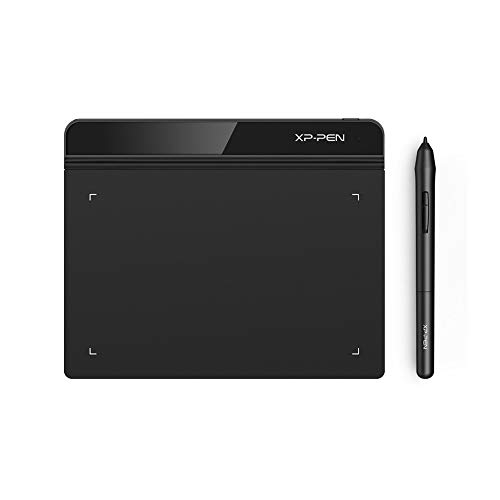
XPPen StarG640 Digital Graphic Tablet 6x4 Inch Art Tablet with Battery-Free Stylus

Our verdict: A 6 by 4 inch, 2mm thin tablet with a battery-free stylus that works with Chromebooks.

The StarG640 has a 6 by 4 inch area, is 2mm thick, uses a battery-free PN01 stylus and works with Chromebooks through Jamboard, Keep and Canvas. It costs $25 to $50.

It ranks seventh because it matches the H640P on size but adds Chromebook compatibility, which makes it popular for classrooms and remote teaching. The 2mm thickness is very slim, and the pen needs no battery. It gives no pressure figure in the listing, so we cannot compare it directly with the others.

Choose it for a Chromebook or classroom. Skip it if you need a listed pressure level.

Active area
6 x 4 inch
Thickness
2mm
Stylus
Battery-free PN01
Chromebook
Jamboard, Keep, Canvas

What we like

  • +Works with Chromebooks
  • +Very thin 2mm body
  • +Battery-free stylus
  • +Low cost

Watch out for

  • −Pressure level not listed
  • −Small surface

Buy it if: Chromebook users and classrooms.

Skip it if: You need a stated pressure figure.

8

Best Brand-Name Entry

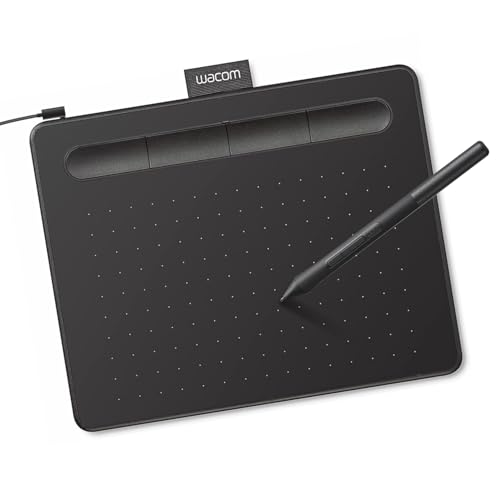
Wacom Intuos Small, Wired Graphic Drawing Tablet with Pen + Software

Our verdict: A wired Wacom tablet with an EMR battery-free pen and a creative software bundle.

The Wacom Intuos Small is a wired USB tablet with an EMR battery-free pen and a bundled creative software package. It works as a screenless tablet mapped to your monitor, and costs $25 to $50.

It ranks last because the listing gives no active area, pressure figure or tilt support, which leaves it behind rivals that publish detailed numbers. The Wacom name is an advantage for support and driver quality, and the software bundle is a useful extra for beginners.

Buy it if brand matters and you want bundled software. Skip it if you want listed specs.

Type
Wired screenless tablet
Pen
EMR battery-free
Extras
Creative software bundle
Connection
USB

What we like

  • +Wacom brand and drivers
  • +Software bundle included
  • +Battery-free EMR pen
  • +Simple wired USB

Watch out for

  • −Pressure and area not listed
  • −No wireless option

Buy it if: Beginners who value brand and software.

Skip it if: You want the biggest area for the money.

Methodology

How We Ranked These

Screen vs screenless

Pen displays were compared with screenless tablets for how quickly a beginner learns to draw.

Pen performance

Pressure levels from 8192 to 16,384, tilt support and battery-free styluses were weighed.

Active area

Areas from 6 x 4 inch to 10 x 6.25 inch were compared against typical sketching needs.

Compatibility and connection

Windows, macOS, Linux, Android and Chromebook support, plus wired, wireless and single-cable options, were noted.

Value under $200

Each product was judged against the $25 to $50, $50 to $100 and $100 to $200 buckets.

Every Primea Score uses the same weights: Performance 30% · Build & Materials 20% · Everyday Usability 20% · Value 20% · Owner Satisfaction 10%. Full scoring rules

Buyer's guide

How to Pick the Right One for You

By Tablet Type

Decide between a screen and a plain surface first.

TypeOur pick
Pen display, best specsUGEE UE12 11.6 inch Drawing Tablet with Screen
Pen display, proven designXP-PEN Artist12 11.6 Inch FHD Drawing Monitor Pen Display
Large screenless tabletXPPen Deco 01 V3 10x6 Drawing Tablet
Small screenless tabletHUION Inspiroy H640P 6x4 inch Drawing Tablet

By Budget

SpendOur pick
$25 to $50, largeXPPen Deco 01 V3 10x6 Drawing Tablet
$25 to $50, smallHUION Inspiroy H640P 6x4 inch Drawing Tablet
$50 to $100XENCELABS Drawing Tablet Small, Portable Wireless
$100 to $200UGEE UE12 11.6 inch Drawing Tablet with Screen

Pen Display vs Pen Tablet

Pen display

You draw directly on the image, which is intuitive but costs more and needs a screen port. Picks: UGEE UE12 and XP-PEN Artist12.

Pen tablet

Cheaper and more portable, but needs hand-eye adjustment. Picks: XPPen Deco 01 V3, HUION H1060P, Xencelabs Small and the 6x4 inch models.

Default to a pen display if you can reach the $100 to $200 range.

By Computer You Use

DeviceOur pick
Windows or Mac desktopHUION Inspiroy H1060P Graphics Drawing Tablet
ChromebookXPPen StarG640 Digital Graphic Tablet 6x4 Inch
Android phone or tabletXPPen Deco 01 V3 10x6 Drawing Tablet
Laptop on the moveXENCELABS Drawing Tablet Small, Portable Wireless

For Beginners Specifically

Look for

A forgiving surface, a battery-free pen and bundled software. Start with a size that matches how much you move your arm.

In this ranking

UGEE UE12 if you can afford a screen, Wacom Intuos Small for bundled software, and XPPen Deco 01 V3 for value.

When to Spend More

Spend more if

You plan to draw seriously or find a screenless tablet awkward. A pen display like the UGEE UE12 or XP-PEN Artist12 earns its premium.

Save if

You are trying digital art out. A $25 to $50 tablet shows you whether you will stick with it.

Questions

Frequently Asked Questions

Do I need to install drivers?+

Usually yes. Most brands provide drivers or a settings app that map the pen to your screen. Check the maker's site for the latest version before setup.

What is the biggest mistake beginners make?+

Buying a tablet that is too small. A 6 x 4 inch surface feels cramped for sketching, so pick a 10 inch tablet or a pen display unless portability is your priority.

Is a pen display worth it over a screenless tablet?+

For most people, yes. Drawing directly on the image is easier to learn. If you can only afford a screenless tablet, give it two weeks before judging it.

How hard is setup?+

Usually 10 to 20 minutes. Plug in, install the driver, calibrate the pen and set up shortcut keys. A pen display needs an HDMI or Type-C port.

How do I look after the pen and surface?+

Replace worn pen nibs, wipe the surface with a soft cloth and store the pen flat. Battery-free styluses need no charging.

Will they work with my phone?+

Some do. The XPPen Deco 01 V3 and HUION models list Android support, and the Xencelabs is wireless. Check the listing for the OS and app requirements.

Final take

The UGEE UE12 is the best drawing tablet under $200 if you want to draw on a screen, with a zero-parallax display, 16K pressure and a single-cable connection. The XP-PEN Artist12 is the proven pen display, the Xencelabs Small is the wireless choice, and the XPPen Deco 01 V3 is the best large screenless tablet for the money. Choose by screen type before specifications.

More Ranked & Reviewed Guides