
Primea ReviewsAll Reviews

Primea Reviews is reader-supported. When you buy through our Amazon links we may earn a commission, at no extra cost to you. Rankings are set by our editors and never sold. Learn more

Ranked & Reviewed by Primea Reviews

The 6 Best Tablets for Drawing of 2026, Ranked & Reviewed

By the Primea Editorial TeamUpdated November 1, 202610 min read6 products ranked
The 6 Best Tablets for Drawing of 2026, Ranked & Reviewed

The short answer

The XP-Pen Artist Pro 16 Gen2 is the best drawing tablet for desk-based illustrators, with a 16 inch 2.5K QHD screen. The Artist Pro 14 Gen2 trades canvas for portability, and the Artist 13.3 Pro V2 shrinks further. The Artist 12 3rd is the entry route, and the TCL NXTPAPER 11 Gen 2 is the only standalone option.

The Primea Scoreboard

Ranked & Reviewed

  1. The largest 2.5K canvas here, aimed at serious desk work.

    94Outstanding
    Check price
  2. A 14 inch pen display that travels better than the 16.

    91Excellent
    Check price
  3. A 13.3 inch pen display with stylus support in the pro price band.

    88Excellent
    Check price
  4. A 11.9 inch screen at half the price of the Pro line.

    85Excellent
    Check price
  5. An older 11.6 inch FHD pen display at the same price band.

    82Very Good
    Check price
  6. 06
    TCL NXTPAPER 11 Gen 2 Android Tablet

    The only pick here that works without a computer.

    79Very Good
    Check price

The first question when shopping for a drawing tablet is not size or price. It is whether the device can run anything by itself. A pen display is a screen you draw on that depends on a Windows or Mac computer to host the art software, while a standalone tablet carries its own processor and apps. Buy the wrong type and you own an expensive second monitor.

Five of the six picks here are XP-Pen pen displays, and one, the TCL NXTPAPER 11 Gen 2, is an Android tablet. We ranked them from spec sheets, weighing canvas size, resolution, stylus confirmation and price band, and set aside two Lenovo tablets whose listings never mention stylus support. A drawing device that cannot confirm its pen is not a drawing device.

Before you buy

What Actually Matters

01

Standalone or tethered

A pen display needs a computer to run your art software, while an Android tablet runs apps itself. This decides your whole workflow, including which programs you can use. Read the listing for words like connects to PC or Mac, or for an operating system. If neither appears, assume you are buying a screen that depends on a computer.

02

Screen size

Screen size is the drawing area in inches, and it sets how much canvas you see at once. Bigger screens suit long strokes and detail work but take more desk and weigh more in a bag. Match the size to your desk and look for the inch figure in the product title, such as 16 inch on the Artist Pro 16 Gen2.

03

Resolution

Resolution describes the sharpness of the image, such as 2.5K QHD on the Artist Pro 16 Gen2 or FHD on the older Artist12. Higher resolution shows fine lines and small text more clearly, which matters for inking and detail. Find the label in the title or specs, and note that several listings here omit it entirely.

04

Stylus support

The stylus is the pen you draw with, and not every tablet listing confirms one. Without confirmation the screen may only respond to touch. Check the title or bullet list for stylus support and, if it is unclear, look for whether the pen is included in the box or sold separately before you buy.

05

Storage

Standalone tablets save art files locally, and 64GB can fill with big layered canvases. Pen displays use your computer's drive instead, so storage is rarely a concern. Check the gigabytes in the listing, and plan on cloud or external backup if you buy a standalone model like the TCL NXTPAPER 11 Gen 2.

In-depth reviews

Our Ranked Picks, Reviewed

1

Best Overall

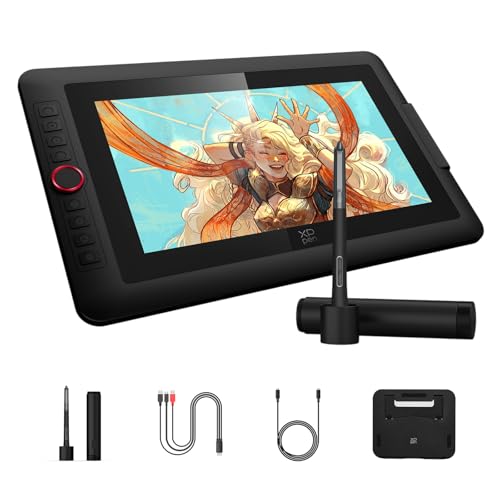
XP-Pen XPPen Artist Pro 16 Gen2 2.5K 16 inch QHD Drawing Tablet with Full

Our verdict: The largest 2.5K canvas here, aimed at serious desk work.

The Artist Pro 16 Gen2 is the drawing display for people who treat illustration as work. It is a 16 inch screen at 2.5K QHD resolution with stylus support, in the $200 to $500 band. On a pen display you draw directly under the nib instead of looking up at a monitor, and a 16 inch canvas lets you make full-arm strokes without constantly panning.

It outranks the Artist Pro 14 Gen2 because the extra two inches and the QHD sharpness matter most for detail work, while both sit in the same price bucket. The extra size is nearly free in dollars.

Buy it if you have a desk and a computer and want the biggest canvas here. The caveat is the footprint: it takes real desk space, it cannot run alone, and it is awkward to use on a couch or while traveling.

Screen
16 inch
Resolution
2.5K QHD
Stylus
Supported
Price
$200-500

What we like

  • +Large 16 inch canvas
  • +2.5K QHD sharpness
  • +Stylus support
  • +Same bucket as smaller pro

Watch out for

  • −Takes real desk space
  • −Needs a computer

Buy it if: Illustrators with a desk and a PC who want the biggest canvas.

Skip it if: You draw on a couch or on the go.

2

Best Mid-Size

XP-Pen XPPen Artist Pro 14 Gen2 Drawing Tablet with Screen 14 inch Graphic

Our verdict: A 14 inch pen display that travels better than the 16.

Artist Pro 14 Gen2 is the same idea in a more carry-friendly size. It is a 14 inch pen display with stylus support from XP-Pen's Pro line, priced in the same $200 to $500 band as the 16 inch. Two inches less diagonal sounds small, yet it changes how easily the display fits a small desk or a laptop bag.

It ranks second because it gives up canvas without saving money. At the same price, the 16 inch is the better drawing surface, so the 14 inch wins only when your desk or travel habits demand it.

Choose it if you want the pro-line features in a smaller body. The caveat is that it is still a pen display, meaning a computer must drive it, and your art software runs on that machine rather than the screen.

Screen
14 inch
Type
Pen display
Stylus
Supported
Price
$200-500

What we like

  • +Compact 14 inch size
  • +Stylus support
  • +Pro-line model
  • +Easier to carry

Watch out for

  • −Smaller canvas than 16
  • −Needs a computer

Buy it if: Artists with a small desk who still want a pro-line display.

Skip it if: You want the roomiest possible canvas.

3

Best Compact Pro

XP-Pen XPPen Artist 13.3 Pro V2 Drawing Tablet with Screen

Our verdict: A 13.3 inch pen display with stylus support in the pro price band.

The Artist 13.3 Pro V2 shrinks the pro display again. It is a 13.3 inch pen display with stylus support, in the $200 to $500 band. The listing gives fewer specifics than the 14 and 16 inch models, so what you know for sure is size, band and the stylus.

It ranks third because it costs the same band as the larger Pro Gen2 pair while offering a smaller screen. Unless the compact footprint is the point, that comparison favors the 14 inch. The Artist 12 3rd below it is cheaper in a lower band.

It suits artists tight on desk space who still want a pro model. The caveat is information: the thin spec list gives you less to compare, such as resolution, so read the full listing and manufacturer page before you commit to this one.

Screen
13.3 inch
Type
Pen display
Stylus
Supported
Price
$200-500

What we like

  • +Compact 13.3 inch screen
  • +Stylus support
  • +Pro V2 line
  • +Small desk friendly

Watch out for

  • −Smaller than the 14 inch
  • −Same price band as larger

Buy it if: Artists tight on desk space who want a pro model.

Skip it if: You would rather spend the same on a 14 or 16 inch.

4

Best Entry Point

XP-Pen XPPen Artist 12 3rd 11.9" Drawing Tablet with Screen

Our verdict: A 11.9 inch screen at half the price of the Pro line.

XP-Pen's Artist 12 3rd is the cheapest way here to try drawing on a screen. It has an 11.9 inch display in its third generation and lands in the $100 to $200 bucket, below the Pro models. A screen of this size fits beside a laptop on a small desk.

It ranks fourth because it undercuts the Artist Pro 14 Gen2 on price and size, trading canvas for cost. A student can learn the pen-on-screen workflow here without paying pro-line money, then upgrade.

Buy it if you are starting out on a computer. The caveat is the drawing area: 11.9 inches is cramped for large canvases, and anyone expecting to outgrow it quickly should stretch to the Pro 14 Gen2 and avoid buying twice. It also needs a computer to run.

Screen
11.9 inch
Type
Pen display
Generation
3rd
Price
$100-200

What we like

  • +Lowest XPPen entry here
  • +Compact 11.9 inch screen
  • +Third generation
  • +Easy on a small desk

Watch out for

  • −Small drawing area
  • −Needs a computer

Buy it if: Beginners who want a screen without the pro-line cost.

Skip it if: You expect to outgrow an 11.9 inch canvas quickly.

5

Best Older Budget

XP-PEN Artist12 11.6 Inch FHD Drawing Monitor Pen Display Graphic

Our verdict: An older 11.6 inch FHD pen display at the same price band.

The Artist12 is the older, smaller version of the same budget idea. It is an 11.6 inch FHD pen display with stylus support, in the $100 to $200 bucket. Full HD resolution is adequate for sketching and learning, though it is less sharp than the QHD on the 16 inch Pro.

It ranks fifth because the Artist 12 3rd offers a slightly larger 11.9 inch screen in the same price band. When a newer generation costs about the same, the older model is only attractive if it turns up cheaper.

It works for a tight budget and a buyer who accepts an older design. The caveat is plain: the 3rd generation is the safer buy, and this one also requires a computer. Skip it if the Artist 12 3rd is available at a similar price.

Screen
11.6 inch
Resolution
FHD
Stylus
Supported
Price
$100-200

What we like

  • +FHD resolution
  • +Stylus support
  • +Compact size
  • +Budget band

Watch out for

  • −Older design
  • −Smaller than 3rd gen

Buy it if: Buyers on a tight budget who accept an older model.

Skip it if: You can get the Artist 12 3rd for similar money.

6

Best Standalone Tablet

TCL NXTPAPER 11 Gen 2 Android Tablet

Our verdict: The only pick here that works without a computer.

TCL's NXTPAPER 11 Gen 2 breaks the pattern: it is an 11 inch Android tablet with 64GB storage and stylus support, in the $200 to $500 band. Because it runs its own apps, you can sketch on a train or sofa with no computer, and the same device handles reading and web browsing.

It ranks last for pure drawing because XP-Pen builds its displays around pen work, while a general-purpose tablet is a compromise. It is the only pick that works alone, which is why it still earns a place.

Choose it for casual sketching and one-device use. The caveat is storage: 64GB fills quickly once you save layered art files, so you will rely on cloud backup. Skip it if you need a large, pro-grade canvas.

Screen
11 inch
Storage
64GB
OS
Android
Stylus
Supported

What we like

  • +Works without a computer
  • +Stylus support
  • +Portable 11 inch
  • +Android apps

Watch out for

  • −Only 64GB storage
  • −Costs $200 to $500

Buy it if: Sketchers who want one device for drawing and daily use.

Skip it if: You need a large pro-grade canvas.

Methodology

How We Ranked These

Screen size

We ranked larger canvases higher because they give more room for strokes.

Stylus support

Only models whose listings mention stylus support were kept.

Computer need

We noted whether each device needs a PC or runs on its own.

Line position

Pro-line models were weighed against entry-level ones within their price bucket.

Value

We compared price bucket against screen size and storage.

Every Primea Score uses the same weights: Performance 30% · Build & Materials 20% · Everyday Usability 20% · Value 20% · Owner Satisfaction 10%. Full scoring rules

Buyer's guide

How to Pick the Right One for You

By Screen Size

Pick the canvas that fits your desk.

CanvasOur pick
16 inchXPPen Artist Pro 16 Gen2
14 inchXPPen Artist Pro 14 Gen2
13.3 inchXPPen Artist 13.3 Pro V2
About 12 inchXPPen Artist 12 3rd

By Budget

SpendOur pick
$100 to $200XPPen Artist 12 3rd
$100 to $200XP-PEN Artist12 11.6 Inch
$200 to $500XPPen Artist Pro 14 Gen2
$200 to $500XPPen Artist Pro 16 Gen2

Pen Display vs Standalone Tablet

Pen display

Connects to a computer and gives a dedicated drawing surface. The four XPPen models here are examples.

Standalone tablet

Runs apps by itself and travels well. The TCL NXTPAPER 11 Gen 2 is the example.

Most serious artists should default to a pen display if they own a computer.

By Portability

NeedOur pick
Draw anywhereTCL NXTPAPER 11 Gen 2
Small deskXPPen Artist 13.3 Pro V2
Travel with a laptopXPPen Artist 12 3rd
Studio deskXPPen Artist Pro 16 Gen2

For Beginners Specifically

Look for

A lower price and a modest screen so you can learn before spending more.

In this ranking

The XPPen Artist 12 3rd is the entry point at $100 to $200.

When to Spend More

Spend more if

You draw daily and want the QHD 16 inch canvas of the Artist Pro 16 Gen2.

Save if

You sketch casually, so the Artist 12 3rd covers it.

Questions

Frequently Asked Questions

Do I need a computer for these?+

The XP-Pen models are pen displays built to connect to a computer. The TCL NXTPAPER 11 Gen 2 is a standalone Android tablet. Decide first whether you own a PC or Mac before choosing between them.

What is the most common mistake?+

Buying a pen display and expecting it to work alone. The Artist Pro 16 Gen2 and Artist 12 3rd both need a host computer. The TCL NXTPAPER 11 Gen 2 is the only standalone pick.

Is the Pro line worth it over the Artist 12?+

If you draw daily, yes. The Pro 16 Gen2 adds a bigger canvas and 2.5K QHD resolution. Casual users can stay with the Artist 12 3rd and save the difference for software or a stand.

How do I set up a pen display?+

Connect the display to your computer, install the driver from the maker, and select it as your drawing surface. Then calibrate the pen in the driver so cursor and nib line up. The TCL tablet needs none of this.

How do I look after the screen?+

Wipe the screen with a soft, dry cloth and avoid pressing hard with the pen tip. A matte screen protector can reduce glare and wear on the Artist displays and the TCL tablet.

Why were the Lenovo tablets left out?+

Their listings did not mention stylus support, so a drawing buyer could not confirm they work with a pen. Only tablets with a clear stylus statement made the ranking.

Final take

Choose the Artist Pro 16 Gen2 if you own a computer and draw at a desk, or the Pro 14 for a smaller desk. The Artist 12 3rd is the entry-level screen, and the TCL NXTPAPER 11 Gen 2 is for sketching away from a computer. Skip the older Artist12 when the 3rd generation costs the same.

More Ranked & Reviewed Guides