
Primea ReviewsAll Reviews

Primea Reviews is reader-supported. When you buy through our Amazon links we may earn a commission, at no extra cost to you. Rankings are set by our editors and never sold. Learn more

Ranked & Reviewed by Primea Reviews

The 7 Best Smart Home Hubs Under $300 for Control and Automation, Ranked & Reviewed

By the Primea Editorial TeamUpdated November 3, 202610 min read7 products ranked
The 7 Best Smart Home Hubs Under $300 for Control and Automation, Ranked & Reviewed

The short answer

The Amazon Echo Hub 8-inch is the best smart home hub for most people, with a wall-mountable screen and wide device support. Home Assistant Green is the pick for local control and advanced automations, the Aeotec Smart Home Hub with Z-Wave suits mixed-protocol homes, and the Lutron Caseta Smart Hub is the specialist for lighting.

The Primea Scoreboard

Ranked & Reviewed

  1. An 8-inch control panel for Alexa homes, with wide device compatibility and a clean touch interface.

    94Outstanding
    Check price
  2. The official Home Assistant box, for people who want automations that run in the house, not the cloud.

    92Outstanding
    Check price
  3. SmartThings hardware with Z-Wave, Zigbee and Matter, plus Alexa and Google support.

    90Excellent
    Check price
  4. A Full HD 15.6 inch kitchen display with Fire TV and Alexa+, more family organiser than hub.

    88Excellent
    Check price
  5. The newer SmartThings hub, with Zigbee and Matter but no Z-Wave.

    86Excellent
    Check price
  6. A lighting-focused hub that talks to Alexa, Apple and Google Home.

    83Very Good
    Check price
  7. A hub for Tapo gear that is said to improve camera AI accuracy.

    80Very Good
    Check price

Buying a smart home hub starts with a vocabulary mistake. People treat a hub, a smart speaker and a smart display as the same thing, then wonder why their Zigbee sensors will not pair. A speaker listens for commands. A hub speaks the radio languages your devices use, such as Zigbee, Z-Wave and Matter, and decides what happens when a sensor trips at 2 a.m.

So this ranking sorts seven hubs by what they actually connect to and how they run automations. We reviewed the listing details for protocols, voice assistant support, local control and hardware, and we ranked them against realistic homes rather than a spec race. Where a listing omits a protocol or a feature, we say so instead of guessing.

Before you buy

What Actually Matters

01

Which radio protocols you need

Zigbee and Z-Wave are low-power mesh radios used by sensors, locks and switches. Matter is a newer shared standard. A hub only controls the radios it has built in. Before buying, list the devices you own and confirm their protocol on the box.

02

Matter gateway support

Matter lets devices from different brands work together, and a Matter gateway helps bridge older devices into that system. It is a sensible feature for a hub bought today. Look for the words Matter gateway or Matter controller on the listing, not just the Matter logo.

03

Local vs cloud control

Local control runs your automations inside the house, so lights and sensors keep working when the internet drops. Cloud control depends on the manufacturer's servers. Home Assistant Green is the most local option here, while most Echo and SmartThings features lean on the cloud.

04

Screen or no screen

A screen gives everyone in the house simple control without opening an app, which helps families and guests. A screenless hub is cheaper and sits out of sight. Choose by who will actually be controlling the system day to day.

05

Ecosystem lock-in

Some hubs lean heavily on one brand, such as Lutron lighting or Tapo cameras. That is fine if you plan to stay, but it limits flexibility later. Check which assistants are supported on the listing and think about the phone your household uses.

In-depth reviews

Our Ranked Picks, Reviewed

1

Best Overall

Amazon Echo Hub (newest model), 8", Redesigned with customizable control and Alexa+, Compatible with thousands of devices

Our verdict: An 8-inch control panel for Alexa homes, with wide device compatibility and a clean touch interface.

The Echo Hub is an 8 inch touchscreen built to act as the control point for a connected home. Amazon lists customizable controls, Alexa+ support and compatibility with thousands of devices, in the $100 to $200 price range.

It wins because it solves the part of smart homes that frustrates families most, which is control for people who do not want to open an app. A wall-mounted or counter-top panel lets everyone in the house dim a light, check a camera or arm a lock with a tap. The tradeoff is that it lives inside Amazon's ecosystem. It is less suited to power users who want deep automations running locally, which is where Home Assistant Green comes in.

Buy it if you already use Alexa and want one visible control point. Skip it if you prefer Google or Apple ecosystems or need local-only automations.

Screen
8 inch touchscreen
Assistant
Alexa+
Compatibility
Thousands of devices
Price bucket
$100 to $200

What we like

  • +Wall-friendly 8 inch control screen
  • +Customizable control dashboard
  • +Compatible with thousands of devices
  • +Alexa+ voice assistant built in

Watch out for

  • −Tied to the Amazon ecosystem
  • −Not a local-only controller

Buy it if: Alexa households wanting one shared control panel.

Skip it if: You want Apple or Google as your main platform.

2

Best for Local Automation

Home Assistant Green | Smart Home hub with Advanced Automation | Official Home Assistant Hardware

Our verdict: The official Home Assistant box, for people who want automations that run in the house, not the cloud.

Home Assistant Green is the project's own hardware, listed as a smart home hub with advanced automation. It arrives ready to run the Home Assistant software. Expect a $200 to $500 outlay.

It ranks second because it offers the deepest control in this guide. Home Assistant works with a huge range of devices and runs automations locally, so lights, schedules and sensors keep working when the internet drops. The cost is a learning curve: you build dashboards and rules yourself, and radio dongles for Zigbee or Z-Wave are usually extra. That makes it a hobbyist favourite rather than a plug-and-play choice.

Choose it if you enjoy tinkering and care about privacy. Skip it if you want a finished product that works the moment you plug it in.

Software
Home Assistant
Focus
Advanced automation
Hardware
Official Home Assistant
Price bucket
$200 to $500

What we like

  • +Automations run locally in your home
  • +Official Home Assistant hardware
  • +Huge range of integrations
  • +No subscription for core features

Watch out for

  • −Steeper learning curve
  • −Radio dongles may cost extra

Buy it if: Tinkerers who want private, local automations.

Skip it if: You want setup finished in ten minutes.

3

Best for Mixed Protocols

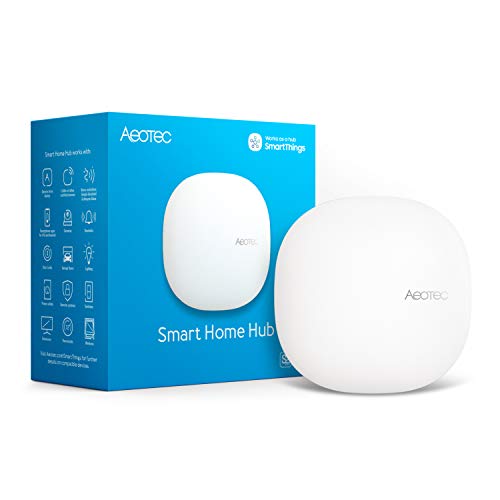
Aeotec Smart Home Hub, Works as a SmartThings Hub, Z-Wave, Zigbee, Matter Gateway, Compatible with Alexa, Google Assistant, WiFi

Our verdict: SmartThings hardware with Z-Wave, Zigbee and Matter, plus Alexa and Google support.

This Aeotec hub works as a SmartThings hub and lists Z-Wave, Zigbee and Matter gateway support, alongside compatibility with Alexa and Google Assistant. It is in the $100 to $200 range.

It takes third place because few hubs cover this many protocols. Z-Wave and Zigbee devices have been sold for years, so a house with older locks, sensors or switches can bring them into one system. Matter adds newer devices on top. Against the Hub2 V4 below, the radios are the whole difference: the older design includes Z-Wave, which the newer one lacks.

This is the buy for owners with a mix of old and new gear. Skip it if your devices are all Wi-Fi or Matter and you want a screen.

Protocols
Z-Wave, Zigbee, Matter
Platform
SmartThings
Assistants
Alexa, Google Assistant
Price bucket
$100 to $200

What we like

  • +Z-Wave and Zigbee together
  • +Matter gateway for newer devices
  • +Works with Alexa and Google
  • +SmartThings automation app

Watch out for

  • −No screen or voice control
  • −Needs the SmartThings app

Buy it if: Homes with older Z-Wave and Zigbee devices.

Skip it if: You want a touchscreen control panel.

4

Best Family Display

Amazon Echo Show 15 (newest model), Full HD 15.6" kitchen hub for home organization, with built-in Fire TV, Designed for Alexa+

Our verdict: A Full HD 15.6 inch kitchen display with Fire TV and Alexa+, more family organiser than hub.

The Echo Show 15 is a 15.6 inch Full HD display designed for the kitchen, with built-in Fire TV and Alexa+. Amazon positions it as a home organisation hub, Expect a $200 to $500 outlay.

It ranks fourth because it is a screen first and a hub second. The large panel is excellent for calendars, notes, cameras and smart home controls that the whole family can see, but it does not add Zigbee or Z-Wave radios of its own, as far as the listing shows. Compared with the smaller Echo Hub, you pay more for size and Fire TV rather than for extra compatibility.

Buy it for a busy kitchen where a big shared display adds value. Skip it if you want a protocol-heavy controller.

Screen
15.6 inch Full HD
Extras
Built-in Fire TV
Assistant
Alexa+
Price bucket
$200 to $500

What we like

  • +Large 15.6 inch Full HD screen
  • +Built-in Fire TV streaming
  • +Great shared family organiser
  • +Alexa+ voice control

Watch out for

  • −Radio protocols not listed
  • −Costs more than the Echo Hub

Buy it if: Families wanting a big shared kitchen screen.

Skip it if: You need Zigbee or Z-Wave radios.

5

Best Matter Gateway

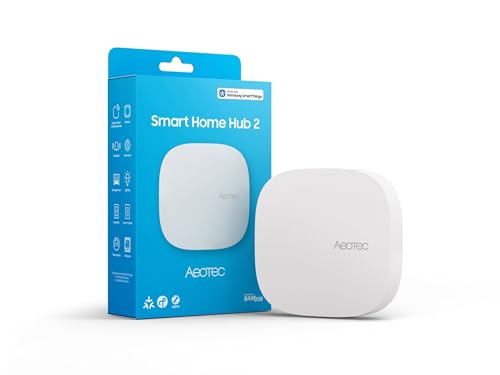
Aeotec Smart Home Hub2 - V4, Works as a SmartThings Hub, Zigbee, Matter Gateway, Compatible with Alexa, Google Assistant, WiFi (No Z-Wave)

Our verdict: The newer SmartThings hub, with Zigbee and Matter but no Z-Wave.

The Hub2 V4 is the newer Aeotec hub. It works as a SmartThings hub with Zigbee, a Matter gateway and Wi-Fi, and it is compatible with Alexa and Google Assistant. The listing says plainly that it does not include Z-Wave; expect to pay $100 to $200.

It ranks fifth because dropping Z-Wave narrows who it suits. If your sensors and locks are Zigbee or Matter, it is a modern and tidy controller. If you own Z-Wave devices, the older Aeotec hub above is the better choice.

Buy it if your home is already Zigbee or Matter. Skip it if you rely on Z-Wave locks or switches.

Protocols
Zigbee, Matter, Wi-Fi
Z-Wave
Not included
Platform
SmartThings
Price bucket
$100 to $200

What we like

  • +Newer SmartThings hardware
  • +Zigbee plus Matter gateway
  • +Works with Alexa and Google
  • +Clear about missing Z-Wave

Watch out for

  • −No Z-Wave support at all
  • −No screen for local control

Buy it if: Zigbee and Matter homes starting fresh.

Skip it if: You own Z-Wave locks or switches.

6

Best for Lighting Control

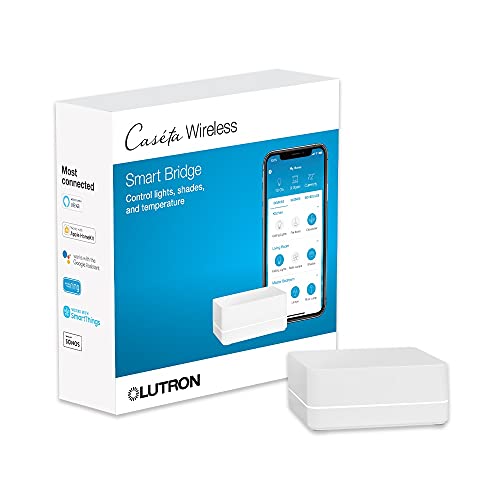
Lutron Caseta Smart Hub Compatible with Alexa, Apple, Google Home, & More

Our verdict: A lighting-focused hub that talks to Alexa, Apple and Google Home.

The Lutron Caseta Smart Hub is the bridge for Lutron's Caseta dimmers and switches, and the listing says it works with Alexa, Apple and Google Home. It is in the $50 to $100 price range.

It ranks sixth because it is a specialist. If you run Caseta lighting it is excellent, as the hub keeps those dimmers responsive and ties them to whichever voice assistant you use. It does not act as a general smart home controller for other brands, so it cannot replace a SmartThings or Home Assistant box.

Buy it if lighting is your main smart home goal. Skip it if you need a hub for locks, sensors and cameras.

Focus
Lutron Caseta lighting
Assistants
Alexa, Apple, Google Home
Role
Bridge, not general hub
Price bucket
$50 to $100

What we like

  • +Works with Alexa, Apple and Google
  • +Cheapest dedicated hub here
  • +Reliable for Caseta lighting
  • +Simple to add and forget

Watch out for

  • −Mostly for Lutron devices
  • −Not a general controller

Buy it if: Lighting-first smart homes using Caseta dimmers.

Skip it if: You want locks, sensors and cameras on one hub.

7

Best for Tapo Cameras

Tapo CentralHub for Smart Devices, H500, Improves Camera AI Accuracy

Our verdict: A hub for Tapo gear that is said to improve camera AI accuracy.

The Tapo H500 is a central hub for Tapo smart devices, and the listing says it improves camera AI accuracy. It is in the $100 to $200 price range.

It ranks last because it is aimed at one ecosystem. For anyone with Tapo cameras and sensors, a central hub can offload some work and give more consistent detection. For everyone else, it is a narrow tool, and the listing gives few details on protocols or voice assistants.

Choose it if your home is built around Tapo cameras. Skip it if you want a general-purpose smart home hub.

Ecosystem
Tapo devices
Benefit
Improves camera AI accuracy
Protocols
Not listed
Price bucket
$100 to $200

What we like

  • +Built for Tapo camera setups
  • +Aims to improve camera AI
  • +Central control for Tapo gear
  • +Mid-range cost

Watch out for

  • −Narrow ecosystem
  • −Few protocol details listed

Buy it if: Owners who already run several Tapo devices.

Skip it if: You want a general smart home controller.

Methodology

How We Ranked These

Protocol coverage

We compared Zigbee, Z-Wave, Matter and Wi-Fi support, since radios determine which devices a hub can control.

Voice and ecosystem fit

Alexa, Google Assistant and Apple support were weighed alongside how locked in each hub is to one brand.

Local control

Hubs that run automations on the device, such as Home Assistant Green, scored above cloud-dependent designs.

Interface and ease of use

Touchscreens, app-only control and setup effort were rated for how well a non-technical household can use them.

Value under $300

Feature depth was set against the $50 to $100, $100 to $200 and $200 to $500 price buckets in this guide.

Every Primea Score uses the same weights: Performance 30% · Build & Materials 20% · Everyday Usability 20% · Value 20% · Owner Satisfaction 10%. Full scoring rules

Buyer's guide

How to Pick the Right One for You

By Device Types You Own

The radios in your devices decide the hub, not the other way round.

Your devicesOur pick
Older Z-Wave and Zigbee gearAeotec Smart Home Hub, Works as a SmartThings Hub, Z-Wave, Zigbee, Matter Gateway
Zigbee and Matter onlyAeotec Smart Home Hub2 - V4, Works as a SmartThings Hub
Alexa-compatible gadgetsAmazon Echo Hub (newest model), 8"
Lutron Caseta lightsLutron Caseta Smart Hub Compatible with Alexa, Apple, Google Home, & More

By Budget

SpendOur pick
$50 to $100Lutron Caseta Smart Hub Compatible with Alexa, Apple, Google Home, & More
$100 to $200, screenAmazon Echo Hub (newest model), 8"
$100 to $200, protocolsAeotec Smart Home Hub, Works as a SmartThings Hub, Z-Wave, Zigbee, Matter Gateway
Near $300, local controlHome Assistant Green | Smart Home hub with Advanced Automation

Plug-and-Play vs Build-It-Yourself

Plug-and-play

Hubs with an app and a guided setup, ready in minutes and supported by a large company. Picks: Amazon Echo Hub, Echo Show 15 and the Lutron Caseta Smart Hub.

Build-it-yourself

Platforms that reward effort with deeper control and local automations. Picks: Home Assistant Green and the Aeotec SmartThings hubs.

Default to plug-and-play unless you enjoy tinkering.

By Control Style

How you want to control itOur pick
Wall panel for the familyAmazon Echo Hub (newest model), 8"
Big kitchen displayAmazon Echo Show 15 (newest model)
App and automation rulesHome Assistant Green | Smart Home hub with Advanced Automation
Camera-centred homeTapo CentralHub for Smart Devices, H500

For Renters Specifically

Look for

A hub that needs no wiring, moves with you and works with plug-in devices. A countertop or shelf design beats anything needing a wall install.

In this ranking

The Amazon Echo Hub and the Aeotec Smart Home Hub both sit on a shelf. Avoid wall-installed dimmers unless your landlord agrees.

When to Spend More

Spend more if

You want a screen the family will actually use, or automations that keep running offline. The Echo Hub and Home Assistant Green are worth the money.

Save if

You only want dimmers or a few sensors controlled. The Lutron Caseta hub or an Aeotec hub handles it for less.

Questions

Frequently Asked Questions

Do I need a hub if my devices use Wi-Fi?+

Not necessarily. Wi-Fi devices connect straight to your router and a speaker can control them. A hub helps when you add Zigbee or Z-Wave gear, or when you want faster, more reliable automations.

What is the most common mistake when buying a hub?+

Buying one without checking the protocols of the devices you already own. A hub with no Z-Wave radio cannot add a Z-Wave lock, however good its other features look.

Is Home Assistant Green worth it over an Echo Hub?+

If you want local automations and deeper control, yes. If you want something your family can use straight away with a touchscreen, the Echo Hub is far easier.

How hard is setup?+

An Echo Hub or Lutron Caseta hub is usually ready in 10 to 20 minutes. Home Assistant Green takes longer, because you add integrations and design your own dashboards.

How do I keep a hub reliable over time?+

Give it a stable Wi-Fi connection or Ethernet, keep its firmware updated and avoid moving it often. Reboot it if automations lag, and keep batteries fresh in any sensors it manages.

Can I use two hubs together?+

Often yes. Many homes pair a screen like the Echo Hub with a protocol hub like an Aeotec model. Check that the assistant you choose supports both before buying.

Final take

The Amazon Echo Hub is the easiest smart home hub to recommend, with an 8 inch screen and broad device support. Home Assistant Green is the better choice for local, private automations, and the Aeotec Smart Home Hub covers Z-Wave and Zigbee together. Treat the Lutron Caseta and Tapo hubs as specialists. Whatever you choose, list your device protocols first.

More Ranked & Reviewed Guides