

Primea ReviewsAll Reviews

Primea Reviews is reader-supported. When you buy through our Amazon links we may earn a commission, at no extra cost to you. Rankings are set by our editors and never sold. Learn more

Ranked & Reviewed by Primea Reviews

The 7 Best Smart Home Hubs Under $100 for Starter Setups, Ranked & Reviewed

By the Primea Editorial TeamUpdated November 3, 202610 min read7 products ranked
The 7 Best Smart Home Hubs Under $100 for Starter Setups, Ranked & Reviewed

The short answer

The Lutron Caseta Smart Hub is the most dependable hub under $100 if lighting is your starting point, working with Alexa, Apple and Google Home. The Echo Show 5 is the best pick for a voice and display front end, the Tapo H100 is the cheapest brand-matched hub, and the MOES Zigbee gateways serve budget builders.

The Primea Scoreboard

Ranked & Reviewed

  1. A dependable bridge that works with Alexa, Apple and Google Home, ideal for a lighting start.

    92Outstanding
    Check price
  2. A compact Alexa+ smart display that doubles as a control panel for compatible devices.

    90Excellent
    Check price
  3. A small Tapo hub with a built-in chime, available for under $25.

    88Excellent
    Check price
  4. A Zigbee and Bluetooth gateway powered over Type-C, compatible with Alexa and Google Home.

    86Excellent
    Check price
  5. A small Alexa+ speaker that serves as the voice side of a starter smart home.

    84Very Good
    Check price
  6. A ZigBee bridge that offers both wireless and wired connections.

    82Very Good
    Check price
  7. A ZigBee 3.0, Bluetooth and Mesh gateway that supports only Tuya smart devices.

    79Very Good
    Check price

Most cheap smart home hubs fail on a detail that is printed on the box: they only work with one brand. A Tuya-only gateway will never talk to your Philips bulbs, and a Tapo hub is built for Tapo accessories. The mistake is buying the cheapest hub first and discovering which ecosystem you have joined afterwards.

This ranking sorts seven sub-$100 options by how openly they work and how well they suit a first smart home. We reviewed the listings for supported ecosystems, protocols, voice control and price tier. Some products here, such as the Echo devices, are voice or display front ends instead of radio hubs, and we say so wherever a listing does not claim a protocol.

Before you buy

What Actually Matters

01

Hub vs voice assistant

A hub bridges the radios your devices use, such as Zigbee. A voice assistant like Echo Dot listens and sends commands. Many starter setups need only the second. Check the listing for radio names before assuming a speaker can add sensors.

02

Single-brand lock-in

Cheap gateways often support one platform. A Tuya-only hub will not accept anything else, and a Tapo hub is aimed at Tapo gear. Read the compatibility line carefully, and prefer hubs that name several assistants, like Alexa, Apple and Google Home.

03

Zigbee and why it matters

Zigbee is a low-power radio used by many inexpensive sensors and bulbs. It keeps traffic off your Wi-Fi and lets batteries last. A gateway is required, so look for the word ZigBee in the title if you plan to buy sensors.

04

Network requirements

Some hubs, like the Tapo H100, need a 2.4GHz Wi-Fi network. If your router merges 2.4 and 5GHz bands, pairing can fail. Check the requirement and consider a temporary band split during setup.

05

Wired vs wireless connection

A wired Ethernet link is usually more stable than Wi-Fi, which matters for a hub that controls locks or lights. If your hub sits far from the router, a wired option, like on the MOES ZHUB W, helps.

In-depth reviews

Our Ranked Picks, Reviewed

1

Best Overall

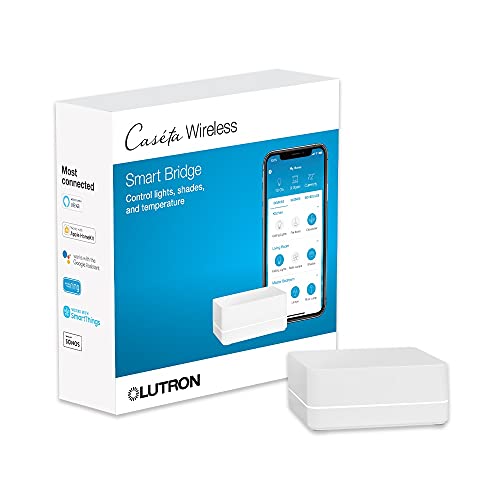
Lutron Caseta Smart Hub Compatible with Alexa, Apple, Google Home, & More

Our verdict: A dependable bridge that works with Alexa, Apple and Google Home, ideal for a lighting start.

The Lutron Caseta Smart Hub is the bridge for Lutron's Caseta lighting range, and the listing says it is compatible with Alexa, Apple, Google Home and more. It falls in the $50 to $100 price tier.

It tops this ranking because it works with all three big voice platforms and keeps lighting control responsive. Caseta dimmers talk to the hub over Lutron's own radio instead of crowding your Wi-Fi, which is a big reason owners report that lights respond quickly. The caveat is scope: it is built around Lutron devices, so it is not the hub for a mixed collection of sensors and plugs.

Buy it if lighting is the first thing you want to automate. Skip it if you want one box for every brand.

Ecosystems
Alexa, Apple, Google Home
Focus
Lutron Caseta lighting
Role
Bridge for Lutron devices
Price bucket
$50 to $100

What we like

  • +Works with Alexa, Apple and Google
  • +Responsive lighting control
  • +Established lighting brand
  • +Simple one-box setup

Watch out for

  • −Limited to Lutron devices
  • −Not a general-purpose hub

Buy it if: Anyone starting a smart home with dimmers and switches.

Skip it if: You want to control many brands from one hub.

2

Best Display Front End

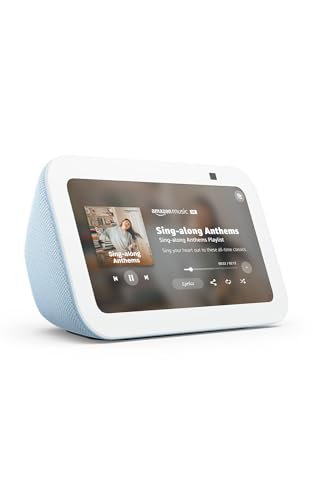
Amazon Echo Show 5 (newest model), Smart display, Designed for Alexa+, 2x the bass and clearer sound, Cloud Blue

Our verdict: A compact Alexa+ smart display that doubles as a control panel for compatible devices.

The Echo Show 5 is a small smart display designed for Alexa+, with improved bass and clearer sound than the previous generation. It falls in the $50 to $100 tier.

It ranks second because a screen makes a starter smart home far easier for the whole household. Dimming a light, viewing a camera or checking a timer is a tap instead of a spoken command, and it sits happily on a bedside table or desk. Be clear about what it is: the listing describes a display and speaker, so it controls devices through Wi-Fi and Alexa rather than adding Zigbee radios.

Buy it if you use Alexa and want visible control in a bedroom or office. Skip it if your gadgets need a Zigbee bridge.

Type
Smart display
Assistant
Alexa+
Audio
2x the bass, clearer sound
Price bucket
$50 to $100

What we like

  • +Touchscreen makes control easy
  • +Alexa+ voice assistant built in
  • +Improved bass for a small display
  • +Compact on desks and nightstands

Watch out for

  • −Not a Zigbee radio hub
  • −Locked to the Alexa ecosystem

Buy it if: Alexa households wanting a small visible control panel.

Skip it if: You use Apple or Google as your main platform.

3

Best Budget Brand Hub

Tapo Smart Hub with Built-in Chime, H100, 2.4GHz Wi-Fi Required

Our verdict: A small Tapo hub with a built-in chime, available for under $25.

The Tapo H100 is a small smart hub with a built-in chime that requires a 2.4GHz Wi-Fi network. It is in the under $25 price tier, the cheapest hub in this ranking.

It lands third because it solves a specific problem at a tiny cost. For anyone already buying Tapo sensors, buttons or switches, one H100 connects them and the chime adds an audible alert. Against the Lutron it is far cheaper but much narrower, since it is built for Tapo accessories. The 2.4GHz requirement is easy to miss, and some routers that merge bands make pairing awkward.

Choose it if you plan a Tapo-based setup. Skip it if you want a hub that works with every brand.

Type
Tapo smart hub
Extra
Built-in chime
Network
2.4GHz Wi-Fi required
Price bucket
Under $25

What we like

  • +Cheapest hub in the field
  • +Built-in chime for alerts
  • +Small and easy to place
  • +Ties Tapo accessories together

Watch out for

  • −Needs a 2.4GHz network
  • −Aimed at the Tapo ecosystem

Buy it if: Buyers building a small Tapo sensor setup.

Skip it if: You own gadgets from many different brands.

4

Best Alexa and Google Gateway

MOES ZigBee Bluetooth Smart Gateway Hub Type-C for Home Automation, Compatible with Alexa & Google Home

Our verdict: A Zigbee and Bluetooth gateway powered over Type-C, compatible with Alexa and Google Home.

This MOES gateway bridges ZigBee and Bluetooth devices, is powered through a Type-C port and is listed as compatible with Alexa and Google Home. The listing gives no price tier.

It ranks fourth because it opens up the cheap Zigbee sensor market that a Wi-Fi hub cannot. Zigbee sensors run on small batteries for a long time, and a gateway like this lets them feed your voice assistant. The compromise is brand ecosystem, as MOES gear usually works through the Tuya-style app, so device support varies by sensor.

It is a good value for a tinkerer building out sensors. Skip it if you want a polished, single-brand experience.

Radios
ZigBee and Bluetooth
Power
Type-C
Assistants
Alexa and Google Home
Price bucket
Not listed

What we like

  • +Zigbee and Bluetooth in one gateway
  • +Works with Alexa and Google
  • +Type-C power is easy to supply
  • +Opens up cheap Zigbee sensors

Watch out for

  • −Device support varies by sensor
  • −No stated Apple support

Buy it if: Budget builders adding Zigbee sensors.

Skip it if: You want a guaranteed single-brand experience.

5

Best Voice Starter

Amazon Echo Dot (newest model) - Vibrant sounding speaker, Designed for Alexa+, Great for bedrooms, dining rooms and offices, Glacier White

Our verdict: A small Alexa+ speaker that serves as the voice side of a starter smart home.

The Echo Dot is a compact Alexa+ speaker, described as great for bedrooms, dining rooms and offices. It falls in the $25 to $50 tier.

It ranks fifth because it is a voice front end, not a radio hub. It lets you speak commands to compatible Wi-Fi lights and plugs, and for many first-time buyers that is all they want. Against the Echo Show 5, you lose the screen, but you also pay less and take up less space on a shelf.

Buy it as the voice layer in a Wi-Fi smart home. Skip it if you expect it to bridge Zigbee or Z-Wave devices.

Type
Alexa+ smart speaker
Best rooms
Bedrooms, dining rooms, offices
Colour
Glacier White
Price bucket
$25 to $50

What we like

  • +Very low cost entry to Alexa
  • +Compact size fits any shelf
  • +Vibrant sound for its size
  • +Controls compatible Wi-Fi devices

Watch out for

  • −No screen for visual control
  • −Not a Zigbee or Z-Wave hub

Buy it if: First-time buyers who want voice control cheaply.

Skip it if: You need to connect Zigbee sensors.

6

Best Wired Option

MOES Wireless & Wired Smart Home Hub, ZigBee Gateway ZHUB W Bridge

Our verdict: A ZigBee bridge that offers both wireless and wired connections.

The ZHUB W is a MOES ZigBee gateway that supports both wireless and wired connections. The listing provides no price tier and gives few other details.

It ranks sixth because the listing says little beyond the connection options. The wired option is the interesting part, since an Ethernet link is often more stable than Wi-Fi, which matters for a gateway that sits in a cupboard or behind a TV. Compared with the Type-C MOES gateway above, it trades the stated Alexa and Google compatibility for a wired option.

Choose it if you want a wired, stable bridge for Zigbee gear. Skip it if you want confirmed voice-assistant support.

Radio
ZigBee gateway
Connection
Wireless and wired
Brand
MOES
Price bucket
Not listed

What we like

  • +Wired option for steadier links
  • +ZigBee gateway for cheap sensors
  • +Wireless fallback available
  • +Suits cupboard installs

Watch out for

  • −Few details in the listing
  • −No assistant support stated

Buy it if: Zigbee builders who can run an Ethernet cable.

Skip it if: You need confirmed Alexa or Google support.

7

Best Tuya-Only Bridge

Smart Multi-Mode Gateway: ZigBee 3.0 & Bluetooth & Mesh Hub, App Remote Control, Intelligent Bridge Wireless Smart Home Gateway

Our verdict: A ZigBee 3.0, Bluetooth and Mesh gateway that supports only Tuya smart devices.

This multi-mode gateway combines ZigBee 3.0, Bluetooth and Mesh in one hub with app remote control. The listing is blunt that it only supports Tuya smart devices, and it falls in the $25 to $50 tier.

It ranks last because of that limitation. If your sensors and switches use the Tuya platform it is a neat and low-cost bridge, but anything outside that family will not connect. The honesty of the listing helps, because it warns buyers before they pay.

Buy it if your devices are already Tuya or Smart Life compatible. Skip it if you own anything from another platform.

Radios
ZigBee 3.0, Bluetooth, Mesh
Compatibility
Tuya devices only
Control
App remote control
Price bucket
$25 to $50

What we like

  • +ZigBee 3.0, Bluetooth and Mesh
  • +Low cost bridge for Tuya gear
  • +App remote control included
  • +Clear about its limits

Watch out for

  • −Only supports Tuya devices
  • −Lowest compatibility here

Buy it if: Owners of existing Tuya sensors and switches.

Skip it if: Your devices come from other platforms.

Methodology

How We Ranked These

Ecosystem openness

We compared how many assistants and brands each product supports, from Alexa, Apple and Google to Tuya-only.

Radio protocols

ZigBee, Bluetooth and Mesh support was checked, and voice or display devices without radios were labelled as front ends.

Starter friendliness

Ease of setup, app dependence and whether the product works well alone were scored for first-time buyers.

Connection options

Wired, wireless, Type-C power and 2.4GHz requirements were weighed for installation flexibility.

Value under $100

Each hub was judged against the under $25, $25 to $50 and $50 to $100 buckets, with unlisted prices noted.

Every Primea Score uses the same weights: Performance 30% · Build & Materials 20% · Everyday Usability 20% · Value 20% · Owner Satisfaction 10%. Full scoring rules

Buyer's guide

How to Pick the Right One for You

By Starting Point

Start with the thing you want to automate first.

First goalOur pick
Smart lightingLutron Caseta Smart Hub Compatible with Alexa, Apple, Google Home, & More
Voice control in a bedroomAmazon Echo Dot (newest model)
A visible control panelAmazon Echo Show 5 (newest model)
Cheap Zigbee sensorsMOES ZigBee Bluetooth Smart Gateway Hub Type-C

By Budget

SpendOur pick
Under $25Tapo Smart Hub with Built-in Chime, H100
$25 to $50, voiceAmazon Echo Dot (newest model)
$25 to $50, Tuya gearSmart Multi-Mode Gateway: ZigBee 3.0 & Bluetooth & Mesh Hub
$50 to $100Lutron Caseta Smart Hub Compatible with Alexa, Apple, Google Home, & More

Open Ecosystem vs Single Brand

Open ecosystem

Works with several voice assistants and keeps options open if you switch phones. Picks: Lutron Caseta Smart Hub and MOES ZigBee Bluetooth Gateway.

Single brand

Cheaper and simpler, but locks you to one family of devices. Picks: Tapo H100, the Tuya multi-mode gateway and the Alexa-based Echo devices.

Default to an open ecosystem if you are unsure which phone or speaker you will use in five years.

By Voice Assistant

AssistantOur pick
Alexa onlyAmazon Echo Show 5 (newest model)
Alexa and GoogleMOES ZigBee Bluetooth Smart Gateway Hub Type-C
Alexa, Apple and GoogleLutron Caseta Smart Hub Compatible with Alexa, Apple, Google Home, & More
No assistant, app onlySmart Multi-Mode Gateway: ZigBee 3.0 & Bluetooth & Mesh Hub

For a First Smart Apartment Specifically

Look for

No wiring, a shelf-friendly footprint and a hub that moves with you. Start with voice control and add sensors later.

In this ranking

The Echo Dot for the cheapest voice start, the Tapo H100 for a tiny sensor setup and the Lutron Caseta hub if your landlord allows swapping a dimmer.

When to Spend More

Spend more if

You want a hub that supports several assistants or a display the whole household uses. The Lutron Caseta hub and Echo Show 5 reach the $50 to $100 tier.

Save if

You plan a few sensors in one ecosystem. The Tapo H100 under $25 does the job.

Questions

Frequently Asked Questions

Can an Echo Dot act as a Zigbee hub?+

The listing describes an Alexa+ speaker, with no Zigbee radio mentioned. It controls compatible Wi-Fi devices by voice, but a Zigbee sensor needs a gateway such as one of the MOES units.

What is the most common mistake when buying a cheap hub?+

Ignoring the compatibility line. Tuya-only and Tapo-focused hubs only work within their families, so buying one before you pick your devices can strand you with sensors that will not pair.

Is the Lutron Caseta hub worth it over an Echo Show 5?+

They do different jobs. The Lutron hub bridges Caseta lighting, while the Echo Show 5 is a display and voice front end. Many homes end up with both.

How hard is setup?+

Most take 10 to 20 minutes. Plug the hub in, install its app, connect to Wi-Fi, then add devices one at a time. The Tapo H100 needs a 2.4GHz network during pairing.

How do I keep a gateway reliable?+

Keep it away from metal cabinets and routers that crowd the same spectrum, and update its firmware when the app prompts. If sensors drop out, move the hub closer or add a mains-powered Zigbee device to extend the mesh.

Will these hubs work without internet?+

Most rely on cloud services for remote control and voice. Some local automations continue during an outage, but you should not expect a full experience without a connection.

Final take

For a first smart home under $100, the Lutron Caseta Smart Hub is the most dependable hub, with support for Alexa, Apple and Google Home. The Echo Show 5 is the best visible control, the Tapo H100 is the cheapest brand-matched bridge, and the MOES gateways serve Zigbee tinkerers. Decide which ecosystem you are joining before you buy anything.

More Ranked & Reviewed Guides