

Primea ReviewsAll Reviews

Primea Reviews is reader-supported. When you buy through our Amazon links we may earn a commission, at no extra cost to you. Rankings are set by our editors and never sold. Learn more

Ranked & Reviewed by Primea Reviews

The 6 Best Silent Laptop Cooling Pads for Quiet Rooms in 2026, Ranked & Reviewed

By the Primea Editorial TeamUpdated November 3, 20269 min read6 products ranked
The 6 Best Silent Laptop Cooling Pads for Quiet Rooms in 2026, Ranked & Reviewed

The short answer

The TECKNET nine-fan pad for 12 to 15.6 inch laptops is the quietest-spec option, with a stated noise level under 40dB and a stepless dial. The havit HV-F2056 is the slim quiet pick for 15.6 to 17 inch machines, and the LIANGSTAR lets you run half its fans to cut noise further. For light work, the Coolertek is the gentlest of all.

The Primea Scoreboard

Ranked & Reviewed

  1. The only pad here with a stated noise figure, under 40dB, plus stepless speed up to 2600 RPM.

    94Outstanding
    Check price
  2. Three ultra-quiet fans, a metal mesh top and a switchable USB port for 15.6 to 17 inch laptops.

    91Excellent
    Check price
  3. Two independent three-fan zones let you run half the fans for a lower-noise setting.

    89Excellent
    Check price
  4. Five fans of mixed sizes, a honeycomb metal top and five angles, for under $25.

    86Excellent
    Check price
  5. Three fans at 1200 RPM, USB powered with no external adapter, for 12 to 17 inch laptops.

    83Very Good
    Check price
  6. Two blue LED fans and a metal mesh top, the gentlest option for small laptops under 14 inches.

    80Very Good
    Check price

No cooling pad is truly silent, and the first buying mistake is believing the word on the box. Every fan makes noise, and a pad is only quiet relative to what is already in your room. What you can control is how many fans you must run, how fast they spin, and whether the pad moves enough air at low speed that you never need full power.

This ranking leans on that logic. We looked at six pads for the lowest noise cost: a stated decibel figure where one exists, fan count, speed control, fan zones that let you run fewer fans, and the laptop sizes each supports. We reviewed listings and specifications and did not measure sound ourselves.

Before you buy

What Actually Matters

01

Stated noise level

A decibel figure turns vague quiet claims into something checkable, though it is a manufacturer number. Under 40dB is roughly a library whisper, but fans at full speed can exceed it. Look for the figure and the speed at which it was rated.

02

Fan count and speed

More fans can run slower for the same airflow, which usually means less noise. A single fast fan whines, while many slow fans hum. RPM on the listing tells you the top speed.

03

Speed control and zones

A stepless dial or independent zones let you choose less airflow when the laptop is cool. Without control, a fixed speed runs whether you need it or not. Check the listing for a dial, switch or zone feature.

04

Laptop size fit

A pad built for 12 to 15.6 inch laptops will not hold a 17 inch machine, and a small pad under a big laptop covers fewer vents. Confirm your screen size against the stated range.

05

Surface and USB power

A metal mesh top spreads heat and resists sag, and USB power avoids an extra adapter but uses a port. Pass-through USB ports give back a port. Check both before buying.

In-depth reviews

Our Ranked Picks, Reviewed

1

Quietest Stated Spec

TECKNET Laptop Cooling Pad with Phone Stand, Laptop Cooler for 12-15.6 Inch

Our verdict: The only pad here with a stated noise figure, under 40dB, plus stepless speed up to 2600 RPM.

This TECKNET has nine fans with stepless speed control to 2600 RPM and a stated noise level below 40dB. It offers five height settings, up to 6 inches of lift, a tilt of up to 34 degrees, dual USB ports with one free, and a fit for laptops from 12 to 15.6 inches.

It takes first place because it is the only product here with a published noise number, and nine fans means each one can run slowly. Slow, many-fan airflow is how you keep a pad inaudible in a quiet office. The cost is the size limit: nothing larger than 15.6 inches fits, and the $25 to $50 price is higher than the budget pads below.

Buy it if you use a laptop up to 15.6 inches and want a verifiable low-noise figure. Skip it if your laptop is a 17 inch machine.

Fans
9, stepless to 2600 RPM
Noise
Under 40dB stated
Fits
12 to 15.6 inch laptops
Height
5 settings, 34 degree tilt

What we like

  • +Published sub-40dB noise figure
  • +Stepless speed dial
  • +Tilt and height for typing posture
  • +Free USB port for peripherals

Watch out for

  • −Does not fit 17 inch laptops
  • −Costs more than budget pads

Buy it if: Quiet offices and bedrooms with a laptop up to 15.6 inches.

Skip it if: Your laptop is 17 inches.

2

Best Slim Quiet Pad

havit HV-F2056 15.6 to 17 Inch Laptop Cooler Cooling Pad, Slim Portable USB Powered

Our verdict: Three ultra-quiet fans, a metal mesh top and a switchable USB port for 15.6 to 17 inch laptops.

The havit HV-F2056 uses three fans described as ultra-quiet, a metal mesh surface, two height settings and an extra USB port with its own power switch. It is built for 15.6 to 17 inch laptops and costs $25 to $50.

It ranks second because it covers the larger laptop sizes that the TECKNET above cannot, and its design philosophy is quiet first. The listing gives no decibel number, so the claim is a design intent, not a measured result. Three fans at a modest speed is a reasonable recipe for low noise, but it moves less air than a nine-fan array.

Buy it if you have a 15.6 to 17 inch laptop and quiet matters more than raw cooling. Skip it if you need a published noise number.

Fans
3 ultra-quiet
Surface
Metal mesh
Fits
15.6 to 17 inch laptops
Extra
USB port with power switch

What we like

  • +Quiet-first three-fan design
  • +Fits 15.6 to 17 inch laptops
  • +Metal mesh top spreads heat
  • +Switchable pass-through USB port

Watch out for

  • −No decibel figure published
  • −Only two height settings

Buy it if: Larger laptops used in quiet rooms.

Skip it if: You want a verifiable noise number.

3

Best Partial-Fan Control

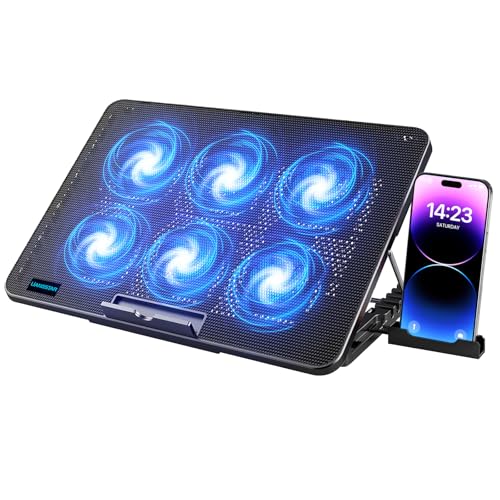
LIANGSTAR Laptop Cooling Pad, Laptop Cooler with 6 Quiet Fans for 12-17 Inch Notebook

Our verdict: Two independent three-fan zones let you run half the fans for a lower-noise setting.

The LIANGSTAR has six fans split into two independent three-fan zones, seven height settings, a diamond-groove metal mesh top, two USB ports and a phone holder. It fits 12 to 17 inch notebooks and costs under $25.

Its value in a quiet ranking is the zone control. Run only the zone under the hottest area of the laptop and you cut noise roughly in half compared with running every fan. That is a flexible way to be quiet without giving up the option to blast the pad when a game or render hits. It ranks third because the maker publishes no decibel figure, but the control makes up for it.

Buy it if you want to choose between quiet and strong on demand. Skip it if you prefer a single, set-and-forget dial.

Fans
6 in two 3-fan zones
Height
7 settings
Fits
12 to 17 inch laptops
Surface
Diamond-groove metal mesh

What we like

  • +Run one zone for lower noise
  • +Fits up to 17 inch laptops
  • +Seven height positions
  • +Priced under $25

Watch out for

  • −No stated noise figure
  • −Zone switches add fiddling

Buy it if: Users who alternate between quiet work and heavy loads.

Skip it if: You want one simple speed dial.

4

Best Budget Airflow

AIMIUZI Laptop Cooling Pad Laptop Cooler Stand, 5 Quiet Fans, 5 Angle Adjustable

Our verdict: Five fans of mixed sizes, a honeycomb metal top and five angles, for under $25.

The AIMIUZI pairs five fans of mixed sizing with a honeycomb metal mesh surface, five height settings and dual USB ports. It fits laptops from 12 to 15.6 inches and costs under $25.

It ranks fourth because more fans mean more airflow, which means you can often run them slower and quieter. The mixed sizing is a design choice to cover different vent locations rather than a noise measure, so treat the quiet label as intent, not a guarantee. Against the TECKNET it gives up the published noise figure and stepless control, but costs far less.

Buy it if you want more airflow than a minimal pad and still want modest noise. Skip it if you have a 17 inch laptop.

Fans
5, mixed sizes
Surface
Honeycomb metal mesh
Height
5 settings
Fits
12 to 15.6 inch laptops

What we like

  • +Five fans cover several vents
  • +Honeycomb metal top
  • +Five angle options
  • +Under $25

Watch out for

  • −No stated noise figure
  • −Limited to 15.6 inch laptops

Buy it if: Budget buyers wanting solid airflow at low speeds.

Skip it if: You own a 17 inch laptop.

5

Best Simple USB Pad

TECKNET Laptop Cooling Pad, Portable Slim Laptop Cooler for 12 to 17 Inch Laptops

Our verdict: Three fans at 1200 RPM, USB powered with no external adapter, for 12 to 17 inch laptops.

This TECKNET is a slim, portable pad with three fans at 1200 RPM, USB power with no external adapter, two height settings and dual USB ports. It fits 12 to 17 inch laptops and costs $25 to $50.

It ranks fifth because a fixed 1200 RPM is a moderate speed that is quiet enough for most rooms, but you cannot slow it further, and there is no published noise number. It is the simplest pad on the list: plug in, set the laptop on top and forget it. That simplicity is its appeal for travel and shared desks.

Buy it if you want a fuss-free, moderately quiet pad that fits many sizes. Skip it if you want speed control or a stated dB level.

Fans
3 at 1200 RPM
Power
USB, no adapter
Height
2 settings
Fits
12 to 17 inch laptops

What we like

  • +Simple plug-in operation
  • +Fits many laptop sizes
  • +Slim and portable
  • +Dual USB ports

Watch out for

  • −Fixed fan speed
  • −No stated noise figure

Buy it if: Travelers and shared desks that need a simple pad.

Skip it if: You want to lower fan speed.

6

Best for Light Loads

Coolertek Portable Slim Quiet Laptop Notebook Cooler Cooling Pad Stand, Fits 11-14 Inch Laptop

Our verdict: Two blue LED fans and a metal mesh top, the gentlest option for small laptops under 14 inches.

The Coolertek has two blue LED fans, a metal mesh surface, two height levels and USB power. It fits 11 to 14 inch laptops and costs under $25.

The design aim is the quietest feel, and with only two fans there is simply less to hear. It ranks last because two fans cannot move much air, so it will not help a laptop under sustained load. For email, documents, video calls and light browsing, though, a gentle lift and mild airflow are often all a thin laptop needs.

Buy it if you have a small laptop and light workloads. Skip it if you game or edit video.

Fans
2 blue LED
Surface
Metal mesh
Height
2 levels
Fits
11 to 14 inch laptops

What we like

  • +Fewest fans means least noise
  • +Slim and light to carry
  • +Metal mesh top
  • +Lowest price bracket

Watch out for

  • −Weak cooling under heavy load
  • −Fits only 11 to 14 inch laptops

Buy it if: Thin laptops doing email and documents.

Skip it if: You game or render video.

Methodology

How We Ranked These

Noise evidence

We favoured pads with a stated decibel figure, then those with quiet-first design choices such as fewer or slower fans.

Fan layout and control

Fan count, stepless dials and independent zones were weighed for how much quiet they allow when load is low.

Size fit

Supported laptop sizes, from 11 to 17 inches, were checked against the listings.

Ergonomics

Height settings, tilt, surface material and USB pass-through were scored for desk use.

Value

Each pad was judged within the under $25 and $25 to $50 brackets it occupies.

Every Primea Score uses the same weights: Performance 30% · Build & Materials 20% · Everyday Usability 20% · Value 20% · Owner Satisfaction 10%. Full scoring rules

Buyer's guide

How to Pick the Right One for You

By Laptop Size

Size decides which pads are even possible.

Laptop screenOur pick
11 to 14 inchCoolertek Portable Slim Quiet Laptop Notebook Cooler Cooling Pad Stand, Fits 11-14 Inch Laptop
12 to 15.6 inchTECKNET Laptop Cooling Pad with Phone Stand, Laptop Cooler for 12-15.6 Inch
15.6 to 17 inchhavit HV-F2056 15.6 to 17 Inch Laptop Cooler Cooling Pad, Slim Portable USB Powered
12 to 17 inch, flexibleLIANGSTAR Laptop Cooling Pad, Laptop Cooler with 6 Quiet Fans for 12-17 Inch Notebook

By Budget

SpendOur pick
Under $25 (small laptops)Coolertek Portable Slim Quiet Laptop Notebook Cooler Cooling Pad Stand, Fits 11-14 Inch Laptop
Under $25 (more airflow)AIMIUZI Laptop Cooling Pad Laptop Cooler Stand, 5 Quiet Fans, 5 Angle Adjustable
Under $25 (zones)LIANGSTAR Laptop Cooling Pad, Laptop Cooler with 6 Quiet Fans for 12-17 Inch Notebook
$25 to $50TECKNET Laptop Cooling Pad with Phone Stand, Laptop Cooler for 12-15.6 Inch

Many Slow Fans vs Few Fans

Many slow fans

Spread airflow across the base so each fan can spin slower and stay quieter. Picks: TECKNET nine-fan, LIANGSTAR and AIMIUZI.

Few fans

Less to hear, but less air to move, which suits light workloads. Picks: havit three-fan, TECKNET 1200 RPM and Coolertek.

Default to many slow fans if you are on a mid-size or gaming laptop.

By Noise Priority

PriorityOur pick
Published decibel figureTECKNET Laptop Cooling Pad with Phone Stand, Laptop Cooler for 12-15.6 Inch
Choose your fan countLIANGSTAR Laptop Cooling Pad, Laptop Cooler with 6 Quiet Fans for 12-17 Inch Notebook
Quiet design on a big laptophavit HV-F2056 15.6 to 17 Inch Laptop Cooler Cooling Pad, Slim Portable USB Powered
Set and forgetTECKNET Laptop Cooling Pad, Portable Slim Laptop Cooler for 12 to 17 Inch Laptops

For a Quiet Bedroom or Office Specifically

Look for

A stated noise figure, a speed dial, and a pad that runs well at low speed. Avoid bright LEDs if the room is dark.

In this ranking

The TECKNET nine-fan pad has the published figure, the LIANGSTAR lets you run half its fans, and the Coolertek is the gentlest for light work.

When to Spend More

Spend more if

Noise bothers you and your laptop runs warm. The TECKNET nine-fan pad gives you speed control and a published noise figure.

Save if

You have a small laptop and light workloads. The Coolertek or AIMIUZI costs under $25.

Questions

Frequently Asked Questions

Can a cooling pad really be silent?+

Not literally. Fans always make some noise, but a pad with many slow fans or zone control can be quiet enough to disappear in a normal room. A stated decibel figure helps.

What is the most common mistake?+

Buying on fan count alone. A pad with many fans at high speed can be louder than one with three fans at moderate speed. Look at RPM and speed control.

Is the TECKNET nine-fan pad worth it over a budget pad?+

If noise is your priority, yes. It is the only one with a published decibel figure and a stepless dial. For light use, a budget pad is perfectly adequate.

How hard is setup?+

Very easy. Place the pad on a flat surface, plug in the USB cable, set the laptop on top and adjust the fan speed or height.

How should I clean one?+

Unplug it and brush dust off the fan grilles every few months. Compressed air helps, but hold the fans still so they do not overspin.

Does it hurt battery life?+

Pads that draw power from your laptop USB port add a small load. On battery, consider lowering fan speed or using a pad with an external adapter.

Final take

For a quiet room and a laptop up to 15.6 inches, the TECKNET nine-fan pad is the best silent laptop cooling pad here, with a stated noise figure under 40dB and a stepless dial. The havit HV-F2056 serves 17 inch laptops, and the LIANGSTAR gives you partial fan control. For light work on a small laptop, the Coolertek is the gentlest and cheapest. Match the size first, then the noise.

More Ranked & Reviewed Guides