
Primea ReviewsAll Reviews

Primea Reviews is reader-supported. When you buy through our Amazon links we may earn a commission, at no extra cost to you. Rankings are set by our editors and never sold. Learn more

Ranked & Reviewed by Primea Reviews

The 4 Best Samsung Tablets of 2026, Ranked & Reviewed

By the Primea Editorial TeamUpdated November 1, 20267 min read4 products ranked
The 4 Best Samsung Tablets of 2026, Ranked & Reviewed

The short answer

The Samsung Galaxy Tab S11 is the best Samsung tablet for anyone who writes, sketches or works on the device, thanks to S Pen support and 128GB of storage. The Tab A11+ with 8GB RAM and 256GB is the value pick for streaming and family use. The S10 FE adds a stylus under $500, and the S11 Ultra suits laptop-style multitasking.

The Primea Scoreboard

Ranked & Reviewed

  1. The S-series pick with S Pen support and 128GB of storage.

    94Outstanding
    Check price
  2. A 256GB, 8GB RAM tablet in the $200-500 tier.

    91Excellent
    Check price
  3. A 10.9 inch tablet with stylus support at a mid-range tier.

    88Excellent
    Check price
  4. A 14.6 inch, 256GB tablet for people who want a laptop-sized screen.

    85Excellent
    Check price

Samsung's tablet naming is a trap for the casual shopper. Two letters after Tab decide whether you get a pen, a premium panel or an entry-level slate, and the same model shows up in several RAM, storage and 5G versions that look identical in search results. Order the wrong suffix and you can end up with a different screen size, price tier or network than you expected.

We ranked four distinct Samsung models and counted the RAM, storage and 5G versions of the Tab A11+ as one entry. All of it comes from the listings rather than a bench session, so the configuration you actually buy is the thing to verify. Series, stylus support and storage drove our scoring, with price tier as the tiebreaker between near neighbours.

Before you buy

What Actually Matters

01

Series

Samsung's S models are the premium tier, the A series is value-focused and FE falls between them. The series decides stylus support, screen quality and price more than any other spec, so it is the first thing to read. Check the letters after Tab in the title, and do not assume a newer number beats a higher series.

02

Storage

Storage is how much the tablet can hold, and it matters most if you download shows, store files or install large apps. The 128GB on the S11 and S10 FE suits streaming, while the 256GB on the A11+ and S11 Ultra gives headroom. Look for the GB figure in the title and confirm it matches the variant selected.

03

Stylus

Stylus support turns a tablet into a note-taking and drawing tool, which is why students and artists pay for the S-series. The S11 lists S Pen and the S10 FE lists stylus support, while the A11+ lists none. Check the listing text for the pen name, and see whether the pen is in the box.

04

Screen size

Screen size sets portability. A 10.9 inch tablet like the S10 FE is easy to hold in one hand, while the 14.6 inch S11 Ultra behaves like a laptop and needs a stand. Larger panels help with split-screen work and drawing. Check the inch figure in the listing and compare it with a sheet of paper.

05

Variants

The same Samsung model often appears in several variants that differ in RAM, storage and 5G, and they are not interchangeable. The A11+ is the clearest example. Confirm RAM, storage and network type in the title before buying, and check the dropdown on the product page so you do not click a cheaper configuration by mistake.

In-depth reviews

Our Ranked Picks, Reviewed

1

Best Overall

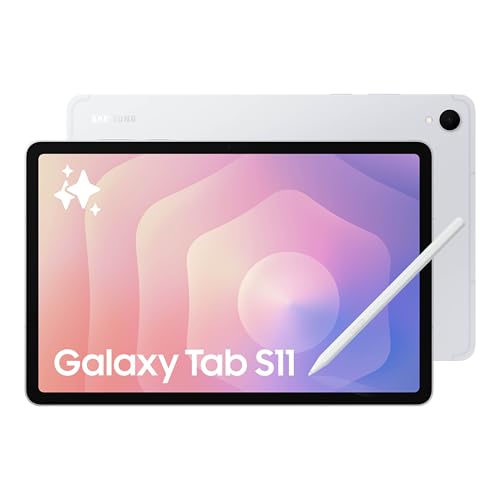
Samsung Galaxy Tab S11 128GB WiFi Android Tablet

Our verdict: The S-series pick with S Pen support and 128GB of storage.

The Galaxy Tab S11 is the tablet to buy if the stylus matters. It sits in Samsung's S-series, lists 128GB of storage as a WiFi model and supports the S Pen, which is the feature that separates a note-taking slate from a media screen. A pen with proper latency and palm handling changes how you annotate PDFs, sketch and mark up documents.

It leads because stylus support at a standard size beats everything the A-series offers for notes and drawing. Against the A11+, it gives up half the storage on this listing and costs a full tier more in the $500+ bucket. The S11 Ultra shares the S-series but is a bigger commitment to carry.

Buy it for note-taking, sketching and heavy daily use. Skip it for streaming and browsing, where the A11+ does the job for much less. The listing shows no cellular option.

Storage
128GB
Pen
S Pen
Connectivity
WiFi
Price tier
$500+

What we like

  • +S Pen support
  • +128GB storage
  • +S-series model
  • +WiFi Android tablet

Watch out for

  • −Premium price tier
  • −No cellular listed

Buy it if: Note-takers and artists.

Skip it if: You only stream video.

2

Best Value

Samsung Galaxy Tab A11+ 8GB RAM

Our verdict: A 256GB, 8GB RAM tablet in the $200-500 tier.

The Galaxy Tab A11+ in this listing carries 8GB of RAM and 256GB of storage, in the $200 to $500 tier. RAM is the number that decides how many browser tabs and apps stay alive in the background, and storage decides whether you can load downloads for a flight. Both are generous for the money here.

It takes second because it costs a tier less than the S11 and carries twice the storage, which suits a family tablet full of videos and shows. The S10 FE behind it adds a stylus but has half the storage, so for pure media use the A11+ has the better spec sheet.

Buy it for streaming, reading and kids. It lists no S Pen, so skip it if you write by hand. It also appears in 6GB and 5G versions elsewhere, and these are not interchangeable, so confirm RAM and network before you order.

RAM
8GB
Storage
256GB
Series
Galaxy Tab A11+
Price tier
$200-500

What we like

  • +256GB storage
  • +8GB RAM
  • +Lower price tier
  • +A-series value

Watch out for

  • −No S Pen listed
  • −Entry-level series

Buy it if: Streaming, reading and family use.

Skip it if: You want stylus support.

3

Best Middle Ground

ist computers Samsung Galaxy Tab S10 FE Tablet

Our verdict: A 10.9 inch tablet with stylus support at a mid-range tier.

The Tab S10 FE is Samsung's middle ground, listing a 10.9 inch screen, 128GB of storage and stylus support in the $200 to $500 tier. The FE series sits between the A and S lines, so it brings pen input without the flagship price tag, which is the reason students gravitate to it.

It ranks third because the S11 is the stronger S-series model and the A11+ carries 256GB against its 128GB. What keeps it above the Ultra is portability: 10.9 inches is easy to hold on a lap, and it costs a tier less. Pen support is its argument over the A11+.

Buy it if you want a pen on a mid-range budget. The caution is the seller: this listing comes from a reseller, ist computers, so check return and warranty terms before ordering. Storage is also half the A11+, so heavy downloaders should look elsewhere.

Screen
10.9 inch
Storage
128GB
Pen
Stylus support
Price tier
$200-500

What we like

  • +Stylus support
  • +10.9 inch screen
  • +128GB storage
  • +Mid-range tier

Watch out for

  • −Reseller listing
  • −Less storage than A11+

Buy it if: Students who want a pen on a mid budget.

Skip it if: You prefer buying direct.

4

Largest Screen

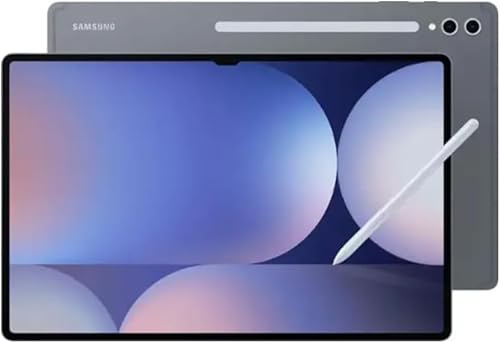
Samsung Galaxy Tab S11 Ultra Ai Wifi Model

Our verdict: A 14.6 inch, 256GB tablet for people who want a laptop-sized screen.

The Galaxy Tab S11 Ultra is a laptop-sized slate. Its listing shows a 14.6 inch screen, 256GB of storage and 5G, in the $500+ tier. That much panel area means two apps side by side stay readable and a drawing canvas feels like paper, which no other tablet in this ranking can match.

It ranks last for most buyers because size and price are both big commitments. A 14.6 inch tablet is awkward to hold one-handed, and you pay the top bucket for it. The S11 delivers the pen at a more portable size, which is what most people actually want from a premium Samsung.

Buy it for split-screen work and large-canvas drawing. Skip it for reading on the couch. The title also says WiFi model while the specs mention 5G, so confirm the version before paying.

Screen
14.6 inch
Storage
256GB
Network
5G listed
Price tier
$500+

What we like

  • +14.6 inch screen
  • +256GB storage
  • +Largest here
  • +5G listed

Watch out for

  • −Premium price tier
  • −Bulky to carry

Buy it if: Multitaskers who want a laptop-sized screen.

Skip it if: You want a portable tablet.

Methodology

How We Ranked These

Series fit

We compared S, S FE and A series positioning from each listing.

Stylus support

S Pen or stylus support counted for note-taking use.

Storage and RAM

Listed storage and memory decided long-term headroom.

Screen size

Screen sizes from 10.9 to 14.6 inches changed the use case.

Price tier

We balanced each tablet's bucket against what it offers.

Every Primea Score uses the same weights: Performance 30% · Build & Materials 20% · Everyday Usability 20% · Value 20% · Owner Satisfaction 10%. Full scoring rules

Buyer's guide

How to Pick the Right One for You

By Main Use

Pick by what you will do most.

UseOur pick
Note-taking and drawingSamsung Galaxy Tab S11 128GB
Streaming and readingSamsung Galaxy Tab A11+ 8GB RAM
Pen use on a mid budgetSamsung Galaxy Tab S10 FE
Large-canvas workSamsung Galaxy Tab S11 Ultra

By Budget

SpendOur pick
$200-500, most storageSamsung Galaxy Tab A11+ 8GB RAM
$200-500, with stylusSamsung Galaxy Tab S10 FE
$500+, standard sizeSamsung Galaxy Tab S11 128GB
$500+, largest screenSamsung Galaxy Tab S11 Ultra

Stylus vs No Stylus

With stylus

Stylus support suits notes and drawing. The Tab S11, S10 FE and S11 Ultra list it or S Pen.

No stylus

The Tab A11+ is built for streaming and reading, with no stylus listed.

Most buyers should default to the A11+ unless they write or draw.

By Screen Size

SizeOur pick
10.9 inchSamsung Galaxy Tab S10 FE
11 inchSamsung Galaxy Tab A11+ 8GB RAM
14.6 inchSamsung Galaxy Tab S11 Ultra

For Students Specifically

Look for

Stylus support for notes and enough storage for textbooks.

In this ranking

The Tab S10 FE offers stylus support at a mid tier, and the S11 adds S Pen at the top tier.

When to Spend More

Spend more if

You draw or take notes daily. The Tab S11 or S11 Ultra fits.

Save if

You mostly stream. The Tab A11+ has 256GB for less.

Questions

Frequently Asked Questions

Why only four tablets?+

The Tab A11+ appears in several RAM, storage and 5G versions, which we counted as one model, and the S11 family follows the same pattern. That leaves four distinct Samsung tablets ranked.

Does the A11+ have a stylus?+

None is listed on the 8GB RAM, 256GB version we ranked, so assume it has no pen. If you want stylus input, the Tab S11 and the S10 FE both list it.

What does 5G add?+

5G adds cellular data when you are away from WiFi. Several A11+ listings and the S11 Ultra mention it, but the S11 listing is WiFi only. Confirm the network in the title, since a WiFi model has no cellular option.

Is the Ultra too big?+

It depends on how you hold a tablet. At 14.6 inches the S11 Ultra is laptop-sized, great for multitasking and drawing but harder to carry than the 10.9 inch S10 FE or the standard S11.

Should I buy from a reseller?+

Check return and warranty terms first. The S10 FE listing comes from a reseller, ist computers, and reseller policies differ from Samsung's own. If you prefer buying direct, the S11 or A11+ are easier choices.

How much storage do I need?+

For streaming, 128GB on the S11 or S10 FE works. For downloads, files and large apps, 256GB on the A11+ or S11 Ultra gives more room, so heavy users should choose that tier.

Final take

For most people who write or draw, the Samsung Galaxy Tab S11 is the right Samsung tablet, with S Pen support and a fair 128GB of storage. If you only stream and read, the Tab A11+ with 256GB is the smarter spend. Take the S10 FE for a pen under $500, and the S11 Ultra only if you truly want a laptop-sized screen.

More Ranked & Reviewed Guides