
Primea ReviewsAll Reviews

Primea Reviews is reader-supported. When you buy through our Amazon links we may earn a commission, at no extra cost to you. Rankings are set by our editors and never sold. Learn more

Ranked & Reviewed by Primea Reviews

The 6 Best RGB Laptop Cooling Pads of 2026, Ranked & Reviewed

By the Primea Editorial TeamUpdated November 1, 202610 min read6 products ranked
The 6 Best RGB Laptop Cooling Pads of 2026, Ranked & Reviewed

The short answer

The Razer Adaptive is the best RGB laptop cooling pad, with a 140mm fan, adaptive control and a 3-port hub, though it needs Synapse. The llano V12 is the best balance of cooling, RGB and price. The KYOLLY adds six fans and an LCD panel, while the YICOSUN suits travelers with a foldable aluminum stand.

The Primea Scoreboard

Ranked & Reviewed

  1. Adaptive fan control and Chroma RGB for Razer ecosystem users.

    94Outstanding
    Check price
  2. One big turbo fan, touch-mute RGB control and a 3-port hub.

    90Excellent
    Check price
  3. Six fans, an LCD panel and a 4-port USB hub with no software.

    87Excellent
    Check price
  4. A wide fan speed range with USB-C ports and a phone holder.

    84Very Good
    Check price
  5. Visible RGB fans with six height settings for large laptops.

    82Very Good
    Check price
  6. A foldable aluminum stand with two fans for 10 to 16 inch laptops.

    79Very Good
    Check price

Lighting is the easy part of a cooling pad. What decides whether it helps is airflow. One large, well-aimed fan often does more than a row of tiny ones, and a pad that blocks your laptop's intake vents can make heat worse. Check where your machine breathes before you shop for color effects.

Our editors reviewed pads from spec sheets, looking at fan size and speed, noise ratings, tilt range, hub ports and lighting control. Six made the list. Each ranks by the cooling and convenience its specs promise, and temperature drops quoted by sellers are flagged as claims.

Before you buy

What Actually Matters

01

Fan size and count

Fan size matters because large fans move more air at lower noise than small ones. The Razer uses a 140mm fan and the llano a 5.5 inch turbo fan, while the KYOLLY uses six smaller fans. A higher fan count is no guarantee of cooling. Look for fan diameter and RPM in the listing.

02

Noise rating

Noise rating shows how loud fans run at full speed. The KYOLLY lists 18dB, which is a seller claim. Pads can drown out a quiet room when pushed. Look for a stated decibel figure, and treat listings with no number as a warning sign for noisy fans.

03

Laptop size fit

Laptop size fit matters because the pad must cover your laptop's vents. The ICE COOREL covers 15 to 17.3 inches and the YICOSUN 10 to 16 inches. A pad too small leaves hot spots uncooled. Check the listed inch range and compare it to your laptop's screen size and vent layout.

04

Hub ports

Hub ports let the pad double as a USB extension. The Razer and llano offer three USB ports, the KYOLLY four, and the Tilted Nation two USB-A and two USB-C. Look at the port types and whether USB-C ports carry data only, since the Tilted Nation does not charge devices.

05

RGB control

RGB control varies. The Razer needs Synapse software, the llano uses touch-mute, and the KYOLLY has an LCD panel. A pad you cannot dim or switch off becomes annoying at night. Check the listing for how you change lighting and whether it remembers settings after power-off.

In-depth reviews

Our Ranked Picks, Reviewed

1

Best Premium

Razer Laptop Cooling Pad Adaptive Smart, Intelligent Fan Control

Our verdict: Adaptive fan control and Chroma RGB for Razer ecosystem users.

The Razer Adaptive Smart cooling pad centers on a 140mm fan that reaches 3000 RPM, with adaptive fan control through Razer Synapse. It includes a 3-port USB Type-A hub, an airtight pressure chamber with foam seals and Chroma RGB lighting with remappable buttons. It sits in the $100 to $200 bracket.

It ranks first because the large fan and sealed chamber attack airflow directly, which matters more than a count of small fans. The llano V12 comes close for less, but it lacks the adaptive control and the sealing design.

Buy it if you already live in the Razer ecosystem and want smart fan behavior. The caveat is that the adaptive features depend on Synapse software, and the price is the highest here, which is hard to justify for owners of other brands.

Fan
140mm, up to 3000 RPM
Control
Adaptive, via Synapse
Hub
3-port USB Type-A
Price bracket
$100-200

What we like

  • +Adaptive fan control
  • +Airtight pressure chamber
  • +Chroma RGB sync
  • +3-port USB hub

Watch out for

  • −Needs Synapse software
  • −Costs $100-200

Buy it if: Razer Chroma users who want adaptive cooling.

Skip it if: You avoid installing software.

2

Best Balance

llano V12 Gaming Laptop Cooling Pad Laptop Cooler

Our verdict: One big turbo fan, touch-mute RGB control and a 3-port hub.

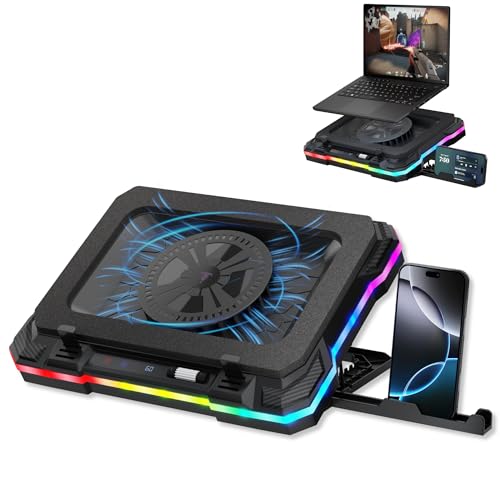
The llano V12 uses a single 5.5 inch turbo fan, with 10 RGB modes in four color options, touch-mute control and a memory function that holds your lighting after power-off. A 36W external adapter feeds it, and a 3-port USB hub comes built in. It falls in the $50 to $100 range.

It ranks second because it delivers the large-fan approach at about half the cost of the Razer, with easy lighting control. The seller states a 44°C reduction in 90 seconds, which is a claim we cannot verify, so treat it as marketing.

Choose it if you want a strong all-round pad without software. The caveat is the external power adapter, which adds a cable to your desk, and its fan has no adaptive speed control like the Razer.

Fan
5.5 inch turbo
RGB
10 modes, 4 colors
Power
36W adapter
Hub
3-port USB

What we like

  • +Large turbo fan
  • +Touch-mute RGB
  • +Lighting memory
  • +3-port hub

Watch out for

  • −Needs external power
  • −Cooling figure is a claim

Buy it if: Gamers wanting one strong fan.

Skip it if: You want laptop-powered only.

3

Best Control Panel

KYOLLY Aluminum Alloy RGB Gaming Laptop Cooler with 6 Fans and LCD Screen

Our verdict: Six fans, an LCD panel and a 4-port USB hub with no software.

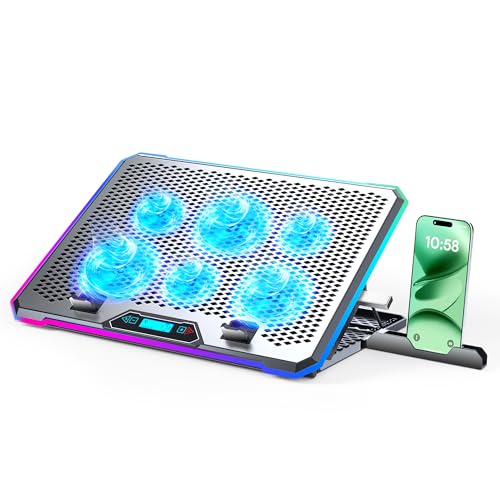
The KYOLLY pad packs six fans running 1700 to 2400 RPM, rated at 18dB, in an aircraft aluminum panel. An LCD control panel handles 10 RGB modes with memory, a 4-port USB 3.0 and 2.0 hub provides expansion, and nine angles from 10 to 45 degrees let you adjust the tilt. It is in the $25 to $50 range.

It ranks third because the panel and hub are great at the price, but six small fans do not guarantee better cooling than one large fan. The llano V12 has the stronger airflow design, while this pad wins on controls and ports.

It suits desk setups that want plenty of USB ports and no software. The caveat is that fan count is not the same as airflow, so check your laptop vent placement.

Fans
6, 1700-2400 RPM, 18dB rated
Tilt
9 angles, 10-45 degrees
Hub
4-port USB 3.0/2.0
Panel
Aluminum alloy, LCD

What we like

  • +LCD control panel
  • +4-port USB hub
  • +Quiet 18dB rating
  • +9 tilt angles

Watch out for

  • −Smaller fans
  • −No USB-C ports

Buy it if: Buyers who want no-software control.

Skip it if: You want one large fan.

4

Best USB-C Hub

Tilted Nation Gaming Laptop Cooling Pad with USB Hub

Our verdict: A wide fan speed range with USB-C ports and a phone holder.

The Tilted Nation pad runs its fans from 600 to 2800 RPM and offers a 4-port hub with two USB-A 3.0 and two USB-C data ports. It has 10 RGB lighting modes, seven tilt levels from 20 to 40 degrees and a built-in phone holder. It costs $50 to $100.

It ranks fourth because the hub and phone holder add convenience, yet the USB-C ports are data only and will not charge a laptop. The KYOLLY gives you more tilt options for less money.

Buy it if you want modern ports on a wide-speed cooler and plan to keep your phone in view. The caveat is the data-only USB-C limitation, which will surprise anyone expecting to use the pad as a charging hub.

Fan speed
600-2800 RPM
Hub
2 USB-A 3.0, 2 USB-C data
Tilt
7 levels, 20-40 degrees
Extra
Phone holder

What we like

  • +Two USB-C ports
  • +Wide fan speed range
  • +Phone holder
  • +7 tilt levels

Watch out for

  • −USB-C not for charging
  • −Costs $50-100

Buy it if: Buyers with USB-C peripherals.

Skip it if: You need charging ports.

5

Best for 17 Inch Laptops

ICE COOREL Gaming Laptop Cooling Pad 15-17.3 Inch with 6 RGB Fans

Our verdict: Visible RGB fans with six height settings for large laptops.

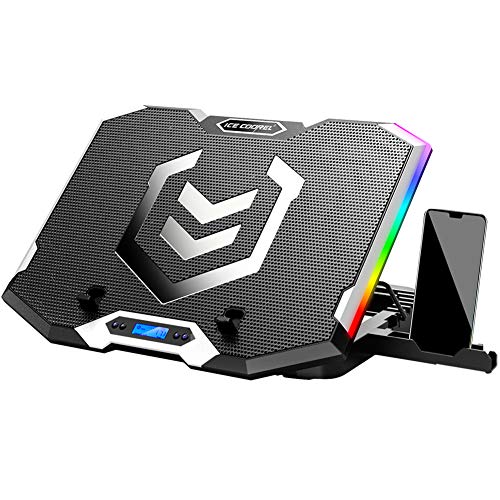
The ICE COOREL is built for bigger machines, with six RGB fans behind transparent housings, an LCD fan-speed display and six height settings. It fits 15 to 17.3 inch laptops and offers seven RGB light modes. It sits in the $25 to $50 bracket.

It lands fifth because it focuses on size support and looks, while the pads above it offer more ports or stronger airflow concepts. The visible fans are a real draw for build-focused desks.

Pick it for 17 inch laptops that overhang smaller pads. The caveat is that the listing gives no noise rating or hub ports, so you will rely on the LCD to manage speed and may need other accessories for USB expansion.

Fans
6 with RGB
Fit
15-17.3 inch
Heights
6 settings
Lighting
7 RGB modes

What we like

  • +Visible RGB fans
  • +LCD speed display
  • +Fits 17.3 inch
  • +6 height settings

Watch out for

  • −No hub listed
  • −Fewer light modes

Buy it if: Owners of 15 to 17.3 inch laptops.

Skip it if: You carry a small laptop.

6

Best Portable

YICOSUN Adjustable Laptop Cooling Stand with 2 Quiet Fans & RGB Lighting

Our verdict: A foldable aluminum stand with two fans for 10 to 16 inch laptops.

The YICOSUN is a foldable aluminum alloy stand with two quiet fans, three-speed control and RGB lighting. It supports laptops from 10 to 16 inches and sits in the $25 to $50 range.

It ranks last because two fans move less air than the larger designs above, and the stand has no hub ports. What it offers is portability, with a folding body that fits a bag, plus a clean metal look.

Buy it if you carry your laptop between rooms or work in cafes and want a light cooling stand. The caveat is limited cooling for heavy gaming, where the Razer or llano V12 will keep a laptop cooler under sustained load.

Fans
2, 3-speed
Build
Aluminum alloy
Fit
10-16 inch
Design
Foldable

What we like

  • +Foldable
  • +Aluminum build
  • +Quiet fans
  • +Fits 10-16 inch

Watch out for

  • −Only two fans
  • −No hub

Buy it if: Travel and small desks.

Skip it if: You run a hot gaming laptop.

Methodology

How We Ranked These

Cooling design

We compared fan size, count and speed.

Noise

We noted stated noise ratings.

Ports

We counted hub ports and USB-C.

RGB control

We checked on-device versus software control.

Fit

We compared stated laptop size range.

Every Primea Score uses the same weights: Performance 30% · Build & Materials 20% · Everyday Usability 20% · Value 20% · Owner Satisfaction 10%. Full scoring rules

Buyer's guide

How to Pick the Right One for You

By Laptop Size

Fit comes first.

LaptopOur pick
15 to 17.3 inchICE COOREL Gaming Laptop Cooling Pad 15-17.3 Inch with 6 RGB Fans
10 to 16 inchYICOSUN Adjustable Laptop Cooling Stand with 2 Quiet Fans & RGB Lighting
Razer laptopRazer Laptop Cooling Pad Adaptive Smart, Intelligent Fan Control
Most gaming laptopsllano V12 Gaming Laptop Cooling Pad Laptop Cooler

By Budget

SpendOur pick
$25-50 controlKYOLLY Aluminum Alloy RGB Gaming Laptop Cooler with 6 Fans and LCD Screen
$25-50 portableYICOSUN Adjustable Laptop Cooling Stand with 2 Quiet Fans & RGB Lighting
$50-100llano V12 Gaming Laptop Cooling Pad Laptop Cooler
$100-200Razer Laptop Cooling Pad Adaptive Smart, Intelligent Fan Control

One Big Fan vs Many Fans

One big fan

Moves more air with less noise. Razer and llano V12 use large fans.

Many fans

Spreads airflow across the base. KYOLLY and ICE COOREL use six.

Most gamers should default to a large fan unless their vents are spread out.

By Ports

NeedOur pick
USB-C dataTilted Nation Gaming Laptop Cooling Pad with USB Hub
USB 3.0 hubKYOLLY Aluminum Alloy RGB Gaming Laptop Cooler with 6 Fans and LCD Screen
3 USB-A portsRazer Laptop Cooling Pad Adaptive Smart, Intelligent Fan Control
3-port hubllano V12 Gaming Laptop Cooling Pad Laptop Cooler

For Quiet Desk Setups Specifically

Look for

A stated dB rating and speed control.

In this ranking

The KYOLLY is rated 18dB and has an LCD control panel.

When to Spend More

Spend more if

You use Razer Chroma and want adaptive control, which the Razer pad provides.

Save if

You just want RGB and airflow, where the KYOLLY costs $25-50.

Questions

Frequently Asked Questions

Do cooling pads really work?+

They can, if airflow reaches the intake vents. A pad with a large fan, like the Razer Adaptive or llano V12, helps most. Check where your laptop breathes before choosing.

Can I turn RGB off?+

Most can. The llano V12 has touch-mute and a memory function, the KYOLLY has an LCD panel, and the Razer uses Synapse. Check the listing for a clear off option.

Do they need power?+

Some do. The llano V12 lists a 36W external adapter, and the Razer has a USB hub that draws power. Check each listing to confirm whether power comes from the laptop or a wall.

Will it fit my laptop?+

Match the listed inch range to your screen. The ICE COOREL covers 15 to 17.3 inches, and the YICOSUN 10 to 16 inches. Also check that the fan sits under your vents.

Are small fans noisy?+

Small fans often get louder at high speed. The KYOLLY lists an 18dB rating, and the YICOSUN advertises quiet fans, but a large fan like the Razer 140mm unit usually runs quieter for the same airflow.

Does USB-C charge?+

Not on the Tilted Nation. Its two USB-C ports are listed as data only, not for charging, so they work for peripherals but will not power a laptop or phone.

Final take

The Razer Adaptive is the premium pick for Razer users, and the llano V12 is the better all-round value for everyone else. The KYOLLY works if you want a control panel and extra ports without software. Choose the ICE COOREL for large laptops, the Tilted Nation for USB-C hub ports, and the YICOSUN when portability matters most.

More Ranked & Reviewed Guides