
Primea ReviewsAll Reviews

Primea Reviews is reader-supported. When you buy through our Amazon links we may earn a commission, at no extra cost to you. Rankings are set by our editors and never sold. Learn more

Ranked & Reviewed by Primea Reviews

8 Rack Switches for Home Labs and Small Offices, Ranked & Reviewed

By the Primea Editorial TeamUpdated November 3, 202611 min read8 products ranked
8 Rack Switches for Home Labs and Small Offices, Ranked & Reviewed

The short answer

The TP-Link SG3452P is the rack switch to buy if you need a lot of PoE ports and real management, with 48 PoE+ ports on a 384W budget and a 5-year warranty. The TP-Link SG2452LP is the Omada-ready alternative, the TL-SG1048 is the plain 48-port unmanaged option, and the UGREEN, NETGEAR and Tenda models cover smaller racks and tight budgets.

The Primea Scoreboard

Ranked & Reviewed

  1. A 48-port L2+ managed switch with 384W of PoE+ budget, four SFP slots and a 5-year warranty.

    95Outstanding
    Check price
  2. A fanless 48-port Omada SDN switch with a 5-year warranty and CISA Secure-by-Design pledge.

    93Outstanding
    Check price
  3. A 48-port gigabit rackmount switch with 96Gbps non-blocking capacity and a 3-year warranty.

    90Excellent
    Check price
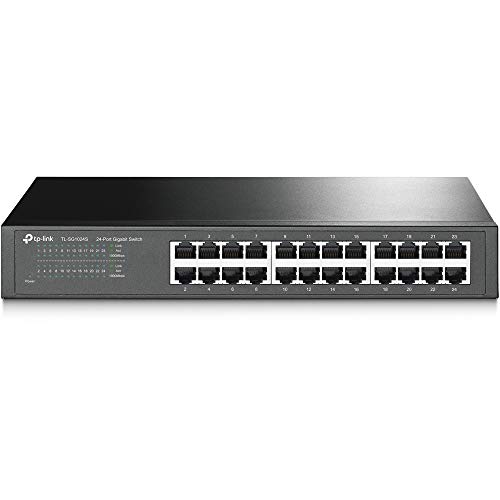
  4. A fanless, EMI-shielded 24-port 1U switch in an 11.6 x 7.1 x 1.7 inch metal case.

    88Excellent
    Check price
  5. A fanless 24-port unmanaged switch that mounts on a desk, wall or rack.

    86Excellent
    Check price
  6. A fanless 24-port rack switch with four switchable working modes and 6KV surge protection.

    84Very Good
    Check price
  7. 07
    UGREEN 16-Port Rackmount Gigabit Switch

    A fanless 16-port version of the UGREEN rack switch with the same modes and surge protection.

    82Very Good
    Check price
  8. 08
    Tenda TEG1016D 16-Port Gigabit Switch

    A 16-port gigabit switch with 10K jumbo frames, 32Gbps capacity and 6KV lightning protection.

    80Very Good
    Check price

The costliest mistake when buying a rack switch is paying for management you will never touch, or the opposite, buying an unmanaged box and discovering you need VLANs the week you add a camera system. An unmanaged switch is a patch panel with a brain: plug in, forget it. A managed one lets you split traffic into VLANs, prioritize voice or video, and see what is going wrong. Which one you need is a decision about your network in three years, not today.

So this ranking is organized around that line between managed and unmanaged. We reviewed eight rackmount switches from their listings, comparing port count, switching capacity, PoE budget, fan design, surge protection and warranty length. Where a listing leaves out the mounting kit or power details, we say so. Prices are shown as brackets, and none of the eight is a 10-gigabit switch, so this is a 1-gigabit-first list.

Before you buy

What Actually Matters

01

Managed versus unmanaged

Unmanaged switches need no setup and offer no control. Managed ones add VLANs, quality of service and monitoring, usually through a web page or controller. If you plan cameras, guest Wi-Fi or a home lab, a managed switch is worth the premium.

02

PoE budget

PoE budget is the total wattage a switch can supply across all ports. A 48-port switch with a 384W budget cannot run every port at the PoE+ maximum, so add up your devices first. Look for per-port limits and the total in the listing.

03

Switching capacity

Switching capacity is the data the switch can move at once. A non-blocking switch has capacity equal to ports times speed times two, such as 96Gbps for 48 gigabit ports. If the listed figure is lower, the switch can bottleneck under load.

04

Fan noise

A rack switch with a fan is often the loudest part of a small rack, and the fan is a failure point too. Fanless designs are silent but run warm, so leave a free rack unit above. Check the cooling line on the listing.

05

Rack fit

A rackmount switch should be a full 19 inch wide 1U unit with ears included. Some compact models are narrower and need a shelf. Check dimensions and what is in the box before you order.

In-depth reviews

Our Ranked Picks, Reviewed

5

Best Flexible Mounting

NETGEAR GS324 24-Port Gigabit Unmanaged Switch

Our verdict: A fanless 24-port unmanaged switch that mounts on a desk, wall or rack.

The NETGEAR GS324 is a 24-port gigabit unmanaged switch that is fanless and can be placed on a desk, a wall or a rack. It uses auto-negotiating ports and supports EEE energy-saving. Expect to pay $50 to $100.

It sits fifth because the flexibility is its strength. You can start on a shelf, then move into a rack later without buying a new switch. Auto-negotiating ports adjust their speed to the device, so older 100 megabit gear works alongside gigabit. EEE, or Energy Efficient Ethernet, lowers idle power, which matters if the switch runs all year. It has no management, so no VLANs, and it ranks below the TL-SG1024S only because that listing describes a metal EMI-shielded case.

Buy it if you are unsure where it will live. Skip it for PoE needs.

Ports
24 gigabit
Mounting
Desktop, wall or rack
Cooling
Fanless
Energy
Auto-negotiating with EEE

What we like

  • +Mounts on desk, wall or rack
  • +Fanless and quiet
  • +Auto-negotiating ports
  • +Energy-saving EEE support

Watch out for

  • −Unmanaged only
  • −No PoE on the listing

Buy it if: Buyers who may move the switch between shelf and rack.

Skip it if: You need VLANs or PoE.

6

Best Switchable Modes

UGREEN 24-Port Rackmount Gigabit Switch

Our verdict: A fanless 24-port rack switch with four switchable working modes and 6KV surge protection.

The UGREEN 24-Port is a rackmount gigabit switch that is fanless, with 6KV surge protection and four switchable working modes. Expect to pay $50 to $100.

It sits sixth because the modes are interesting but poorly explained on the listing. Switchable modes on a small switch usually include a standard mode, a mode that prioritizes certain ports, and an isolation mode that stops ports talking to each other. Confirm the exact set before relying on them. The 6KV surge protection is a useful safety margin for a rack in a garage or outbuilding, where lightning-induced surges are a risk. The brand is newer in networking than TP-Link or NETGEAR.

Buy it if you want mode switching on a budget. Skip it if you value an established support network.

Ports
24 gigabit
Modes
4 switchable
Protection
6KV surge
Cooling
Fanless

What we like

  • +Four switchable working modes
  • +6KV surge protection
  • +Fanless, quiet running
  • +Rackmount design

Watch out for

  • −Modes poorly explained on listing
  • −Newer networking brand

Buy it if: Garage or workshop racks that value surge protection.

Skip it if: You want a long-established networking brand.

7

Best 16-Port Compact Rack

UGREEN 16-Port Rackmount Gigabit Switch

Our verdict: A fanless 16-port version of the UGREEN rack switch with the same modes and surge protection.

The UGREEN 16-Port is the smaller sibling of the 24-port model, with the same four switchable working modes, 6KV surge protection and fanless design. Expect to pay $50 to $100.

It sits seventh because the price gap between 16 and 24 ports is small, and the extra eight ports are cheap insurance. Many racks fill faster than their owners expect, as every access point, camera and printer wants a port. On a 16-port switch, you also need to leave a port or two for an uplink, which leaves 14 usable. Compared with the Tenda 16-port, you get surge protection and modes, but the listing offers fewer capacity figures.

Buy it for a small rack with a firm port count. Otherwise, buy the 24-port.

Ports
16 gigabit
Modes
4 switchable
Protection
6KV surge
Cooling
Fanless

What we like

  • +Four switchable working modes
  • +6KV surge protection
  • +Fanless, quiet running
  • +Compact 16-port size

Watch out for

  • −Port count fills quickly
  • −Few capacity figures listed

Buy it if: Small racks with a known, modest device count.

Skip it if: Your device count may grow past 14.

8

Best Budget Rack Switch

Tenda TEG1016D 16-Port Gigabit Switch

Our verdict: A 16-port gigabit switch with 10K jumbo frames, 32Gbps capacity and 6KV lightning protection.

The Tenda TEG1016D is a 16-port gigabit switch with 10K jumbo frame support, 32Gbps switching capacity and 6KV lightning protection. Expect to pay $25 to $50, which makes it the cheapest switch here.

It sits last because it is the plainest model, but it covers the basics for little money. A 32Gbps figure is 16 ports at 1Gbps in both directions, so it is fully non-blocking. Jumbo frames let large transfers use bigger packets, which can help with a NAS or backups, as long as every device on the path supports them. The 6KV protection is a useful extra at this price. Tenda has less support reach than TP-Link or NETGEAR.

Buy it for a budget rack or NAS backbone. Skip it if you need management.

Ports
16 gigabit
Capacity
32Gbps
Frames
10K jumbo frames
Protection
6KV lightning

What we like

  • +Lowest price in this ranking
  • +10K jumbo frame support
  • +32Gbps non-blocking capacity
  • +6KV lightning protection

Watch out for

  • −Unmanaged only
  • −Less support reach

Buy it if: Budget racks and NAS backbones that need cheap gigabit ports.

Skip it if: You want VLANs or brand support.

Methodology

How We Ranked These

Management level

We separated unmanaged, Omada-managed and L2+ managed switches, since that decides what a network can do later.

Port count and capacity

We compared port counts and stated switching capacity, checking that the figure matched ports at full speed.

PoE budget

Where PoE is listed, we looked at the total wattage, because the budget is shared across ports.

Noise and cooling

Fanless designs scored higher for closets and offices where a rack fan is the loudest component.

Warranty and protection

Warranty length and surge or lightning ratings were weighed, since a rack switch runs unattended for years.

Every Primea Score uses the same weights: Performance 30% · Build & Materials 20% · Everyday Usability 20% · Value 20% · Owner Satisfaction 10%. Full scoring rules

Buyer's guide

How to Pick the Right One for You

By Port Count

Buy more ports than you need today, because racks fill up.

PortsOur pick
16 ports, budgetTenda TEG1016D 16-Port Gigabit Switch
16 ports, surge protectionUGREEN 16-Port Rackmount Gigabit Switch
24 ports, mounting flexibilityNETGEAR GS324 24-Port Gigabit Unmanaged Switch
24 ports, metal caseTP-Link TL-SG1024S 24-Port Gigabit Switch
48 ports, unmanagedTP-Link TL-SG1048 48-Port Gigabit Switch
48 ports, managedTP-Link SG2452LP 48-Port Omada Managed Switch

By Budget

SpendOur pick
$25 to $50Tenda TEG1016D 16-Port Gigabit Switch
$50 to $100NETGEAR GS324 24-Port Gigabit Unmanaged Switch
$50 to $100 (modes and surge)UGREEN 24-Port Rackmount Gigabit Switch
$200 to $500TP-Link SG2452LP 48-Port Omada Managed Switch
$500+TP-Link TL-SG3452P 48-Port L2+ Managed PoE Switch

Managed vs Unmanaged

Managed

VLANs, monitoring, QoS and PoE control, with a setup step and a higher price. Picks: TP-Link SG3452P, TP-Link SG2452LP.

Unmanaged

Plug in and forget, cheaper and quieter. Picks: TP-Link TL-SG1048, TL-SG1024S, NETGEAR GS324, UGREEN 24-Port, UGREEN 16-Port, Tenda TEG1016D.

Default to unmanaged for a plain wired room, and to managed for cameras or business use.

By Noise Tolerance

RoomOur pick
Bedroom or office closetTP-Link SG2452LP 48-Port Omada Managed Switch
Living space rackNETGEAR GS324 24-Port Gigabit Unmanaged Switch
Quiet small rackTP-Link TL-SG1024S 24-Port Gigabit Switch
Garage rackUGREEN 24-Port Rackmount Gigabit Switch

For Security Cameras Specifically

Look for

PoE+ ports with a total budget that covers every camera, plus VLAN support to isolate the camera network.

In this ranking

The TP-Link SG3452P supplies PoE+ on all 48 ports with a 384W budget and L2+ management, which makes it the clear pick for camera installs.

When to Spend More

Spend more if

You run cameras, access points or a business network. The TP-Link SG3452P or SG2452LP offer management and a 5-year warranty.

Save if

You only need wired ports for a NAS and PCs. The Tenda TEG1016D or NETGEAR GS324 do that for much less.

Questions

Frequently Asked Questions

Do I need a managed switch for a home lab?+

Not at first, but VLANs become useful quickly once you separate IoT, guests and servers. If you expect to grow, the TP-Link SG2452LP is a sensible managed step, while an unmanaged switch like the TL-SG1048 is enough for plain wired ports.

What is the most common mistake with PoE switches?+

Ignoring the total budget. A switch may have 48 PoE ports, but the 384W budget on the TP-Link SG3452P is shared, so add up your device wattage and leave headroom.

Is a rackmount switch worth it over a desktop switch?+

If you have a rack or want a tidy closet, yes. Rack switches keep cabling organised and often have more ports, but a desktop model like the NETGEAR GS324 can also mount in a rack.

How do I mount one in a rack?+

Attach the ears to the sides of the switch, then secure it to the rack posts with four screws. Leave a free rack unit above fanless models for airflow.

Do these switches need maintenance?+

Unmanaged switches need only dusting and a check on the cables. Managed ones, like the SG3452P and SG2452LP, should have their firmware updated periodically.

Will a gigabit switch slow down a faster internet connection?+

Only if your connection exceeds one gigabit, since each port tops out at 1Gbps. For multi-gigabit internet, you need a switch with faster uplink ports or SFP slots, such as those on the SG3452P.

Final take

The TP-Link SG3452P is the rack switch to buy if you run PoE devices and want management, the TP-Link SG2452LP is the quieter Omada route, and the TL-SG1048 is the plain 48-port workhorse. For smaller racks, the NETGEAR GS324 and TL-SG1024S are the dependable 24-port picks. Count your ports, add your PoE wattage, and buy the headroom.

More Ranked & Reviewed Guides