
Primea ReviewsAll Reviews

Primea Reviews is reader-supported. When you buy through our Amazon links we may earn a commission, at no extra cost to you. Rankings are set by our editors and never sold. Learn more

Ranked & Reviewed by Primea Reviews

The 7 Best Quiet Network Switches for Desks, Bedrooms and Media Closets in 2026, Ranked & Reviewed

By the Primea Editorial TeamUpdated November 3, 202610 min read7 products ranked
The 7 Best Quiet Network Switches for Desks, Bedrooms and Media Closets in 2026, Ranked & Reviewed

The short answer

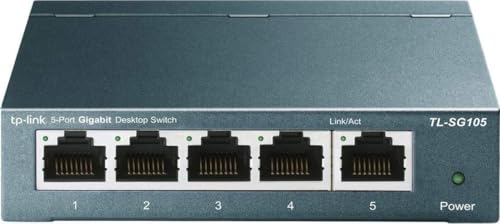
The NETGEAR GS308 is the quiet switch to buy for most homes: eight gigabit ports, a fanless metal case and efficient Ethernet in a very low price bracket. The TP-Link TL-SG108S-M2 is the better pick if your internet or NAS has outgrown gigabit, and the TP-Link TL-SG105 is the five-port choice for a single desk. Every unit here is fanless, so the only thing you will hear is nothing.

The Primea Scoreboard

Ranked & Reviewed

  1. Eight gigabit ports in a fanless metal case, at a price almost everyone can justify.

    95Outstanding
    Check price
  2. A shielded metal eight-port switch with 24x7 live technical support behind it.

    93Outstanding
    Check price
  3. Eight 2.5G ports with 40Gbps of switching capacity, and it runs on the Cat5e you already have.

    91Excellent
    Check price
  4. A compact five-port switch with QoS, IGMP snooping and a three-year warranty.

    89Excellent
    Check price
  5. A fanless five-port switch with energy-efficient Ethernet for tight spaces.

    87Excellent
    Check price
  6. Five 2.5G ports and 25Gbps of capacity in a compact metal case, for $25 to $50.

    85Excellent
    Check price
  7. A fanless eight-port 2.5G switch with efficient Ethernet, at the highest price here.

    82Very Good
    Check price

People shop for a quiet switch and then check the wrong thing. They read noise decibel figures that rarely exist, when the real answer is simpler: if a switch has no fan, it makes no fan noise. The ugly truth about cheap networking gear is that noise almost always comes from a small cooling fan in a managed or PoE model, not from an unmanaged box like these.

So this ranking is about everything else that separates a silent switch from a good one: port count, whether the ports run at 1 gigabit or 2.5 gigabit, how the metal case handles heat without airflow, and how the unit mounts on a desk or wall. We reviewed seven fanless unmanaged switches from the listings and spec sheets, and we did not measure sound.

Before you buy

What Actually Matters

01

Fanless design

A switch with no fan has no moving parts to make noise or wear out. The trade is that heat has to escape through the case, which is why metal housings are common on quiet models. Check the listing for the word fanless, because PoE and managed switches often add fans.

02

Port speed

Gigabit ports top out at 1000 Mbps, while 2.5G ports reach 2500 Mbps over the same Cat5e cable. The speed only matters if the device at the other end can use it, so look at the Ethernet port on your router, NAS and PC before paying extra. A multi-gig switch connected to gigabit devices simply runs at gigabit.

03

Switching capacity

Switching capacity is the total bandwidth the chip can move across all ports at once. For a simple eight-port home switch this is rarely the bottleneck, but stated figures such as the 25Gbps and 40Gbps on the TP-Link 2.5G units show the chip can keep every port busy. Check the listing for a stated number instead of assuming.

04

Unmanaged vs smart features

Unmanaged switches work out of the box with no configuration. Extras like QoS and IGMP snooping help prioritise video calls and multicast streams, but they are not a substitute for a managed switch with VLANs. Pick unmanaged for a plug-and-forget setup.

05

Mounting and power

Many silent switches use a small external power adapter, so check where the outlet sits relative to the shelf or wall. Wall-mounting holes keep the switch off the desk and improve airflow around the metal case. Energy-efficient Ethernet also trims idle power draw.

In-depth reviews

Our Ranked Picks, Reviewed

1

Best Overall

NETGEAR GS308 8-Port Gigabit Unmanaged Switch

Our verdict: Eight gigabit ports in a fanless metal case, at a price almost everyone can justify.

The GS308 is the default answer to a quiet home switch. It gives you eight gigabit ports in a fanless metal housing, supports 802.3az energy-efficient Ethernet, and can sit on a desk or mount to a wall. It sits in the under $25 bracket, which is remarkable for a metal-cased unit.

It ranks first because it covers the most common need, a handful of wired devices on a home network, without charging for features you will not use. Against the five-port GS305 it gives you three extra ports for the same kind of money, and extra ports are cheaper than a second switch later. The tradeoff is that gigabit speed is the ceiling, so it will not carry a multi-gig internet plan across your network.

Buy it if you have a router, a console, a desktop and a few other wired devices. Skip it if your ISP plan or NAS is faster than 1 gigabit.

Ports
8 gigabit
Cooling
Fanless metal housing
Efficiency
802.3az energy-efficient Ethernet
Mounting
Desktop or wall mount

What we like

  • +Fanless metal housing stays silent
  • +Eight ports for a tiny price
  • +Energy-efficient Ethernet saves power
  • +Desktop or wall mounting

Watch out for

  • −Gigabit speed ceiling
  • −No management features

Buy it if: Most homes with a router and several wired devices.

Skip it if: You pay for a multi-gig internet plan.

5

Best Small Silent Switch

NETGEAR GS305 5-Port Gigabit Unmanaged Switch

Our verdict: A fanless five-port switch with energy-efficient Ethernet for tight spaces.

The GS305 is the five-port sibling of the GS308, sharing the fanless build and the power-saving Ethernet mode, and it sits on a shelf or screws to a wall. It sits in the under $25 bracket and is the smallest and simplest option in the group.

It ranks below the TL-SG105 because that model adds QoS, IGMP snooping and a stated three-year warranty, while this one keeps to the basics. It ranks above the larger multi-gig models for a buyer who only wants silence and gigabit, though the eight-port GS308 gives better room to grow. Treat it as the right size for one workstation or one entertainment shelf.

Buy it if you need to split one wall jack into several wired connections. Skip it if you want QoS features or more ports.

Ports
5 gigabit
Cooling
Fanless
Efficiency
802.3az energy-efficient
Mounting
Desktop or wall

What we like

  • +Silent fanless design
  • +Energy-efficient Ethernet
  • +Wall mount option
  • +Smallest footprint here

Watch out for

  • −Only five ports
  • −No QoS listed

Buy it if: A single desk or TV shelf needing a few more wired ports.

Skip it if: You want QoS or room to expand.

7

Premium 2.5G Pick

NETGEAR MS308 8-Port 2.5G Unmanaged Switch

Our verdict: A fanless eight-port 2.5G switch with efficient Ethernet, at the highest price here.

The MS308 gives you eight 2.5G ports in a fanless design, works with existing Cat5e or Cat6 cabling, and supports 802.3az energy-efficient Ethernet. It is the most expensive unit here, sitting in the $100 to $200 bracket.

It ranks last, not because it is bad, but because the TP-Link TL-SG108S-M2 offers a comparable eight-port 2.5G setup for a lower price bracket and also states its 40Gbps switching capacity. The NETGEAR adds the energy-efficient Ethernet mention and a brand some owners trust for long-term firmware and support, which may justify the premium if you buy NETGEAR across your network.

Buy it if you want eight silent 2.5G ports and prefer NETGEAR. Skip it if price matters more than brand.

Ports
8 x 2.5G
Cooling
Fanless
Cabling
Cat5e or Cat6
Price bracket
$100 to $200

What we like

  • +Eight silent 2.5G ports
  • +Energy-efficient Ethernet
  • +Works with Cat5e or Cat6
  • +NETGEAR brand support

Watch out for

  • −Priciest switch here
  • −No stated switching capacity

Buy it if: NETGEAR households upgrading to multi-gig.

Skip it if: You want the lowest price for eight 2.5G ports.

Methodology

How We Ranked These

Noise and cooling

Every switch was required to be fanless, then compared on case material, since a metal body spreads heat without airflow.

Port count and speed

Five and eight port layouts were compared across 1 gigabit and 2.5G speeds, with stated switching capacity where it is published.

Feature set

QoS, IGMP snooping, energy-efficient Ethernet and shielding were weighed for what they change on a home network.

Mounting and support

Desktop and wall mounting, warranty length and live support lines were scored as long-term ownership signals.

Value by bracket

Each switch was judged against the under $25, $25 to $50, $50 to $100 and $100 to $200 brackets it occupies.

Every Primea Score uses the same weights: Performance 30% · Build & Materials 20% · Everyday Usability 20% · Value 20% · Owner Satisfaction 10%. Full scoring rules

Buyer's guide

How to Pick the Right One for You

By Port Count

Count your wired devices now, then add two ports for growth.

Wired devicesOur pick
Up to 4NETGEAR GS305 5-Port Gigabit Unmanaged Switch
Up to 4, want QoS and a warrantyTP-Link TL-SG105 5-Port Gigabit Unmanaged Switch
5 to 7NETGEAR GS308 8-Port Gigabit Unmanaged Switch
5 to 7, want 2.5GTP-Link TL-SG108S-M2 8-Port 2.5G Unmanaged Switch

By Budget

SpendOur pick
Under $25NETGEAR GS308 8-Port Gigabit Unmanaged Switch
$25 to $50TP-Link TL-SG105S-M2 5-Port 2.5G Unmanaged Switch
$50 to $100TP-Link TL-SG108S-M2 8-Port 2.5G Unmanaged Switch
$100 to $200NETGEAR MS308 8-Port 2.5G Unmanaged Switch

Gigabit vs 2.5G

Gigabit

Cheaper and enough for streaming, gaming and ordinary downloads on a typical home plan. Picks: NETGEAR GS308, TP-Link TL-SG108, TP-Link TL-SG105 and NETGEAR GS305.

2.5G

Worth it if your router, NAS or PC already has a 2.5G port or your internet plan exceeds gigabit. Picks: TP-Link TL-SG108S-M2, TP-Link TL-SG105S-M2 and NETGEAR MS308.

Default to gigabit unless you already own 2.5G equipment.

By Placement

Where it livesOur pick
Bedroom or deskNETGEAR GS305 5-Port Gigabit Unmanaged Switch
Media closetNETGEAR GS308 8-Port Gigabit Unmanaged Switch
Electrically noisy roomTP-Link TL-SG108 8-Port Gigabit Unmanaged Switch
Home office with a NASTP-Link TL-SG108S-M2 8-Port 2.5G Unmanaged Switch

For Home Offices and Bedrooms Specifically

Look for

A fanless metal body, a power adapter that is small and easy to hide, and a wall-mount option that keeps cables off the desk.

In this ranking

The NETGEAR GS305 suits a bedroom desk, the NETGEAR GS308 handles a home office with several devices, and the TP-Link TL-SG108 adds shielding for crowded electronics.

When to Spend More

Spend more if

Your internet plan, NAS or workstation uses 2.5G. The TP-Link TL-SG108S-M2 or NETGEAR MS308 keep up without noise.

Save if

Everything on your network is gigabit. The NETGEAR GS308 does the whole job for the lowest bracket.

Questions

Frequently Asked Questions

Will a quiet switch slow my internet?+

No. An unmanaged switch simply passes traffic between ports at wire speed. Your internet speed is limited by your plan and router, not by a switch with enough capacity.

What is the common mistake when buying a switch?+

Buying multi-gig ports with no multi-gig devices. A 2.5G switch plugged into gigabit devices runs at gigabit, so check your router, NAS and PC ports first.

Is a 2.5G switch worth it over a gigabit one?+

Only if you have gear that can use it, such as a 2.5G internet plan, a NAS or a modern motherboard. Otherwise the gigabit models do the same job for less and are just as silent.

How hard is setup?+

Plug in the power adapter, connect your router to one port, and plug your devices into the rest. There is no software or configuration with these unmanaged models.

Do these switches get hot without fans?+

They run warm to the touch, which is normal for a metal case that spreads heat. Give the switch some open space around it and avoid stacking items on top, especially in a closed cabinet.

Can I use my existing Cat5e cables with 2.5G?+

Yes. The 2.5G switches here are listed as working over existing Cat5e cabling for typical home distances. Very long or poor-quality cable runs may drop to gigabit.

Final take

The NETGEAR GS308 is the best quiet network switch for most people: eight silent gigabit ports, a metal case and wall mounting for very little money. The TP-Link TL-SG108 is a close second with live support, and the TP-Link TL-SG108S-M2 is the upgrade to buy when your internet or NAS goes multi-gig. Choose the five-port models only if you are sure you will never need a sixth cable.

More Ranked & Reviewed Guides