

Primea ReviewsAll Reviews

Primea Reviews is reader-supported. When you buy through our Amazon links we may earn a commission, at no extra cost to you. Rankings are set by our editors and never sold. Learn more

Ranked & Reviewed by Primea Reviews

The 6 Best Quiet Mechanical Keyboards and Switch Options of 2026, Ranked & Reviewed

By the Primea Editorial TeamUpdated November 1, 202610 min read6 products ranked
The 6 Best Quiet Mechanical Keyboards and Switch Options of 2026, Ranked & Reviewed

The short answer

The Logitech MX Mechanical is the best overall, with low-profile tactile switches, multi-device wireless and a full-size layout. The SteelSeries Apex 3 names a Whisper Quiet switch on a budget, and the Redragon K668 adds case foam. The Keychron V6 Max and V6 Knob are hot-swappable so you can fit silent switches, and the Logitech G413 TKL needs your own dampening.

The Primea Scoreboard

Ranked & Reviewed

  1. Low-profile tactile switches and wireless multi-device in a full-size board.

    94Outstanding
    Check price
  2. A branded Whisper Quiet switch with a wrist rest and water resistance.

    91Excellent
    Check price
  3. Linear Red switches with sound absorbing foam for under $50.

    88Excellent
    Check price
  4. Wireless full-size hot-swap board where you can add silent switches.

    85Excellent
    Check price
  5. A wired hot-swap board with a volume knob and QMK and VIA control.

    82Very Good
    Check price
  6. A sturdy tenkeyless board that needs your own dampening.

    79Very Good
    Check price

Quiet is the least reliable word in a keyboard listing. A tactile Brown switch is not a silent one, a linear Red is not automatically hushed, and plenty of boards ship with neither, so the case, the keycaps and the foam often matter as much as the switch name. What your coworkers hear is mostly the bottom-out thud and the hollow ring of the case, not the click.

Our editors compared six keyboards from their listings on switch type, dampening, build, connection and upgrade path. We did not measure sound, so no decibel claims appear here. Scores reward boards that name a quiet switch, absorb sound with foam, or let you swap switches later, and mark down listings that lean on the word quiet alone.

Before you buy

What Actually Matters

01

Switch type

Linear switches press smoothly, tactile ones add a bump and clicky ones add a snap. Only silent versions of linear or tactile switches have dampers to soften the bottom out. Look for the word silent in the switch name, not just tactile or linear, because a standard Brown is only a little quieter than a clicky switch.

02

Low-profile design

Low-profile switches have shorter travel, so the keycap hits the board with less force. They tend to feel softer on a desk. Check for low-profile in the title, and note that keycaps will not interchange with standard boards. The MX Mechanical is the only low-profile pick here, and its keycaps are specific to it.

03

Case dampening

Foam inside the case and a rigid frame absorb the hollow sound that keys make. Without foam, even a quiet switch can echo. Look for the words sound absorbing foam in the listing. The Redragon K668 states it, and most other boards leave the case untreated, so the sound is down to the plate and desk.

04

Hot-swap sockets

A hot-swap board lets you pull out switches and fit new ones without soldering. It is the cheapest way to make a loud board quieter. Check the listing for hot-swappable and for the socket compatibility. Three of these boards list hot-swap sockets, and the others require a new keyboard for a different switch, which is the costly way to change sound.

05

Wireless and layout

Full size boards have a numpad, and tenkeyless boards do not. A smaller layout saves desk space, and wireless frees cable clutter. Choose layout and connection based on how you work. Wireless boards also need charging, and a wired board is always on, which matters for office use.

In-depth reviews

Our Ranked Picks, Reviewed

1

Best Overall

Logitech MX Mechanical Wireless Illuminated Keyboard

Our verdict: Low-profile tactile switches and wireless multi-device in a full-size board.

The MX Mechanical uses low-profile tactile mechanical switches, so the keycap travels a shorter distance and hits the board with less force. It adds Bluetooth plus a Logi Bolt receiver with multi-device switching, backlit keys and a rechargeable battery, in a full-size layout with a numpad.

It ranks first because low-profile switches are gentler on a desk, and the wireless convenience makes it the easiest board to live with. Against the Apex 3 it costs more, in the $100 to $200 bucket, but it brings a more refined build.

Buy it for shared offices and quiet desks where you want a no-fuss board. The caveats are that it is not hot-swappable and the price sits in the higher bracket. Low-profile keycaps also do not interchange with standard sets.

Switches
Low-profile tactile
Connection
Bluetooth and Logi Bolt
Layout
Full size with numpad
Power
Rechargeable

What we like

  • +Low-profile tactile switches
  • +Multi-device switching
  • +Backlit keys
  • +Rechargeable battery

Watch out for

  • −Not hot-swappable
  • −Higher price bracket

Buy it if: Shared offices and quiet desks.

Skip it if: You want to swap switches.

2

Best Quiet Budget Board

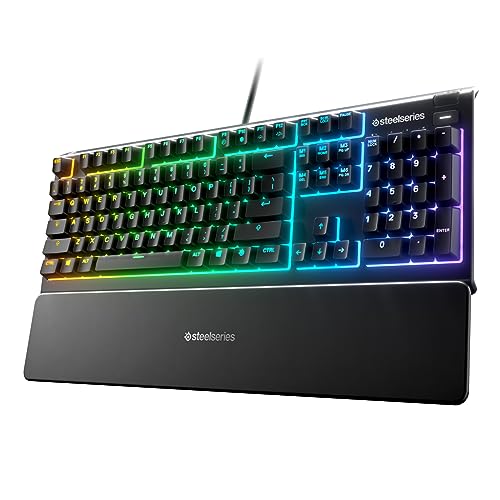
SteelSeries Apex 3 RGB Gaming Keyboard

Our verdict: A branded Whisper Quiet switch with a wrist rest and water resistance.

The Apex 3 uses SteelSeries' branded Whisper Quiet Gaming Switch, with 10 zone RGB lighting, IP32 water resistance and a magnetic wrist rest. It connects by USB. Only this listing names a quiet switch, at a price between $50 and $100.

It ranks second because that quiet branding is the closest thing to a dampened switch among the budget boards. The catch is that the listing does not describe how the switch is dampened, and it is wired only, so the cable stays.

Buy it for a quiet-leaning gaming board at a modest price. Skip it if you want wireless. The caveat: gaming lighting adds a visual signature that some shared offices dislike, and the switch description is marketing language, not a specification.

Switch
Whisper Quiet branded
Lighting
10 zone RGB
Protection
IP32 water resistant
Extra
Magnetic wrist rest

What we like

  • +Whisper Quiet switch
  • +IP32 water resistance
  • +Magnetic wrist rest
  • +Under $100

Watch out for

  • −Wired only
  • −Gaming styled lighting

Buy it if: Budget buyers wanting a quiet switch.

Skip it if: You want wireless.

3

Best Dampened Budget

Redragon K668 108-Key Mechanical Keyboard (Red Switch)

Our verdict: Linear Red switches with sound absorbing foam for under $50.

The K668 has hot-swappable Red linear switches, sound absorbing foam inside the case and a 108 key full-size layout. It ships with two sets of mixed colour keycaps and a wired USB connection, and costs $25 to $50. Linear switches have no bump, which is gentler to type on than tactile ones.

It ranks third because the Red switches are not silent dampened, though the foam takes the edge off the hollow sound. The build is budget, and the hot-swap sockets mean you can fit silent switches later.

Buy it for upgradeable quiet on a tight budget. Skip it if you want wireless. The honest caveat: the Red switches are not silent, so out of the box it is quieter than a bare-case board, not quiet.

Switches
Hot-swappable Red linear
Dampening
Case foam
Layout
108 key full size
Extra
Two keycap sets

What we like

  • +Sound absorbing foam
  • +Hot-swappable switches
  • +Full size layout
  • +Under $50

Watch out for

  • −Red switches not silent
  • −Wired only

Buy it if: Budget buyers wanting upgradeable quiet.

Skip it if: You want wireless.

4

Best Wireless Hot-Swap

Keychron V6 Max Wireless (Gateron Brown Switch)

Our verdict: Wireless full-size hot-swap board where you can add silent switches.

The V6 Max has hot-swappable Gateron Brown tactile switches, 2.4GHz and Bluetooth wireless, QMK programming and RGB backlighting. It works with Mac, Windows and Linux. Hot-swappable means you can pull out the switches and fit new ones without soldering.

It ranks fourth because the stock Brown switches are tactile, not silent. The point of buying it is the sockets, which let you fit silent switches and make the board as quiet as you want. It costs more, in the $100 to $200 bucket.

Buy it if you like to tinker and want wireless. Skip it if you want quiet out of the box. The caveat: you pay for the board and then for the replacement switches, and tactile switches in the meantime are only moderately quiet.

Switches
Hot-swappable Gateron Brown
Wireless
2.4GHz and Bluetooth
Software
QMK programmable
Layout
Full size with numpad

What we like

  • +Hot-swappable switches
  • +2.4GHz and Bluetooth
  • +QMK programmable
  • +Mac, Windows and Linux

Watch out for

  • −Stock switches not silent
  • −Higher price bracket

Buy it if: Tinkerers building a quiet board.

Skip it if: You want quiet out of the box.

5

Best Wired Hot-Swap

Keychron V6 Knob Version (Keychron K Pro Brown Switch)

Our verdict: A wired hot-swap board with a volume knob and QMK and VIA control.

The V6 Knob has hot-swappable Keychron K Pro Brown tactile switches, a physical volume knob and QMK and VIA programming. It is a wired, full-size board with a numpad, and costs $50 to $100. The knob puts volume at your fingertips without a function layer.

It ranks fifth because it is wired and ships with tactile switches that are not silent. Compared with the V6 Max, it saves money by dropping wireless but keeps hot-swap sockets.

Buy it if you want a wired, upgradeable board on a budget. Skip it if you need wireless. The caveat: stock switches are tactile, so you need to buy silent switches to make it quiet, and the V6 Max offers the same upgrade path with wireless.

Switches
Hot-swappable K Pro Brown
Control
Physical volume knob
Software
QMK and VIA
Connection
Wired

What we like

  • +Hot-swappable switches
  • +Physical volume knob
  • +QMK and VIA support
  • +Full size layout

Watch out for

  • −Wired only
  • −Tactile not silent

Buy it if: Wired tinkerers on a budget.

Skip it if: You need wireless.

6

Best Compact Frame

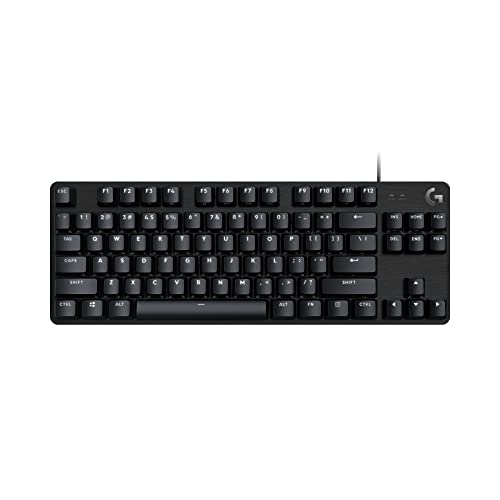
Logitech G413 TKL SE Mechanical Gaming Keyboard

Our verdict: A sturdy tenkeyless board that needs your own dampening.

The G413 TKL SE is a tenkeyless board with no numpad, standard-height mechanical switches, an aluminum alloy top plate and a wired USB connection. The compact layout saves desk space, and the metal plate gives a rigid frame.

It ranks last because nothing in the listing points to quiet switches, so noise is down to what you add yourself, such as o-rings or a desk mat. The compact footprint and solid build are the reasons to consider it.

Choose it for a small desk and a willingness to dampen it. Skip it if you want quiet out of the box. The caveats: no quiet switch is listed, it is wired only, and a rigid aluminum plate can sound more hollow without foam. It costs $50 to $100.

Layout
Tenkeyless, no numpad
Switches
Standard height mechanical
Top plate
Aluminum alloy
Connection
Wired USB

What we like

  • +Compact tenkeyless layout
  • +Aluminum alloy top plate
  • +Sturdy build
  • +Under $100

Watch out for

  • −No quiet switch listed
  • −Wired only

Buy it if: Small desks and DIY dampening.

Skip it if: You want quiet out of the box.

Methodology

How We Ranked These

Switch type

Low-profile and branded quiet switches ranked above standard tactile or linear ones.

Case dampening

Foam and solid frames reduce sound, so we credited them.

Swap options

Hot-swap sockets let you add silent switches later.

Connectivity

Wireless and multi-device options were weighed for office use.

Value

Price tier was set against how quiet each board is likely to be on paper.

Every Primea Score uses the same weights: Performance 30% · Build & Materials 20% · Everyday Usability 20% · Value 20% · Owner Satisfaction 10%. Full scoring rules

Buyer's guide

How to Pick the Right One for You

By Noise Priority

Match the board to how quiet you need to be.

PriorityOur pick
Quietest on paperSteelSeries Apex 3 RGB
Gentle low-profile feelLogitech MX Mechanical
Foam dampenedRedragon K668
Build toward silentKeychron V6 Max Wireless

By Budget

SpendOur pick
Under $50Redragon K668
$50 to $100SteelSeries Apex 3 RGB
$100 to $200Logitech MX Mechanical

Quiet Switches vs Hot-Swap Upgrade

Quiet from the start

A branded or low-profile switch that is gentle out of the box. The SteelSeries Apex 3 and Logitech MX Mechanical are examples.

Hot-swap upgrade

Buy a board with sockets and add silent switches later. The Keychron V6 boards and Redragon K668 allow it.

Most buyers should default to a board that is quiet from the start unless they enjoy tinkering.

By Connection

ConnectionOur pick
Wireless multi-deviceLogitech MX Mechanical
Wireless hot-swapKeychron V6 Max Wireless
Wired with volume knobKeychron V6 Knob Version
Wired compactLogitech G413 TKL SE

For Shared Offices Specifically

Look for

A low-profile or silent switch, wireless connection and a soft landing feel for video calls.

In this ranking

The Logitech MX Mechanical offers low-profile tactile switches and multi-device wireless.

When to Spend More

Spend more if

You work around others every day. The Logitech MX Mechanical is the gentlest board on this list.

Save if

You only need a little less noise. The Redragon K668 uses foam and hot-swap sockets for under $50.

Questions

Frequently Asked Questions

Are tactile switches quiet?+

Not by default. Tactile Browns are quieter than clicky switches but still louder than silent versions, so check the exact switch name and look for the word silent. A Brown from one maker can sound different from another.

What is the biggest mistake when buying a quiet keyboard?+

Trusting the word quiet. Look for a named silent switch, foam inside the case or a low-profile design, because those are the features that change sound. Marketing adjectives change nothing, and a board with foam and a silent switch beats one that only says quiet.

Is a hot-swap board worth it over a fixed one?+

If you may want silent switches later, yes. It lets you upgrade without soldering and rescue an unsatisfying board. Check that the switch pin style matches the sockets before buying. The Keychron V6 Max and Redragon K668 both support that.

How do I make a loud keyboard quieter?+

Add o-rings, use a desk mat and fit silent switches if the board is hot-swappable. Each step helps a little, and the desk mat helps with the thud. Start with the cheapest change, the mat, and listen.

Do low-profile keyboards need special keycaps?+

Yes. Low-profile boards use their own keycaps, so you cannot mix them with standard ones, and replacements must be bought for that board, so factor that into the price of a low-profile model. The MX Mechanical is the low-profile pick here.

Can I use these on Mac?+

The Keychron V6 Max lists Mac, Windows and Linux support. For other boards, check the listing's compatibility notes before ordering, since function keys and layers can differ by operating system. The V6 Max also offers QMK programming for remapping.

Final take

Buy the MX Mechanical for a quiet-leaning, no-tinker desk, or the Apex 3 if budget matters and you accept a wired board. The Keychron boards suit tinkerers who will swap in silent switches. The G413 TKL is a compact frame that you will need to dampen yourself.

More Ranked & Reviewed Guides