

Primea ReviewsAll Reviews

Primea Reviews is reader-supported. When you buy through our Amazon links we may earn a commission, at no extra cost to you. Rankings are set by our editors and never sold. Learn more

Ranked & Reviewed by Primea Reviews

The 8 Best Mechanical Keyboard Layouts Explained, Ranked & Reviewed (2026)

By the Primea Editorial TeamUpdated November 1, 202610 min read8 products ranked
The 8 Best Mechanical Keyboard Layouts Explained, Ranked & Reviewed (2026)

The short answer

The AULA F75 Pro is the best mechanical keyboard in this guide for most people: a 75% layout that keeps arrows and the function row, with three connection modes and hot-swap switches. The Logitech G413 TKL is the easy first step down from full-size, and the Keychron V6 Max suits numpad users who want wireless.

The Primea Scoreboard

Ranked & Reviewed

  1. A 75% board that keeps the keys you use and drops the ones you do not.

    94Outstanding
    Check price
  2. The least surprising way to leave the numpad behind.

    91Excellent
    Check price
  3. A full-size board you can finally put anywhere on the desk.

    89Excellent
    Check price
  4. Same full-size wireless body, with a smooth linear stroke.

    88Excellent
    Check price
  5. The tweakable full-size board without a wireless premium.

    86Excellent
    Check price
  6. Keychron's hot-swap experience with the knob left off.

    84Very Good
    Check price
  7. A budget full-size board with four extra hotkeys and swappable switches.

    82Very Good
    Check price
  8. The cheapest way to get a real numpad on a mechanical board.

    79Very Good
    Check price

The costly mistake in this category is buying a layout for the photograph. A compact board looks tidy until you reach for a numpad that is gone or a Home key that has moved behind a function layer, and then the keyboard ends up in a drawer. Layout is a decision about the keys you press daily, not about desk aesthetics.

We reviewed eight boards covering the three layouts people actually choose between: tenkeyless, 75% and full-size. Each pick was ranked on layout usefulness, switch and keycap quality, connection options and how easy it is to customize later, using spec sheets and owner experience. Layout comes first because every other feature is secondary if the key you need is missing.

Before you buy

What Actually Matters

01

Layout size

Layout means which keys the board includes: full-size has everything, TKL drops the numpad, 75% squeezes the cluster tighter still. It matters because each cut saves desk width but removes a key you may use daily. Check the product photo for arrow keys, a function row and where Delete and Page Up sit before you commit to a size, and count the keys you use in a normal day.

02

Numpad need

A numpad is the block of digits on the right side. People who enter figures or use shortcuts built on it lose speed without it. Be honest about how often you use it, since a knob or layer does not replace it. Look for a 104 or 108 key count in the listing, as on the Redragon and RisoPhy.

03

Switch type

Linear switches press smoothly, tactile ones have a bump, and clicky ones add sound. The choice changes noise and feel across a full day. Check whether sockets are hot-swappable, which lets you change switches later without soldering. The Keychron, AULA and Redragon boards are, and the Logitech and RisoPhy are not, which matters if you may want a quieter feel later.

04

Connection mode

Wired boards avoid battery worries, while wireless ones free the desk. Multi-mode boards pair with several devices. Look for 2.4GHz or Bluetooth in the listing, and note the cable type for wired boards. The AULA F75 Pro and Keychron V6 Max offer both, and the wired V6 and Logitech do not.

05

Firmware and keycaps

QMK/VIA firmware lets you remap keys in software, and PBT keycaps resist shine better than ABS. Both extend ownership. Search the specs for QMK, VIA and keycap material, and remember that remapping works best on wired or 2.4GHz connections. The Keychron V6 boards list QMK/VIA, the AULA lists PBT keycaps, and the RisoPhy uses ABS.

In-depth reviews

Our Ranked Picks, Reviewed

1

Best Overall

AULA F75 Pro Wireless Mechanical Keyboard, 75% Hot Swappable

Our verdict: A 75% board that keeps the keys you use and drops the ones you do not.

The AULA F75 Pro is a 75% board with a compressed right-side cluster, hot-swappable pre-lubed switches, 2.4GHz, USB-C and Bluetooth 5.0 connections, PBT side-printed keycaps and a rotary volume knob. A 75% layout keeps the arrows and F-row that a 60% board drops, so you save width without hunting for missing keys.

It ranks first because it hits the useful middle of the layout range at a modest price. The Logitech TKL is more familiar but wired and not hot-swappable.

Buy it as a small board that still has dedicated arrow and function keys. The caveats are no numpad and a tight right-side cluster. Skip it if you enter numbers or spreadsheet data for hours each day.

Layout
75%
Connection
2.4GHz, USB-C, Bluetooth 5.0
Switches
Hot-swappable, pre-lubed
Keycaps
PBT side-printed

What we like

  • +Compact with arrows and F-row
  • +Three connection modes
  • +Hot-swappable switches
  • +Rotary volume knob

Watch out for

  • −No numpad at all
  • −Tight right-side cluster

Buy it if: Hybrid workers who want a small board that still has dedicated arrow and function keys.

Skip it if: You enter numbers or spreadsheet data for hours each day.

2

Best First Step Down

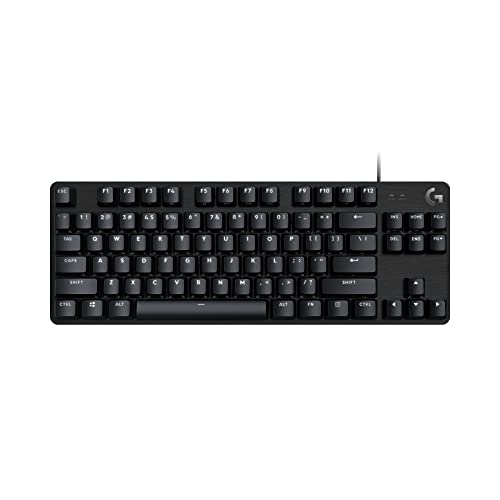
Logitech G413 TKL SE Mechanical Gaming Keyboard

Our verdict: The least surprising way to leave the numpad behind.

The Logitech G413 TKL SE uses an 80% tenkeyless layout with a full F-row and a dedicated arrow and navigation cluster, wired mechanical switches, an aluminum-alloy top case and G HUB support. Because nothing moves except the numpad, muscle memory carries over from a full-size board.

It ranks second since it is wired only and the switches are not hot-swappable. It requires the least relearning of any compact board.

Buy it if you are moving from a full-size board and want zero relearning. Skip it if you want a wireless board or plan to swap switches later. The metal top case adds rigidity for the price, and the full navigation cluster keeps Home and End where you expect them. Because it is a gaming board, expect bright lighting that you can tone down in software.

Layout
TKL (80%)
Connection
Wired
Top case
Aluminum alloy
Software
Logitech G HUB

What we like

  • +Familiar key positions
  • +Full nav cluster kept
  • +Metal top case
  • +Simple wired setup

Watch out for

  • −Wired only
  • −Not hot-swappable

Buy it if: People moving from a full-size board who want zero relearning.

Skip it if: You want a wireless board or plan to swap switches later.

3

Best Wireless Full-Size

Keychron V6 Max Wireless, Gateron Brown Switch

Our verdict: A full-size board you can finally put anywhere on the desk.

The Keychron V6 Max with Gateron Brown switches is a full-size wireless board with a numpad, tactile hot-swappable switches, 2.4GHz and Bluetooth 5.1, QMK/VIA firmware and RGB backlighting. A tactile bump confirms each press without the noise of a clicky switch.

It ranks third because the footprint is big and it sits in a higher price bucket. It is the full-size board you can put anywhere on the desk.

Buy it for numpad work with wireless and a tactile feel. Skip it if desk width is tight or you prefer smooth linear switches. QMK/VIA lets you remap the layout in software.

Layout
Full-size with numpad
Connection
2.4GHz, Bluetooth 5.1
Switch
Gateron Brown (tactile)
Firmware
QMK/VIA

What we like

  • +Wireless with a numpad
  • +Tactile, quiet-ish switches
  • +Fully remappable firmware
  • +Hot-swappable sockets

Watch out for

  • −Big desk footprint
  • −Higher price bucket

Buy it if: Numpad users who want wireless and a tactile typing feel.

Skip it if: Desk width is tight or you prefer smooth linear switches.

4

Best Linear Full-Size

Keychron V6 Max Wireless, Gateron Banana Switch

Our verdict: Same full-size wireless body, with a smooth linear stroke.

The Keychron V6 Max with Gateron Banana switches is the same wireless full-size body, with linear switches, hot-swap sockets, 2.4GHz and Bluetooth 5.1, and QMK/VIA remapping. A linear stroke is smooth with no bump, which many typists and gamers prefer.

It ranks fourth because linear switches give no tactile confirmation and the board takes a lot of desk. It differs from the Brown version only in feel.

Buy it if you prefer linear switches and need a numpad. Skip it if you want tactile feedback to confirm each keypress. Because the sockets are hot-swappable, you can change your mind later, and swapping to tactile switches costs little.

Layout
Full-size with numpad
Connection
2.4GHz, Bluetooth 5.1
Switch
Gateron Banana (linear)
Backlight
RGB

What we like

  • +Smooth linear keystroke
  • +Wireless full-size layout
  • +QMK/VIA remapping
  • +Hot-swappable switches

Watch out for

  • −No tactile bump
  • −Takes a lot of desk

Buy it if: Typists who prefer linear switches and need a numpad.

Skip it if: You want tactile feedback to confirm each keypress.

5

Best Wired Customizer

Keychron V6 Wired Custom Mechanical Keyboard, Knob Version

Our verdict: The tweakable full-size board without a wireless premium.

The Keychron V6 Wired Knob Version is a full-size board with a numpad, a rotary knob, QMK/VIA firmware, hot-swappable K Pro Brown switches and a wired USB-C connection that works on Mac and Windows. A knob handles volume without a function layer.

It ranks fifth because it is wired only and has the full-size footprint. It is cheaper than the wireless V6 Max.

Buy it for a numpad user who likes to remap keys and stay plugged in. Skip it if you want to move the keyboard around without a cable. A wired link suits a fixed desk well, and the knob frees a function key for other uses. Hot-swap sockets let you try linear switches later without soldering.

Layout
Full-size, rotary knob
Connection
Wired USB-C
Switch
K Pro Brown, hot-swap
OS
Mac and Windows

What we like

  • +Rotary knob for volume
  • +QMK/VIA customization
  • +Hot-swap sockets
  • +Works on Mac and Windows

Watch out for

  • −Wired only
  • −Full-size footprint

Buy it if: Numpad users who like to remap keys and stay plugged in.

Skip it if: You want to move the keyboard around without a cable.

6

Best No-Knob Keychron

Keychron V6 Wired, Frosted Black-Translucent

Our verdict: Keychron's hot-swap experience with the knob left off.

The Keychron V6 Wired in frosted black-translucent has no rotary knob, with a numpad, K Pro Brown hot-swap switches, QMK/VIA firmware and a wired USB-C link. It is the V6 board with the knob left off.

It ranks sixth because it lacks a volume knob and is wired only. The translucent case is its styling.

Buy it for the V6 board and no extras. Skip it if a volume knob or wireless matters. The knob version costs about the same, so check the price before choosing. Otherwise the board matches the knob version for firmware, switches and case quality, so the choice is largely about looks.

Layout
Full-size, no knob
Connection
Wired USB-C
Switch
K Pro Brown, hot-swap
Case
Frosted black-translucent

What we like

  • +Translucent case styling
  • +Remappable QMK/VIA
  • +Hot-swappable sockets
  • +Numpad included

Watch out for

  • −No volume knob
  • −Wired only

Buy it if: Buyers who want the V6 board and no extras.

Skip it if: A volume knob or wireless matters to you.

7

Best for Macro Keys

Redragon K668 RGB Gaming Keyboard, 108 Keys

Our verdict: A budget full-size board with four extra hotkeys and swappable switches.

The Redragon K668 is a 108-key full-size board with four extra hotkeys, a hot-swappable socket with red switches, two sets of PBT keycaps, a sound-absorbing foam case and a wired USB connection. Four macro keys help with shortcuts.

It ranks seventh because it is wired and large. It offers a numpad and swappable switches at a budget price.

Buy it if you want a numpad plus extra hotkeys on a budget. Skip it if you want wireless or advanced firmware remapping. The foam dampens the case, which improves the sound, and two keycap sets let you change the look. The red switch is linear, so expect a smooth, quiet-ish stroke.

Layout
108-key full-size
Switch
Red, hot-swap socket
Keycaps
Two PBT sets included
Connection
Wired USB

What we like

  • +Four extra macro keys
  • +Hot-swap sockets
  • +Foam-dampened case
  • +Two PBT keycap sets

Watch out for

  • −Wired only
  • −Large footprint

Buy it if: Budget shoppers who want a numpad plus extra hotkeys.

Skip it if: You want wireless or advanced firmware remapping.

8

Best Budget Numpad Board

RisoPhy Mechanical Gaming Keyboard, RGB 104 Keys

Our verdict: The cheapest way to get a real numpad on a mechanical board.

The RisoPhy is a 104-key full-size board with blue clicky switches, ABS keycaps, a spill-resistant build, anti-ghosting and RGB backlighting, wired by USB. It is the cheapest numpad board here.

It ranks last because clicky blue switches are loud, ABS keycaps wear shiny and it is not hot-swappable. It is a basic board.

Buy it for numpad use alone on a tight budget. Skip it if you share a room or take video calls. Loud switches are the main cost, and the board cannot swap them later. The spill-resistant build gives some reassurance at a desk with drinks.

Layout
104-key full-size
Switch
Blue (clicky)
Keycaps
ABS
Extras
Spill-resistant, anti-ghosting

What we like

  • +Lowest price bucket
  • +Full numpad
  • +Spill-resistant design
  • +RGB backlighting

Watch out for

  • −Loud clicky switches
  • −ABS keycaps wear shiny
  • −Not hot-swappable

Buy it if: Numpad users on a tight budget working alone.

Skip it if: You share a room or take video calls.

Methodology

How We Ranked These

Layout usefulness

We checked which keys each layout removes and whether the ones that remain cover typical work, from arrows to a numpad.

Desk footprint

Width matters on small desks, so compact layouts scored higher than full-size boards where function was equal.

Switch and keycap quality

We looked at switch type, hot-swap sockets and PBT versus ABS caps on each spec sheet.

Connectivity

Wireless and multi-device options were weighed against wired-only designs for a shared desk.

Customization

Remappable firmware and swappable switches extend a board's life, so they added to the score.

Every Primea Score uses the same weights: Performance 30% · Build & Materials 20% · Everyday Usability 20% · Value 20% · Owner Satisfaction 10%. Full scoring rules

Buyer's guide

How to Pick the Right One for You

By Layout Need

Pick the layout first, then the brand.

If you needOur pick
Small footprint, keep arrows and F-rowAULA F75 Pro
Zero relearning, no numpadLogitech G413 TKL SE
Numpad, wirelessKeychron V6 Max Brown
Numpad plus macro keysRedragon K668

By Budget

SpendOur pick
Under $50RisoPhy 104-key, Redragon K668
$50 to $100AULA F75 Pro, Logitech G413 TKL SE, Keychron V6 Knob
$100 to $200Keychron V6 Max Brown or Banana

Compact vs Full-Size

Compact

75% and TKL layouts save width and shorten the mouse reach. The AULA F75 Pro and Logitech G413 TKL SE lead here.

Full-size

Full-size keeps the numpad and extra keys, but takes more room. The Keychron V6 family, Redragon K668 and RisoPhy are the picks.

Most buyers should default to compact unless they truly use the numpad every day.

By Switch Feel

PreferenceOur pick
Smooth linearKeychron V6 Max Banana
Gentle tactile bumpKeychron V6 Max Brown, Keychron V6 Knob
Loud and clickyRisoPhy 104-key
Swap switches laterAULA F75 Pro, Redragon K668

For Shared Desks Specifically

Look for

A wireless or multi-device mode, quiet tactile or linear switches, and a narrow body.

In this ranking

The AULA F75 Pro pairs three connection modes with a compact body. Skip the RisoPhy because of its clicky blue switches.

When to Spend More

Spend more if

You want wireless full-size or long-term remapping. The Keychron V6 Max models and V6 Knob justify it through QMK/VIA firmware.

Save if

You type in one place and the numpad is the only requirement. The Redragon K668 or RisoPhy covers it.

Questions

Frequently Asked Questions

Is a 75% keyboard hard to get used to?+

Most people adapt within a few days, and typing speed returns quickly. The main change is that Delete, Page Up and Page Down sit in a single compressed column. If you want no adjustment at all, the Logitech G413 TKL SE keeps standard spacing.

What is the most common layout mistake?+

Buying a compact board and then missing the numpad or navigation keys. Count how often you use each key before you commit, because layers are slower than a real key, and a compact board never feels truly compact if you keep reaching for missing keys.

Is hot-swap worth paying for?+

It lets you change switches without soldering, so a bad first choice is not permanent. The AULA F75 Pro, Redragon K668 and Keychron V6 boards all offer it, while the Logitech and RisoPhy do not.

Do these work on Mac and Windows?+

The Keychron V6 Knob lists Mac and Windows compatibility directly. Others generally work as standard keyboards, but confirm the keycap legends and any software support on the listing.

How do I keep a mechanical keyboard clean?+

Pull the keycaps with a puller, brush out crumbs and wipe the plate. PBT caps resist shine, so they tend to look better longer than ABS, and dust is easier to clear from hot-swap boards.

Are blue switches a problem at the office?+

Yes for shared spaces and open offices. Blue switches click audibly on every press, which is why the RisoPhy suits a private room better than an open desk.

Final take

The AULA F75 Pro is the right mechanical keyboard for most people who want a smaller footprint, because a 75% layout keeps the keys you use. Pick the Logitech G413 TKL for zero relearning and the Keychron V6 Max for a wireless numpad. Choose the layout before the switch.

More Ranked & Reviewed Guides