
Primea ReviewsAll Reviews

Primea Reviews is reader-supported. When you buy through our Amazon links we may earn a commission, at no extra cost to you. Rankings are set by our editors and never sold. Learn more

Ranked & Reviewed by Primea Reviews

The 7 Best Mechanical Keyboards Under $50 for Typing and Gaming, Ranked & Reviewed

By the Primea Editorial TeamUpdated November 3, 202610 min read7 products ranked
The 7 Best Mechanical Keyboards Under $50 for Typing and Gaming, Ranked & Reviewed

The short answer

The Redragon K673 PRO is the best mechanical keyboard under $50 for most people, a wireless 81-key gasket-style board with a cushioned feel. The Redragon K617 is the wired 60% hot-swap pick, the AULA WIN68 HE brings Hall effect switches, and the Cherry KC 200 MX is the office choice with genuine MX2A switches.

The Primea Scoreboard

Ranked & Reviewed

  1. A wireless 81-key gasket-mount board with a knob, a cushioned feel and easy device switching.

    94Outstanding
    Check price
  2. A wired 60% board where switches can be swapped without soldering.

    92Outstanding
    Check price
  3. Magnetic Hall effect switches for fast triggering, with a customizable web driver.

    90Excellent
    Check price
  4. A 75% hot-swappable linear board with a multi-function knob and indicators.

    88Excellent
    Check price
  5. A renewed Cherry office board with MX2A brown switches and a metal plate frame.

    86Excellent
    Check price
  6. 06
    FANTECH Maxfit61 60% Mechanical Keyboard

    A 61-key mini board under $25 with pre-lubed stabilizers.

    84Very Good
    Check price
  7. A wired 68-key portable board at the lowest tier with mechanical-feel keys.

    82Very Good
    Check price

The first mistake at this price is buying a layout before a feel. A 60% board drops the function row, arrows and numpad, and plenty of people who like the look discover within a week that they miss the arrow keys. A 75% or 81-key board keeps them and costs about the same, so decide which keys you use before you chase RGB or a brand.

We ranked seven keyboards under $50 on layout, switch type, whether switches can be swapped, wireless support and build. We reviewed listings, which are often sparse and sometimes truncated, so we state only what each page says and leave out switch colors and battery sizes that are not given. A separate aluminum keyboard case in the source pool was left out, since it is a shell, not a keyboard.

Before you buy

What Actually Matters

01

Layout size

A 60% board drops arrows, function keys and the numpad, 75% keeps arrows and function keys, and 81 keys is similar. Pick by the keys you use daily. Check the key count on the listing.

02

Switch type

Linear switches press smoothly, tactile ones have a bump, and clicky ones add a sound. Hall effect switches use magnets for adjustable actuation. Look for the switch name rather than just the word mechanical.

03

Hot-swap sockets

Hot-swap sockets let you replace switches without soldering. That lets you change feel and repair a failed switch. Look for the words hot-swap or hot-swappable.

04

Stabilizers and build

Stabilizers keep long keys level, and poor ones rattle. A gasket mount or metal plate changes how the board sounds and feels. Pre-lubed stabilizers help out of the box.

05

Wired versus wireless

Wired boards never need charging and have the lowest latency. Wireless ones add freedom and device switching but need a battery. Check which connection the listing names.

In-depth reviews

Our Ranked Picks, Reviewed

1

Best Overall

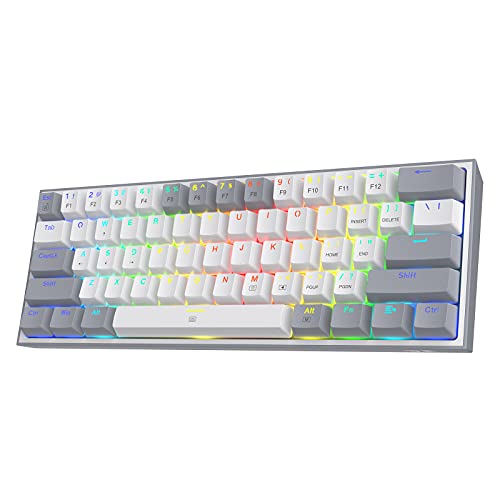
Redragon K673 PRO Wireless 81-Key RGB Gasket Gaming Keyboard

Our verdict: A wireless 81-key gasket-mount board with a knob, a cushioned feel and easy device switching.

The K673 PRO is a wireless 81-key RGB keyboard with a gasket design and a single knob. The listing describes switching between devices without re-pairing and a creamy, cushioned typing feel, and it sits at $25 to $50.

It wins because it combines the layout most people end up wanting with features that usually cost more. A gasket mount suspends the plate on soft pads, which softens bottoming out and takes the harsh edge off cheap switches. The knob handles volume, and device switching helps if you move between a laptop and a desktop. The 81-key size keeps arrows and a function row.

Buy it as a single keyboard for work and play. Wireless boards need charging, so keep a cable handy.

Layout
81 keys
Connection
Wireless
Mount
Gasket
Extras
Knob, RGB

What we like

  • +Gasket mount softens typing feel
  • +Wireless with easy device switching
  • +Keeps arrows and function row
  • +Volume knob included

Watch out for

  • −Needs periodic charging
  • −Switch type is not stated

Buy it if: Buyers who want one wireless keyboard for desk and laptop use.

Skip it if: You want a tiny 60% footprint.

2

Best Hot-Swap 60%

Redragon K617 Wired 60% Compact Hot-Swap RGB Gaming Mechanical Keyboard

Our verdict: A wired 60% board where switches can be swapped without soldering.

The K617 is a wired 60% compact keyboard with hot-swap sockets and RGB lighting. The listing says you can swap switches without soldering, with a $25 to $50 price.

The runner-up spot suits it because hot-swap sockets are the feature that makes a cheap board last. If a switch fails or you want a different feel, you pull it out and push another in, with no iron needed. A 60% frame gives you more mouse room on the desk. The cost is the missing arrows and function row, which are reached through a layer key.

Choose it if you want a small board you can customize. Skip it if you rely on dedicated arrow keys.

Layout
60% compact
Connection
Wired
Switches
Hot-swap
Lighting
RGB

What we like

  • +Swap switches without soldering
  • +Small footprint frees mouse room
  • +Wired, so no charging
  • +RGB lighting

Watch out for

  • −No dedicated arrow keys
  • −Wired only

Buy it if: Gamers who want a compact board they can customize.

Skip it if: You need arrows and a function row.

3

Best Hall Effect Board

AULA WIN68 HE Mechanical Gaming Keyboard 60%

Our verdict: Magnetic Hall effect switches for fast triggering, with a customizable web driver.

The WIN68 HE is a compact gaming keyboard with Hall effect magnetic switches, described as a fast trigger board, with a customizable web driver. It is priced at $25 to $50.

Third place fits because Hall effect switches register a press by sensing a magnet instead of a metal contact, which allows adjustable actuation points and very quick response. That suits competitive games. The web driver lets you tune settings from a browser without installing software. The listing calls it 60% while the model name suggests 68 keys, so check the layout before buying.

Buy it for fast-paced games where actuation tuning matters. For plain typing, a standard switch board is simpler.

Switches
Hall effect, magnetic
Type
Fast trigger gaming
Software
Web driver
Size
Compact

What we like

  • +Magnetic switches respond quickly
  • +Web-based customization
  • +Fast trigger design
  • +Rare Hall effect at this price

Watch out for

  • −Layout description is unclear
  • −Overkill for office typing

Buy it if: Competitive gamers who want adjustable fast triggering.

Skip it if: You mostly type documents.

4

Best 75% Layout

Newmen GM326 Mechanical Keyboard

Our verdict: A 75% hot-swappable linear board with a multi-function knob and indicators.

The Newmen GM326 is a 75% mechanical keyboard with rainbow lighting, hot-swappable linear switches, a multi-function knob and indicators. It costs $25 to $50.

It ranks fourth because 75% is the friendliest compact layout: it keeps the arrow keys and function row in a body smaller than full size. Linear switches have no tactile bump, which gamers like and some typists find mushy. Hot-swap sockets mean you can change them later. The listing is truncated, so confirm connection type and battery details on the page.

Choose it if you want arrows in a compact frame. Linear feel is the thing to be sure about.

Layout
75%
Switches
Hot-swappable linear
Control
Multi-function knob
Lighting
Rainbow

What we like

  • +75% keeps arrow keys
  • +Hot-swappable switches
  • +Multi-function knob
  • +Indicator lights

Watch out for

  • −Linear switches lack a bump
  • −Listing details are incomplete

Buy it if: Buyers who want a compact board with arrow keys.

Skip it if: You prefer tactile switches.

5

Best Office Board

Cherry KC 200 MX Mechanical Office Keyboard with New MX2A switches. Modern Design with Metal Plate Frame. (Bronze W/MX2A Brown Switch) (Renewed)

Our verdict: A renewed Cherry office board with MX2A brown switches and a metal plate frame.

The Cherry KC 200 MX uses MX2A switches in a brown tactile version, a metal plate frame and built-in white LED indicators. This listing is a renewed unit at $25 to $50.

Fifth place suits it because genuine Cherry switches are a known quantity and a tactile brown is a safe typing feel for an office. The metal plate adds stiffness. As a renewed product, it has been refurbished and resold, so condition and warranty depend on the seller. It has no RGB and no hot-swap, so it is plain on purpose.

Buy it for quiet-ish office typing with a trusted switch. Check the return terms because it is renewed.

Switches
Cherry MX2A brown
Frame
Metal plate
Indicators
White LED
Condition
Renewed

What we like

  • +Genuine Cherry MX2A switches
  • +Metal plate frame
  • +Tactile brown for typing
  • +Understated office design

Watch out for

  • −Renewed, not new
  • −No hot-swap or RGB

Buy it if: Office typists who want trusted Cherry switches.

Skip it if: You want a new unit with full warranty.

6

Best Pre-Lubed Stabilizers

FANTECH Maxfit61 60% Mechanical Keyboard

Our verdict: A 61-key mini board under $25 with pre-lubed stabilizers.

The Maxfit61 is a mini 60% mechanical keyboard with pre-lubed stabilizers. It costs under $25.

It ranks sixth because the stabilizers are the detail worth noting. Stabilizers hold the long keys such as space and shift, and rattly ones are the most common complaint at this price, so a pre-lubed set sounds better out of the box. The listing says little about switches or connection, so it is a budget gamble on those.

Buy it as an inexpensive 60% to try the layout. Do not expect premium switches.

Layout
60%, 61 keys
Stabilizers
Pre-lubed
Type
Mechanical
Price bracket
Under $25

What we like

  • +Pre-lubed stabilizers
  • +Very low price
  • +Compact 60% layout
  • +Frees desk space

Watch out for

  • −Switch details not listed
  • −No arrow keys

Buy it if: Buyers trying a 60% layout cheaply.

Skip it if: You want listed switch specs.

7

Best Ultra-Budget

Guiheng Wired Portable 60% Mechanical Gaming Keyboard

Our verdict: A wired 68-key portable board at the lowest tier with mechanical-feel keys.

The Guiheng is a wired, portable 60% style gaming keyboard with 68 keys, described as having a mechanical feel. It costs under $25.

It finishes last because the listing is vague about the switches, and mechanical feeling can mean anything from true switches to a close imitation. At 68 keys it likely keeps arrows, which is handy. Treat it as a travel or backup board.

Buy it only if the price is the priority. Confirm the switch type before ordering.

Keys
68
Connection
Wired
Style
Portable 60%
Price bracket
Under $25

What we like

  • +Lowest price tier
  • +Portable size
  • +Wired and simple
  • +68 keys

Watch out for

  • −Switch type is unclear
  • −Few verified details

Buy it if: Travel or backup use on a tiny budget.

Skip it if: You want confirmed mechanical switches.

Methodology

How We Ranked These

Layout and usability

We weighed 60%, 75% and 81-key layouts by how many everyday keys they keep.

Switch type

We compared hot-swap, Hall effect and Cherry switches, and noted where a listing does not say.

Build and typing feel

We looked at gasket mounts, metal plates and pre-lubed stabilizers, which shape sound and feel.

Connectivity

We separated wired from wireless boards and device-switching features.

Value and listing clarity

We rewarded clear specs and marked down vague or truncated listings.

Every Primea Score uses the same weights: Performance 30% · Build & Materials 20% · Everyday Usability 20% · Value 20% · Owner Satisfaction 10%. Full scoring rules

Buyer's guide

How to Pick the Right One for You

By Layout

Choose the layout first, because it is the hardest thing to change later.

Layout you wantOur pick
81 keys with arrows, wirelessRedragon K673 PRO Wireless 81-Key
60% compact, hot-swapRedragon K617 Wired 60% Hot-Swap
75% with arrowsNewmen GM326 Mechanical Keyboard
Mini 60%, cheapestFANTECH Maxfit61 60% Mechanical Keyboard

By Budget

SpendOur pick
Under $25FANTECH Maxfit61 60% Mechanical Keyboard
$25 to $50, wirelessRedragon K673 PRO Wireless 81-Key
$25 to $50, gamingAULA WIN68 HE Mechanical Gaming Keyboard
$25 to $50, officeCherry KC 200 MX Mechanical Office Keyboard

Hot-Swap vs Fixed Switches

Hot-swap

Switches pull out and push in, so you can change feel or fix a failure. Picks: Redragon K617 and Newmen GM326.

Fixed switches

Soldered in, so what you buy is what you keep. Common on simple office boards. Picks: Cherry KC 200 MX and most budget boards.

Choose hot-swap if you are unsure which switch you like.

By Main Use

UseOur pick
Office typingCherry KC 200 MX Mechanical Office Keyboard
Competitive gamingAULA WIN68 HE Mechanical Gaming Keyboard
Mixed work and playRedragon K673 PRO Wireless 81-Key
Travel and backupGuiheng Wired Portable 60% Keyboard

For Typing Comfort Specifically

Look for

Tactile switches, a gasket or metal plate for a firmer feel, and a layout with arrows so you rarely need layers.

In this ranking

The Redragon K673 PRO has the cushioned gasket feel, and the Cherry KC 200 MX offers tactile brown switches.

When to Spend More

Spend more if

You want wireless and a better feel. The Redragon K673 PRO sits at the top of the $25 to $50 band.

Save if

You want to try a 60% layout. The FANTECH is under $25.

Questions

Frequently Asked Questions

Can I use these with a Mac?+

Most work, though modifier keys may need remapping. Check whether the keyboard has a Mac mode or software. Wired boards usually work immediately.

What is the most common mistake at this price?+

Choosing a 60% layout without checking whether you need arrow keys. Count the keys you use before buying.

Is a mechanical keyboard worth it over a membrane one?+

For heavy typing and gaming, yes, since the feel is more consistent and switches last longer. For light use, a membrane board is fine and quieter.

How do I swap switches?+

Use a switch puller to lift the old switch straight out, then press a new one in, aligning the pins. Do not bend the pins. Only do this on hot-swap boards.

How do I clean it?+

Unplug it, pull off the keycaps, brush or blow out dust and wipe the plate with a slightly damp cloth. Let it dry before replacing keycaps.

Are renewed keyboards safe to buy?+

They can be, if the seller offers returns or a warranty. Check the condition grade and policy. The Cherry listing here is renewed.

Final take

The Redragon K673 PRO is the best mechanical keyboard under $50 for most people, with wireless freedom and a gasket feel. The K617 is the hot-swap 60% choice, the AULA WIN68 HE suits fast gaming, and the Cherry KC 200 MX is the office option with trusted switches.

More Ranked & Reviewed Guides