

Primea ReviewsAll Reviews

Primea Reviews is reader-supported. When you buy through our Amazon links we may earn a commission, at no extra cost to you. Rankings are set by our editors and never sold. Learn more

Ranked & Reviewed by Primea Reviews

The 6 Best Printers with Cheap Ink of 2026, Ranked & Reviewed

By the Primea Editorial TeamUpdated November 1, 202610 min read6 products ranked
The 6 Best Printers with Cheap Ink of 2026, Ranked & Reviewed

The short answer

The HP Smart Tank 5101 is the best printer for cheap ink, with two years of ink included and a compact body. Epson's EcoTank ET-2800 is the easy entry choice, the ET-4800 adds a feeder and fax for offices, and the ET-4950 is rated for up to three years of refills. Canon's PIXMA G620 suits photos, and the ET-2400 is the plainest.

The Primea Scoreboard

Ranked & Reviewed

  1. Two years of ink included in the box keeps early costs close to zero.

    94Outstanding
    Check price
  2. A compact EcoTank with setup bottles in the box and a low entry price.

    91Excellent
    Check price
  3. A feeder, fax and Ethernet in the same $100 to $200 tier.

    88Excellent
    Check price
  4. Refills rated up to three years, with a touchscreen and feeder.

    85Excellent
    Check price
  5. A Canon MegaTank that keeps photo printing cheap.

    82Very Good
    Check price
  6. A plain compact EcoTank for everyday pages.

    79Very Good
    Check price

Printer makers sell the hardware near cost and earn their margin on cartridges, which is why a bargain inkjet can cost more to feed than to buy. Anyone who prints weekly eventually does the math and discovers that a small cartridge holds a few dollars of ink sold at a premium. Tank printers flip that model: a higher entry price, then bottles that cost far less per page.

That shift is the premise of this ranking. We looked at eight tank printers and ranked six against the Primea framework, drawing on manuals, listings and owner feedback. The decision factors were how much ink ships in the box, whether the machine has a feeder, how connectivity works and which price tier the extras justify. Duplicate color variants were merged.

Before you buy

What Actually Matters

01

Tank vs cartridge

A tank printer fills from bottles rather than small cartridges, and bottle ink costs far less per page. The machine itself costs more up front, so it pays back for regular printers. In the product title, look for EcoTank, MegaTank or Smart Tank, and confirm the listing says cartridge-free or refillable rather than just high yield.

02

Ink included

Some listings ship a large starter supply. The HP Smart Tank 5101 bundles two years of ink, which can postpone your first refill purchase. That changes the first-year cost far more than a few dollars of price difference. Read the title and bullets for included ink wording, and distinguish a long supply from a few setup bottles.

03

How much you print

Savings grow with volume. A printer used a few times a year may never repay a higher price, while a weekly printer will. Estimate your monthly pages, then compare how many bottles you would use in a year. If you print rarely, the cheaper ET-2800 or ET-2400 tier is easier to justify than the ET-4950, which is built for steady volume.

04

Document feeder

A document feeder lets the scanner pull pages in one at a time automatically. Without one, you lift the lid and place each sheet by hand, which is tedious and slow past a few pages. The ET-4800 and ET-4950 list a feeder. Check the bullets or the product photos for the feeder tray on top.

05

Wi-Fi limits

Some printers connect only on the 2.4GHz Wi-Fi band, which can matter on routers that merge or prioritize 5GHz. The HP 5101 lists this limit. Check the connectivity line before buying, and confirm whether Ethernet is offered if your office needs a wired link, as on the Epson ET-4800.

In-depth reviews

Our Ranked Picks, Reviewed

1

Best Ink Value

HP Smart Tank 5101 Wireless All-in-One Refillable Printer

Our verdict: Two years of ink included in the box keeps early costs close to zero.

The HP Smart Tank 5101 gets the top spot by solving the cost problem on day one. It is a refillable tank printer that prints, scans and copies, and its listing bundles two years of ink, so a household printing weekly may not buy a refill bottle for a long stretch. It has a compact footprint compared with larger tank models and sits in the $100 to $200 tier.

It outranks the Epson ET-2800 because the ink supply is the largest saving in this group. The Epson ships setup bottles, a start rather than a long reserve.

Buy it for a family that prints every week and hates ink shopping. Two caveats come from the spec sheet: there is no automatic document feeder, so multipage scanning is manual, and Wi-Fi works on the 2.4GHz band only, which matters if your router splits bands.

Ink
2 years included
System
Refillable tank
Wi-Fi
2.4GHz only
Feeder
None

What we like

  • +Two years of ink included
  • +Compact for a tank model
  • +Prints, scans, copies
  • +Refillable tank system

Watch out for

  • −No document feeder
  • −Wi-Fi limited to 2.4GHz

Buy it if: Households that print every week and hate buying ink.

Skip it if: You scan multi-page documents.

2

Best Entry Tank

Epson EcoTank ET-2800 Wireless Cartridge-Free Supertank Printer (Black)

Our verdict: A compact EcoTank with setup bottles in the box and a low entry price.

Epson's EcoTank ET-2800 is the cleanest entry point into tank printing. It prints, scans and copies wirelessly in a compact body, uses a cartridge-free refillable system and ships with ink bottles for setup. It also lands in the $100 to $200 tier, the same as the HP above it.

It ranks second because the HP lists two years of included ink while the Epson lists only setup bottles, so the HP wins the early-cost argument. The Epson counters with a simple, well-understood design and no band restriction mentioned for its wireless.

It fits students and light home users who want cheap pages without complexity. The caveat is hardware: no feeder is listed and no Ethernet port, so anyone who needs wired connection or document handling should step up to the ET-4800.

Ink
Setup bottles included
Functions
Print, scan, copy
Network
Wireless
Price tier
$100 to $200

What we like

  • +Setup ink bottles included
  • +Compact all-in-one
  • +Wireless printing
  • +Entry price tier

Watch out for

  • −No feeder listed
  • −Basic feature set

Buy it if: Students and light home users.

Skip it if: You need Ethernet or a feeder.

3

Best Value Office

Epson EcoTank ET-4800 Wireless Cartridge-Free Supertank Printer

Our verdict: A feeder, fax and Ethernet in the same $100 to $200 tier.

The ET-4800 is the Epson to buy for a small office. It keeps the cartridge-free EcoTank system but adds an automatic document feeder, fax, Ethernet alongside wireless, and a scanner and copier, all in the $100 to $200 tier. Ethernet matters in offices where a wired link is more dependable than Wi-Fi.

It ranks third because it needs more floor space than the entry models, and it takes more bottles to fill. It still beats the ET-2800 for work use, because scanning a ten-page contract through a feeder takes minutes rather than a page-by-page chore.

Pick it for a home office that scans and copies often. The caveat is the fax function, which most homes never touch, so you pay in size for a feature you may ignore. Light printers should stay with the ET-2800.

Feeder
Automatic
Network
Wireless and Ethernet
Fax
Included
Price tier
$100 to $200

What we like

  • +Document feeder included
  • +Ethernet and wireless
  • +Fax built in
  • +Strong features for the tier

Watch out for

  • −Larger than entry models
  • −Fax unused by most

Buy it if: Home offices that scan and copy a lot.

Skip it if: You only print a few pages.

4

Best for Heavy Use

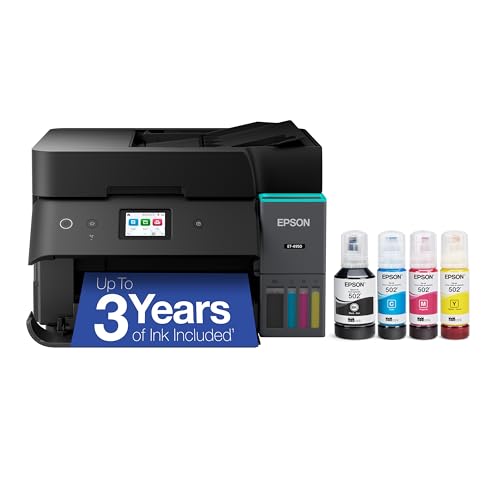
Epson EcoTank ET-4950 Wireless Cartridge-Free Supertank Printer

Our verdict: Refills rated up to three years, with a touchscreen and feeder.

The ET-4950 is the Epson aimed at daily printing. It keeps the automatic document feeder and adds a 2.4-inch color touchscreen, 18 ppm print speed and a refill supply rated for up to three years. The rating assumes typical use, so heavy printers will finish the bottles sooner.

It ranks fourth because the upfront cost rises to the $200 to $500 tier while the feature set is close to the ET-4800's. The touchscreen and long ink rating are what you pay for, and the savings only show up if you print consistently.

Buy it for an office printing daily, where menu-driven control and a big ink reserve cut interruptions. Skip it if you print rarely, since the ET-4800 offers a feeder for less and the ET-2800 does the basics for far less.

Ink rating
Up to 3 years
Screen
2.4-inch touchscreen
Speed
18 ppm
Feeder
Automatic

What we like

  • +Long ink supply rating
  • +Touchscreen
  • +Document feeder
  • +18 ppm speed

Watch out for

  • −Higher upfront cost
  • −Rating assumes typical use

Buy it if: Offices printing daily.

Skip it if: You print rarely.

5

Best for Photos

Canon PIXMA G620 Wireless MegaTank Photo All-in-One Printer

Our verdict: A Canon MegaTank that keeps photo printing cheap.

Canon's PIXMA G620 is the photo specialist. It uses a refillable MegaTank system, prints, copies and scans, connects wirelessly and works with Alexa voice support. The output is aimed at photos, which is where a tank system matters most: color prints burn ink far faster than text pages, so cheap bottles pay back sooner.

It ranks fifth because it costs more, in the $200 to $500 tier, and no feeder appears in its listing. Document-heavy homes do better with the ET-4800 or ET-4950, which add office tools at similar prices.

Choose it if you print family photos or craft projects regularly. The caveat is that you pay for photo focus even if most pages are documents, and without a feeder multipage scanning stays manual.

System
MegaTank refillable
Output
Photo-focused colour
Voice
Alexa
Price tier
$200 to $500

What we like

  • +Photo-focused output
  • +Refillable MegaTank
  • +Alexa support
  • +Wireless

Watch out for

  • −Costs more
  • −No feeder listed

Buy it if: Photo printers at home.

Skip it if: You print mostly documents.

6

Simplest Pick

Epson EcoTank ET-2400 Wireless Cartridge-Free Supertank Printer

Our verdict: A plain compact EcoTank for everyday pages.

The ET-2400 is the plainest Epson here. It is a small cartridge-free EcoTank for everyday home pages, with color printing, scanning, copying and wireless, in the $100 to $200 tier. Compact size makes it easy to place on a shelf or desk.

It ranks last because it sits so close to the ET-2800, which lists setup bottles in the box and has a clearer listing. When two machines cost the same and one documents more of what ships, the better-documented one wins the rank. The HP 5101 above also beats it on included ink.

Pick it if simple home printing is the entire goal and it happens to be the one in stock. The caveat is that no feeder is listed, and the thin listing leaves questions about what comes in the box that you should check before ordering.

System
EcoTank refillable
Functions
Print, scan, copy
Network
Wireless
Price tier
$100 to $200

What we like

  • +Compact design
  • +Cartridge-free tank
  • +Wireless
  • +Entry price tier

Watch out for

  • −Thin listing
  • −No feeder listed

Buy it if: Simple everyday printing.

Skip it if: You need document handling.

Methodology

How We Ranked These

Ink cost

We weighed included ink and the refillable tank system as the main cost driver.

Upfront price

Price tier decided whether the savings pay off for typical buyers.

Office tools

Feeders, fax and Ethernet were credited for offices.

Print volume fit

Ink ratings and speed show who each printer suits.

Footprint

Compact designs scored better for small spaces.

Every Primea Score uses the same weights: Performance 30% · Build & Materials 20% · Everyday Usability 20% · Value 20% · Owner Satisfaction 10%. Full scoring rules

Buyer's guide

How to Pick the Right One for You

By Printing Volume

More pages means more savings.

VolumeOur pick
Rare printingEpson EcoTank ET-2400
Weekly printingHP Smart Tank 5101
Daily printingEpson EcoTank ET-4950
Photo printingCanon PIXMA G620

By Budget

SpendOur pick
$100 to $200, ink includedHP Smart Tank 5101
$100 to $200, simpleEpson EcoTank ET-2800
$100 to $200, office toolsEpson EcoTank ET-4800
$200 to $500Epson EcoTank ET-4950

Bundled Ink vs Bigger Tank

Bundled ink

Saves money at the start. The HP Smart Tank 5101 lists two years included.

Larger system

Better for heavy use and features. The Epson EcoTank ET-4800 and ET-4950 offer this.

Most buyers should default to the HP Smart Tank 5101.

By Office Needs

NeedOur pick
Feeder and faxEpson EcoTank ET-4800
TouchscreenEpson EcoTank ET-4950
Compact footprintHP Smart Tank 5101
Cheapest to startEpson EcoTank ET-2400

For Students Specifically

Look for

A compact wireless printer in the entry price tier.

In this ranking

The Epson EcoTank ET-2800 is compact and includes setup bottles.

When to Spend More

Spend more if

You print every day and want the Epson EcoTank ET-4950's long ink rating.

Save if

You print weekly, where the HP Smart Tank 5101 is enough.

Questions

Frequently Asked Questions

Are tank printers really cheaper to run?+

Usually, for regular printers. Bottles hold far more ink per dollar than cartridges, so the HP Smart Tank 5101 or any EcoTank repays its higher purchase price after enough pages. Occasional printers may never recover the difference.

What is the common mistake?+

Buying the cheapest cartridge printer and ignoring what a year of replacement ink costs. A tank model like the HP Smart Tank 5101 or Epson ET-2800 costs more on day one but usually costs less over a year.

Is the ET-4950 worth it over the ET-4800?+

For daily printing, yes: the ET-4950 adds a touchscreen and refills rated for up to three years. If you print moderately, the ET-4800 keeps the feeder and Ethernet for less.

How do I set up a tank printer?+

Fill each tank from its matching bottle, following the color guide on the printer, then run the on-screen alignment carefully. The HP 5101 and Epson EcoTank models include setup ink, so you can start printing right after.

How do I avoid clogs?+

Print something regularly. Long idle periods can dry ink in the nozzles, so run a test page every few weeks on any of these Epson or HP models. Keep bottles upright and the printer powered through its normal cleaning cycles.

Does the HP work on 5GHz Wi-Fi?+

No, not directly. The listing says 2.4GHz only, so connect it to the 2.4GHz band or a dual-band router. The Epson ET-4800 also offers Ethernet if a wired link is simpler.

Final take

For most households, the HP Smart Tank 5101 is the right buy, because bundled ink removes the biggest early cost. Move to the ET-4800 when you scan stacks of pages, the ET-4950 for daily office volume and the Canon G620 for photos. Pick the ET-2800 or ET-2400 only if budget and simplicity outweigh a feeder.

More Ranked & Reviewed Guides