
Primea ReviewsAll Reviews

Primea Reviews is reader-supported. When you buy through our Amazon links we may earn a commission, at no extra cost to you. Rankings are set by our editors and never sold. Learn more

Ranked & Reviewed by Primea Reviews

The 6 Best Printers for Documents of 2026, Ranked & Reviewed

By the Primea Editorial TeamUpdated November 1, 202610 min read6 products ranked
The 6 Best Printers for Documents of 2026, Ranked & Reviewed

The short answer

The Brother DCP-L2640DW is the best printer for documents: monochrome laser, automatic duplex and toner that fuses to the page. Choose the Canon MF753Cdw II if you need color at 35 ppm with a feeder. The Brother HL-L3220CDW is the cheaper color laser, while the HP OfficeJet Pro 8125e is the low-cost inkjet. The PIXMA TR4720 is only for fax.

The Primea Scoreboard

Ranked & Reviewed

  1. A compact monochrome laser built for sharp, durable text.

    94Outstanding
    Check price
  2. A 35 ppm color laser with an auto document feeder and a 3-year warranty.

    91Excellent
    Check price
  3. A 19 ppm color laser with a 250-sheet tray and duplex.

    88Excellent
    Check price
  4. An inkjet with high-capacity INKvestment cartridges and automatic 2-sided copy and scan.

    85Excellent
    Check price
  5. A $50-100 inkjet with an auto document feeder and duplex.

    82Very Good
    Check price
  6. A basic wireless all-in-one with a document feeder and built-in fax.

    79Very Good
    Check price

Printer marketing is built around color gamuts and borderless photos, yet the typical home office prints contracts, tax forms and school reports in black. That mismatch is why so many buyers end up with an inkjet that clogs after a quiet month and a cartridge bill that dwarfs the hardware price.

For paper documents the engine type and duplex capability decide almost everything. We reviewed six printers, laser and inkjet, and scored them on the Primea framework using listed engine, duplex, document feeder, speed and the way each handles ink or toner. Text sharpness and long-run cost counted most. Inkjets that only suit light use are flagged as such rather than hidden, because a cheap printer that sits unused for weeks usually costs more than it saves.

Before you buy

What Actually Matters

01

Laser or inkjet

Laser printers fuse toner into the paper with heat, giving sharp text that resists smearing, while inkjets spray liquid ink that costs less upfront and more per page. For mostly text, the engine matters more than any feature. Check that the title or spec table says laser, as the Brother DCP-L2640DW and Canon MF753Cdw II do.

02

Duplex printing

Duplex means automatic two-sided printing. It halves paper use and lets you print booklets and long reports without flipping pages. Without it, every double-sided job needs manual reloading. Look for "duplex" or "2-sided" in the specs. The PIXMA TR4720 is the pick here with no listed duplex, which is a real daily irritation.

03

Document feeder

An auto document feeder pulls sheets through the scanner one at a time, so a ten page contract scans without lifting the lid ten times. If you copy or scan multi-page files, it is essential. The Canon MF753Cdw II, HP OfficeJet Pro 8125e and PIXMA TR4720 list one. Confirm it in the specs, not the photos.

04

Print speed

Pages per minute tells you how long a long document takes to finish. The picks range from 19 ppm on the Brother HL-L3220CDW to 35 ppm on the Canon MF753Cdw II, where listed. Speed matters more for offices than households, since one slow printer queues everyone behind a long job. Look for the ppm figure in the title or spec table.

05

Ink or toner cost

Consumables are the real cost. High-capacity cartridges like Brother's INKvestment mean fewer replacements, and laser toner lasts far longer than inkjet ink between purchases. Subscriptions such as HP's Instant Ink change the math too. Check how the listing describes cartridge capacity, and read the terms of any ink plan before enrolling, because a subscription can lock you into one cartridge supplier.

In-depth reviews

Our Ranked Picks, Reviewed

1

Best Overall

Brother DCP-L2640DW Wireless Compact Monochrome Laser Printer

Our verdict: A compact monochrome laser built for sharp, durable text.

The DCP-L2640DW is a compact monochrome laser with duplex printing and wireless and mobile support. The mechanism is the point: laser toner is melted into the paper fibers, so letters stay crisp and do not feather the way inkjet ink can on cheap stock, and the output is listed as archivally stable.

It ranks first because it does the job most people buy a printer for and nothing else. The Canon MF753Cdw II prints faster and in color, but costs the same $200 to $500 tier and takes more desk space. If your pages are text, color capability is money spent on toner you will not use.

Buy it for contracts, reports and forms that must stay legible for years. The caveat is plain: black and white only, so charts and color graphics print in grayscale.

Engine
Monochrome laser
Duplex
Yes
Connectivity
Wireless and mobile
Output
Toner fused, archival

What we like

  • +Sharp, non-feathering text
  • +Automatic duplex printing
  • +Wireless and mobile printing
  • +Archivally stable output

Watch out for

  • −Black and white only
  • −Higher upfront cost

Buy it if: Text-heavy documents that need to stay sharp and legible for years.

Skip it if: You print color graphics.

2

Best Color Laser

Canon Color imageCLASS MF753Cdw II Wireless Duplex Laser Printer

Our verdict: A 35 ppm color laser with an auto document feeder and a 3-year warranty.

Canon's MF753Cdw II is the one here built for volume. It lists a 35 ppm color laser engine, duplex printing, an auto document feeder and a 3-year limited warranty, in the $200 to $500 tier.

That speed is nearly double the 19 ppm of the Brother HL-L3220CDW, and the feeder lets you copy or scan a stack of pages without standing at the glass. It sits second rather than first because most households never print enough to use the speed, and it is larger and costlier to feed than the monochrome Brother.

Buy it for a small office or busy family printing color handouts and text at real volume. Skip it if you print a few pages a week: you would pay for capacity that sits idle while four toner cartridges age.

Engine
Color laser
Speed
35 ppm
Feeder
Auto document feeder
Warranty
3-year limited

What we like

  • +35 ppm print speed
  • +Auto document feeder
  • +Duplex printing
  • +3-year limited warranty

Watch out for

  • −Larger and costlier
  • −More than light users need

Buy it if: A household or small office needing sharp text plus color documents at real volume.

Skip it if: You print only a few pages a week.

3

Best Mid-Range Color Laser

Brother HL-L3220CDW Wireless Color Laser Printer

Our verdict: A 19 ppm color laser with a 250-sheet tray and duplex.

The HL-L3220CDW delivers color laser output at 19 ppm with a 250-sheet tray, duplex printing and mobile compatibility, also in the $200 to $500 tier. The tray capacity is the underrated spec: 250 sheets means reloading a few times a month rather than weekly.

It lands third because the Canon beats it on speed at 35 ppm and on the document feeder, which the Brother does not list. Against the DCP-L2640DW it adds color but gives up the lean text-only design. It occupies the middle: laser quality without the highest-end hardware.

Buy it for regular document output with occasional color. The caveat is that it is a printer only, so scanning or copying needs a separate device, which matters if you handle paperwork that arrives on paper.

Engine
Color laser
Speed
19 ppm
Tray
250 sheets
Duplex
Yes

What we like

  • +Color laser output
  • +250-sheet paper tray
  • +Duplex printing
  • +Mobile device compatible

Watch out for

  • −Slower than the Canon
  • −No document feeder listed

Buy it if: Regular document output that wants laser quality without the highest-end price.

Skip it if: You need scanning or a feeder.

4

Best High-Capacity Inkjet

Brother INKvestment MCF-J5010DW Wireless Color Inkjet All-in-One

Our verdict: An inkjet with high-capacity INKvestment cartridges and automatic 2-sided copy and scan.

The MCF-J5010DW is an inkjet built around INKvestment high-capacity cartridges, which cut how often you swap ink. It adds automatic 2-sided copy and scan, a 2.7-inch color touchscreen and wireless color printing, in the $200 to $500 tier.

It ranks fourth because it costs as much as the lasers above while its text is less durable: inkjet ink sits on the surface more than toner does. Its argument is flexibility. It handles photos and mixed pages that a monochrome laser cannot, and two-sided scanning is rare among picks here.

Buy it for a higher-volume home office that wants copy and scan tools plus color. Skip it if lowest cost per text page is the goal, since the Brother DCP-L2640DW wins that fight on a pure text workload.

Type
Color inkjet all-in-one
Ink
INKvestment high capacity
Scan and copy
Automatic 2-sided
Screen
2.7-inch touchscreen

What we like

  • +High-capacity cartridges
  • +Automatic 2-sided copy and scan
  • +2.7-inch color touchscreen
  • +Fewer cartridge swaps

Watch out for

  • −Costs as much as lasers
  • −Inkjet text less durable

Buy it if: Higher-volume document printing that still wants inkjet color flexibility.

Skip it if: You want lowest cost per text page.

5

Best Budget All-in-One

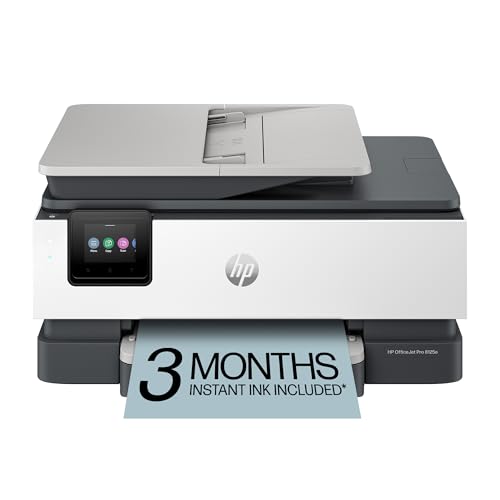
HP OfficeJet Pro 8125e Wireless All-in-One Color Inkjet Printer

Our verdict: A $50-100 inkjet with an auto document feeder and duplex.

The OfficeJet Pro 8125e shows how far inkjets have come on features: an auto document feeder, duplex printing, AI-enabled setup and a 3-month Instant Ink trial, for the $50 to $100 tier. A feeder at that price is unusual.

It ranks fifth because the cheap hardware is the start of the spending, not the end. Ink costs accumulate, and the Instant Ink trial only softens them for three months, so check the subscription terms before enrolling. The MCF-J5010DW above it spends more on the printer in exchange for fewer cartridge swaps.

Buy it for mixed text and color at modest volume, particularly if you want to scan multi-page documents cheaply. Skip it if you print large amounts of plain text, where a laser runs cheaper over a year.

Type
Color inkjet all-in-one
Feeder
Auto document feeder
Duplex
Yes
Trial
3-month Instant Ink

What we like

  • +Auto document feeder
  • +Duplex printing
  • +Low upfront cost
  • +AI-enabled setup

Watch out for

  • −Ongoing ink cost
  • −Trial lasts 3 months

Buy it if: Mixed text and color document printing without a laser's upfront cost.

Skip it if: You print heavy volumes of text.

6

Best Basic Fax Pick

Canon PIXMA TR4720 All-in-One Wireless Printer

Our verdict: A basic wireless all-in-one with a document feeder and built-in fax.

The PIXMA TR4720 exists for one reason: it is the only pick here with built-in fax. It also has an auto document feeder, mobile printing support and wireless all-in-one functions, in the $50 to $100 tier, on standard cartridges.

It ranks last because it lists no duplex mode, which every other printer in this guide offers, and standard cartridges deplete faster than the high-capacity INKvestment type on the Brother MCF-J5010DW. The feeder and fax make it useful for paperwork that still arrives by phone line, but it is a light-duty machine.

Buy it for occasional scanning, copying and fax on a tight budget. Heavy printers will outgrow it quickly, and without duplex every double-sided job means flipping pages by hand.

Type
Wireless all-in-one inkjet
Feeder
Auto document feeder
Fax
Built-in
Ink
Standard cartridge

What we like

  • +Built-in fax
  • +Auto document feeder
  • +Mobile printing support
  • +Wireless all-in-one

Watch out for

  • −No duplex listed
  • −Standard cartridges deplete faster

Buy it if: Budget document scanning and printing with occasional multi-page needs.

Skip it if: You want duplex printing.

Methodology

How We Ranked These

Print engine

We compared monochrome laser, color laser and inkjet for document work.

Duplex and feeder

We weighed automatic two-sided printing and document feeders.

Ink or toner design

We looked at how each handles consumables.

Speed and capacity

We noted listed print speed and tray size.

Value

We compared each against its price bracket.

Every Primea Score uses the same weights: Performance 30% · Build & Materials 20% · Everyday Usability 20% · Value 20% · Owner Satisfaction 10%. Full scoring rules

Buyer's guide

How to Pick the Right One for You

By Document Type

What you print decides the engine.

You printOur pick
Mostly black textBrother DCP-L2640DW Wireless Compact Monochrome Laser Printer
Text plus color at volumeCanon Color imageCLASS MF753Cdw II Wireless Duplex Laser Printer
Occasional color with laser qualityBrother HL-L3220CDW Wireless Color Laser Printer
Mixed light documentsHP OfficeJet Pro 8125e Wireless All-in-One Color Inkjet Printer

By Budget

SpendOur pick
$50-100, with feederHP OfficeJet Pro 8125e Wireless All-in-One Color Inkjet Printer
$50-100, with faxCanon PIXMA TR4720 All-in-One Wireless Printer
$200-500, textBrother DCP-L2640DW Wireless Compact Monochrome Laser Printer
$200-500, colorCanon Color imageCLASS MF753Cdw II Wireless Duplex Laser Printer

Laser vs Inkjet

Laser

Sharper text and toner that does not feather. Picks: Brother DCP-L2640DW, Canon MF753Cdw II and Brother HL-L3220CDW.

Inkjet

Cheaper upfront with flexible color. Picks: Brother INKvestment, HP OfficeJet Pro 8125e and Canon PIXMA TR4720.

Most document buyers should default to laser, the Brother DCP-L2640DW, unless they need color often.

By Scanning Need

NeedOur pick
Two-sided scan and copyBrother INKvestment MCF-J5010DW Wireless Color Inkjet All-in-One
Feeder at low costHP OfficeJet Pro 8125e Wireless All-in-One Color Inkjet Printer
Fax and feederCanon PIXMA TR4720 All-in-One Wireless Printer
Feeder with fast laserCanon Color imageCLASS MF753Cdw II Wireless Duplex Laser Printer

For Home Offices Specifically

Look for

Duplex printing, a wireless connection and toner that does not fade or smear.

In this ranking

The Brother DCP-L2640DW lists duplex, wireless and mobile printing, plus smear-free toner.

When to Spend More

Spend more if

You print many pages or need color and a feeder. The Canon MF753Cdw II offers 35 ppm and a 3-year warranty.

Save if

You print little. The HP OfficeJet Pro 8125e and Canon PIXMA TR4720 sit in the $50-100 range.

Questions

Frequently Asked Questions

Is laser better for documents?+

Usually yes, for text. Toner fuses to the page for sharp, non-feathering text, as on the Brother DCP-L2640DW, and it avoids the clogged nozzles inkjets suffer after quiet weeks. If you print color regularly, the Canon MF753Cdw II keeps the laser benefits.

What is a common mistake?+

Buying on color and photo features when you print mostly black text. You then pay for inkjet cartridges you barely use, and clogged nozzles after quiet weeks make it worse. A monochrome laser like the Brother DCP-L2640DW costs less to run for documents.

Is the Canon MF753Cdw II worth it over the Brother HL-L3220CDW?+

If you need a document feeder and 35 ppm speed, yes. The Brother HL-L3220CDW is slower at 19 ppm and lists no feeder, so it suits lighter use with a 250-sheet tray.

How do I set up wireless printing?+

Connect the printer to your Wi-Fi from its control panel or maker's app, then add it from your computer or phone, keeping both on the same network during setup. The HP OfficeJet Pro 8125e lists AI-enabled setup to guide you through it.

How do I cut ink costs?+

Choose a laser such as the Brother DCP-L2640DW, or high-capacity cartridges like Brother INKvestment on the MCF-J5010DW. Print duplex to halve paper use, and avoid cheap standard cartridges, which the PIXMA TR4720 uses.

Do I need a printer with a feeder?+

Only if you scan or copy multi-page documents regularly. The Canon MF753Cdw II, HP OfficeJet Pro 8125e and PIXMA TR4720 list one, while the Brother DCP-L2640DW and HL-L3220CDW suit pure printing.

Final take

For documents, the Brother DCP-L2640DW is the right default: sharp laser text, automatic duplex and wireless printing in a compact body. Add the Canon MF753Cdw II when you need color at 35 ppm and a feeder. The Brother HL-L3220CDW is the cheaper color laser. Inkjets like the OfficeJet Pro 8125e save money upfront but cost more per page of text.

More Ranked & Reviewed Guides