
Primea ReviewsAll Reviews

Primea Reviews is reader-supported. When you buy through our Amazon links we may earn a commission, at no extra cost to you. Rankings are set by our editors and never sold. Learn more

Ranked & Reviewed by Primea Reviews

The 8 Best Printer Stands for Small Spaces of 2026, Ranked & Reviewed

By the Primea Editorial TeamUpdated November 1, 20269 min read8 products ranked
The 8 Best Printer Stands for Small Spaces of 2026, Ranked & Reviewed

The short answer

The HUANUO is the best overall, a dedicated stand with a 14.1 inch maximum height, rear cable channel, locking casters and a drawer. The YAOHUOO 22 by 15 inch stand takes bigger printers, and the HOOBRO suits dorms with a charging shelf. Two metal carts, a WALI riser, a Liitrton CPU stand and a plastic Sywhitta cart cover odd spaces.

The Primea Scoreboard

Ranked & Reviewed

  1. A real printer stand sized for compact and mid-size machines.

    93Outstanding
    Check price
  2. A bigger top for business-class all-in-ones, on casters.

    90Excellent
    Check price
  3. A compact under-desk shelf with a charging station built in.

    87Excellent
    Check price
  4. A flexible metal cart that holds a printer plus supplies.

    85Excellent
    Check price
  5. Roll the printer into a corner and out again when needed.

    83Very Good
    Check price
  6. A tiny desk riser for rooms with no floor space.

    81Very Good
    Check price
  7. A low rolling platform repurposed from a PC tower stand.

    79Very Good
    Check price
  8. The lightest cart here, best for a light compact printer.

Most people measure the printer and forget to measure the gap it has to live in. A stand that fits the machine but not the space under the desk ends up in the middle of the room, and a printer whose paper tray slides out also needs clearance in front of it. The top surface decides whether the printer sits safely, and the height decides whether the lid and tray still open.

Our editors ranked eight options, mixing dedicated printer stands with utility carts and risers that small-space owners often use instead. Scores reward stands built for printers, with cable control and locking casters, and mark down repurposed products that leave the fit to you. Weight capacity is rarely stated, so we say where the listing is silent.

Before you buy

What Actually Matters

01

Top surface size

Measure your printer's width and depth and compare it with the stand's top. A printer that overhangs is a tipping risk. Look for the tabletop dimensions in the title, such as the YAOHUOO's 22 by 15 inches. Allow a margin on each side so cables and the power plug have room to sit, and keep the rear vents clear.

02

Clearance

Paper trays and scanner lids need room to open. A stand too low under a shelf blocks them, and a stand too high makes the printer awkward to reach. Check the stand height against your space. The HUANUO's 14.1 inch maximum height suits many under-desk gaps, but measure the clearance above it as well, including the lid.

03

Casters

Casters make the stand mobile, and locking ones stop it rolling. Locks matter when you pull a tray, because the stand can slide away under the force. Look for the word locking in the listing. Only the HUANUO states locking casters among these picks, so check the others before relying on them, particularly with a heavy machine.

04

Cable control

A rear channel keeps power and USB cords tidy. Without it, cables tangle on the floor and catch on casters. Look for a cable management mention, as on the HUANUO. If a stand lacks one, add clips along the frame and tie surplus cord into a short loop, so that the plug is never under tension.

05

Designed for printers

Carts and risers were not built for printers and lack tailored features. They work, but check the fit yourself. The listing usually says if it is a utility cart. Look at shelf size, material and weight rating if listed, because the printer's footprint and weight decide whether a repurposed product is safe.

In-depth reviews

Our Ranked Picks, Reviewed

1

Best Overall

HUANUO Printer Stand with Cable Management and Storage Drawer

Our verdict: A real printer stand sized for compact and mid-size machines.

The HUANUO is a dedicated printer stand, 14.1 inches at its maximum height, with a rear cable management channel, locking caster wheels and a storage drawer under the top shelf. It fits compact and mid-size printers and costs $25 to $50. Locking casters matter because pulling a paper tray out of a rolling stand can push the whole unit away.

It takes the top spot because it is the one built for a printer, with cord control and a drawer for paper. Next to the carts it has the tidier cable path, and next to the YAOHUOO it has the lower profile.

Buy it for a small office with a compact or mid-size machine. The caveats: oversized printers will not fit the top, and one drawer holds only a ream or two of paper.

Max height
14.1 inch
Cables
Rear channel
Mobility
Locking casters
Storage
Drawer under top shelf

What we like

  • +Rear cable channel
  • +Locking casters
  • +Storage drawer
  • +Low 14.1 inch profile

Watch out for

  • −Fits compact to mid-size only
  • −One storage drawer

Buy it if: Compact and mid-size printers in a small office.

Skip it if: Your printer is oversized.

2

Best for Larger Printers

YAOHUOO 22x15 Large Printer Stand with Drawer

Our verdict: A bigger top for business-class all-in-ones, on casters.

The YAOHUOO is a two-tier rolling stand with a 22 by 15 inch tabletop, a built-in drawer and casters. The listing says it fits business-class all-in-one printers, which are wider and deeper than home models. It costs $25 to $50.

It ranks below the HUANUO because it lacks a listed cable channel, but it sits above the HOOBRO since the 22 by 15 inch top handles wider machines. That top is the key spec, because a printer that overhangs its stand is a tipping risk.

Buy it for a bigger all-in-one in a small room, where the stand has to roll out of the way. Skip it if floor space is your tightest limit, because the larger footprint takes more room. Add clips for the cables since no channel is listed.

Tabletop
22 x 15 inch
Tiers
2
Storage
Built-in drawer
Mobility
Casters

What we like

  • +22 x 15 inch top
  • +Fits business-class AIO
  • +Built-in drawer
  • +Rolls on casters

Watch out for

  • −Larger footprint
  • −No cable channel listed

Buy it if: Bigger all-in-one printers in small rooms.

Skip it if: Floor space is the tightest constraint.

3

Best for Dorms

HOOBRO 2-Tier Printer Stand with Charging Station

Our verdict: A compact under-desk shelf with a charging station built in.

The HOOBRO is a two-tier open shelf with a built-in charging station shelf and a compact under-desk profile, in a rustic brown and black finish. It is suited to compact printers and costs $25 to $50. The charging shelf keeps phone and laptop chargers off the desktop.

It ranks third because the compact size limits which printers fit, and open shelves offer less cover than a drawer. What it adds is a charging spot, which suits a dorm or studio.

Buy it for a small printer in a dorm, where the stand also serves as a charging station. Skip it if you own a large all-in-one. The caveat: open shelves collect dust, so paper left on them yellows and curls, and cables are not routed for you.

Design
2-tier open shelf
Extra
Charging station shelf
Profile
Compact under-desk
Finish
Rustic brown and black

What we like

  • +Built-in charging station
  • +Compact under-desk size
  • +Two shelves
  • +Rustic finish

Watch out for

  • −Compact printers only
  • −Open shelves collect dust

Buy it if: Dorms and studios with a compact printer.

Skip it if: You own a large all-in-one.

4

Best Heavy-Duty Cart

Simple Houseware 3-Tier Heavy Duty Metal Utility Rolling Cart

Our verdict: A flexible metal cart that holds a printer plus supplies.

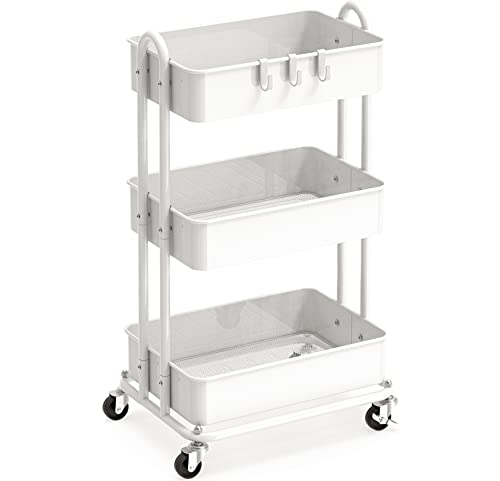
The Simple Houseware cart has three tiers on a heavy-duty metal frame, with rolling casters and a white finish. It was a general utility cart, not a printer stand, with a narrow footprint for its capacity. The top shelf holds the printer, while the lower shelves hold paper and ink.

It ranks fourth because the cart was not made for printers, but the extra tiers make it handy for supplies. Compared with the Pipishell, the heavy-duty frame is the point, since it better supports a heavier machine. It costs $25 to $50.

Buy it if you want one cart for a printer plus other supplies. Skip it if you want a purpose-built stand. The caveats: no cable control, and you must check that the shelf size fits your printer's footprint, since the listing does not say.

Tiers
3
Frame
Heavy-duty metal
Mobility
Rolling casters
Finish
White

What we like

  • +Three tiers of storage
  • +Heavy-duty metal frame
  • +Rolling casters
  • +Narrow footprint

Watch out for

  • −Not made for printers
  • −No cable control

Buy it if: One cart for a printer plus other supplies.

Skip it if: You want a purpose-built printer stand.

5

Best Hide-Away Cart

Pipishell 3 Tier Rolling Cart, Metal Utility Cart with Wheels and Handle

Our verdict: Roll the printer into a corner and out again when needed.

The Pipishell is a three-tier metal cart with a built-in handle, rolling wheels and a white finish. It started life as a general utility cart. At $25 to $50, it is easy to wheel out of sight.

It ranks fifth because the handle makes it easy to maneuver, but the listing does not claim heavy-duty construction like the Simple Houseware. Its strength is the store-away appeal for people who print rarely.

Buy it to roll the printer into a corner and out again only when needed. Skip it if you want cable management or a firm base for a heavy machine. The caveat: with no printer features, you must confirm that the printer sits flat on the top shelf, with tray clearance around it.

Tiers
3
Frame
Metal
Handle
Built-in
Mobility
Rolling wheels

What we like

  • +Built-in handle
  • +Rolling wheels
  • +Three tiers
  • +Easy to hide away

Watch out for

  • −Generic utility cart
  • −No printer features

Buy it if: Wheeling a printer out only when needed.

Skip it if: You want cable management.

6

Best Desktop Riser

WALI Computer Monitor Stand with Underneath Storage

Our verdict: A tiny desk riser for rooms with no floor space.

The WALI is a desktop riser platform with an underneath storage compartment and a compact footprint, priced under $25. It was designed as a monitor or laptop riser, and the space below holds paper or small supplies.

It ranks sixth because a riser puts the printer on your desk, which costs workspace, and it was not made for printers. For rooms with no floor space at all, that is the only trade available.

Buy it for a tiny room where the printer must sit on the desk. Skip it if you have floor space under the desk. The caveat: the riser lists no weight rating in the data we have, so check the printer weight against the seller's limits, and keep the printer's lid and tray clear of the monitor.

Type
Desktop riser
Storage
Underneath compartment
Footprint
Compact
Price
Under $25

What we like

  • +Very low price
  • +No floor space needed
  • +Storage underneath
  • +Compact footprint

Watch out for

  • −Not made for printers
  • −Uses desk space

Buy it if: Tiny rooms where the printer sits on the desk.

Skip it if: You have floor space under the desk.

7

Smallest Footprint

Liitrton Mobile CPU Stand, Adjustable Computer Tower Stand

Our verdict: A low rolling platform repurposed from a PC tower stand.

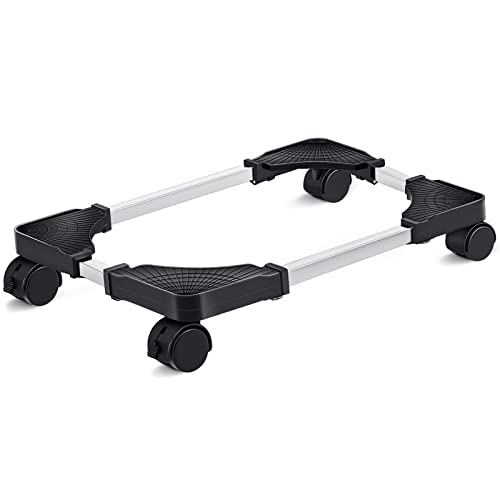
The Liitrton is a mobile CPU stand with adjustable width, rolling casters and a low compact platform, priced under $25. It was designed for computer towers, not printers. The adjustable width lets it cradle different printer sizes.

It ranks seventh because it offers only a platform, with no shelf, drawer or cable control. It is the smallest footprint in the ranking and one of the cheapest.

Buy it if floor space is minimal and you want the printer to roll away from the desk. Skip it if you want storage. The caveats are no tiers and no cable channel, plus a repurposed design, so check the width adjustment grips your printer securely. A printer that slides off a low platform is a mess.

Type
Mobile CPU stand
Width
Adjustable
Mobility
Rolling casters
Price
Under $25

What we like

  • +Adjustable width
  • +Rolls on casters
  • +Smallest footprint
  • +Very low price

Watch out for

  • −Repurposed CPU stand
  • −No storage at all

Buy it if: Buyers who want the smallest footprint.

Skip it if: You want a drawer or shelf.

8

Lightest Cart

Sywhitta 3-Tier Plastic Rolling Utility Cart with Handle

Our verdict: The lightest cart here, best for a light compact printer.

The Sywhitta is a three-tier plastic rolling cart with a built-in handle and a white finish, and it is the lightest pick in the list. It costs $25 to $50. Low weight makes it simple to move between rooms.

It ranks last because a plastic frame suits lighter machines than the metal carts. Plastic shelves can bow under a heavy printer, and the listing does not rate their capacity.

Choose it for a light compact printer on a budget, or a rental where you move the cart often. Skip it if your printer is heavy. The caveat: do not stack paper reams on the lower shelves of a plastic frame, and check that the top shelf is flat before you set the printer down.

Tiers
3
Frame
Plastic
Handle
Built-in
Weight
Lightest here

What we like

  • +Lightest cart here
  • +Built-in handle
  • +Rolling wheels
  • +Three tiers

Watch out for

  • −Plastic frame
  • −Not for heavy printers

Buy it if: Light compact printers on a budget.

Skip it if: Your printer is heavy.

Methodology

How We Ranked These

Printer fit

Stands built for printers ranked above repurposed carts and risers.

Footprint

Floor and desk space used, since small rooms cannot spare much.

Mobility

Casters, handles and locking wheels make a stand easy to move.

Storage and cables

Drawers, shelves and cable channels reduce clutter around the printer.

Build material

Metal frames scored above plastic for steadier support.

Every Primea Score uses the same weights: Performance 30% · Build & Materials 20% · Everyday Usability 20% · Value 20% · Owner Satisfaction 10%. Full scoring rules

Buyer's guide

How to Pick the Right One for You

By Printer Size

Printer size decides which stand fits.

PrinterOur pick
CompactHOOBRO 2-Tier
Compact to mid-sizeHUANUO Printer Stand
Business-class all-in-oneYAOHUOO 22x15
Light compactSywhitta 3-Tier

By Budget

SpendOur pick
Under $25WALI Riser, Liitrton CPU Stand
$25 to $50HUANUO, YAOHUOO, HOOBRO, Simple Houseware, Pipishell, Sywhitta

Printer Stand vs Utility Cart

Printer stand

Built around a printer, lower and tidier. The HUANUO, YAOHUOO and HOOBRO are the picks.

Utility cart

More tiers for supplies but generic. Simple Houseware, Pipishell and Sywhitta are the picks.

Most buyers should default to a printer stand unless they need extra storage.

By Room Constraint

ConstraintOur pick
No floor spaceWALI Riser
Under-desk gapHOOBRO 2-Tier
Smallest footprintLiitrton CPU Stand
Want it out of sightPipishell 3 Tier

For Dorm Rooms Specifically

Look for

A compact profile, mobility and somewhere to charge devices.

In this ranking

The HOOBRO adds a charging station shelf in a compact under-desk size.

When to Spend More

Spend more if

You want a purpose-built stand. The HUANUO gives cable control and a drawer.

Save if

You just need a platform. The Liitrton or WALI costs least.

Questions

Frequently Asked Questions

Can I use a utility cart for a printer?+

Yes, but check the tier size against your printer. The three carts here were not designed for printers, so fit and load rating are your responsibility. Check the shelf size and the printer's weight before you load it.

What is the biggest mistake with printer stands?+

Ignoring tray and lid clearance. The printer needs room to open, so measure the space above and in front of the stand as well as the footprint. A tray that hits a shelf can jam, and a lid that cannot lift prevents scanning.

Are locking casters worth it?+

Yes, since a rolling stand can shift when you pull a tray. The HUANUO lists locking casters, and the others do not say, so confirm before you rely on them for a rolling setup.

How do I manage cables?+

A rear channel like the HUANUO's keeps cords tidy. Otherwise, use clips along the frame and keep the power cable separate from USB leads to avoid interference. Leave slack so the plug is never under tension.

Will a plastic cart hold a printer?+

It may suit a light compact printer, like the Sywhitta. Heavier units belong on metal, such as the Simple Houseware cart or a dedicated stand, which spread the weight better.

Can a monitor riser hold a printer?+

The WALI is a monitor riser and not made for printers, so check your printer's size and weight first. It also takes desk space, which is the cost of using it. A heavy multifunction printer is better placed on the floor.

Final take

Buy the HUANUO for a compact or mid-size printer, or the YAOHUOO if yours is a business-class all-in-one. Choose the HOOBRO for a dorm, a metal cart if you also need supply storage, and the WALI or Liitrton only when floor space is nearly zero. Measure tray clearance first.

More Ranked & Reviewed Guides