
Primea ReviewsAll Reviews

Primea Reviews is reader-supported. When you buy through our Amazon links we may earn a commission, at no extra cost to you. Rankings are set by our editors and never sold. Learn more

Ranked & Reviewed by Primea Reviews

The 5 Best Desktop Printer Stands of 2026, Ranked & Reviewed

By the Primea Editorial TeamUpdated November 1, 20267 min read5 products ranked
The 5 Best Desktop Printer Stands of 2026, Ranked & Reviewed

The short answer

The HUANUO is the best desktop printer stand because it is the only pick purpose-built for printers, with a storage drawer, cable cutouts and locking casters in the $25 to $50 tier. The HOOBRO suits small offices with a built-in charging station, and the WALI is the cheapest riser for a light inkjet. The Hovadova and Liitrton are CPU stands that roll under a desk but are not made for printers.

The Primea Scoreboard

Ranked & Reviewed

  1. The only one here built from the start to hold a printer.

    94Outstanding
    Check price
  2. A compact two-tier unit with a charging station built in.

    90Excellent
    Check price
  3. A cheap lift with some space underneath, but not made for printers.

    86Excellent
    Check price
  4. A ventilated rolling base that doubles as a printer riser.

    82Very Good
    Check price
  5. A plain rolling base for the tightest budgets.

    79Very Good
    Check price

Printers are heavier and clumsier than they look, and the stand underneath them gets blamed for problems that start with the wrong size. A shelf a half inch too shallow lets the output tray hang in mid-air. A platform rated for a light inkjet will bow under a laser all-in-one. Before you shop, measure your printer's footprint and read its weight in the manual, because no listing will do that for you. A few minutes with a tape measure prevents most returns.

We ranked five stands on paper using spec sheets and listed features, scoring them on the Primea framework. Purpose-built printer stands outrank repurposed monitor risers and CPU carts, since weight rating, storage and cable control matter more than the cheapest price.

Before you buy

What Actually Matters

01

Weight capacity

Weight capacity is the load a stand can carry without sagging. A laser all-in-one can weigh far more than an inkjet, and a bowing shelf becomes unsafe fast. Check the listing for a stated rating, compare it to the printer weight in your manual, and treat any stand with no figure at all as suitable only for the lightest machines. Heavier printers deserve a stated rating, not a guess.

02

Shelf depth

Shelf depth is how far the shelf extends front to back. Printers have output trays and paper feeds that extend beyond the body, and a shelf that is too shallow leaves them hanging. Measure the printer with the tray extended, then compare it to the listed shelf dimension, and allow a little margin for a safe fit. Check the width of the base too, since some printers are wider than their trays.

03

Cable management

Cable management means cutouts, grommets or routing channels that keep the power and data cords tidy. A printer connects with both, and cords tangled behind a stand pull on ports and block airflow. Look for the words cable management in the title or bullets, and check the photos to see where the cord actually exits.

04

Casters and locks

Casters let you roll the stand to clear a jam or sweep underneath, but unlocked wheels let it drift as the printer shakes, which scuffs floors and strains cables. Locking casters fix that. Look for the word locking in the specs, not just wheels, and remember that a rolling stand needs floor space to move into.

05

Ventilation

Ventilation matters because printers produce heat while running, and a solid shelf traps it. An open or slotted platform improves airflow underneath. Check the listing for open or slotted designs, particularly on under-desk placement where air is already limited, and keep the printer's vents clear of the stand. Slotted platforms also shed dust better than solid boards.

In-depth reviews

Our Ranked Picks, Reviewed

1

Best Overall

HUANUO Printer Stand with Cable Management and Storage Drawer

Our verdict: The only one here built from the start to hold a printer.

The HUANUO is the only stand here designed around a printer, with a built-in storage drawer, cable management cutouts and locking caster wheels. The maximum shelf height is 14.1 inches. Locking casters matter more than they sound: a printer shakes the shelf as it pulls paper, and an unlocked stand creeps across a bare floor.

It leads because the drawer swallows paper and cartridges while the cutouts keep the power cord out of sight. The HOOBRO is smaller and has no rolling base, and the three risers below it have no purpose-built design at all. The $25 to $50 tier is fair for what it includes.

Pick it if the printer shares a desk with plenty of supplies. The caveat is the 14.1 inch height limit and the larger footprint, so skip it if you only want a few inches of lift.

Max shelf height
14.1 inches
Storage
Built-in drawer
Mobility
Locking casters
Cables
Cutout management

What we like

  • +Purpose-built for printers
  • +Storage drawer included
  • +Locking casters
  • +Cable cutouts

Watch out for

  • −Shelf height limit
  • −Larger footprint

Buy it if: Desks needing paper and ink storage.

Skip it if: You only need a few inches of lift.

2

Best for Small Offices

HOOBRO 2-Tier Printer Stand with Charging Station

Our verdict: A compact two-tier unit with a charging station built in.

The HOOBRO is a compact two-tier stand with a built-in charging station, finished in rustic brown and black, sized for small home offices. It sits on or under a desk. The charging station is the hook: you power the printer and recharge a phone from one tidy location, and the second tier gives paper somewhere to live.

It ranks second because it has no drawer or casters, so it cannot match the HUANUO's storage or the ease of rolling it out to clear a jam. It does beat the budget risers on organization and construction. Its tiers also limit shelf depth, which is the risk with a deep printer.

It suits a tidy small office where the second tier holds paper. Check your printer's depth against the shelf dimensions before ordering, because a large output tray will overhang.

Tiers
2-tier shelf
Power
Built-in charging station
Placement
Under desk or on desk
Finish
Rustic brown and black

What we like

  • +Charging station built in
  • +Two tiers of storage
  • +Fits under or on desk
  • +Compact for small offices

Watch out for

  • −No drawer or casters
  • −Limited shelf depth

Buy it if: A small office needing printer plus charging.

Skip it if: You want rolling mobility.

3

Best Budget Riser

WALI Computer Monitor Stand for Desk, Adjustable Laptop Riser

Our verdict: A cheap lift with some space underneath, but not made for printers.

The WALI is an adjustable riser marketed for monitors and laptops, with a compact flat platform and storage space underneath. It is the lowest-priced pick here, under $25. A riser frees desk space by lifting the printer and giving you somewhere to tuck a notebook or router below.

It ranks third because it works for a light printer but was not designed for one: there is no cable management and no weight rating aimed at printers. That is the real cost of repurposing a monitor accessory. Against the HOOBRO, you save money and lose organization.

Fine for a small inkjet on a tight budget. Skip it for a heavy laser all-in-one, because a riser rated for a laptop or screen tells you nothing about a vibrating, paper-feeding machine.

Height
Adjustable riser
Storage
Space underneath
Design
Compact flat platform
Price bracket
Under $25

What we like

  • +Lowest price here
  • +Adjustable height
  • +Storage underneath
  • +Compact platform

Watch out for

  • −Not designed for printers
  • −No cable control

Buy it if: Light printers on a budget.

Skip it if: Your printer is heavy.

4

Best Ventilated Platform

Hovadova Adjustable Mobile CPU Stand (Black)

Our verdict: A ventilated rolling base that doubles as a printer riser.

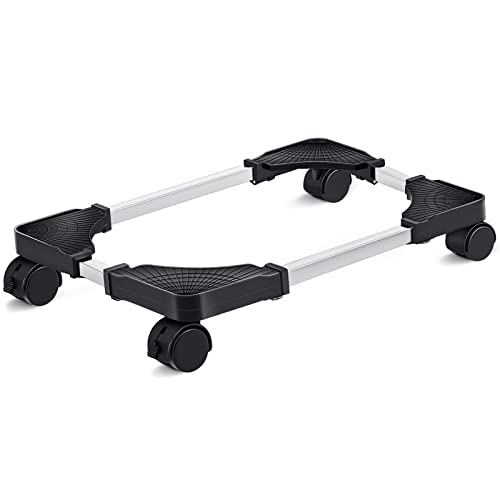
The Hovadova is a CPU tower stand with a ventilated platform, four casters and adjustable width, finished in black, priced under $25. Ventilation helps a printer shed heat while it runs, and the casters let you slide it out from under a desk to clear a jam or reach the toner.

It ranks fourth because it is a low platform with no storage and was never made for printers. It beats the Liitrton below on the ventilation and the four casters. Against the HOOBRO, it gives up organization in exchange for the ability to live beneath the desk.

Pick it for under-desk placement of a compact printer. Skip it if you want a shelf, drawer or cable cutouts, and check the load limit, since CPU stands are rated for towers and not printers.

Platform
Ventilated
Mobility
4 caster wheels
Fit
Adjustable width
Price bracket
Under $25

What we like

  • +Ventilated platform
  • +Four casters
  • +Adjustable width
  • +Low cost

Watch out for

  • −No storage
  • −Not made for printers

Buy it if: Under-desk compact printers.

Skip it if: You want a shelf or drawer.

5

Best Cheapest Rolling Base

Liitrton Mobile CPU Stand Adjustable Computer Tower Stand

Our verdict: A plain rolling base for the tightest budgets.

The Liitrton is another CPU tower stand, with adjustable width, rolling casters and a low, flat platform, priced under $25. Adjustable width is useful because it lets you set the rails around your printer's base so it cannot slide off while the stand rolls.

It ranks last because it lists no ventilation and offers no storage or cable help, which puts it behind the Hovadova. It is the plainest rolling base in the guide. For a printer that moves rarely, there is very little reason to choose it over a fixed riser.

Choose it as a cheap wheeled base for a compact printer under a desk. The caveat is the low platform: it will not raise the printer to eye level, and the listing gives no weight rating for a printer.

Platform
Low, flat
Mobility
Rolling casters
Fit
Adjustable width
Price bracket
Under $25

What we like

  • +Cheap rolling base
  • +Adjustable width
  • +Compact footprint
  • +Low-profile

Watch out for

  • −No ventilation listed
  • −No storage

Buy it if: Moving a compact printer under a desk.

Skip it if: You need lift or storage.

Methodology

How We Ranked These

Printer-specific design

Whether the stand was built for printers or repurposed from another product.

Storage and cables

Drawers, shelves and cutouts that keep supplies and cords tidy.

Mobility

Casters and locks that let you move or fix the stand.

Footprint

Width and depth against typical printer sizes.

Price bracket

Value within each price band.

Every Primea Score uses the same weights: Performance 30% · Build & Materials 20% · Everyday Usability 20% · Value 20% · Owner Satisfaction 10%. Full scoring rules

Buyer's guide

How to Pick the Right One for You

By Where It Sits

Location decides which stand works.

PlacementOur pick
On desk with storageHUANUO Printer Stand
Under or on desk, small officeHOOBRO 2-Tier
Just a lift on the deskWALI Adjustable Riser
Under desk, rollingHovadova Mobile CPU Stand

By Budget

SpendOur pick
Under $25 liftWALI Adjustable Riser
Under $25 rollingHovadova Mobile CPU Stand
Under $25 cheapest baseLiitrton Mobile CPU Stand
$25-50HUANUO Printer Stand

Dedicated Stand vs Repurposed Riser

Dedicated stand

Built with storage and cable control. The HUANUO and HOOBRO fit here.

Repurposed riser

Cheaper, simpler and lighter duty. The WALI, Hovadova and Liitrton belong here.

Choose a dedicated stand unless your printer is small and the budget is tight.

By Printer Size

PrinterOur pick
Compact inkjetWALI Adjustable Riser
Mid-size all-in-oneHUANUO Printer Stand
Small office printer with phone chargingHOOBRO 2-Tier
Tiny printer, floor useLiitrton Mobile CPU Stand

For Small Desks Specifically

Look for

A stand that frees the desk surface and tucks storage underneath.

In this ranking

The HOOBRO 2-Tier and HUANUO stand both move supplies off the desk, with HOOBRO the more compact.

When to Spend More

Spend more if

You store paper and ink; the HUANUO stand adds a drawer and wheels.

Save if

You own a small inkjet; the WALI riser is enough.

Questions

Frequently Asked Questions

Can a CPU stand hold a printer?+

A light one, yes. Check the weight limit first, since CPU stands such as the Hovadova and Liitrton are rated for towers, not printers. A heavy laser all-in-one belongs on a purpose-built stand like the HUANUO.

How much shelf depth do I need?+

Measure the printer with its output tray extended, then add a small margin so nothing hangs off the front edge. The HOOBRO's two-tier shelves are limited in depth, so compare the listed dimension to your printer before ordering it.

Do I need locking casters?+

They keep the stand still while the printer shakes through a print job. The HUANUO lists locking casters, while the Hovadova and Liitrton list casters without naming locks, so they can creep on bare floors.

Is the HOOBRO worth the charging station?+

If you charge a phone at your desk, yes, since it powers both from one spot. Otherwise the HUANUO offers more storage with its drawer and locking casters, which suits supplies better.

Can I put a printer under a desk?+

Yes, but leave room to open the lid and clear jams. The Hovadova and Liitrton roll out for access, and the HOOBRO is listed for under-desk placement. Check that the printer's vents stay clear.

Why not a rolling cart?+

Carts add height but need floor space and clear less desk. For desk use, a compact stand like the HUANUO or HOOBRO fits better, and the casters on the HUANUO give you cart-like mobility anyway.

Final take

Choose the HUANUO unless you have a reason not to, since it is the only stand designed for a printer and it handles supplies and cables. The HOOBRO is the better fit for a compact office that needs a charging station. The WALI, Hovadova and Liitrton are budget workarounds for light printers, so check the load limit before trusting them. Measure depth first and the rest follows.

More Ranked & Reviewed Guides