
Primea ReviewsAll Reviews

Primea Reviews is reader-supported. When you buy through our Amazon links we may earn a commission, at no extra cost to you. Rankings are set by our editors and never sold. Learn more

Ranked & Reviewed by Primea Reviews

The 5 Best Premium Laptop Cooling Pads of 2026, Ranked & Reviewed

By the Primea Editorial TeamUpdated November 1, 202610 min read5 products ranked
The 5 Best Premium Laptop Cooling Pads of 2026, Ranked & Reviewed

The short answer

The Razer Adaptive Smart pad is the best overall, with a 140mm fan, foam-sealed airflow chamber, Synapse fan curves and a 2-year warranty. The llano V12 Ultra suits laptops up to 19 inches, the IETS GT500 is the loud, powerful turbofan, the llano V10 fits 13 to 17.3 inch laptops, and the Metfut is the quiet Peltier option.

The Primea Scoreboard

Ranked & Reviewed

  1. The most refined pad, with a sealed airflow path.

    94Outstanding
    Check price
  2. Software control for laptops up to 19 inches.

    91Excellent
    Check price
  3. Raw airflow from a 5000 RPM turbofan.

    88Excellent
    Check price
  4. A smaller pad with physical buttons and USB-C.

    85Excellent
    Check price
  5. A semiconductor cooling panel with a low stated noise.

    81Very Good
    Check price

A premium cooling pad is not simply a bigger fan. The difference lies in whether the air is driven into your laptop's intake or merely blown around the room, and whether you can tune it without a jet-engine whine at full speed. Open-frame pads waste most of what they move, which is why sealed designs stand out, so a sealed path or a well-matched fan size does more for temperatures than raw RPM.

Our editors ranked five pads from their specification sheets: fan speed, stated noise, supported laptop sizes, control method and warranty. Temperature drops quoted by makers are claims, not measurements we took, and we treat them that way. Software-dependent features count only as far as the listing explains them, and unexplained claims score nothing.

Before you buy

What Actually Matters

01

Fan speed versus noise

A faster fan moves more air but gets louder. The IETS GT500 states 65dB at 5000 RPM, while others run slower, and the Metfut states 20dB or less. Pick the speed range you can tolerate near your desk, and check the stated decibels on the listing. Variable control lets you back off from the maximum.

02

Laptop size support

A pad that is too small leaves the fan off-center from your intake vents, and one that is too big wastes the airflow. The llano V12 Ultra supports up to 19 inches, and the V10 starts at 13 inches. Match the range to your laptop, and find where your intake vents sit, usually on the underside.

03

Sealed airflow

A foam-sealed chamber, as in the Razer, pushes air into the intake instead of past it, which makes the same fan more effective than an open design. Look for words like pressure chamber or seals in the listing. Most budget pads lack one, so an open fan simply blows air under and around the laptop.

04

Control method

Software, physical buttons or a dial each suit a different user. Software offers fan curves but requires installing an app. Dials and buttons work with no install, which suits shared or locked-down machines. Check which method each listing names: the Razer and V12 Ultra use software, the V10 uses buttons and the IETS uses a dial.

05

Power and ports

Pads that add USB hubs use one of your own ports. Check whether a hub has an independent data line, like the GT500. A pad with an adapter requirement, like the Metfut, needs an extra purchase. Count your free ports and note which listings include USB-C, because a pad that eats your last port is annoying.

In-depth reviews

Our Ranked Picks, Reviewed

1

Best Overall

Razer Laptop Cooling Pad Adaptive Smart, Intelligent Fan Control

Our verdict: The most refined pad, with a sealed airflow path.

The Razer pairs a 140mm brushless fan, rated up to 3000 RPM, with an airtight pressure chamber lined with foam seals. The seal matters because it channels air into the laptop's intake instead of letting it escape around the sides. Fan curves are set in Razer Synapse software, so you decide when the fan ramps, and a 3-port USB Type-A hub is built in.

It ranks first because it is the only pad here that seals airflow to the laptop and adds software control. The V12 Ultra has a software layer too, but its airflow path is open. Expect to pay $100 to $200 for it.

Buy it for a gamer who wants tuned, quiet cooling. The caveats are that you need Synapse installed and you pay for refinement.

Fan
140mm, up to 3000 RPM
Control
Razer Synapse
USB hub
3 Type-A ports
Warranty
2 years

What we like

  • +Sealed airflow chamber
  • +Software fan curves
  • +3-port USB hub
  • +2-year warranty

Watch out for

  • −$100-200 price
  • −Needs Synapse software

Buy it if: Gamers who want tuned, quiet cooling.

Skip it if: You do not want software.

2

Best for Large Laptops

llano V12 Ultra Laptop Cooling Pad with Smart Software Control

Our verdict: Software control for laptops up to 19 inches.

The V12 Ultra uses a 5.5 inch turbo fan up to 2800 RPM and supports laptops from 15.6 to 19 inches. Myth.cool software offers three AI modes, and a USB 3.0 hub turns one port into three. The maker states a 22 degree C drop in 90 seconds, a claim we cannot confirm.

It ranks second because the software is less established than Razer's and the airflow path is not sealed, though it supports larger laptops than any other pad here. It lands in the same price tier as the Razer.

Buy it for a 17 to 19 inch gaming laptop. Skip it for a small laptop, since a 13 inch machine would be badly matched to the pad. The caveat: the claimed temperature drop is the maker's number, not an independent result.

Fan
5.5 in, up to 2800 RPM
Laptop size
15.6 to 19 in
Software
Myth.cool, 3 AI modes
USB
USB 3.0 hub, 1 to 3

What we like

  • +Supports 19 inch laptops
  • +3 AI fan modes
  • +USB 3.0 hub
  • +Turbo fan

Watch out for

  • −Not 13 inch friendly
  • −Claimed drop is unverified

Buy it if: Large 17 to 19 inch gaming laptops.

Skip it if: You own a small laptop.

3

Best for Airflow

IETS GT500 Powerful Turbo-Fan (5000 RPM) Laptop Cooling Pad

Our verdict: Raw airflow from a 5000 RPM turbofan.

The GT500 uses an industrial turbofan up to 5000 RPM with infinitely variable speed control. A bottom air-intake design draws air from beneath, and a three-port USB hub keeps an independent data line. Noise is stated at 65dB at maximum speed, which is loud.

It ranks third because it is loud at full speed, unlike the Razer, and has no software. It outruns every other pad here on RPM, and costs less, in the $50 to $100 bucket.

Buy it for a hot laptop under heavy load, where airflow matters more than noise. Skip it for a quiet room. The speed control lets you back off to a tolerable level, but at the top setting the fan will dominate a call. If silence matters, the Metfut states far lower noise.

Fan
Turbofan, up to 5000 RPM
Noise
65dB at max
USB
3-port hub
Speed control
Infinitely variable

What we like

  • +5000 RPM turbofan
  • +Variable speed control
  • +Independent USB data line
  • +$50-100 price

Watch out for

  • −65dB at maximum
  • −No software

Buy it if: Hot laptops under heavy load.

Skip it if: You work in a quiet room.

4

Best Compact

llano V10 Gaming Laptop Cooling Pad, RGB Laptop Cooler Stand

Our verdict: A smaller pad with physical buttons and USB-C.

The V10 uses a 4.72 inch fan with a copper motor, up to 3500 RPM, and fits laptops from 13 to 17.3 inches. Physical buttons control the fan and the RGB lighting, and both USB-A and USB-C ports are provided. The maker states a 38 degree C drop, which is also unverified.

It ranks fourth because the fan is smaller than the pads above. It is the better choice for thinner laptops, because the 13 inch minimum fit leaves vents covered where bigger pads would not.

Buy it for a mainstream 13 to 17 inch laptop and a desk without software. Skip it if you own a 19 inch laptop. The buttons mean no app is needed, and the pad sits in the $50 to $100 bucket, though its smaller fan moves less air than the V12 Ultra.

Fan
4.72 in, up to 3500 RPM
Laptop size
13 to 17.3 in
Ports
USB-A and USB-C
Control
Physical buttons

What we like

  • +USB-A and USB-C
  • +Physical buttons
  • +Fits 13 inch laptops
  • +Copper motor

Watch out for

  • −Smaller fan
  • −Claimed drop is unverified

Buy it if: Mainstream 13 to 17 inch laptops.

Skip it if: You own a 19 inch laptop.

5

Best Quiet Option

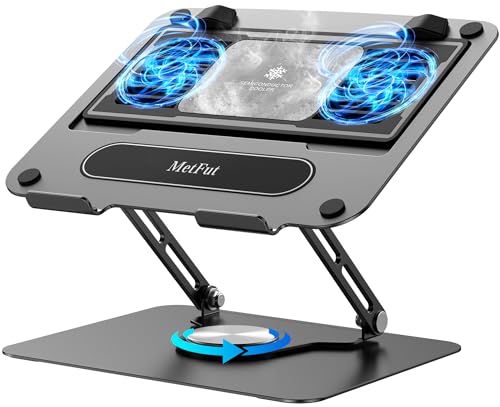
Metfut Laptop Cooling Pad with Detachable Fan & Cooler

Our verdict: A semiconductor cooling panel with a low stated noise.

The Metfut uses a Peltier semiconductor cooling panel and two fans stated at 20dB or less, plus a detachable cooler. A carbon steel frame holds up to 20 lb, and a 20W adapter, sold separately, is required for maximum power. A Peltier panel chills a surface by electric current, not just moving air.

It ranks last because the extra adapter adds cost and complexity, and its design is unusual. It is the quietest design on paper, with a stated noise far below the IETS.

Pick it for a noise-sensitive workspace such as a shared office. Skip it if you want plug-and-play. The caveat: without the adapter you get less than full power, and the stated noise is the maker's figure. It sits in the $50 to $100 bucket.

Cooling
Peltier panel, 2 fans
Noise
20dB or less (stated)
Load
Up to 20 lbs
Power
20W adapter, sold separately

What we like

  • +Semiconductor cooling panel
  • +Low stated noise
  • +Detachable cooler
  • +Carbon steel frame

Watch out for

  • −Adapter sold separately
  • −Unusual design

Buy it if: Noise-sensitive work spaces.

Skip it if: You want plug-and-play.

Methodology

How We Ranked These

Airflow design

We compared fan size, stated RPM and whether the path is sealed to the laptop.

Noise

We used each maker's stated decibel figure and fan speed range.

Laptop fit

We checked the supported laptop sizes, from 13 to 19 inches.

Controls

We weighed software, physical buttons and speed dials.

Extras

We counted USB hubs, ports and warranty length.

Every Primea Score uses the same weights: Performance 30% · Build & Materials 20% · Everyday Usability 20% · Value 20% · Owner Satisfaction 10%. Full scoring rules

Buyer's guide

How to Pick the Right One for You

By Laptop Size

Fit is the first filter.

LaptopOur pick
17 to 19 inch gaming laptopllano V12 Ultra
15 to 17 inch gaming laptopRazer Laptop Cooling Pad
13 to 17.3 inch laptopllano V10
Hot, heavy-load laptopIETS GT500 5000 RPM

By Budget

SpendOur pick
$50-100, max airflowIETS GT500 5000 RPM
$50-100, compactllano V10
$50-100, quietMetfut Laptop Cooling Pad
$100-200Razer Laptop Cooling Pad

Turbo Fan vs Semiconductor

Turbo fan

Moves a lot of air and costs less, but gets loud. Picks: IETS GT500, llano V12 Ultra, llano V10 and Razer.

Semiconductor

A Peltier panel plus two fans, stated at 20dB or less. The pick is the Metfut.

Most buyers should default to a turbo fan pad unless silence is the priority.

By Noise Tolerance

ToleranceOur pick
Quietest on paperMetfut Laptop Cooling Pad
Tunable noiseRazer Laptop Cooling Pad
Moderate noisellano V10
Noise does not matterIETS GT500 5000 RPM

For Desk Gaming Setups Specifically

Look for

Adjustable fan curves, spare USB ports and support for your laptop size.

In this ranking

The Razer gives software curves and a 3-port hub, and the llano V12 Ultra adds a USB 3.0 hub for 19 inch machines.

When to Spend More

Spend more if

You game daily and want a tuned, sealed pad. The Razer is the premium pick.

Save if

You just want more airflow. The IETS GT500 delivers it at $50-100.

Questions

Frequently Asked Questions

Do laptop cooling pads really work?+

They help most when a laptop runs hot under load. The temperature drops quoted here are maker claims, not our measurements, so treat them as marketing until you see independent figures, and judge by fit and fan design.

Will the llano V12 Ultra fit a 13 inch laptop?+

Its listing covers 15.6 to 19 inches, so a 13 inch laptop is not a good match. Use the V10 instead, which starts at 13 inches, or the pad will sit off-centre under the vents.

Is the Razer worth it over the IETS GT500?+

If you want software control and a sealed path, yes. If raw airflow is enough, the IETS costs less and moves more air, at the price of noise, with 65dB stated at maximum speed.

How do I set one up?+

Place the laptop so its intake vents line up with the fan, then connect the USB cable. Install the software if the pad uses it, and set a gentle fan curve first, then raise it only if temperatures climb.

Does the Metfut need a power adapter?+

The listing says a 20W adapter is required for maximum power and is sold separately. Without it, expect reduced cooling, so budget for the extra purchase and check that it ships with a compatible plug.

How should I clean the fan?+

Unplug the pad and clear dust with compressed air. Do not take apart sealed units, such as the Razer's foam chamber, which could damage the seals and reduce the airflow.

Final take

Buy the Razer for refined, tuned cooling, or the V12 Ultra for a 17 to 19 inch gaming laptop. Choose the IETS GT500 when airflow beats silence, the V10 for a mainstream laptop, and the Metfut where noise matters and you can accept a separate adapter.

More Ranked & Reviewed Guides