
Primea ReviewsAll Reviews

Primea Reviews is reader-supported. When you buy through our Amazon links we may earn a commission, at no extra cost to you. Rankings are set by our editors and never sold. Learn more

Ranked & Reviewed by Primea Reviews

The 8 Best Powerful Laptop Cooling Pads of 2026, Ranked & Reviewed

By the Primea Editorial TeamUpdated November 1, 202611 min read8 products ranked
The 8 Best Powerful Laptop Cooling Pads of 2026, Ranked & Reviewed

The short answer

The llano V10 is the best powerful laptop cooling pad: up to 3500 RPM with a copper motor, a stated 38°C drop, dual USB-A and USB-C ports and a removable dust filter, for $50 to $100. The IETS GT500 5000 RPM has the highest fan speed, and the llano V12 states a 44°C drop.

The Primea Scoreboard

Ranked & Reviewed

  1. The only pad here that publishes both RPM and a temperature drop.

    94Outstanding
    Check price
  2. The highest fan speed in the ranking, with the noise to match.

    91Excellent
    Check price
  3. A big stated temperature drop plus a live fan-speed display.

    88Excellent
    Check price
  4. Same strong claim as the V12 above, minus the speed display.

    86Excellent
    Check price
  5. The 5000 RPM design with less speed and less noise.

    84Very Good
    Check price
  6. Engineered airflow with automatic speed control.

    83Very Good
    Check price
  7. A thermoelectric alternative that runs at 20dB or less.

    81Very Good
    Check price
  8. The cheapest pick, with many fans and little published data.

    78Very Good
    Check price

A big number on a cooling pad box is not the same as cooling power. Some listings publish fan speed, some publish a temperature drop, and a few publish neither, so comparing them takes more care than reading the headline. A pad with thirteen small fans and no stated figures may move less air than one with a single well-sealed turbofan.

We ranked eight pads using only what each listing states (fan speed, stated temperature reduction, noise, power source and sealing), with no pad run on a bench. Where a number is missing, we say so rather than fill the gap. Temperature drops are manufacturer figures taken under their own conditions, not measurements of ours, so they work best as a cross-check against a published RPM.

Before you buy

What Actually Matters

01

Fan speed (RPM)

RPM is how fast the fan spins, and it is a rough guide to airflow. A higher figure moves more air but usually adds noise. Look for the number in the title or bullets, and treat a missing RPM as unknown, not as zero. Peak speed is also the loudest setting. The IETS lists 5000 and 4200, the llano V10 3500, the Razer 3000.

02

Stated temperature drop

Some makers publish a Celsius reduction. It is useful, but it comes from the maker's own conditions and your laptop may differ. Room temperature and workload change it. Prefer listings that also give RPM so you have two numbers to cross-check. The llano V10 gives both, while the V12 pair give only a drop. A pair of numbers is easier to trust.

03

Noise level

Noise is stated in dB, and the figure usually applies at maximum speed. A 65dB pad is clearly audible, while 20dB is close to silent. Fan noise grows quickly with speed. Check whether the number is for max speed or normal use. The IETS lists 65 and 55dB, the Metfut 20dB or lower.

04

Power source

Pads either draw power from the laptop's USB port or use an external adapter. External power supports stronger fans but needs an outlet. Check for an adapter wattage such as 36W in the listing. The llano V12 pair use 36W adapters, and the 13-fan budget pad runs from USB.

05

Sealing and intake

A pad that seals against the laptop pushes air in rather than letting it escape. This matters most for laptops with bottom intake. Look for foam seals or a pressure chamber, and match the intake position to your laptop. A misaligned pad cools less. The IETS and Razer pads list sealed designs.

In-depth reviews

Our Ranked Picks, Reviewed

1

Best Overall

llano V10 Gaming Laptop Cooling Pad, RGB Laptop Cooler Stand

Our verdict: The only pad here that publishes both RPM and a temperature drop.

The llano V10 is listed at up to 3500 RPM with a pure copper motor and a stated 38°C reduction within minutes. It adds dual USB-A and USB-C ports and a removable dust filter, and sells for $50 to $100. A flat contact surface supports liquid metal cooling, and a dust filter keeps fans from clogging with lint.

It beats the IETS GT500 5000 RPM on balance because it backs its power claim with two published numbers. The IETS wins on peak fan speed but also on noise. Against the V12 listings, it adds a stated RPM, which those leave out.

Buy it if you want a claim you can check. The caveat is that the temperature drop is the maker's own figure. Skip it if you want the highest raw RPM, since the V10 tops out lower.

Fan speed
Up to 3500 RPM
Stated drop
38°C
Ports
USB-A and USB-C
Filter
Removable dust filter

What we like

  • +RPM and drop both published
  • +Copper motor
  • +Dual USB ports
  • +Removable dust filter

Watch out for

  • −Lower RPM than IETS 5000
  • −Temperature figure is maker-stated

Buy it if: Gamers who want a documented, balanced pad.

Skip it if: Peak fan speed matters more than documentation.

2

Best for Raw Airflow

IETS GT500 Powerful Turbo-Fan (5000 RPM) Laptop Cooling Pad

Our verdict: The highest fan speed in the ranking, with the noise to match.

The IETS GT500 turbofan runs up to 5000 RPM with variable control from 0 to 5000. Its sealed foam pressure design and bottom air intake target laptops that exhaust at the rear. A 3-port USB hub completes it, and it sells for $50 to $100. Sealed foam forces air into the laptop's vents instead of letting it escape around the edges.

It ranks just below the llano V10 because the listing states noise up to 65dB at max speed and gives no temperature drop. Compared with the 4200 RPM GT500 below it, you gain speed and give up quiet. Against the V12, it publishes an RPM.

Choose it for hot gaming laptops and rear-exhaust designs. The caveat is noise at full speed. Skip it for a shared room or a quiet office.

Fan speed
Up to 5000 RPM
Noise
Up to 65dB
USB
3-port hub
Design
Sealed foam pressure

What we like

  • +Highest RPM here
  • +Sealed airflow design
  • +Variable speed control
  • +3-port USB hub

Watch out for

  • −Loud at max speed
  • −No temperature drop stated

Buy it if: Hot rear-exhaust gaming laptops.

Skip it if: You need a quiet pad.

3

Best Speed Readout

llano V12 Laptop Cooling Pad, Gaming Laptop Cooler Stand

Our verdict: A big stated temperature drop plus a live fan-speed display.

This llano V12 states a 44°C reduction for CPU and GPU in 90 seconds, with a real-time LED fan-speed display and a 36W external power adapter. It adds a separate dust filter and memory foam seal and sells for $50 to $100. A live readout lets you see whether the fan is actually working, rather than guessing from sound.

It ranks below the V10 because RPM is not published, so the drop figure stands alone. It beats the other V12 listing because the speed readout lets you see what the fan is doing. External power allows stronger fans but needs a wall outlet.

Buy it if you like to monitor the fan. The caveat is that it needs wall power. Skip it if you want a published RPM to compare.

Stated drop
44°C in 90 seconds
Power
36W adapter
Display
Live fan speed
RPM
Not published

What we like

  • +Large stated drop
  • +Live speed display
  • +Foam seal included
  • +External power

Watch out for

  • −RPM not published
  • −Needs wall power

Buy it if: Tinkerers who want to watch fan speed.

Skip it if: You want a published RPM figure.

4

Best Value Llano

llano V12 Gaming Laptop Cooling Pad Laptop Cooler

Our verdict: Same strong claim as the V12 above, minus the speed display.

This V12 lists the same 44°C stated reduction in 90 seconds, a 36W external power adapter, a 3-port USB hub and a removable dust filter. It sells for $50 to $100. A 3-port hub gives back USB ports a pad would otherwise use up, a practical plus on a thin laptop.

It ranks under the LED version because it drops the real-time readout, and RPM is again not published. The tradeoff is simple: the power claim is identical, but you get less feedback. Against the V10, it states a larger drop but no fan speed.

Pick it if the display does not matter to you. The caveat is the absent RPM and speed display. Skip it if you want the live readout, which the other V12 listing includes.

Stated drop
44°C in 90 seconds
Power
36W adapter
USB
3-port hub
RPM
Not published

What we like

  • +Large stated drop
  • +3-port USB hub
  • +Removable dust filter
  • +External power

Watch out for

  • −No RPM published
  • −No speed display

Buy it if: Buyers who trust the temperature claim.

Skip it if: You want a speed display.

5

Best Quieter IETS

IETS GT500 Powerful Turbo-Fan (4200 RPM) Laptop Cooling Pad

Our verdict: The 5000 RPM design with less speed and less noise.

The 4200 RPM GT500 uses the same sealed foam pressure design and bottom air intake, with a 0 to 4200 variable range. It fits 13 to 17.3 inch laptops, lists noise up to 55dB and sells for $50 to $100. A variable dial lets you trade airflow for quiet.

It ranks below the 5000 RPM model for peak power and below the llano pads for documentation, since no temperature drop is given. Its edge over the 5000 version is a 10dB lower stated noise ceiling. Against the Metfut, it moves far more air but is louder.

Buy it for a more livable turbofan. The caveat is lower peak airflow than the 5000 RPM model. Skip it if you want the strongest airflow available.

Fan speed
Up to 4200 RPM
Noise
Up to 55dB
Fit
13 to 17.3 inch
Design
Sealed foam pressure

What we like

  • +Quieter than the 5000 RPM
  • +Wide laptop fit
  • +Sealed airflow design
  • +Variable speed

Watch out for

  • −No temperature drop stated
  • −Lower peak airflow

Buy it if: Turbofan buyers who want less noise.

Skip it if: You need maximum airflow.

6

Best Smart Control

Razer Laptop Cooling Pad Adaptive Smart, Intelligent Fan Control

Our verdict: Engineered airflow with automatic speed control.

The Razer pad lists a 140mm brushless fan at 3000 RPM, an airtight pressure chamber with foam seals and adaptive cooling that adjusts speed automatically. Fan curves can be set through Razer Synapse. It sells for $100 to $200. Automatic speed control ramps up under load and idles quietly otherwise.

It ranks mid-table because it is the priciest pad here and states no temperature drop. Against the llano V10, it offers smarter control but less proof of results. The documented RPM, 3000, is lower than the IETS pads.

Buy it if you already use Razer software. The caveat is the high cost and unstated drop. Skip it if you want the most cooling per dollar.

Fan
140mm, 3000 RPM
Control
Adaptive, custom curves
Seal
Airtight chamber
Price bracket
$100-200

What we like

  • +Automatic speed control
  • +Custom fan curves
  • +Airtight pressure chamber
  • +Documented RPM

Watch out for

  • −Highest price bracket
  • −No temperature drop stated

Buy it if: Razer users who like automated cooling.

Skip it if: You want the most cooling per dollar.

7

Best Near-Silent

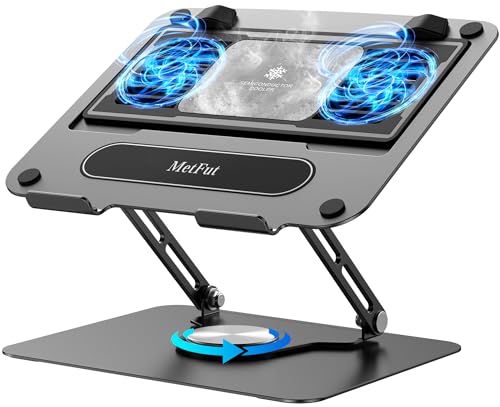
Metfut Laptop Cooling Pad with Detachable Fan & Cooler

Our verdict: A thermoelectric alternative that runs at 20dB or less.

The Metfut uses Peltier semiconductor cooling rated at 20W with a compatible 20W adapter, a detachable cooler and a carbon steel frame that supports up to 20 lbs. Noise is listed at 20dB or lower. It sells for $50 to $100. A Peltier module moves heat electrically instead of by airflow, which explains the silence.

It ranks lower only because thermoelectric cooling is a different approach and the listing gives no RPM or temperature drop to compare with the fan pads. Its advantage over xy fan model here is near-silent running. Against the Razer, it trades airflow for quiet.

Buy it if noise is your top complaint. The caveat is the need for a separate adapter. Skip it if you want proven high airflow.

Cooling
20W thermoelectric
Noise
20dB or lower
Frame
Carbon steel, 20 lbs
Cooler
Detachable

What we like

  • +Near-silent running
  • +Thermoelectric cooling
  • +Detachable cooler
  • +Sturdy steel frame

Watch out for

  • −Needs a 20W adapter
  • −No temperature drop stated

Buy it if: Quiet-room users.

Skip it if: You need maximum airflow.

8

Best Budget

Gaming Laptop Cooler with 13 Ultra Quiet Fans, LCD Screen and Multi Color RGB

Our verdict: The cheapest pick, with many fans and little published data.

This cooler packs 13 fans, three large and ten small, plus an LCD cooling-status screen and 10 RGB modes. It is powered by the laptop over dual USB ports and sells for $25 to $50. No wall adapter means one less cable, which suits a travel bag.

It ranks last because neither RPM nor a temperature drop is published, so fan count is the only power signal. Many small fans are not the same as strong airflow. Against the llano V10, it costs less but proves less.

Buy it if budget rules. The caveat is the absent specs. Skip it if you want documented power.

Fans
13 (3 large, 10 small)
Display
LCD status screen
Power
Laptop-powered USB
Price bracket
$25-50

What we like

  • +Lowest price bracket
  • +Many fans
  • +LCD status screen
  • +No wall power needed

Watch out for

  • −No RPM published
  • −No temperature drop stated

Buy it if: Budget buyers who want a busy-looking pad.

Skip it if: You want documented cooling power.

Methodology

How We Ranked These

Published fan speed

We gave credit to listings that state RPM and noted where it is missing.

Stated temperature drop

Maker-stated drops count as claims, not measurements, and were weighted below documented specs.

Noise

Stated dB ceilings were compared, since power usually costs quiet.

Power and ports

External adapters, USB hubs and laptop-powered designs were compared for convenience.

Sealing and design

Foam seals, pressure chambers and intake layout affect how airflow reaches the laptop.

Every Primea Score uses the same weights: Performance 30% · Build & Materials 20% · Everyday Usability 20% · Value 20% · Owner Satisfaction 10%. Full scoring rules

Buyer's guide

How to Pick the Right One for You

By Priority

Decide what powerful means to you first.

PriorityOur pick
Documented powerllano V10
Maximum airflowIETS GT500 5000 RPM
Live fan monitoringllano V12 with LED display
Smart automatic controlRazer Adaptive Smart
Near-silent runningMetfut Peltier

By Budget

SpendOur pick
$25-5013-fan Gaming Laptop Cooler
$50-100llano V10 or IETS GT500 4200 RPM
$100-200Razer Adaptive Smart

Fan vs Thermoelectric

Fan cooling

Moves air across the laptop. Fast and proven. llano V10, IETS GT500 5000 and 4200 RPM, both llano V12 listings and the Razer use this.

Thermoelectric

Peltier cooling at 20W with 20dB noise or lower. The Metfut is the only example here.

Most buyers should default to a fan pad unless noise is the main problem.

By Noise Tolerance

PreferenceOur pick
Quiet is essentialMetfut Peltier
Moderate noise, strong airflowIETS GT500 4200 RPM
Loud is fineIETS GT500 5000 RPM
Large fan count, quiet label13-fan Gaming Laptop Cooler

For Rear-Exhaust Gaming Laptops Specifically

Look for

A bottom air intake and a sealed foam design that pushes air to the laptop.

In this ranking

IETS GT500 5000 RPM and 4200 RPM, which list a bottom intake for rear-exhaust laptops.

When to Spend More

Spend more if

You want automation and software control, which the Razer Adaptive Smart offers, or published proof from the llano V10.

Save if

You only need modest help, where the 13-fan Gaming Laptop Cooler is the cheapest route.

Questions

Frequently Asked Questions

Will these fit my laptop?+

Check the size range on the listing. The IETS GT500 4200 RPM lists 13 to 17.3 inch fit. For others, confirm your laptop's size and vent position, since a pad that overhangs the vents wastes most of its airflow.

What is the most common buying mistake?+

Trusting a big number without context. A temperature drop with no RPM, or a fan count with neither, is a weak signal of real power, as on the 13-fan budget pad. Cross-check two numbers where you can.

Is the Razer worth it over the llano V10?+

Only if you want adaptive control and Razer Synapse. The llano V10 costs less and publishes more numbers, including a 38°C stated drop and up to 3500 RPM. The Razer states no drop and 3000 RPM.

How do I set one up?+

Place it flat under the laptop, connect USB or the external adapter, and set the fan speed. Make sure the intake lines up with your vents, and use the foam seal on the llano V12. Start at a medium speed and raise it only if temperatures stay high.

How do I maintain it?+

Clean the dust filter where one is included, such as on the llano V10 and V12, and wipe the fans occasionally. Unplug before cleaning, and use compressed air in short bursts so fan blades do not overspin.

Do thermoelectric pads replace fans?+

The Metfut uses Peltier cooling with a detachable cooler instead of a high-RPM fan. It suits quiet use, but the listing gives no temperature drop to compare, so treat it as a quiet alternative, not a stronger one.

Final take

Buy the llano V10 for a documented, balanced pad. Choose the IETS GT500 5000 RPM for a hot rear-exhaust gaming laptop and the 4200 RPM version for less noise. The llano V12 suits tinkerers who want a speed readout, the Razer automatic control, and the Metfut quiet-room use. Prefer listings that publish two numbers.

More Ranked & Reviewed Guides