

Primea ReviewsAll Reviews

Primea Reviews is reader-supported. When you buy through our Amazon links we may earn a commission, at no extra cost to you. Rankings are set by our editors and never sold. Learn more

Ranked & Reviewed by Primea Reviews

The 6 Best Portable Monitors Under $200 of 2026, Ranked & Reviewed

By the Primea Editorial TeamUpdated November 1, 20269 min read6 products ranked
The 6 Best Portable Monitors Under $200 of 2026, Ranked & Reviewed

The short answer

The cocopar 16 inch is the best portable monitor under $200, with a 2.5K QHD panel, 144Hz over USB-C and a metal chassis. The ARZOPA 16 inch 2.5K wins on sharpness and color at 1.46 lb, and the EVICIV is the largest screen at 18.5 inches. The 144Hz ARZOPA is the budget gaming route, the KYY is a proven basic, and the MNN is the cheapest.

The Primea Scoreboard

Ranked & Reviewed

  1. The most complete feature set in the budget tier.

    94Outstanding
    Check price
  2. A crisp, light 16-inch screen with wide color.

    91Excellent
    Check price
  3. The biggest screen under $200, with a stand that doubles as a mount.

    88Excellent
    Check price
  4. Real 144Hz for little money, minus adaptive sync.

    85Excellent
    Check price
  5. A dependable travel screen with a cover that folds into a stand.

    82Very Good
    Check price
  6. The lowest price in this ranking, with HDR mode.

    79Very Good
    Check price

Under $200 a portable monitor can be sharp, fast or large, and rarely all three. The common regret is buying on resolution alone, then finding the screen needs a power adapter you do not own, or a USB-C port on your laptop that carries charge but no video. A single cable is the whole appeal, and it only works when both ends agree.

We reviewed six models and scored them on the Primea framework, weighing resolution, refresh rate, color coverage, port support, weight and mounting. Prices appear as buckets only. Before you pick, check whether your laptop's USB-C port outputs video, because that one fact decides whether you need an HDMI cable or just a USB-C one, and it is easy to look up.

Before you buy

What Actually Matters

01

USB-C video support

A USB-C port on a laptop must support DisplayPort video for a single-cable setup, and some ports only charge. Check your laptop specs for DisplayPort Alt Mode, and confirm the monitor lists it. If your port is charge-only, use an HDMI connection instead, which every monitor here offers in some form. A charge-only port is more common than buyers expect on older laptops.

02

Resolution and size

2560x1600 on a 16 inch screen is about 189 pixels per inch, sharper than 1080p at 15.6 inches, which matters for text work. Look for the exact pixel figures in the title, not just 2.5K or QHD, because resolution labels vary and a mislabeled panel will look softer than you expect. Higher pixel density also costs battery life and graphics power.

03

Refresh rate

60Hz suits office work, while 120Hz and 144Hz feel smoother for games and scrolling. A listing can quote different rates for different ports, as the cocopar does with 144Hz over USB-C and 120Hz over HDMI. Read the port-specific numbers, and match them to the cable you will use. A cheap cable can cap the refresh rate below the advertised figure.

04

Power needs

Some monitors need extra power when connected to a laptop that cannot supply enough, and a listing may not include an adapter. Look for an adapter note in the box contents, and check whether the monitor draws from the laptop battery, which shortens your travel time. A power bank or wall adapter solves it, so pack one.

05

Stand and mounting

A cover stand has fixed angles, whereas a VESA hole pattern lets you mount the monitor on an arm. The cocopar has dual VESA holes and the EVICIV a 75x75mm bracket. Look for VESA hole listings or rotation details if you plan a desk setup. A fixed kickstand tilts forward and stays put, while an arm lets you adjust height.

In-depth reviews

Our Ranked Picks, Reviewed

1

Best Overall

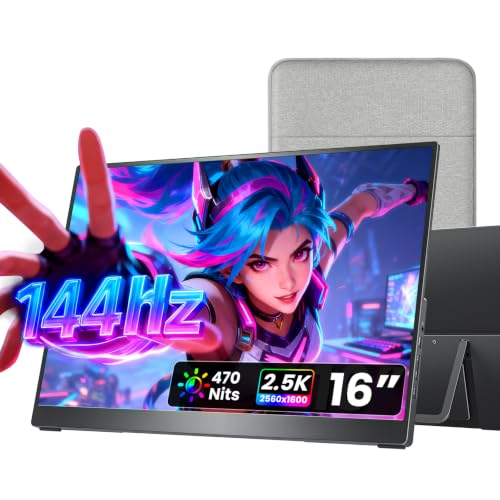
cocopar Portable Monitor 16 Inch 2.5K QHD 110% sRGB 144Hz USB-C, 120Hz HDMI

Our verdict: The most complete feature set in the budget tier.

The cocopar is a 16 inch panel running 2.5K QHD at 144Hz over USB-C and 120Hz over HDMI, covering 110% sRGB, in a metal chassis with two VESA holes and a full HDMI port next to its pair of USB-C inputs. It sits in the $100 to $200 bucket. The metal body resists flexing in a bag, which a thin plastic shell does not.

Pole position goes to the cocopar because it is the only pick that combines a sharp panel, high refresh and sturdy build. Against the ARZOPA 2.5K, it drops color range but adds refresh rate.

Buy it for laptop users who also game. The caveats are that it sits near the price ceiling and refresh drops to 120Hz over HDMI. Skip it if you only need basic 1080p.

Display
16-inch 2.5K QHD
Refresh
144Hz USB-C, 120Hz HDMI
Color
110% sRGB
Ports
Full HDMI, 2x USB-C

What we like

  • +Sharp 2.5K QHD panel
  • +144Hz over USB-C
  • +Metal chassis
  • +Dual VESA holes

Watch out for

  • −Near the price ceiling
  • −Refresh drops on HDMI

Buy it if: Laptop users who also game.

Skip it if: You only need basic 1080p.

2

Best Sharp Picture

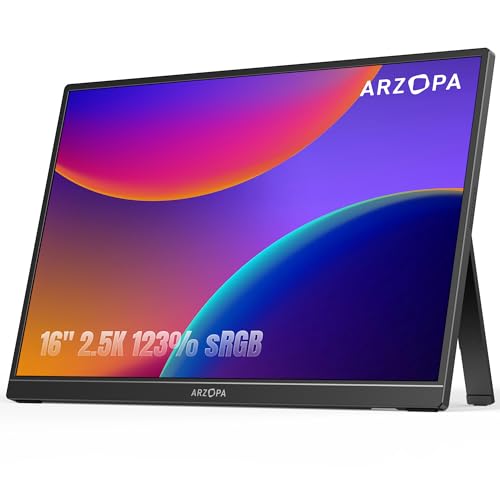
ARZOPA 16" 2.5K Portable Monitor, 2560x1600 QHD IPS Display 123% sRGB

Our verdict: A crisp, light 16-inch screen with wide color.

The ARZOPA is a 16 inch 2560x1600 IPS monitor with 123% sRGB, 350 nits, eye care technology, USB-C and HDMI, weighing 1.46 lb. It sits in the $100 to $200 bucket. At 2560x1600, text looks print-sharp on a 16 inch panel, and wide color helps photo editing.

The 2.5K ARZOPA is runner-up as it matches the cocopar on sharpness and beats it on color range, but it lists no high refresh rate. It is also the lighter of the two, a small advantage for a bag.

Buy it for editing and reading on the go. The caveat is no stated high refresh, so skip it if you want fast gaming, and note that it lists one HDMI-style input.

Display
16-inch 2560x1600
Color
123% sRGB
Brightness
350 nits
Weight
1.46 lb

What we like

  • +Very sharp 2560x1600
  • +Wide 123% sRGB color
  • +Light at 1.46 lb
  • +Eye care technology

Watch out for

  • −No high refresh listed
  • −One HDMI-style input

Buy it if: Editing and reading on the go.

Skip it if: You want high refresh gaming.

3

Best Large Screen

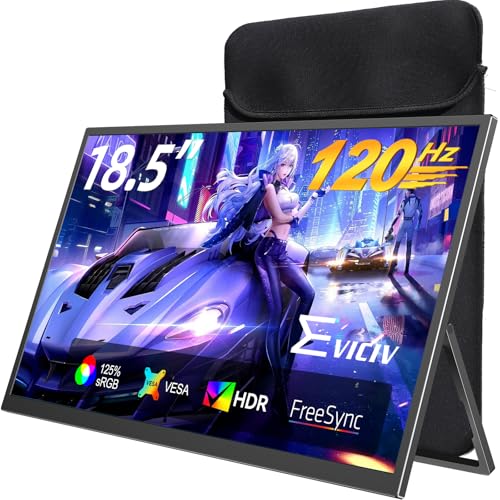
EVICIV Portable Monitor 18.5 Inch 120Hz, 125% sRGB FreeSync

Our verdict: The biggest screen under $200, with a stand that doubles as a mount.

The EVICIV is an 18.5 inch 120Hz panel with 125% sRGB and FreeSync, full-size HDMI, dual USB-C and a 75x75mm VESA bracket with 360 degree rotation. It sits in the $100 to $200 bucket. FreeSync syncs the panel to the graphics card, which removes tearing in games on supported hardware.

The EVICIV takes bronze as its larger screen costs portability: it is heavier and bulkier than the 16 inch picks. What you gain is real screen area and a stand that doubles as a mount.

Buy it for a desk second monitor that sometimes travels. The caveat is that it is less portable, so skip it if weight matters most, and make sure the bag you carry fits an 18.5 inch panel.

Display
18.5-inch 120Hz
Color
125% sRGB
Sync
FreeSync
Mount
75x75mm VESA

What we like

  • +Largest screen here
  • +120Hz with FreeSync
  • +360 degree bracket
  • +Full-size HDMI

Watch out for

  • −Less portable
  • −Bulkier than 16-inch

Buy it if: A desk second monitor that sometimes travels.

Skip it if: Weight matters most.

4

Best for Gaming Budget

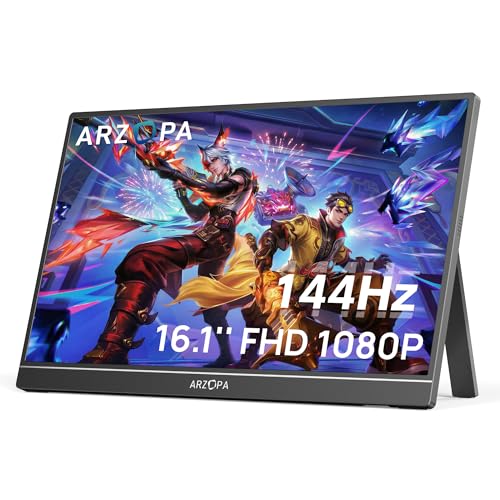
ARZOPA 16.1'' 144Hz Portable Gaming Monitor, 106% sRGB

Our verdict: Real 144Hz for little money, minus adaptive sync.

This ARZOPA is a 16.1 inch 1080p monitor running at 144Hz with 106% sRGB, two USB-C ports, mini-HDMI and a built-in kickstand, in the $50 to $100 bucket. High refresh at 1080p is easy for modest hardware to drive, which suits handheld PCs and consoles.

The 144Hz ARZOPA sits fourth as it is the cheapest route to 144Hz here, but the listing shows no adaptive sync, and the resolution is lower than the 2.5K models. Against the MNN, it doubles the refresh rate.

Buy it for a budget gamer using consoles or handhelds. The caveats are the missing adaptive sync and mini-HDMI only. Skip it if you need sharp text for work.

Display
16.1-inch 1080p
Refresh
144Hz
Color
106% sRGB
Ports
2x USB-C, mini-HDMI

What we like

  • +144Hz at a low price
  • +Built-in kickstand
  • +Two USB-C ports
  • +Wide color coverage

Watch out for

  • −No adaptive sync listed
  • −Mini-HDMI only

Buy it if: Budget gamers using consoles or handhelds.

Skip it if: You need sharp text.

5

Best Proven Basic

KYY Portable Monitor 15.6" 1080P Computer Monitor Screen Extender w/Cover

Our verdict: A dependable travel screen with a cover that folds into a stand.

The KYY is a 15.6 inch 1080p IPS screen with two USB-C ports, mini-HDMI, a cover that doubles as a fixed-angle stand and a weight of 1.7 lb, in the $50 to $100 bucket. A cover that folds into a stand means nothing extra to carry.

The KYY lands fifth as its stand locks into only two angles and the panel is plain 1080p. Against the MNN, it is a bucket higher but more proven in design.

Buy it for occasional travel work. The caveats are only two stand angles and a plain panel, so skip it if you want free tilt, and expect to prop it against something for a custom angle.

Display
15.6-inch 1080p IPS
Ports
2x USB-C, mini-HDMI
Stand
Two fixed angles
Weight
1.7 lb

What we like

  • +Simple, proven design
  • +Cover doubles as stand
  • +Two USB-C ports
  • +Lightweight 1.7 lb

Watch out for

  • −Only two stand angles
  • −Plain 1080p

Buy it if: Occasional travel work.

Skip it if: You want free tilt.

6

Best Cheapest

MNN 15.6" FHD 60Hz Portable Monitor USB-C HDMI IPS HDR

Our verdict: The lowest price in this ranking, with HDR mode.

The MNN is a 15.6 inch FHD 60Hz IPS monitor with HDR mode, dual USB-C, HDMI and multiple display modes, in the $25 to $50 bucket. HDR mode on a budget panel offers modest gains, but it is a feature rivals at this price often skip.

The MNN trails the field as 60Hz and plain 1080p are the baseline here, but nothing else costs less, and the multiple display modes help you tune it for reading or video. Against the KYY, it offers HDMI instead of mini-HDMI.

Buy it for students and first-time buyers. The caveats are only 60Hz and basic panel quality. Skip it if you want high refresh or 2.5K sharpness.

Display
15.6-inch FHD IPS
Refresh
60Hz
Ports
2x USB-C, HDMI
Price
$25-50

What we like

  • +Lowest price here
  • +Dual USB-C plus HDMI
  • +Multiple display modes
  • +HDR mode included

Watch out for

  • −Only 60Hz
  • −Basic panel quality

Buy it if: Students and first-time buyers.

Skip it if: You want high refresh or 2.5K.

Methodology

How We Ranked These

Resolution

We compared 1080p against 2.5K panels and noted how pixel density changes text clarity.

Refresh rate

We looked at listed refresh across USB-C and HDMI, since they can differ.

Ports

We checked for full-size HDMI, dual USB-C and note any adapter exclusions.

Stand and mount

We weighed built-in stands, covers and VESA patterns.

Portability

We used listed weights and screen sizes to judge travel fit.

Every Primea Score uses the same weights: Performance 30% · Build & Materials 20% · Everyday Usability 20% · Value 20% · Owner Satisfaction 10%. Full scoring rules

Buyer's guide

How to Pick the Right One for You

By Primary Use

Start with how you will use it.

UseOur pick
Mixed work and playcocopar 16 Inch 2.5K QHD
Editing and readingARZOPA 16" 2.5K
Big desk second screenEVICIV 18.5 Inch
Console gaming on a budgetARZOPA 16.1'' 144Hz

By Budget

SpendOur pick
$25-50MNN 15.6" FHD
$50-100, basicKYY 15.6" 1080P
$50-100, gamingARZOPA 16.1'' 144Hz
$100-200cocopar 16 Inch 2.5K QHD

2.5K vs 144Hz

2.5K sharpness

Better for text and photos. Picks: cocopar 16 Inch 2.5K and ARZOPA 16" 2.5K.

144Hz speed

Better for motion and games. Picks: ARZOPA 16.1'' 144Hz, and the cocopar 16 Inch also offers both.

Most buyers should choose the cocopar 16 Inch, which covers both.

By Portability

PriorityOur pick
Lightest and sharpestARZOPA 16" 2.5K
Light basic travelKYY 15.6"
Largest screen, less travelEVICIV 18.5 Inch
Cheapest to carry aroundMNN 15.6"

For Laptop Travel Specifically

Look for

Under 2 lb, USB-C video, and a cover or stand that packs flat.

In this ranking

The ARZOPA 16" 2.5K weighs 1.46 lb, and the KYY weighs 1.7 lb with a built-in cover stand.

When to Spend More

Spend more if

You edit, game or want a metal chassis. The cocopar 16 Inch 2.5K covers all three.

Save if

You need an occasional extra screen. The KYY or MNN will do.

Questions

Frequently Asked Questions

Will my laptop work with these?+

Only if its USB-C port supports video output. Otherwise use a mini-HDMI or HDMI connection, which the cocopar, EVICIV and MNN offer in full size or mini form. Mini-HDMI cables are easy to lose, so buy a spare.

What is the common mistake?+

Assuming any USB-C port carries video. Check your device specs first for DisplayPort Alt Mode, since a charge-only port will not light any of these screens. The manual or the maker's support page usually states it.

Is the cocopar worth it over the ARZOPA?+

Yes if you want high refresh and a metal body. The ARZOPA wins on color range and weight at 1.46 lb, so editors and travelers may prefer it.

How do I set it up?+

Connect via USB-C or HDMI, then set extend or mirror in your display settings. The cocopar and EVICIV list two USB-C ports, so you can connect power and video separately, which helps when the laptop port cannot feed the panel.

How do I care for the screen?+

Store it in its cover and clean with a dry microfiber cloth. Never press on the panel, especially on the 16 inch ARZOPA models, which are thin, and carry them in a sleeve, not loose in a bag.

Does the EVICIV need a stand?+

It has a 75x75mm VESA bracket with 360 degree rotation, so you can mount it on an arm. The bracket doubles as its stand on a desk, and the rotation lets you flip it to portrait for reading.

Final take

Buy the cocopar if you want one portable screen that handles laptop work and games. The ARZOPA 2.5K is the better choice for editing and reading on the go, and the EVICIV suits a second desk monitor that sometimes travels. The 144Hz ARZOPA, KYY and MNN cover tighter budgets. Check your laptop's USB-C video support before ordering any of them.

More Ranked & Reviewed Guides