
Primea ReviewsAll Reviews

Primea Reviews is reader-supported. When you buy through our Amazon links we may earn a commission, at no extra cost to you. Rankings are set by our editors and never sold. Learn more

Ranked & Reviewed by Primea Reviews

The 6 Best Portable Monitors for PS5 of 2026, Ranked & Reviewed

By the Primea Editorial TeamUpdated November 1, 202610 min read6 products ranked
The 6 Best Portable Monitors for PS5 of 2026, Ranked & Reviewed

The short answer

The cocopar 18.5 inch 2K QHD at 120Hz is the best portable monitor for PS5, balancing sharpness and frame rate with full-size HDMI. The VisionOwl 15.6 inch 4K suits Fidelity mode, and the cocopar 16 inch gives 120Hz over HDMI for less. The VisionOwl 18.5 inch is a big 1080p panel, the EVICIV adds a large 120Hz screen, and the ARZOPA is the budget pick that needs a mini-HDMI cable.

The Primea Scoreboard

Ranked & Reviewed

  1. The sharpest realistic resolution on a big 18.5 inch panel.

    94Outstanding
    Check price
  2. Four times the pixels of 1080p for Fidelity mode fans.

    90Excellent
    Check price
  3. A metal 16 inch panel that is clear about its HDMI refresh rate.

    87Excellent
    Check price
  4. A large 1080p screen at 2.7 pounds.

    84Very Good
    Check price
  5. 120Hz on a big screen, with FreeSync that is not PS5 VRR.

    81Very Good
    Check price
  6. A low-cost 1080p panel that needs a mini-HDMI cable.

    78Very Good
    Check price

The PS5 plays in two moods. Fidelity mode chases sharper pictures at 30 or 60 frames, and Performance mode trades resolution for 120 frames. A portable monitor leans toward one or the other, and buying a panel that flatters the wrong mode wastes the money. A 4K screen is lovely in a cinematic adventure and a poor reason to pick a 60Hz limit for a shooter.

Our editors ranked six portable monitors from their listings, scored on the Primea framework, with HDMI refresh rate, resolution, port type, size and weight weighted most. Prices appear as buckets. Several listings quote refresh rates for USB-C that the console never uses, so we read the HDMI figure and say where it is missing. Read the HDMI figure before the headline refresh rate.

Before you buy

What Actually Matters

01

Fidelity vs Performance mode

Fidelity favors resolution and Performance favors frame rate. A 4K panel suits the first and a 120Hz panel the second. Decide which mode you use before choosing, since a single monitor rarely does both, and check the listing for the refresh rate that applies to HDMI, which is what the console uses. Marketing often quotes the best number for the other port.

02

HDMI refresh rate

The PS5 connects by HDMI, so the refresh rate on that input is what counts. Some panels quote a higher figure for USB-C, which the console does not use. Look for the HDMI number in the specs, such as 120Hz on the cocopar listings, and be wary when the listing gives one figure for both. A missing HDMI figure is a warning sign.

03

VRR vs FreeSync

FreeSync is a monitor-side feature, while the PS5 uses its own variable refresh support. A FreeSync label does not guarantee console VRR. Treat it as a bonus, not a promise, and check the monitor's documentation for console support before paying for a feature you may not get. Confirm in a console support page if you can.

04

Port type

Full-size HDMI takes a standard cable, while mini-HDMI needs an adapter or special lead. Check the port list and what ships in the box, since a console on a desk should not need a hunt for the right cable. Two USB-C ports also help you power the screen separately, which reduces cable swaps.

05

Screen size and weight

Larger panels are easier to see but harder to carry. Look for a weight in pounds and the diagonal in inches, such as 2.7 lb on the VisionOwl 18.5 inch. Decide whether the monitor will stay at home or travel, and whether you need a kickstand or a VESA mount. A heavier panel needs a sturdier stand.

In-depth reviews

Our Ranked Picks, Reviewed

1

Best Overall

cocopar Portable Monitor 18.5 Inch 2K QHD 120Hz 120% sRGB

Our verdict: The sharpest realistic resolution on a big 18.5 inch panel.

This cocopar pairs an 18.5 inch 2K QHD panel with 120Hz and 120% sRGB. It adds a full-size HDMI port, dual USB-C, a 75x75mm VESA pattern, a kickstand and modest built-in speakers, in the $200 to $500 bucket. 2K QHD is the sweet spot for a console: it is sharper than 1080p yet far easier to drive at 120 frames than 4K.

It ranks first because it balances sharpness and refresh rate on a large screen, which suits both PS5 modes. The VisionOwl 4K is sharper but lists no refresh rate.

Buy it for console players who want a big, sharp panel. The caveats are that it is less pocketable and the speakers are modest. Skip it if you pack light for travel.

Panel
18.5 in 2K QHD
Refresh
120Hz
Color
120% sRGB
Ports
Full-size HDMI, 2x USB-C

What we like

  • +Large 18.5 inch screen
  • +120Hz refresh
  • +Full-size HDMI
  • +VESA plus kickstand

Watch out for

  • −Less pocketable
  • −Speakers are modest

Buy it if: Console players wanting a big sharp panel.

Skip it if: You pack light for travel.

2

Best 4K Fidelity

VisionOwl Portable Monitor 15.6 Inch 4K UHD 145% sRGB

Our verdict: Four times the pixels of 1080p for Fidelity mode fans.

The VisionOwl 15.6 inch is a 4K UHD panel with a claimed 145% sRGB, a full metal chassis, a 75x75mm VESA pattern, USB-C, full-size HDMI and a kickstand, in the $200 to $500 bucket. Four times the pixels of 1080p make Fidelity mode look crisp on a small screen.

It ranks second because 4K only helps if you play in Fidelity mode, and it does not list a refresh rate, so you cannot count on 120 frames in Performance mode. The cocopar covers both modes better.

Buy it for Fidelity mode and cinematic games. The caveats are the unlisted refresh rate and the higher price bucket. Skip it if you prefer 120 frames in shooters.

Panel
15.6 in 4K UHD
Color
145% sRGB claimed
Body
Full metal chassis
Ports
USB-C, full-size HDMI

What we like

  • +True 4K UHD
  • +Metal chassis
  • +Full-size HDMI
  • +Built-in kickstand

Watch out for

  • −Refresh rate not listed
  • −Higher price bucket

Buy it if: Fidelity mode and cinematic games.

Skip it if: You prefer 120 frames in shooters.

3

Best 120Hz HDMI

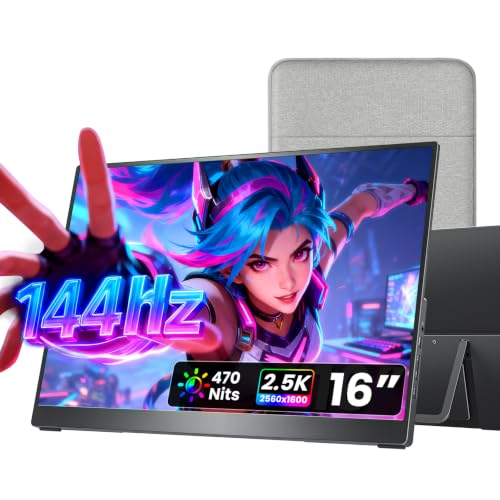
cocopar Portable Monitor 16 Inch 2.5K QHD 110% sRGB 144Hz USB-C, 120Hz HDMI

Our verdict: A metal 16 inch panel that is clear about its HDMI refresh rate.

The cocopar 16 inch is a 2.5K QHD panel with 120Hz over HDMI and 144Hz over USB-C, plus 110% sRGB, a metal chassis, full-size HDMI, dual USB-C and dual VESA holes, in the $100 to $200 bucket. It states the HDMI rate plainly, which is the figure a console uses.

It ranks third because it shrinks the screen next to the 18.5 inch version, but it costs a bucket less and still holds 120Hz over HDMI. Against the VisionOwl 4K, it trades pixel count for speed.

Buy it for Performance mode players who want a compact panel. The caveats are the smaller screen and QHD instead of 4K. Skip it if you want the largest display.

Panel
16 in 2.5K QHD
Refresh
120Hz HDMI, 144Hz USB-C
Body
Metal chassis
Mounting
Dual VESA holes

What we like

  • +120Hz over HDMI
  • +Metal chassis
  • +Dual VESA holes
  • +Lower price bucket

Watch out for

  • −Smaller screen
  • −QHD not 4K

Buy it if: Performance mode players.

Skip it if: You want the largest display.

4

Best Big 1080p

VisionOwl Portable Monitor for Laptop, 18.5 Inch FHD 100Hz

Our verdict: A large 1080p screen at 2.7 pounds.

This VisionOwl is an 18.5 inch FHD panel at 100Hz with 125% sRGB, full-size HDMI, dual USB-C, a 75x75mm VESA pattern, a kickstand and a listed weight of 2.7 pounds, in the $100 to $200 bucket. A stated weight is rare in this category, and 2.7 lb is reasonable for a screen this size.

It ranks fourth because its 100Hz ceiling is below the 120Hz of the cocopar and EVICIV, so it cannot fully use Performance mode. 1080p stretched over 18.5 inches also looks softer up close.

Buy it for casual play on a big screen. The caveats are the 100Hz limit and the large 1080p panel. Skip it if you want 120Hz.

Panel
18.5 in FHD
Refresh
100Hz
Weight
2.7 lb
Ports
Full-size HDMI, 2x USB-C

What we like

  • +Large 18.5 inch panel
  • +Listed 2.7 lb weight
  • +Full-size HDMI
  • +VESA plus kickstand

Watch out for

  • −Only 100Hz
  • −1080p at a large size

Buy it if: Casual play on a big screen.

Skip it if: You want 120Hz.

5

Best Value Large 120Hz

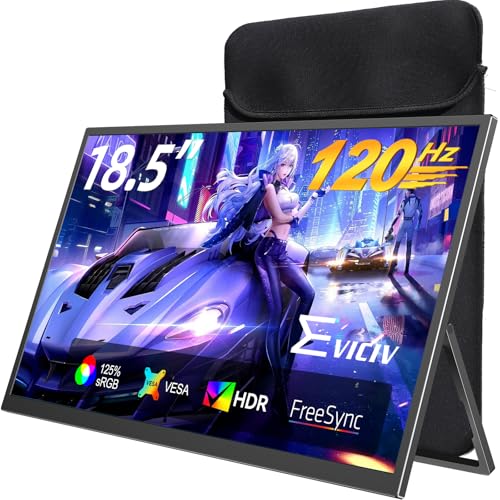
EVICIV Portable Monitor 18.5 Inch 120Hz, 125% sRGB FreeSync

Our verdict: 120Hz on a big screen, with FreeSync that is not PS5 VRR.

The EVICIV offers an 18.5 inch panel at 120Hz with 125% sRGB, FreeSync, a 1ms response claim, full-size HDMI, dual USB-C and a 360 degree VESA bracket, in the $100 to $200 bucket. 120Hz on a large screen at this price is its argument.

It ranks fifth because FreeSync is a different system from the variable refresh the PS5 uses, so the label may not help on a console, and the resolution is not top tier. It still beats the VisionOwl 18.5 inch on refresh rate.

Buy it for a big 120Hz screen at a modest cost. The caveats are the FreeSync mismatch and the unstated resolution. Skip it if you depend on console variable refresh.

Panel
18.5 in, 120Hz
Color
125% sRGB
Response
1ms listed
Mount
360 degree VESA bracket

What we like

  • +120Hz refresh
  • +Large screen
  • +VESA bracket
  • +Full-size HDMI

Watch out for

  • −FreeSync is not PS5 VRR
  • −Resolution not top tier

Buy it if: A big 120Hz screen at a modest cost.

Skip it if: You depend on console VRR.

6

Best Budget Pick

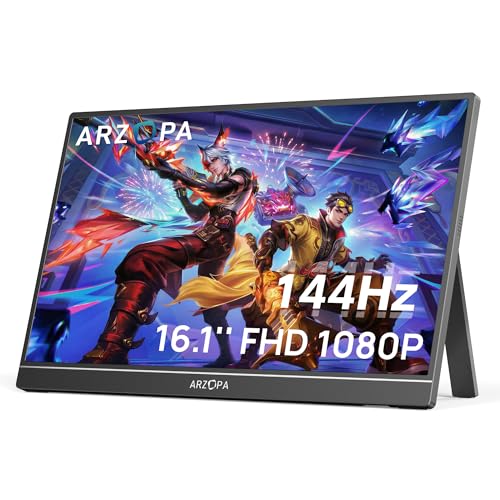
ARZOPA 16.1'' 144Hz Portable Gaming Monitor, 106% sRGB

Our verdict: A low-cost 1080p panel that needs a mini-HDMI cable.

The ARZOPA is a 16.1 inch 1080p panel at 144Hz with 106% sRGB, two USB-C ports, a mini-HDMI input and a built-in kickstand, in the $50 to $100 bucket. No adaptive sync is listed. The console connects through mini-HDMI, so the lead is the practical annoyance.

It ranks last because it needs a mini-HDMI adapter cable for the console and has no adaptive sync, but it is the cheapest panel here. The 144Hz figure may apply to USB-C, so check the HDMI rate.

Buy it for budget console gaming. The caveats are the adapter cable and the missing sync. Skip it if you dislike adapter cables.

Panel
16.1 in 1080p
Refresh
144Hz
Ports
Mini-HDMI, 2x USB-C
Price bucket
$50-100

What we like

  • +Lowest price bucket
  • +144Hz panel
  • +Built-in kickstand
  • +Two USB-C ports

Watch out for

  • −Needs mini-HDMI cable
  • −No adaptive sync listed

Buy it if: Budget console gaming.

Skip it if: You dislike adapter cables.

Methodology

How We Ranked These

Resolution fit

We matched panel resolution to what the PS5 realistically outputs in each mode.

HDMI refresh

We looked for the refresh rate available over HDMI, not USB-C.

Port type

Full-size HDMI beat mini-HDMI for avoiding adapters.

Size and weight

Panel size and listed weight were compared for portability.

Price bucket value

Features were compared within each bucket.

Every Primea Score uses the same weights: Performance 30% · Build & Materials 20% · Everyday Usability 20% · Value 20% · Owner Satisfaction 10%. Full scoring rules

Buyer's guide

How to Pick the Right One for You

By Game Mode

Your preferred PS5 mode points to a resolution or a frame rate.

ModeOur pick
Fidelity (4K)VisionOwl Portable Monitor 15.6 Inch 4K UHD
Performance (120fps)cocopar Portable Monitor 16 Inch 2.5K QHD
Balanced, big screencocopar Portable Monitor 18.5 Inch 2K QHD
Casual playVisionOwl Portable Monitor 18.5 Inch FHD

By Budget

SpendOur pick
$50-100ARZOPA 16.1'' 144Hz Portable Gaming Monitor
$100-200 (large)EVICIV Portable Monitor 18.5 Inch 120Hz
$100-200 (sharp)cocopar Portable Monitor 16 Inch 2.5K QHD
$200-500cocopar Portable Monitor 18.5 Inch 2K QHD

4K vs 120Hz

4K

Maximises detail in Fidelity mode. The VisionOwl 15.6 inch is the only 4K pick.

120Hz

Gives smoother motion in Performance mode. The cocopar models and EVICIV deliver it.

Most PS5 owners should default to 120Hz QHD, since it suits more games at this screen size.

By Screen Size

SizeOur pick
15.6 inchVisionOwl Portable Monitor 15.6 Inch 4K UHD
16 inchcocopar Portable Monitor 16 Inch 2.5K QHD
16.1 inchARZOPA 16.1'' 144Hz Portable Gaming Monitor
18.5 inchEVICIV Portable Monitor 18.5 Inch 120Hz

For Dorm Rooms Specifically

Look for

A kickstand, a VESA pattern and a screen big enough for desk use.

In this ranking

The cocopar 18.5 inch includes a kickstand and VESA, and the ARZOPA is the cheapest.

When to Spend More

Spend more if

You want the best all-round screen, the cocopar 18.5 inch, or 4K detail from the VisionOwl.

Save if

Budget rules, in which case the ARZOPA or EVICIV does the job.

Questions

Frequently Asked Questions

Will a portable monitor work with PS5 audio?+

Use the monitor's headphone jack or the controller. Built-in speakers are basic, so most players use headphones through the controller or the monitor's jack, particularly with the cocopar or VisionOwl models. Wireless headsets pair with the console directly.

Do I need a special HDMI cable?+

A standard cable works with full-size HDMI. The ARZOPA needs a mini-HDMI lead, so buy the right one before the console arrives, and check the length for your desk. Standard cables only fit the full-size ports.

Is 4K worth it on a 15.6 inch screen?+

Only if you play in Fidelity mode and sit close. Otherwise 120Hz QHD, like the cocopar 18.5 inch, feels smoother and drives more easily. The console renders fewer pixels at 120 frames.

Can I power it from the PS5?+

Some draw power over USB-C from the console, but a wall adapter is safer and avoids a dim picture. A screen that sags in brightness is usually underpowered, so use the charger supplied. A weak USB port may also drop the signal.

Does PS5 support FreeSync?+

Not directly. The PS5 uses its own variable refresh support, which is separate from FreeSync, so FreeSync on the EVICIV is a bonus at best. Do not pay extra for it alone.

How do I protect the screen in a bag?+

Use a sleeve or case, and avoid stacking heavy items on it, since the thin panel flexes. The metal chassis on the cocopar and VisionOwl adds some protection, but screens still crack. Pressure on the panel is the usual cause.

Final take

Buy the cocopar 18.5 inch for a console player who wants a sharp and fast panel, and the VisionOwl 4K if Fidelity mode and cinematic games are the priority. The cocopar 16 inch is the compact 120Hz choice, and the EVICIV is a large value screen. Take the ARZOPA only if the mini-HDMI lead is not an annoyance. Read the HDMI refresh rate before the headline number.

More Ranked & Reviewed Guides