

Primea ReviewsAll Reviews

Primea Reviews is reader-supported. When you buy through our Amazon links we may earn a commission, at no extra cost to you. Rankings are set by our editors and never sold. Learn more

Ranked & Reviewed by Primea Reviews

The 6 Best Portable Monitors for Coding of 2026, Ranked & Reviewed

By the Primea Editorial TeamUpdated November 1, 202610 min read6 products ranked
The 6 Best Portable Monitors for Coding of 2026, Ranked & Reviewed

The short answer

The VisionOwl 16 inch 2.5K is the best portable monitor for coding: 2560x1600, 470 nits and a metal chassis with portrait support. The cocopar 2.5K adds a taller 16:10 canvas, and the ARZOPA is the lightest sharp panel at 1.46 lb. The EVICIV gives width for split panes, and the 1080p models are for tighter budgets.

The Primea Scoreboard

Ranked & Reviewed

  1. The sharpest text and brightest panel of the group, in a metal shell.

    94Outstanding
    Check price
  2. A tall 16:10 screen that gives code more vertical room.

    92Outstanding
    Check price
  3. The lightest sharp panel here, at 1.46 lb.

    89Excellent
    Check price
  4. More width for side-by-side editing, with lower pixel density.

    86Excellent
    Check price
  5. A proven, plain 1080p screen for coders who do not obsess over sharpness.

    82Very Good
    Check price
  6. The cheapest way to test a second screen, with portrait support.

    78Very Good
    Check price

Developers usually shop portable monitors by diagonal inches and overlook the number that governs eye comfort: pixel density. Spread 1080p across 16 inches and monospaced text shows visible stair-stepping, which most people notice around the third hour. Packing 2560x1600 pixels into the same panel redraws every glyph with smooth edges, and that is why the sharp panels sit at the top of this list.

We reviewed six portable monitors on paper, comparing resolution, aspect ratio, input options, stand design and portrait support. Everything comes from spec sheets and listing details, and each pick is ranked by how well it serves someone who lives in an editor, a terminal and a browser at once. A refresh rate boost mattered little, since code does not animate.

Before you buy

What Actually Matters

01

Resolution and pixel density

Pixel density is how many pixels sit in each inch of screen, and it controls how crisp small text looks. A 16-inch 2560x1600 panel renders code glyphs with far less stair-stepping than a 1080p panel of the same size. Check the listing for the exact pixel count, not just words like HD or sharp, because that number decides how readable text will be.

02

Aspect ratio

Aspect ratio is the shape of the screen. A 16:10 panel is taller than a 16:9 one, which means more lines of code visible before you scroll. Look for 2560x1600 or 16:10 in the spec list to confirm. The cocopar 2.5K and VisionOwl use that taller shape, while the 1080p models and the EVICIV are wider.

03

Ports and cables

Portable monitors take power and video through USB-C, or video through HDMI. A full-size HDMI port works with more devices than mini-HDMI, which often needs an adapter. Confirm that your laptop's USB-C port supports video output before relying on a single-cable setup, since some ports only charge.

04

Stand and portrait mode

Developers often rotate a monitor to portrait to read long files and logs. A kickstand or cover that supports portrait makes this possible without a separate arm. Look for the word portrait or VESA holes in the listing. The VisionOwl and KYY name portrait support, and the EVICIV rotates on its bracket.

05

Brightness

Nits measure how bright the panel gets, which matters in lit rooms or near windows. Around 350 nits is workable indoors and 470 nits handles bright rooms better. Check the figure in the title or bullet list, since some listings omit it. The VisionOwl lists 470 and the ARZOPA 350, while the cocopar gives none.

In-depth reviews

Our Ranked Picks, Reviewed

1

Best Overall

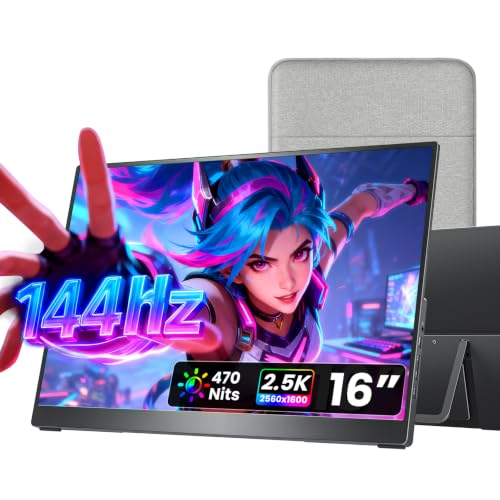
VisionOwl Portable Monitor 16 Inch 2.5K QHD 144Hz, 470 Nits

Our verdict: The sharpest text and brightest panel of the group, in a metal shell.

VisionOwl builds a 16 inch, 2560x1600 screen that reaches 470 nits inside a metal shell. Inputs are a standard HDMI jack and two USB-C ports, there are two VESA holes, and the kickstand holds the panel in portrait. More pixels per inch than a 1080p screen means small code glyphs render cleanly, and 470 nits is the highest brightness listed in the group.

It ranks first because it combines sharp text, brightness and a sturdy build. The cocopar has a taller aspect ratio but gives no brightness figure, and the ARZOPA is dimmer at 350 nits.

Buy it for the sharpest text over long sessions. The caveats are a mid-range price and a 144Hz refresh rate you will rarely use in an editor. Skip it if you want only a cheap second screen for occasional use.

Panel
16-inch 2560x1600
Brightness
470 nits
Ports
Full-size HDMI, dual USB-C
Mounting
Dual VESA holes

What we like

  • +Highest brightness listed here
  • +Metal chassis feels solid
  • +Kickstand supports portrait mode
  • +Full-size HDMI included

Watch out for

  • −Mid-range price tier
  • −Refresh rate wasted for coding

Buy it if: Developers who want the sharpest text for long sessions.

Skip it if: You only need a cheap second screen for occasional use.

2

Best 16:10 Canvas

cocopar Portable Monitor 16 Inch 2.5K QHD 110% sRGB 144Hz USB-C, 120Hz HDMI

Our verdict: A tall 16:10 screen that gives code more vertical room.

The 2.5K cocopar also measures 16 inches at 2560x1600 but uses the taller 16:10 shape. It covers 110% sRGB, wraps the panel in metal, and offers a full HDMI port, two USB-C inputs and a pair of VESA holes. A 16:10 shape is taller than a typical 16:9 screen, which shows more lines of code before you scroll.

It ranks second because no brightness figure is listed and it costs about the same as the VisionOwl. It wins on vertical room.

Buy it if you read and edit long files all day. Skip it if you want the brightest possible panel for sunny rooms. The metal build suits a bag, and VESA holes allow arm mounting. Because the brightness is not listed, check it with the seller before buying for a window desk.

Panel
16-inch 2560x1600, 16:10
Color
110% sRGB
Ports
Full-size HDMI, dual USB-C
Mounting
Dual VESA holes

What we like

  • +Extra vertical space for code
  • +Sharp 2.5K resolution
  • +Metal chassis build
  • +Two USB-C plus HDMI

Watch out for

  • −No brightness figure listed
  • −Mid-range price tier

Buy it if: People who read and edit long files all day.

Skip it if: You want the brightest possible panel for sunny rooms.

3

Best for Daily Carry

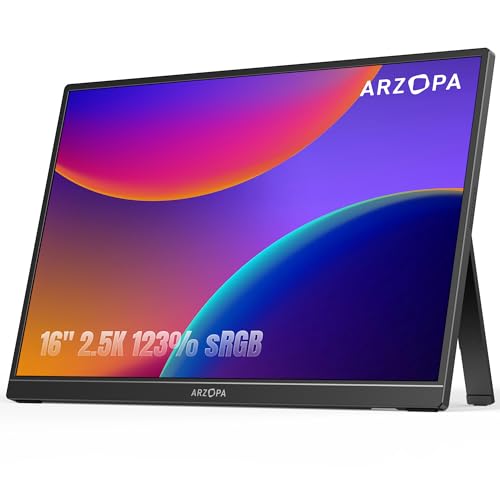
ARZOPA 16" 2.5K Portable Monitor, 2560x1600 QHD IPS Display 123% sRGB

Our verdict: The lightest sharp panel here, at 1.46 lb.

ARZOPA squeezes a 2560x1600 IPS panel into a 1.46 lb body, with 123% sRGB, eye care technology, 350 nits, an attached stand, USB-C and HDMI. Sharp pixels in a light body suit developers who carry a monitor between desks.

It ranks third because it is dimmer than the top two and offers no VESA holes. It beats them on weight.

Buy it for daily commutes. Skip it if you want to mount it on a VESA arm. A built-in stand means fewer parts to lose in a bag, and the low weight is the reason to pick it over the VisionOwl. Eye care mode cuts blue light on night sessions, though brightness trails the top two.

Panel
16-inch 2560x1600 IPS
Brightness
350 nits
Weight
1.46 lb
Color
123% sRGB

What we like

  • +Light at 1.46 lb
  • +Sharp 2.5K IPS panel
  • +Wide 123% sRGB listed
  • +Eye care mode

Watch out for

  • −Dimmer than the top two
  • −Built-in stand only

Buy it if: Commuters who carry a monitor every day.

Skip it if: You want to mount it on a VESA arm.

4

Best for Split Panes

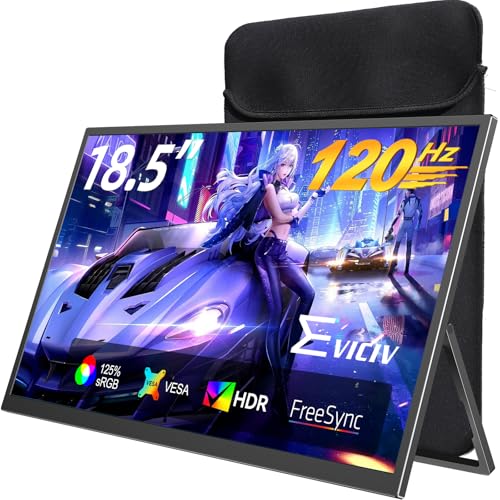
EVICIV Portable Monitor 18.5 Inch 120Hz, 125% sRGB FreeSync

Our verdict: More width for side-by-side editing, with lower pixel density.

At 18.5 inches and 120Hz, the EVICIV is the biggest screen here, with 125% sRGB, FreeSync, standard HDMI, two USB-C ports and a 75x75mm VESA bracket that turns through 360 degrees. More width gives you side-by-side editor and terminal windows without cramping either.

It ranks fourth because text is softer at this size and the screen is bulky for travel. It gives up the density of the 2.5K models.

Buy it for a desk setup that runs split-pane editing. Skip it if you travel with your monitor. A rotating bracket makes portrait easy, so logs and long files fit down the side. Expect to raise font sizes slightly, because pixel density is lower than on the 16 inch 2.5K models.

Size
18.5-inch, 120Hz
Color
125% sRGB, FreeSync
Ports
Full-size HDMI, dual USB-C
Mounting
75x75mm VESA, 360 degree bracket

What we like

  • +Largest screen in this guide
  • +Rotating VESA bracket
  • +FreeSync supported
  • +Full-size HDMI included

Watch out for

  • −Softer text at this size
  • −Bulky for travel

Buy it if: Desk setups that run split-pane editing.

Skip it if: You travel with your monitor.

5

Best Value 1080p

cocopar Portable Monitor 15.6 Inch 1080P FHD 60Hz 85% sRGB

Our verdict: A proven, plain 1080p screen for coders who do not obsess over sharpness.

The 1080P cocopar is a 15.6 inch, 60Hz screen with 85% sRGB, an HDMI port of normal size, two USB-C inputs and two VESA holes. It is a plain second screen with a straightforward setup.

It ranks fifth because the pixel density is lower and the color coverage is the narrowest listed. Text looks coarser than on the 2.5K models.

Buy it if you want a dependable second screen on a budget. Skip it if text sharpness is your top priority. You may raise the font size to compensate, which reduces the space you gain, so weigh the saving against the lost workspace. Two VESA holes still allow an arm if your desk is crowded.

Panel
15.6-inch 1080p, 60Hz
Color
85% sRGB
Ports
Full-size HDMI, dual USB-C
Mounting
2 VESA holes

What we like

  • +Full-size HDMI included
  • +Two VESA mounting holes
  • +Well-regarded basic panel
  • +Simple plug-in setup

Watch out for

  • −Lower pixel density
  • −Narrowest color coverage listed

Buy it if: Budget-minded coders who want a dependable second screen.

Skip it if: Text sharpness is your top priority.

6

Best Starter Screen

KYY Portable Monitor 15.6" 1080P Computer Monitor Screen Extender w/Cover

Our verdict: The cheapest way to test a second screen, with portrait support.

KYY sells a 15.6 inch 1080p IPS screen that weighs 1.7 lb, with two USB-C inputs, a mini-HDMI jack and a magnetic cover that doubles as a portrait-capable stand. It is the cheapest way to test a second screen.

It ranks last because text is the least sharp and mini-HDMI needs a special cable. It is a trial buy.

Buy it as a first-time portable monitor. Skip it if you code all day and want crisp text. Portrait mode works through the cover stand, and the magnetic cover protects the panel in a bag. Plan on a mini-HDMI cable if you use HDMI sources, since the adapter is rarely included.

Panel
15.6-inch 1080p IPS
Ports
2x USB-C, mini-HDMI
Stand
Magnetic cover, portrait capable
Weight
1.7 lb

What we like

  • +Lowest price bucket here
  • +Portrait mode supported
  • +Magnetic cover stand
  • +Two USB-C ports

Watch out for

  • −Least sharp text
  • −Mini-HDMI needs special cable

Buy it if: First-time buyers testing a second screen.

Skip it if: You code all day and want crisp text.

Methodology

How We Ranked These

Pixel density

We favored 2560x1600 panels because they render small code fonts more cleanly than 1080p at the same size.

Aspect ratio

16:10 screens show more lines of code, so they were weighted above 16:9 where the specs allowed.

Input flexibility

Full-size HDMI and dual USB-C ports earn credit because they work with laptops, desktops and consoles.

Stand and mounting

Portrait support and VESA holes matter for coders who rotate the screen to read long files.

Portability

Weight and stand design decide whether a monitor actually leaves the desk.

Every Primea Score uses the same weights: Performance 30% · Build & Materials 20% · Everyday Usability 20% · Value 20% · Owner Satisfaction 10%. Full scoring rules

Buyer's guide

How to Pick the Right One for You

By Screen Priority

Decide what matters most for your editor layout, then match it to a pick.

PriorityOur pick
Sharpest textVisionOwl Portable Monitor 16 Inch 2.5K
Most lines of code visiblecocopar Portable Monitor 16 Inch 2.5K
Lightest to carryARZOPA 16" 2.5K Portable Monitor
Widest workspaceEVICIV Portable Monitor 18.5 Inch
Basic second screencocopar Portable Monitor 15.6 Inch 1080P

By Budget

SpendOur pick
Under $100KYY Portable Monitor 15.6" 1080P
$100 to $200, plain panelcocopar Portable Monitor 15.6 Inch 1080P
$100 to $200, sharp textARZOPA 16" 2.5K Portable Monitor
$100 to $200, brightestVisionOwl Portable Monitor 16 Inch 2.5K

2.5K vs 1080p

2.5K panels

Pack more pixels into the same area, so text looks cleaner. Picks: VisionOwl, cocopar 16 Inch, ARZOPA 16 Inch.

1080p panels

Cost less and demand less from your laptop, but text looks coarser. Picks: cocopar 15.6 Inch, KYY.

Most coders should default to 2.5K unless the budget is tight.

By Mounting Style

SetupOur pick
VESA arm, dual holesVisionOwl Portable Monitor 16 Inch 2.5K
VESA arm, 75x75mm bracketEVICIV Portable Monitor 18.5 Inch
Portrait on a cover standKYY Portable Monitor 15.6"
Built-in stand onlyARZOPA 16" 2.5K Portable Monitor

For Remote Developers Specifically

Look for

Sharp text, portrait support, and a single USB-C cable connection to the laptop.

In this ranking

The VisionOwl covers all three with a metal body, while the ARZOPA is the pick if weight matters more.

When to Spend More

Spend more if

You code for hours daily. The VisionOwl or cocopar 16 Inch will be easier on your eyes than the 1080p picks.

Save if

You want to try a second screen. The KYY or cocopar 15.6 Inch gets you started cheaply.

Questions

Frequently Asked Questions

Do portable monitors work with any laptop?+

They need either a USB-C port with video output or an HDMI port. If your laptop's USB-C port is charge-only, use the HDMI input on the monitor instead and power it separately, which works with any laptop that has a video port.

Is 1080p enough for coding?+

It works, but text on a 15.6-inch 1080p screen looks coarser than on a 2560x1600 one. Many developers raise the font size to compensate, which cuts the extra screen space you bought the monitor for, so a 2.5K panel is the better value.

Is a 144Hz refresh rate useful for coding?+

Not really. A higher refresh rate smooths scrolling slightly, but pixel density and screen shape affect editing comfort far more. The VisionOwl's 144Hz is a bonus, not a reason to buy, since scrolling code rarely taxes a display.

Is the 18.5-inch EVICIV worth it over a 16-inch?+

Only if it stays on a desk. The extra width helps with side-by-side windows, but you give up the sharper 2.5K text of the 16-inch models and add bulk to your bag.

How do I use a portable monitor in portrait mode?+

Rotate the stand or use a VESA bracket, then set the screen orientation in your operating system's display settings, then check that the cable does not strain. The KYY cover and VisionOwl kickstand both support portrait.

Do these monitors need their own power supply?+

Most can draw power over USB-C from the laptop, but that drains the battery faster. Plugging in a separate USB-C charger keeps the monitor at full brightness and spares the laptop battery.

Final take

The VisionOwl 16 inch 2.5K is the right portable monitor for most developers, because sharp text and brightness matter more than refresh rate. Choose the cocopar 2.5K for taller code views, the ARZOPA for travel and the EVICIV for a fixed desk. Buy pixel density first.

More Ranked & Reviewed Guides