
Primea ReviewsAll Reviews

Primea Reviews is reader-supported. When you buy through our Amazon links we may earn a commission, at no extra cost to you. Rankings are set by our editors and never sold. Learn more

Ranked & Reviewed by Primea Reviews

The 7 Best NVMe Enclosures Under $50 of 2026, Ranked & Reviewed

By the Primea Editorial TeamUpdated November 4, 20269 min read7 products ranked
The 7 Best NVMe Enclosures Under $50 of 2026, Ranked & Reviewed

The short answer

The WAVLINK M.2 SSD Enclosure is the best NVMe case under $50 because it runs 20Gbps over USB-C and lists support up to 16TB. The Thermalright HR-EB120 matches the 20Gbps speed with active cooling for less. The MAIWO Dual Bay is the pick for two drives, and the JEYI covers the most M.2 lengths. Remember, a 20Gbps case only helps if your port can also deliver it.

The Primea Scoreboard

Ranked & Reviewed

  1. An NVMe-only case with 20Gbps USB-C and support for drives up to 16TB.

    91Excellent
    Check price
  2. 20Gbps in an aluminum case with active cooling and triple-layer thermal bonding, for under $25.

    89Excellent
    Check price
  3. Two NVMe bays behind a 10Gbps Type-C port, for backups and cloning.

    87Excellent
    Check price
  4. Fits 2230, 2242, 2260 and 2280 drives, with a status LED and full aluminum body.

    85Excellent
    Check price
  5. A red 10Gbps NVMe case with an exclusive four-layer cooling system.

    83Very Good
    Check price
  6. 06
    FIDECO M.2 NVMe SSD Enclosure

    Best Tool-Free Install

    FIDECO M.2 NVMe SSD Enclosure

    A tool-free NVMe case that promises fast speeds and broad compatibility.

    81Very Good
    Check price
  7. 07
    V VCOM M.2 NVMe SSD Enclosure

    Best Basic Carry Case

    V VCOM M.2 NVMe SSD Enclosure

    A plain 10Gbps PCIe NVMe case that is easy to carry and honest about its limits.

    79Very Good
    Check price

The mistake with a cheap NVMe enclosure is blaming the SSD. A fast drive in the wrong case will crawl, because the bridge chip, the USB port on your computer and the cable all cap the speed, and a drive that overheats will throttle itself within minutes of a large copy. People then return the SSD, not the enclosure.

So this ranking is built around the case, not the drive. We reviewed seven NVMe enclosures that all sit in the lowest price bands, and scored them on the Primea framework with interface speed, thermal design and drive compatibility weighted most. We favored cases that state their limits clearly over ones that only say fast.

Before you buy

What Actually Matters

01

Interface speed

The enclosure's USB speed, 10Gbps or 20Gbps, caps your transfers no matter how fast the SSD is. A 20Gbps case needs a matching 20Gbps port and cable to help. Check your computer's port speed first, and buy 20Gbps only if the port supports it, otherwise the extra speed goes unused.

02

NVMe versus SATA

M.2 drives come in NVMe and SATA types that look nearly identical but use different protocols. An NVMe-only case, such as the WAVLINK or VCOM, will not read a SATA M.2 drive. Look at the key notches and your drive's model number, and read the listing's compatibility line before ordering.

03

Cooling

Fast SSDs generate heat, and a hot drive throttles, meaning transfer speed falls partway through a large copy. Active cooling, as on the Thermalright, or a multi-layer passive design, as on the ZeroneTeck, keeps temperatures down. Look for a cooling description on the listing, especially if you move large video files.

04

Drive length

M.2 drives come in lengths such as 2230, 2242, 2260 and 2280. Most cases fit 2280 only. The JEYI lists all four, which helps if your drive comes from a handheld console or a thin laptop. Find the length in your drive's specifications, and confirm the case lists it explicitly.

05

Capacity and cabling

Enclosures list a maximum supported capacity, such as the WAVLINK's 16TB. Larger drives can fail to mount if the bridge chip is not rated for them. Check that the listing's limit exceeds your drive, and use the cable that ships in the box, because a poor cable can drop you to slower speeds.

In-depth reviews

Our Ranked Picks, Reviewed

2

Best Cooled 20Gbps

Thermalright HR-EB120 20G C Black-Aluminum housing with Active Cooling

Our verdict: 20Gbps in an aluminum case with active cooling and triple-layer thermal bonding, for under $25.

Thermalright lists 20Gbps speed, an aluminum housing, active cooling and triple-layer thermal bonding. Heat is the hidden limit of fast external SSDs: at 20Gbps a drive can climb into throttle territory in the middle of a long copy, and the speed then drops sharply. Active cooling, which usually means a fan, is aimed at exactly that.

It comes second only because the WAVLINK lists a firm 16TB ceiling and NVMe-only focus, while this listing is cut off on its compatibility line. On price it wins, since it sits in the under-$25 band. The tradeoff is that a fan adds a moving part and a little noise.

A smart pick for sustained transfers, such as backups and video offloads. Skip it if you need a silent, fanless desk.

Interface
20Gbps
Housing
Aluminum
Cooling
Active cooling
Price band
Under $25

What we like

  • +Twenty gigabit speed rating
  • +Active cooling resists throttling
  • +Aluminum housing
  • +Under $25 price band

Watch out for

  • −Fan adds noise and wear
  • −Compatibility text incomplete
  • −Needs a 20Gbps port

Buy it if: Anyone copying hundreds of gigabytes at a time.

Skip it if: You want a silent, fanless enclosure.

3

Best Dual-Bay

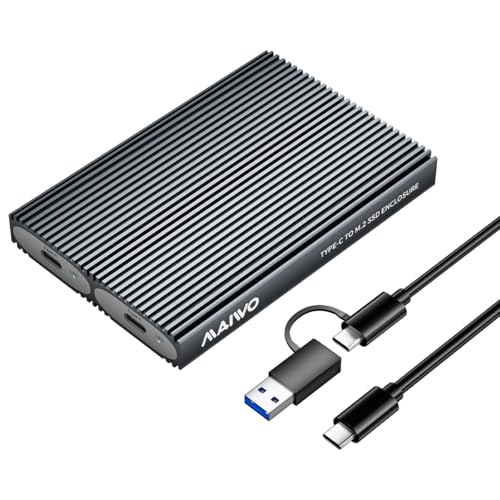
MAIWO Dual Bay M.2 NVMe SSD Enclosure

Our verdict: Two NVMe bays behind a 10Gbps Type-C port, for backups and cloning.

The MAIWO takes two M.2 NVMe drives in one body and connects over a 10Gbps Type-C interface. The listing flags a note on compatibility, which is worth reading, since dual-bay cases often have specific rules about how drives are used together.

It ranks below the single-drive 20Gbps cases because one 10Gbps port is shared between two drives, so you will not see the full speed of both at once. It ranks above the single-bay 10Gbps cases for the second slot, which makes cloning, backup mirroring and offline drive swaps far simpler. The $25 to $50 band is fair for that function.

Buy it if you juggle two drives. Skip it if you need peak speed from a single drive.

Bays
Dual M.2 NVMe
Interface
10Gbps Type-C
Use
Backup and cloning
Price band
$25 to $50

What we like

  • +Holds two NVMe drives
  • +Handy for cloning and backups
  • +Type-C 10Gbps port
  • +Reasonable price band

Watch out for

  • −Port bandwidth is shared
  • −Compatibility note to read
  • −Not 20Gbps

Buy it if: Photographers and IT users who swap or clone drives often.

Skip it if: You need full speed from one drive.

4

Best Size Compatibility

JEYI M.2 NVMe Enclosure 10Gbps USB-C for 2230/42/60/80 SSDs M&M+B Key

Our verdict: Fits 2230, 2242, 2260 and 2280 drives, with a status LED and full aluminum body.

The JEYI is named for its range: it takes 2230, 2242, 2260 and 2280 SSD lengths, and the name includes M and M+B key support. That matters because small 2230 drives from handheld consoles and laptops are common, and many cases only fit the 2280 size.

It sits fourth because it runs at 10Gbps, below the two 20Gbps cases, and the listing highlights a full aluminum thermal design and a status LED instead of active cooling. The LED is more useful than it sounds: it shows when the drive is active, so you know when it is safe to unplug. The under-$25 band is hard to beat.

Good for anyone with a spare small drive or a mix of sizes. Skip it if you need maximum speed.

Interface
10Gbps USB-C
Drive sizes
2230, 2242, 2260, 2280
Body
Full aluminum
Extra
Status LED

What we like

  • +Fits four M.2 lengths
  • +Status LED shows activity
  • +Full aluminum thermal design
  • +Under $25 price band

Watch out for

  • −Limited to 10Gbps
  • −No active cooling
  • −Key types need checking

Buy it if: Owners of small 2230 drives or mixed M.2 sizes.

Skip it if: You need 20Gbps transfer speed.

5

Best Four-Layer Cooling

ZeroneTeck M.2 NVMe SSD Enclosure to USB Adapter

Our verdict: A red 10Gbps NVMe case with an exclusive four-layer cooling system.

ZeroneTeck's red enclosure offers 10Gbps transfer and a four-layer cooling system. The layers are pads and metal paths between the chip and the shell, so the entire body acts as a heatsink. It is a passive approach, so there is no fan to fail.

It ranks fifth because the JEYI covers more drive sizes and the 20Gbps cases are faster, while this one is simply a competent 10Gbps case with a bolder color. The listing says little about which drive lengths it takes, so check that your SSD is 2280 before ordering. The price sits in the under $25 band.

Fits a 2280 NVMe drive that you want to keep cool without a fan. Skip it if your drive is a shorter size.

Interface
10Gbps
Cooling
4-layer passive
Drive type
M.2 NVMe
Price band
Under $25

What we like

  • +Four-layer cooling system
  • +No fan to fail
  • +Under $25 price band
  • +Distinctive red finish

Watch out for

  • −Drive length support unclear
  • −Only 10Gbps
  • −Little compatibility detail

Buy it if: Users with a standard 2280 NVMe drive who want cool, quiet running.

Skip it if: You own a short 2230 or 2242 drive.

6

Best Tool-Free Install

FIDECO M.2 NVMe SSD Enclosure

Our verdict: A tool-free NVMe case that promises fast speeds and broad compatibility.

FIDECO's enclosure is built around tool-free installation: you slide the drive in without a screwdriver. The listing also talks about blazing speeds and broad compatibility, though it gives no figure for either, so those words carry little weight on their own.

It ranks sixth because the competing cases publish a speed, a cooling method or a size range, and this one does not. The tool-free design is the real draw, since tiny M.2 screws vanish easily, and it suits people who swap drives rather than leave one inside permanently. Pricing is under $25.

A sensible choice for casual upgrades and drive rescues. Check the full listing for the interface speed before relying on it for big transfers.

Install
Tool-free
Drive type
M.2 NVMe
Speed claim
Fast, figure not listed
Price band
Under $25

What we like

  • +No screwdriver needed
  • +Good for frequent swaps
  • +Under $25 price band
  • +Simple, compact design

Watch out for

  • −No speed figure in listing
  • −No cooling detail listed
  • −Vague compatibility wording

Buy it if: People who swap drives often and lose tiny screws.

Skip it if: You need a confirmed speed or cooling spec.

7

Best Basic Carry Case

V VCOM M.2 NVMe SSD Enclosure

Our verdict: A plain 10Gbps PCIe NVMe case that is easy to carry and honest about its limits.

The VCOM states plainly that it is only suitable for PCIe NVMe M.2 SSDs, runs at 10Gbps and is easy to carry. That clear warning is useful: SATA M.2 drives look similar but will not work in a PCIe-only case, and many returns come from that exact mixup.

It ranks last because the others add something: 20Gbps, cooling, tool-free fitting or a dual bay. The VCOM gives you a straightforward working case and little else. That can be enough for backups and general file moves, and the under $25 price makes it the easiest to justify.

Buy it as a travel spare or an entry-level case for a single NVMe drive. Skip it if you need cooling for long transfers.

Interface
10Gbps
Drive type
PCIe NVMe only
Form
Easy to carry
Price band
Under $25

What we like

  • +Clear compatibility warning
  • +Easy to carry
  • +Under $25 price band
  • +Straightforward design

Watch out for

  • −No cooling features listed
  • −Only 10Gbps
  • −Nothing sets it apart

Buy it if: Travelers and first-time buyers wanting a basic NVMe case.

Skip it if: You will run long, heavy transfers.

Methodology

How We Ranked These

Interface speed

We ranked 20Gbps cases ahead of 10Gbps ones, since the bridge chip sets the ceiling regardless of the SSD.

Thermal design

We weighed active cooling, multi-layer thermal pads and plain aluminum by how well they limit throttling on long copies.

Drive compatibility

We scored size range, key type support and protocol clarity, because a wrong-protocol drive simply will not work.

Capacity and bays

We credited stated capacity ceilings and the dual-bay layout for flexible storage.

Convenience

We looked at tool-free fitting, status LEDs and portability for everyday use.

Every Primea Score uses the same weights: Performance 30% · Build & Materials 20% · Everyday Usability 20% · Value 20% · Owner Satisfaction 10%. Full scoring rules

Buyer's guide

How to Pick the Right One for You

By Interface Speed

Match the case to the fastest port you actually have.

Your portOur pick
20Gbps USB-C, large drivesWAVLINK M.2 SSD Enclosure
20Gbps USB-C, long copiesThermalright HR-EB120 20G C Black-Aluminum housing with Active Cooling
10Gbps USB-C, small drivesJEYI M.2 NVMe Enclosure 10Gbps USB-C for 2230/42/60/80 SSDs M&M+B Key
10Gbps, two drivesMAIWO Dual Bay M.2 NVMe SSD Enclosure
10Gbps, simple travel caseV VCOM M.2 NVMe SSD Enclosure

By Budget

SpendOur pick
Under $25, fastestThermalright HR-EB120 20G C Black-Aluminum housing with Active Cooling
Under $25, small drivesJEYI M.2 NVMe Enclosure 10Gbps USB-C for 2230/42/60/80 SSDs M&M+B Key
Under $25, cool and quietZeroneTeck M.2 NVMe SSD Enclosure to USB Adapter
Under $25, tool-freeFIDECO M.2 NVMe SSD Enclosure
$25 to $50WAVLINK M.2 SSD Enclosure

Active vs Passive Cooling

Active cooling

A fan moves air over the chip, which holds speed during long copies at the cost of noise and a moving part. Pick: Thermalright HR-EB120.

Passive cooling

Aluminum shells and thermal pads draw heat out silently. Picks: ZeroneTeck, JEYI, WAVLINK and MAIWO.

Default to passive unless you routinely copy hundreds of gigabytes in one go.

By Drive Size

Your driveOur pick
2230, 2242, 2260 or 2280JEYI M.2 NVMe Enclosure 10Gbps USB-C for 2230/42/60/80 SSDs M&M+B Key
Standard 2280 NVMeZeroneTeck M.2 NVMe SSD Enclosure to USB Adapter
Two 2280 NVMe drivesMAIWO Dual Bay M.2 NVMe SSD Enclosure
Very large driveWAVLINK M.2 SSD Enclosure

For Video Editing Specifically

Look for

20Gbps speed, active cooling or a strong thermal design, and a stated capacity ceiling above your drive.

In this ranking

The WAVLINK M.2 SSD Enclosure for capacity and speed, or the Thermalright HR-EB120 if sustained heat is your worry.

When to Spend More

Spend more if

You have a 20Gbps port and a big drive. The WAVLINK lists 16TB support and is the only case in the $25 to $50 band for single drives.

Save if

You use a laptop at 10Gbps. The JEYI or VCOM keeps the cost under $25.

Questions

Frequently Asked Questions

Will a SATA M.2 drive work in these cases?+

Not in the NVMe-only cases. The WAVLINK and VCOM explicitly say NVMe only. If you own a SATA M.2 drive, look for a case that lists SATA support on the page instead, and check the key notches on your drive first.

What is the most common mistake with NVMe enclosures?+

Using a slow port or cable. A WAVLINK or Thermalright on a 5Gbps port runs far below its rating. Plug into your fastest USB-C port and use the cable in the box before blaming the case.

Is the 20Gbps WAVLINK worth it over a 10Gbps case?+

Only with a 20Gbps port and a fast drive. The WAVLINK also lists 16TB support, which helps with large drives. If your computer tops out at 10Gbps, the JEYI or ZeroneTeck delivers the same real-world speed for less.

How do I install the SSD?+

Open the case, seat the drive in the slot, fasten it with the supplied screw or tool-free clip and add the thermal pad. FIDECO is tool-free. Handle the drive by its edges to avoid static damage.

Do I need to clean or maintain the enclosure?+

Keep ports free of dust, eject the drive before unplugging and check the thermal pad if you reopen the case. On the Thermalright, clear the fan intake periodically, since dust slows airflow.

Can I boot an operating system from these?+

Often, yes, but it depends on your computer and the bridge chip. External booting works best at higher speeds, so the WAVLINK and Thermalright are better choices than a basic 10Gbps case. Check your computer's boot options first.

Final take

The WAVLINK M.2 SSD Enclosure is the best NVMe case under $50, with 20Gbps USB-C and room for drives up to 16TB. The Thermalright HR-EB120 is the better buy for long copies thanks to active cooling and an under $25 price. For small or mixed drives, the JEYI fits the widest range. Match the case to your port speed, and buy the 20Gbps models only if the port can use them.

More Ranked & Reviewed Guides