
Primea ReviewsAll Reviews

Primea Reviews is reader-supported. When you buy through our Amazon links we may earn a commission, at no extra cost to you. Rankings are set by our editors and never sold. Learn more

Ranked & Reviewed by Primea Reviews

The 7 Best NVMe Enclosures Under $100 of 2026, Ranked & Reviewed

By the Primea Editorial TeamUpdated November 4, 20269 min read7 products ranked
The 7 Best NVMe Enclosures Under $100 of 2026, Ranked & Reviewed

The short answer

The UGREEN 40Gbps enclosure is the best NVMe case under $100 for most people who already own a drive and a 40Gbps port. The ORICO 40Gbps adds a cooling fan, the ANYOYO pairs 40Gbps with a fan and a dual-chip design, and the ORICO dual-bay clones drives without a PC. The ACASIS 10Gbps and ASUS ROG Arion suit slower ports.

The Primea Scoreboard

Ranked & Reviewed

  1. A 40Gbps enclosure with a dedicated heat-dissipation design, sold without the SSD.

    92Outstanding
    Check price
  2. 40Gbps with multiple heat-dissipation measures and a built-in cooling fan.

    90Excellent
    Check price
  3. A 40Gbps fan-cooled enclosure with a dual-chip design aimed at stability.

    88Excellent
    Check price
  4. A 40Gbps enclosure with a clear tool-free installation design.

    86Excellent
    Check price
  5. Two tool-free bays, 20Gbps, silent passive cooling and PC-free offline cloning.

    84Very Good
    Check price
  6. An aluminum alloy case on USB Type-C 3.2 with two cables included.

    82Very Good
    Check price
  7. A 10Gbps magnetic enclosure with a cooling fan, aimed at 4K@60 video recording.

    79Very Good
    Check price

A fast enclosure only pays off if the port, the cable and the drive all keep up. A 40Gbps enclosure plugged into a 10Gbps laptop port runs at 10Gbps, and an old drive may not saturate even that. The number on the box sets a ceiling, and the cheapest way to waste money is to buy a ceiling you cannot reach.

We ranked seven NVMe enclosures, all in the $50 to $100 bracket, on the Primea framework, scoring link speed, cooling and the installation experience. The spec sheets are short, giving link speeds and headline features but few thermal or controller details, so we flag the gaps rather than guess at them.

Before you buy

What Actually Matters

01

Link speed versus your port

A 40Gbps enclosure needs a 40Gbps port to run at full speed. On a 10Gbps port it will run at 10Gbps. Check your computer's port speed before paying for a faster case. If your port is 10Gbps, the ACASIS or ASUS is enough. Also check the cable: a slow cable quietly caps a fast enclosure, so use the one in the box.

02

Cooling

NVMe drives slow down when hot. Passive designs, such as the UGREEN or the ORICO dual-bay, are silent, while fans on the ORICO 40Gbps, ANYOYO and ACASIS move more air at the cost of noise. Match cooling to how long your transfers run, and remember that a case sitting on a soft surface traps heat whatever the spec says.

03

Tool-free installation

If you swap drives often, a tool-free design saves time and avoids losing tiny screws. The Yottamaster and ORICO dual-bay list it. Otherwise a screw-in design is fine for a drive you install once. Check the listing photos to see how the drive is held, because a loose drive can flex and wear the connector.

04

Dual bays and cloning

A dual-bay case holds two drives and can clone one to the other without a PC. The ORICO dual-bay does this with one key. The catch is that the 20Gbps link is shared, so each drive gets less than a single-bay 40Gbps case.

05

Drive compatibility

Enclosures support M.2 NVMe, and some also support SATA. Check the listing for the drive type, and note that the SSD is usually not included. Confirm the length of M.2 drive supported if you use a long drive, since not every listing states the supported length, and ask the seller when in doubt.

In-depth reviews

Our Ranked Picks, Reviewed

1

Best Overall

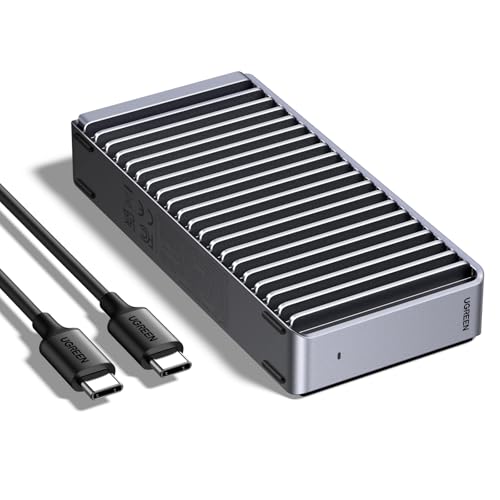
UGREEN 40Gbps M.2 NVMe Enclosure (SSD Not Included)

Our verdict: A 40Gbps enclosure with a dedicated heat-dissipation design, sold without the SSD.

UGREEN pitches this 40Gbps enclosure as quick for large transfers, with a unique heat dissipation design and support for multiple SSD types. The SSD is not included, which is the norm.

It wins by being the cleanest option at this speed: the cooling is built into the shell rather than relying on a small fan that can fail or whine. The ORICO and ANYOYO models use fans, which move more air but add moving parts.

Buy it if your laptop or desktop has a 40Gbps port and you own a spare drive. The caveat is that the listing gives few thermal details, so if you plan multi-hour copies of very large files, watch the case temperature by touch and let it rest between jobs.

Link speed
40Gbps
Cooling
Passive heat dissipation design
Drive
SSD not included
Price
$50 to $100

What we like

  • +40Gbps link speed
  • +Heat dissipation built into shell
  • +No fan to fail
  • +Supports multiple SSD types

Watch out for

  • −Few thermal details listed
  • −SSD sold separately
  • −Needs a 40Gbps port

Buy it if: Buyers who have a spare NVMe drive and a 40Gbps port.

Skip it if: Your computer only has a 10Gbps port.

2

Best Fan-Cooled

ORICO 40Gbps M.2 NVMe SSD Enclosure with Built-in Cooling Fan

Our verdict: 40Gbps with multiple heat-dissipation measures and a built-in cooling fan.

ORICO lists 40Gbps speed, multiple heat dissipation methods, wide compatibility and a built-in cooling fan.

The fan is the difference from the UGREEN: it keeps a fast drive from throttling during long copies of video files. It ranks second because a fan adds noise and a wear item, while the UGREEN's passive design has neither.

Buy it for heavy sustained transfers. The caveat is fan noise, which the listing does not quantify, so it may not suit a silent desk, and a fan that clogs with dust will need an occasional blast of compressed air.

Link speed
40Gbps
Cooling
Built-in fan plus heat dissipation
Compatibility
Wide
Price
$50 to $100

What we like

  • +40Gbps link speed
  • +Built-in cooling fan
  • +Multiple heat dissipation methods
  • +Wide compatibility

Watch out for

  • −Fan noise not stated
  • −Fan is a wear item
  • −Few controller details

Buy it if: Users moving large video or backup files who worry about throttling.

Skip it if: You want a silent enclosure.

3

Best Dual-Chip

ANYOYO 40Gbps M.2 NVMe SSD Enclosure with Cooling Fan

Our verdict: A 40Gbps fan-cooled enclosure with a dual-chip design aimed at stability.

ANYOYO lists 40Gbps transfer, a cooling fan, dual-chip reliability and superior heat dissipation.

It ranks third because the dual-chip claim is a selling point without detail: the listing does not say which chips or how they work. It matches the ORICO on speed and cooling and trails it only in recognizability.

Buy it if the price is right and you want a fan. The caveat is the vague chip description. Without a named controller you cannot check driver support or firmware updates, so read buyer questions on the listing before you commit to it for important backups.

Link speed
40Gbps
Cooling
Fan plus heat dissipation
Design
Dual-chip
Price
$50 to $100

What we like

  • +40Gbps link speed
  • +Cooling fan
  • +Dual-chip design
  • +Heat dissipation focus

Watch out for

  • −Chip details not given
  • −Fan noise not stated
  • −Lesser-known brand

Buy it if: Buyers who want a fan-cooled 40Gbps case and are open to a newer brand.

Skip it if: You want detailed controller information.

4

Best Tool-Free

Yottamaster M.2 NVMe SSD Enclosure 40Gbps

Our verdict: A 40Gbps enclosure with a clear tool-free installation design.

Yottamaster offers 40Gbps speed, wide compatibility and tool-free installation with a clear design.

The tool-free install is the draw: you can swap drives without a screwdriver, handy if you move one drive between machines. It ranks fourth because no cooling feature is listed, and sustained transfers on a fast drive generate heat.

Buy it for easy drive swaps. The caveat is the lack of a stated cooling design, so long transfers may slow as the drive warms, and a clear shell does nothing to move heat away from the controller.

Link speed
40Gbps
Install
Tool-free, clear design
Compatibility
Wide
Price
$50 to $100

What we like

  • +Tool-free installation
  • +40Gbps link speed
  • +Clear design
  • +Wide compatibility

Watch out for

  • −No cooling listed
  • −Few thermal details
  • −SSD sold separately

Buy it if: People who swap drives often and want no tools.

Skip it if: You run long sustained transfers.

5

Best Dual-Bay

ORICO 20Gbps Dual Bay NVMe Enclosure Tool-Free M.2 NVMe Enclosure

Our verdict: Two tool-free bays, 20Gbps, silent passive cooling and PC-free offline cloning.

Two bays share a 20Gbps link, with tool-free installation, 0dB silent passive cooling and a one-key offline clone that works between two drives without a PC.

Offline cloning is the unique feature: you can copy a drive to another without a computer in the middle. It ranks fifth because 20Gbps is shared by two bays and slower than the 40Gbps single-bay cases.

Buy it if cloning is the goal. The caveat is that the same-protocol clone requires matching drives, and the destination must be at least as large as the source, so plan your capacities before you buy a second drive.

Link speed
20Gbps
Bays
Dual, tool-free
Cooling
0dB passive
Feature
One-key offline clone

What we like

  • +Dual bays
  • +PC-free offline cloning
  • +Silent passive cooling
  • +Tool-free installation

Watch out for

  • −20Gbps is shared
  • −Clone needs same protocol
  • −Slower than 40Gbps cases

Buy it if: Buyers who clone drives or run two NVMe drives at once.

Skip it if: You want maximum single-drive speed.

6

Best Known Brand

ASUS ROG Strix Arion Aluminum Alloy M.2 NVMe SSD Enclosure Case Adapter

Our verdict: An aluminum alloy case on USB Type-C 3.2 with two cables included.

The ROG Strix Arion is an aluminum alloy enclosure for M.2 PCIe NVMe drives, using USB Type-C 3.2 and including two cables.

It ranks sixth because the link speed is not listed beyond the USB 3.2 label, and the 40Gbps cases are clearly faster in their listings. The metal body and included cables are real benefits.

Buy it for a brand name and a metal body. The caveat is that speed is less clearly stated, so compare it to a 40Gbps case only if your port is slower anyway, and keep the two cables handy for desktops and laptops alike.

Interface
USB Type-C 3.2
Body
Aluminum alloy
Drive type
M.2 PCIe NVMe
Cables
Two included

What we like

  • +Aluminum body
  • +Two cables included
  • +Known gaming brand
  • +Supports M.2 NVMe

Watch out for

  • −Speed not clearly listed
  • −Slower than 40Gbps cases
  • −No cooling fan

Buy it if: Buyers who want a known brand and a metal body for everyday storage.

Skip it if: You need 40Gbps.

7

Best Magnetic

ACASIS 10Gbps Magnetic M.2 NVMe SSD Enclosure with 4K ProRes Recording

Our verdict: A 10Gbps magnetic enclosure with a cooling fan, aimed at 4K@60 video recording.

The ACASIS runs at 10Gbps, attaches magnetically, has a cooling fan and is marketed for 4K@60 ProRes storage.

It ranks last because 10Gbps is the slowest link here, but the magnetic mount and fan suit a phone-recording workflow. It is a niche product for content creators.

Buy it for recording to a phone. The caveat is that magnetic attachment depends on your device, so check that your phone or case supports it, and confirm that the fan does not add noise to your recordings.

Link speed
10Gbps
Mount
Magnetic
Cooling
Fan
Use
4K@60 recording

What we like

  • +Magnetic attachment
  • +Cooling fan
  • +Aimed at 4K@60 recording
  • +Priced $50 to $100

Watch out for

  • −Slowest link here
  • −Niche use case
  • −Fan noise not stated

Buy it if: Creators who record video straight to an external SSD.

Skip it if: You want a general-purpose fast case.

Methodology

How We Ranked These

Link speed

The listed 10, 20 or 40Gbps ceiling and how it matches common ports.

Cooling

Passive designs, fans and heat dissipation claims, since NVMe drives throttle when hot.

Installation

Tool-free design and the ease of swapping drives.

Special features

Cloning, magnetic mounting and recording support.

Price under $100

All seven sit in the $50 to $100 bracket, so we weigh features per dollar.

Every Primea Score uses the same weights: Performance 30% · Build & Materials 20% · Everyday Usability 20% · Value 20% · Owner Satisfaction 10%. Full scoring rules

Buyer's guide

How to Pick the Right One for You

By Link Speed

Match the enclosure to your port.

PortOur pick
40Gbps, quietUGREEN 40Gbps M.2 NVMe Enclosure (SSD Not Included)
40Gbps, fan-cooledORICO 40Gbps M.2 NVMe SSD Enclosure with Built-in Cooling Fan
20GbpsORICO 20Gbps Dual Bay NVMe Enclosure Tool-Free M.2 NVMe Enclosure
10GbpsACASIS 10Gbps Magnetic M.2 NVMe SSD Enclosure with 4K ProRes Recording

By Budget

SpendOur pick
$50 to $100 (best overall)UGREEN 40Gbps M.2 NVMe Enclosure (SSD Not Included)
$50 to $100 (cloning)ORICO 20Gbps Dual Bay NVMe Enclosure Tool-Free M.2 NVMe Enclosure
$50 to $100 (tool-free)Yottamaster M.2 NVMe SSD Enclosure 40Gbps
$50 to $100 (brand name)ASUS ROG Strix Arion Aluminum Alloy M.2 NVMe SSD Enclosure Case Adapter

Passive vs Fan Cooling

Passive

Silent and no moving parts. The UGREEN and the ORICO dual-bay use passive designs.

Fan

More cooling under sustained load. The ORICO 40Gbps, ANYOYO and ACASIS use fans.

Choose passive for everyday use and a fan for long, heavy transfers.

By Feature

FeatureOur pick
Tool-free installYottamaster M.2 NVMe SSD Enclosure 40Gbps
Offline cloningORICO 20Gbps Dual Bay NVMe Enclosure Tool-Free M.2 NVMe Enclosure
Dual-chip designANYOYO 40Gbps M.2 NVMe SSD Enclosure with Cooling Fan

For Video Recording Specifically

Look for

Magnetic mounting, cooling and a link speed that supports your camera or phone.

In this ranking

The ACASIS 10Gbps Magnetic M.2 NVMe SSD Enclosure is marketed for 4K@60 recording.

When to Spend More

Spend more if

You need sustained 40Gbps transfers; the ORICO 40Gbps with its fan is built for that.

Save if

Your port is slower; the ASUS ROG Strix Arion or ACASIS covers 10Gbps use.

Questions

Frequently Asked Questions

Does the enclosure include an SSD?+

No. The UGREEN is explicitly sold without an SSD, and the others are enclosures only. You add your own M.2 NVMe drive. Check the listing for the supported drive length before you buy.

What mistake do buyers make?+

Buying 40Gbps for a 10Gbps port. The UGREEN or ORICO will run at your port's speed. Check your laptop's port first, and save money with the ACASIS or ASUS if the port is slower.

Is the ORICO 40Gbps worth it over the UGREEN?+

Only if you do long transfers. The ORICO adds a cooling fan, while the UGREEN uses passive heat dissipation. For everyday use the UGREEN's silent design is simpler.

How do I install the drive?+

Open the case, seat the M.2 drive in the slot, and close it. The Yottamaster and ORICO dual-bay are tool-free, so no screwdriver is needed. Format the drive on first use.

How do I keep the drive cool?+

Keep the enclosure in open air, away from soft surfaces. Fan models like the ANYOYO need clear intake. Avoid stacking devices on a passive case such as the UGREEN.

Can the ORICO dual-bay clone without a computer?+

Yes, through its one-key offline clone, as long as both drives use the same protocol. This works without a PC. For regular transfers to a computer, a single-bay 40Gbps case is faster.

Final take

The UGREEN 40Gbps M.2 NVMe Enclosure (SSD Not Included) is the best NVMe enclosure under $100 for most people with a fast port. The ORICO 40Gbps with a fan suits sustained transfers, the ORICO dual-bay handles cloning, and the Yottamaster is the tool-free choice. Match the enclosure to your port speed first.

More Ranked & Reviewed Guides