
Primea ReviewsAll Reviews

Primea Reviews is reader-supported. When you buy through our Amazon links we may earn a commission, at no extra cost to you. Rankings are set by our editors and never sold. Learn more

Ranked & Reviewed by Primea Reviews

The 8 Best Network Switches Under $500 of 2026, Ranked & Reviewed

By the Primea Editorial TeamUpdated November 4, 202610 min read8 products ranked
The 8 Best Network Switches Under $500 of 2026, Ranked & Reviewed

The short answer

The NETGEAR GS308E is the best overall switch: eight gigabit ports with VLANs, QoS and port mirroring in an easy web interface for a small price. The TP-Link TL-SG108S-M2 is the pick for 2.5 gigabit upgrades, and the 10GbE switch with two 10Gb ports suits NAS and workstation links. The TP-Link TL-SG1428PE is the PoE+ choice for cameras and access points.

The Primea Scoreboard

Ranked & Reviewed

  1. Eight gigabit ports with VLANs, QoS and port mirroring for the price of an unmanaged switch.

    94Outstanding
    Check price
  2. 02
    TP-Link TL-SG108S-M2

    Best 2.5 Gigabit Switch

    TP-Link TL-SG108S-M2

    Eight 2.5 gigabit ports that upgrade your wired speed without rewiring to Cat6.

    92Outstanding
    Check price
  3. Two 10Gb RJ45 ports and four 2.5Gb ports for a NAS or workstation uplink.

    90Excellent
    Check price
  4. 04
    TP-Link TL-SG1428PE

    Best PoE+ Switch

    TP-Link TL-SG1428PE

    Twenty-four PoE+ gigabit ports with VLANs for cameras and access points.

    88Excellent
    Check price
  5. 05
    TP-Link TL-SG1024DE

    Best 24-Port Gigabit

    TP-Link TL-SG1024DE

    Twenty-four gigabit ports with jumbo frames and port mirroring in a rack-friendly size.

    86Excellent
    Check price
  6. A compact metal eight-port switch with no software and wall or desk mounting.

    84Very Good
    Check price
  7. 07
    TP-Link TL-SG116

    Best 16-Port Budget

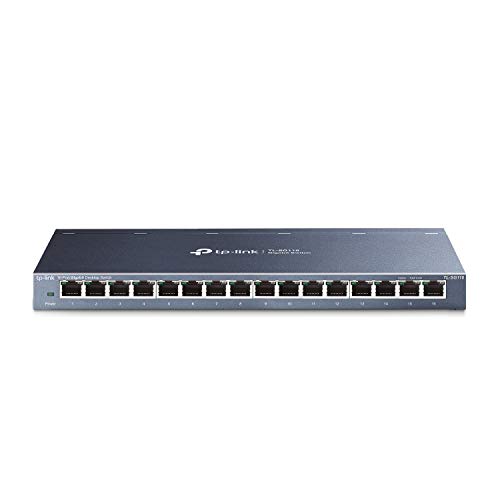
    TP-Link TL-SG116

    Sixteen gigabit ports with energy-efficient design and flow control.

    82Very Good
    Check price
  8. A five-port gigabit plug-and-play switch with flexible mounting options.

    80Very Good
    Check price

Most buyers pick a switch by port count, then discover the real limit is somewhere else. A gigabit switch cannot make a 2.5 gigabit connection faster, a switch without PoE needs a separate power brick for every camera, and an unmanaged switch cannot split a guest network from your work gear. Port count tells you how many things connect, not how well.

So these eight were ranked by what they let you do. The Primea framework weighted port speed and uplink capability highest, then management features such as VLANs and QoS, then PoE and mounting. Everything here sits well under the $500 ceiling, so the decision is about matching the switch to your network rather than stretching a budget.

Before you buy

What Actually Matters

01

Port speed

Switch ports run at gigabit, 2.5 gigabit or 10 gigabit, and each link negotiates down to the slowest device on it. A 2.5G switch like the TL-SG108S-M2 only helps if both ends support it. Check the port speeds on the listing, and verify your NAS, PC and access points have matching ports.

02

Managed versus unmanaged

Unmanaged switches work out of the box with no settings, but they treat every device as equal. Managed or smart switches add VLANs, QoS and monitoring, so a camera or IoT gadget can be fenced off from your laptop. If you want separate guest or IoT networks, look for a stated VLAN count, such as up to 64 on the GS308E.

03

PoE and power budget

PoE switches power devices like cameras and access points over the network cable, so no outlet is needed at the mount point. The standard, such as 802.3at/af on the TL-SG1428PE, defines how much each port can give. The number that bites is the total power budget across all ports at once, so find it on the product page.

04

Port count and growth

Count how many wired devices you have, then add room to grow, since swapping a full switch later means rewiring. Five ports on the GS305 fills quickly, eight is typical for a home, and 16 or 24 suit offices. Remember that one port always goes to the uplink toward your router.

05

Cabling requirements

Gigabit works on Cat5e, 2.5 gigabit also runs on Cat5e for short runs, and 10 gigabit needs better cabling over distance. Cable quality sets the real speed, so a fast switch on old wiring falls back or drops. Check the cable category printed on the jacket or wall plates and confirm the switch's claims.

In-depth reviews

Our Ranked Picks, Reviewed

1

Best Overall

NETGEAR 8-Port Gigabit Ethernet Easy Smart Managed Network Switch (GS308E)

Our verdict: Eight gigabit ports with VLANs, QoS and port mirroring for the price of an unmanaged switch.

NETGEAR's GS308E pairs eight auto-negotiating 1 Gbps ports with an easy smart web interface that runs on Windows, Mac or Linux. Up to 64 VLANs let you split a guest network or IoT devices from your main LAN, QoS prioritizes voice or video, IGMP snooping keeps multicast from flooding ports, and port mirroring helps troubleshoot.

It beats the unmanaged GS108 because those management features cost little extra, and it leads the 2.5 gigabit TP-Link on proven software even though it is slower per port. Compared with the 24-port switches, it is the right size for a desk or media cabinet.

Best for a home lab, a small office or a smart home that wants network segmentation. Caveat: managed settings add a learning curve, and the ports are 1 Gbps, so multi-gig internet plans will exceed them.

Ports
8 x 1 Gbps
Management
Easy smart web GUI
VLANs
Up to 64
Features
QoS, IGMP snooping, port mirroring

What we like

  • +VLANs and QoS at a low price
  • +Works on Windows, Mac, Linux
  • +Port mirroring for troubleshooting
  • +Auto-negotiating gigabit ports

Watch out for

  • −Only gigabit per port
  • −Management has a learning curve
  • −No PoE on any port

Buy it if: Home labs and small offices wanting VLANs and QoS affordably.

Skip it if: You have multi-gig internet or devices.

3

Best for 10 Gigabit Links

10Gbe Ethernet Switch Unmanaged with 2 x 10Gb RJ45 Ports + 4 x 2.5Gb Base-T

Our verdict: Two 10Gb RJ45 ports and four 2.5Gb ports for a NAS or workstation uplink.

This unmanaged switch combines two 10 Gb RJ45 ports with four 2.5 Gb Base-T ports, a layout designed around one fast link plus several mid-speed devices. A typical setup puts a NAS or workstation on a 10 Gb port and runs 2.5G clients off the rest. The listing says it delivers 2.5x faster network performance than gigabit gear and is simple to set up.

It ranks third because six ports is a small count and the unit is unmanaged. Compared with the TL-SG108S-M2, it gives up two ports for a pair of 10G links, a trade that makes sense when a NAS is the bottleneck.

Pick it for video editing storage or a fast server connection. Caveat: reaching 10 Gbps over copper needs good cabling and 10G network cards on both ends.

10 Gb ports
2 x 10Gb RJ45
2.5 Gb ports
4 x 2.5Gb Base-T
Management
Unmanaged
Speed
2.5x faster than gigabit

What we like

  • +Two 10 Gb RJ45 ports
  • +Four 2.5 Gb ports
  • +Simple to set up
  • +Ideal for a NAS uplink

Watch out for

  • −Only six ports in total
  • −Unmanaged, no VLANs
  • −Needs 10G cards and good cable

Buy it if: Creators linking a NAS or workstation at 10 Gbps.

Skip it if: You need many ports or managed features.

6

Best Plug-and-Play Metal Switch

NETGEAR 8-Port Gigabit Ethernet Unmanaged Network Switch (GS108)

Our verdict: A compact metal eight-port switch with no software and wall or desk mounting.

NETGEAR's GS108 delivers eight 1 Gbps ports in a compact metal case that sits on a desk or mounts to a wall. Setup is plug and play with no software to install, which is exactly right for someone who wants more ports behind a router and nothing else. Metal housing also helps with heat.

It ranks sixth because the managed GS308E gives much more control for a small difference in price. The GS108 beats the five-port GS305 on port count, and the TP-Link TL-SG116 on build, but it has no tuning options.

A good fit for a TV cabinet or workbench. Caveat: with no management, you cannot create VLANs or prioritize traffic, and an unmanaged switch cannot tell you what is wrong when something misbehaves.

Ports
8 x 1.0 Gbps
Setup
Plug and play, no software
Case
Compact metal
Mounting
Desktop or wall

What we like

  • +True plug and play
  • +Compact metal build
  • +Desk or wall mounting
  • +Eight gigabit ports

Watch out for

  • −No VLANs or QoS
  • −No diagnostics
  • −Slower than 2.5G rivals

Buy it if: A simple port expansion for a TV cabinet or workbench.

Skip it if: You want any management features.

8

Best Tiny Switch

NETGEAR 5-Port Gigabit Ethernet Unmanaged Network Switch (GS305)

Our verdict: A five-port gigabit plug-and-play switch with flexible mounting options.

The GS305 is the smallest switch in this roundup, with five gigabit ports, plug-and-play operation and flexible mounting. It suits a desk where one wall jack needs to feed a laptop, a printer, a console and a streamer. At this size it is easy to hide behind a monitor or TV.

It finishes last because five ports run out fast, and there are no management features or PoE. It is the one to pick when space and budget matter more than expansion, while the GS108 gives more ports for a modest step up.

Best for a single desk or a bedroom TV setup. Caveat: if you add one more device you will need another switch, so consider the eight-port GS108 if you plan to grow.

Ports
5 x gigabit
Setup
Plug and play, unmanaged
Mounting
Flexible options
Price bucket
Under $25

What we like

  • +Very small footprint
  • +Plug and play setup
  • +Flexible mounting options
  • +Lowest price in the group

Watch out for

  • −Only five ports
  • −No management or PoE
  • −Easy to outgrow

Buy it if: One desk or TV stand needing a few extra ports.

Skip it if: You expect to add more wired devices.

Methodology

How We Ranked These

Port speed

Gigabit, 2.5 gigabit and 10 gigabit ports were compared, because the slowest link in a path caps real speed.

Management features

VLANs, QoS, IGMP snooping and port mirroring were weighed against fully unmanaged plug-and-play designs.

Port count

Five, eight, 16 and 24-port layouts were matched to home, desk and rack scenarios rather than scored by size alone.

PoE support

PoE+ ports that power cameras and access points earned points for installs where outlets are scarce.

Build and mounting

Metal housings, desktop and wall mounting options and energy efficiency were compared for long-term reliability.

Every Primea Score uses the same weights: Performance 30% · Build & Materials 20% · Everyday Usability 20% · Value 20% · Owner Satisfaction 10%. Full scoring rules

Buyer's guide

How to Pick the Right One for You

By Port Speed

Match the switch speed to the fastest device you own.

SpeedOur pick
Gigabit with managementNETGEAR 8-Port Gigabit Ethernet Easy Smart Managed Network Switch (GS308E)
2.5 gigabitTP-Link TL-SG108S-M2
10 gigabit uplink10Gbe Ethernet Switch Unmanaged with 2 x 10Gb RJ45 Ports + 4 x 2.5Gb Base-T
Plain gigabitNETGEAR 8-Port Gigabit Ethernet Unmanaged Network Switch (GS108)

By Budget

SpendOur pick
Under $25NETGEAR 5-Port Gigabit Ethernet Unmanaged Network Switch (GS305)
$25 to $50NETGEAR 8-Port Gigabit Ethernet Easy Smart Managed Network Switch (GS308E)
$50 to $100TP-Link TL-SG108S-M2
$100 to $200TP-Link TL-SG1428PE

Managed vs Unmanaged

Managed or smart

The GS308E adds VLANs, QoS and port mirroring, and the TL-SG1428PE and TL-SG1024DE offer web monitoring.

Unmanaged

The GS108, GS305 and TL-SG116 work instantly with no settings, which suits simple port expansion.

Most homes should buy the GS308E for its management at almost unmanaged prices.

By Port Count

Ports neededOur pick
5 portsNETGEAR 5-Port Gigabit Ethernet Unmanaged Network Switch (GS305)
8 portsNETGEAR 8-Port Gigabit Ethernet Easy Smart Managed Network Switch (GS308E)
16 portsTP-Link TL-SG116
24 portsTP-Link TL-SG1024DE

For Security Cameras Specifically

Look for

PoE or PoE+ ports to power cameras, enough ports for all of them, and VLAN support to isolate camera traffic.

In this ranking

The TP-Link TL-SG1428PE has 24 PoE+ ports with VLAN features, so cameras need no separate power adapters.

When to Spend More

Spend more if

You have 2.5G or 10G devices: the TP-Link TL-SG108S-M2 or the 10GbE switch removes the wired bottleneck.

Save if

Your devices are all gigabit. The NETGEAR GS108 covers them for less.

Questions

Frequently Asked Questions

Do I need Cat6 cable for a 2.5 gigabit switch?+

Not usually. The TP-Link TL-SG108S-M2 is designed to reach 2.5 Gbps over existing Cat5e wiring, which saves you from rewiring walls. For the 10 gigabit links on the 10GbE switch, higher quality cable is advisable over longer runs.

What is the common mistake when buying a switch?+

Buying by port count and ignoring speed. A 24-port TL-SG1024DE is gigabit only, so a 2.5G NAS plugged into it will still be capped at gigabit. Match the ports to your fastest device first, then check the count.

Is the managed GS308E worth it over the GS108?+

For most people yes. It adds up to 64 VLANs, QoS, IGMP snooping and port mirroring in the same eight-port form, while the GS108 is purely plug and play with no tuning. Skip the upgrade only if you will never touch a setting.

How do I set up VLANs on an easy smart switch?+

Connect to the switch with a browser, open the VLAN page on the GS308E and assign each port to a VLAN. Keep your admin port in the default VLAN so you do not lock yourself out.

How do I keep a switch running well?+

Give it airflow, keep cable runs tidy and update firmware on managed units such as the GS308E. The metal GS108 case helps shed heat, while the 24-port TL-SG1428PE and other PoE models need open ventilation because powering devices adds warmth.

Can I power cameras from a normal switch?+

No. Only PoE switches like the TP-Link TL-SG1428PE send power over the cable. With the GS308E or TL-SG108S-M2 you need a separate power adapter or a PoE injector for each camera, which adds clutter at every mount.

Final take

The NETGEAR GS308E is the best value switch in this ranking, giving you eight gigabit ports with VLANs, QoS and port mirroring for the price of a basic box. Upgrade to the TP-Link TL-SG108S-M2 when your devices are 2.5G, or the TL-SG1428PE when you need PoE for cameras. Choose by the speed and power your devices need, not by port count.

More Ranked & Reviewed Guides