
Primea ReviewsAll Reviews

Primea Reviews is reader-supported. When you buy through our Amazon links we may earn a commission, at no extra cost to you. Rankings are set by our editors and never sold. Learn more

Ranked & Reviewed by Primea Reviews

The 8 Best Network Switches Under $300 of 2026, Ranked & Reviewed

By the Primea Editorial TeamUpdated November 4, 202611 min read8 products ranked
The 8 Best Network Switches Under $300 of 2026, Ranked & Reviewed

The short answer

The TP-Link TL-SG108S-M2 is the best switch here for most people because eight 2.5 gigabit ports lift the ceiling without new cabling. The NETGEAR GS308E adds web management for VLANs and QoS at a low price, and the TP-Link TL-SG1428PE powers 24 PoE+ devices. The remaining switches suit port-hungry setups and 10 gigabit uplinks.

The Primea Scoreboard

Ranked & Reviewed

  1. 01
    TP-Link TL-SG108S-M2

    Eight 2.5 gigabit ports that raise network speed without a cabling upgrade.

    94Outstanding
    Check price
  2. Eight gigabit ports with an easy web GUI and up to 64 VLANs, QoS, IGMP snooping and port mirroring.

    91Excellent
    Check price
  3. 03
    TP-Link TL-SG1428PE

    Best PoE Switch

    TP-Link TL-SG1428PE

    24 PoE+ gigabit ports with web-based management and extensive VLAN features.

    89Excellent
    Check price
  4. Two 10Gb RJ45 ports plus four 2.5Gb Base-T ports for NAS and workstation links.

    87Excellent
    Check price
  5. 05
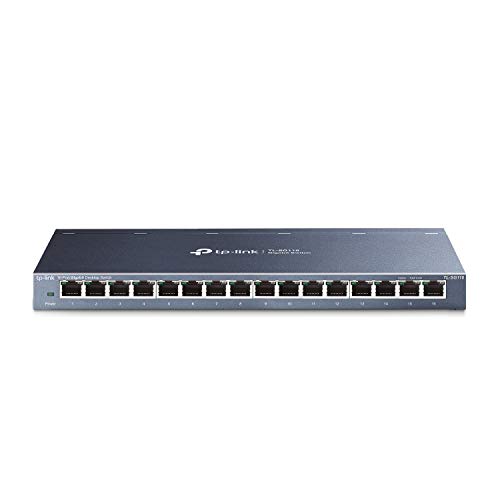
    TP-Link TL-SG116

    Best 16-Port Unmanaged

    TP-Link TL-SG116

    Sixteen 10/100/1000 ports with energy-efficient design and IEEE 802.3x flow control.

    85Excellent
    Check price
  6. 06
    TP-Link TL-SG1024DE

    Best 24-Port Value

    TP-Link TL-SG1024DE

    24 gigabit ports with 9K jumbo frame support and port mirroring for monitoring.

    83Very Good
    Check price
  7. Eight gigabit ports in a compact metal case with desktop or wall-mount placement and no software.

    81Very Good
    Check price
  8. 08
    TP-Link 8 Port Gigabit Switch

    Cheapest Managed Option

    TP-Link 8 Port Gigabit Switch

    An eight-port gigabit switch with web management and up to 32 simultaneous VLANs, under $25.

    79Very Good
    Check price

Network switches are rated by ports and speed, and the number buyers should care about most is rarely printed on the box: the one on their own router, modem and wall jacks. A switch with eight 2.5 gigabit ports adds nothing if the router only speaks gigabit, and a managed switch with 64 VLANs adds nothing if you never configure one. Most home networks run into a mismatch, not a shortage.

This ranking starts from what you plug into it. We compared eight switches priced below $300 across four tiers: gigabit unmanaged, smart managed, 2.5 gigabit, and PoE or 10 gigabit for specialized setups. Features such as VLANs, port mirroring and jumbo frames are listed where the listing states them, and we flag where a listing is vague about management or power budget.

Before you buy

What Actually Matters

01

Port speed

Gigabit is 1000 Mbps, 2.5 gigabit gives 2500 Mbps and 10 gigabit gives 10000 Mbps. A switch only runs as fast as its slowest link. Check the ports on your router, NAS and PC before paying for speed. The TL-SG108S-M2 claims 2.5 Gbps without a Cat6 upgrade. Look up the port rating of your router, NAS and PC first, since one gigabit device in the chain caps that link regardless of the switch.

02

Managed versus unmanaged

Unmanaged switches need no setup and offer no controls. Smart-managed switches such as the GS308E add VLANs, QoS and port mirroring through a web interface. If you want to isolate IoT devices or prioritize calls, you need management. Otherwise, it only adds complexity. Read the listing for a web interface and a VLAN count, because a managed switch with no browser interface is awkward to configure.

03

Port count

Buy more ports than you need, since networks grow. Eight ports suit a desk, sixteen suit a home with several wired rooms, and twenty-four suit a closet. Remember one port is used as the uplink to your router, so subtract one when counting. Networks tend to grow with every new camera or console, so buying one size larger now is cheaper than replacing the switch next year.

04

PoE and power budget

PoE powers cameras and access points over the data cable. The listing should name the standard, such as 802.3at, and the total power budget in watts. The TL-SG1428PE lists 24 PoE+ ports but not the budget, so check before connecting many devices. Add the wattage of each camera or access point, and keep the total below the switch's budget with some headroom to spare.

05

Jumbo frames and flow control

Jumbo frames, supported up to 9K on the TL-SG1024DE, cut overhead for big file transfers but need support on every device in the path. Flow control, listed on the TL-SG116, slows senders when a port is overloaded. Neither matters for ordinary browsing, but both can help a busy NAS or backup job. Look for the feature names in the spec bullets instead of assuming every switch includes them.

In-depth reviews

Our Ranked Picks, Reviewed

2

Best Smart Managed

NETGEAR 8-Port Gigabit Ethernet Easy Smart Managed Network Switch (GS308E)

Our verdict: Eight gigabit ports with an easy web GUI and up to 64 VLANs, QoS, IGMP snooping and port mirroring.

The GS308E gives a home network real management for $25 to $50: eight 1 Gbps auto-negotiating ports plus a web GUI that runs on Windows, Mac or Linux. It supports up to 64 VLANs, QoS, IGMP snooping and port mirroring, a feature set usually found on much costlier switches.

It ranks second because management matters more than raw speed for anyone separating IoT devices or prioritizing voice. The TL-SG108S-M2 is faster, but it lists no management. Against the TP-Link 8 Port, the GS308E supports 64 VLANs against 32, and has a friendlier GUI. The ports work the moment you plug in, so you can ignore the management until needed.

Best for homes that segment guest and IoT traffic. The caveat is gigabit-only ports.

Ports
8 x 1 gigabit
VLANs
Up to 64
Features
QoS, IGMP snooping, port mirroring
Management
Easy Smart web GUI

What we like

  • +Up to 64 VLANs
  • +QoS and IGMP snooping
  • +Port mirroring included
  • +$25 to $50 bracket

Watch out for

  • −Gigabit ports only
  • −Smart-managed, not fully managed
  • −Only eight ports

Buy it if: Homes and small offices that want VLANs and QoS without paying for enterprise gear.

Skip it if: You need 2.5 gigabit or PoE.

4

Best 10 Gigabit Uplink

10Gbe Ethernet Switch Unmanaged with 2 x 10Gb RJ45 Ports + 4 x 2.5Gb Base-T

Our verdict: Two 10Gb RJ45 ports plus four 2.5Gb Base-T ports for NAS and workstation links.

This unmanaged switch carries two 10Gb RJ45 ports and four 2.5Gb Base-T ports. The 10Gb pair is for a NAS and a workstation, or for an uplink to a 10G router, and the four 2.5Gb ports cover everyday devices. The listing claims 2.5x faster network performance than standard gigabit and easy setup.

It ranks fourth because it has only six ports and no management, so it is a specialist link, not a general switch. Against the TL-SG108S-M2, it trades two ports for two 10G ports, which only pays off if you have 10G hardware. It is priced at $50 to $100, which is low for 10G.

Best for a NAS-to-workstation link. The caveat is that 10GBASE-T runs hot and needs good cabling, and the brand is unnamed in the listing, so support is uncertain.

10G ports
2 x 10Gb RJ45
2.5G ports
4 x 2.5Gb Base-T
Management
Unmanaged
Price bracket
$50 to $100

What we like

  • +Two 10Gb RJ45 ports
  • +Four 2.5Gb ports
  • +Plug-and-play setup
  • +Low price for 10G

Watch out for

  • −Only six ports
  • −Unnamed brand
  • −No management features

Buy it if: NAS and workstation users who need a 10Gb link on a budget.

Skip it if: You need many ports or a trusted brand name.

7

Best Plug-and-Play Metal

NETGEAR 8-Port Gigabit Ethernet Unmanaged Network Switch (GS108)

Our verdict: Eight gigabit ports in a compact metal case with desktop or wall-mount placement and no software.

The GS108 does one thing: eight 1.0 Gbps ports with no software to install. The compact metal design supports desktop or wall-mount placement, and the $25 to $50 price makes it the classic drop-in expansion for a router.

It ranks seventh because it matches the GS308E on ports and price but lacks management, which makes the GS308E the better buy for nearly everyone. The GS108's advantage is pure simplicity: nothing to configure and nothing to misconfigure. Against the TL-SG108S-M2, it loses on speed.

Best for a living room media center or office. The caveat is gigabit only, with no VLANs or QoS, so it cannot isolate or prioritize traffic.

Ports
8 x 1.0 gigabit
Setup
Plug and play, no software
Case
Compact metal
Mounting
Desktop or wall-mount

What we like

  • +Plug-and-play setup
  • +Compact metal case
  • +Wall-mount option
  • +$25 to $50 bracket

Watch out for

  • −No management features
  • −Gigabit only
  • −Same price as GS308E

Buy it if: Simple expansion behind a TV or on a desk with no configuration.

Skip it if: You want VLANs or any traffic control.

Methodology

How We Ranked These

Port speed

We ranked 2.5 and 10 gigabit ports above gigabit, but only where cabling and devices can use them.

Management features

VLANs, QoS, IGMP snooping and port mirroring were scored by how many are listed and how approachable the interface is.

Port count

Eight, sixteen and twenty-four port designs were matched to desk, home and closet uses.

Power over Ethernet

PoE capability was credited when the listing states the standard, and penalized when no power budget is given.

Price against the cap

Every switch sits below $300, so we compared value within the $25 to $200 range.

Every Primea Score uses the same weights: Performance 30% · Build & Materials 20% · Everyday Usability 20% · Value 20% · Owner Satisfaction 10%. Full scoring rules

Buyer's guide

How to Pick the Right One for You

By Port Speed

Match the switch to the fastest device you own.

Fastest deviceOur pick
10 gigabit NAS or workstation10Gbe Ethernet Switch Unmanaged with 2 x 10Gb RJ45 Ports + 4 x 2.5Gb Base-T
2.5 gigabit router or PCTP-Link TL-SG108S-M2
Gigabit with VLANsNETGEAR 8-Port Gigabit Ethernet Easy Smart Managed Network Switch (GS308E)
Gigabit, simpleNETGEAR 8-Port Gigabit Ethernet Unmanaged Network Switch (GS108)
Gigabit, many portsTP-Link TL-SG116

By Budget

SpendOur pick
Under $25TP-Link 8 Port Gigabit Switch
$25 to $50NETGEAR 8-Port Gigabit Ethernet Easy Smart Managed Network Switch (GS308E)
$50 to $100TP-Link TL-SG108S-M2
$100 to $200TP-Link TL-SG1428PE

Managed vs Unmanaged

Managed

VLANs, QoS and monitoring through a web interface. Picks: NETGEAR GS308E, TP-Link TL-SG1428PE, TP-Link 8 Port, and TL-SG1024DE for port mirroring.

Unmanaged

Plug in and forget it. Picks: TL-SG108S-M2, GS108, TL-SG116 and the 10Gbe switch.

Default to unmanaged unless you plan to segment traffic.

By Number of Ports

Ports neededOur pick
Six10Gbe Ethernet Switch Unmanaged with 2 x 10Gb RJ45 Ports + 4 x 2.5Gb Base-T
EightTP-Link TL-SG108S-M2
SixteenTP-Link TL-SG116
Twenty-fourTP-Link TL-SG1024DE
Twenty-four with PoETP-Link TL-SG1428PE

For a Home Office Specifically

Look for

Enough ports for desks and a NAS, speed that matches your fastest device, and VLANs if you separate guest or work traffic.

In this ranking

The TL-SG108S-M2 covers speed, and the GS308E covers VLANs and QoS.

When to Spend More

Spend more if

You run cameras or access points. The TL-SG1428PE's 24 PoE+ ports at $100 to $200 replace many power adapters.

Save if

You just need ports. The GS108 costs $25 to $50 and the TP-Link 8 Port stays under $25.

Questions

Frequently Asked Questions

Do I need a managed switch at home?+

Usually not. A managed switch like the NETGEAR GS308E helps if you separate IoT devices with VLANs or prioritize voice traffic. For plain expansion, the TL-SG108S-M2 or GS108 is simpler.

What is the biggest mistake buying a network switch?+

Paying for speed you cannot use. A 2.5 gigabit switch like the TL-SG108S-M2 only helps when the devices have 2.5G ports. Check your router and PC before spending extra.

Is the TL-SG108S-M2 worth it over the GS308E?+

If your devices support 2.5G, yes. If you need VLANs and QoS, the GS308E wins with up to 64 VLANs, but it is gigabit only. They solve different problems.

How do I connect a switch to my router?+

Run a cable from a router LAN port to any switch port, then connect devices to the remaining ports. Unmanaged models like the GS108 need no setup. Managed ones are configured through a web page.

Does the TL-SG1428PE power every device?+

It offers 24 PoE+ ports on 802.3at and 802.3af, but the listing gives no total power budget. Add up your devices' wattage and compare with the budget before connecting a full set of cameras.

Will a 10Gb switch work with older Ethernet cables?+

Not at full speed. 10GBASE-T generally needs good Cat6a or better over longer runs. The 10Gbe switch also has 2.5G ports that run on Cat5e. Check your cable category first.

Final take

For most people the TP-Link TL-SG108S-M2 is the best switch under $300: eight 2.5 gigabit ports that lift your network without new cabling. The NETGEAR GS308E is the pick for VLANs and QoS, the TP-Link TL-SG1428PE is the right call for PoE, and the 10Gbe switch is for NAS-to-workstation links.

More Ranked & Reviewed Guides