
Primea ReviewsAll Reviews

Primea Reviews is reader-supported. When you buy through our Amazon links we may earn a commission, at no extra cost to you. Rankings are set by our editors and never sold. Learn more

Ranked & Reviewed by Primea Reviews

The 7 Best Network Switches Under $200 of 2026, Ranked & Reviewed

By the Primea Editorial TeamUpdated November 4, 202610 min read7 products ranked
The 7 Best Network Switches Under $200 of 2026, Ranked & Reviewed

The short answer

The TP-Link TL-SG108S-M2 is the best network switch under $200 for most homes: eight 2.5-gigabit ports at $50 to $100. The TL-SG105S-M2 shrinks that to five ports for less. The NETGEAR GS308E adds managed features like VLANs, the 10GbE model serves fast NAS setups, and the TL-SG1024DE covers 24-port wiring closets.

The Primea Scoreboard

Ranked & Reviewed

  1. 01
    TP-Link TL-SG108S-M2

    Eight 2.5-gigabit ports for $50 to $100, enough for a modern home or small office.

    94Outstanding
    Check price
  2. 02
    TP-Link TL-SG105S-M2

    Best Compact 2.5G

    TP-Link TL-SG105S-M2

    Five 2.5-gigabit ports at $25 to $50 for a desk or media cabinet.

    92Outstanding
    Check price
  3. Eight gigabit ports with a browser-based GUI and real traffic segmentation tools.

    90Excellent
    Check price
  4. Two 10Gb RJ45 ports plus four 2.5Gb ports in an unmanaged, plug-and-play switch.

    88Excellent
    Check price
  5. 05
    TP-Link TL-SG1024DE

    Twenty-four gigabit ports with jumbo frames and port mirroring for $50 to $100.

    86Excellent
    Check price
  6. 06
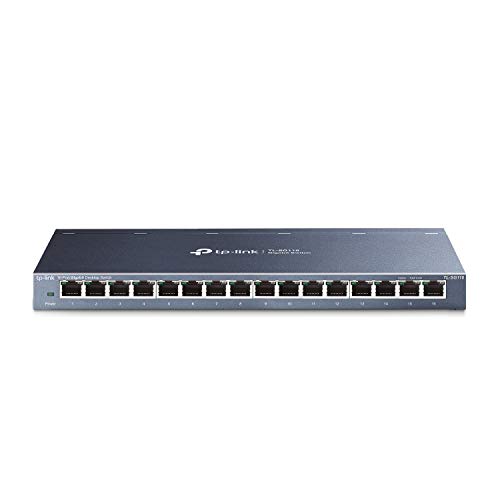
    TP-Link TL-SG116

    Best 16-Port

    TP-Link TL-SG116

    Sixteen 10/100/1000 ports that are energy efficient, reliable and quiet.

    84Very Good
    Check price
  7. 07
    TP-Link TL-SG105

    Best Budget Switch

    TP-Link TL-SG105

    Five gigabit ports, fanless and energy efficient, for under $25.

    82Very Good
    Check price

The usual advice on switches is to count ports and buy the cheapest. That works until the day you plug a fast NAS or a 2.5G router into a gigabit switch and every port quietly runs at a fraction of its potential. A switch is only as fast as its slowest port, so the speed rating matters at least as much as the port count.

So we ranked on port speed first, then count, then management. We reviewed seven switches under $200 from their listings, from a five-port gigabit unit under $25 to a 24-port model and a mixed 10GbE switch, and weighed what each lets you do with VLANs, mirroring and monitoring. Cat5e and Cat6 limits matter too, which the listings address for the 2.5G models.

Before you buy

What Actually Matters

01

Port speed

Port speed is how fast each socket can move data: 1 Gbps, 2.5 Gbps or 10 Gbps. A fast NAS plugged into a gigabit port is capped at gigabit. 2.5G switches can use existing Cat5e cable over short runs. Check the speed per port in the title, and match it to your router and NAS.

02

Managed vs unmanaged

Unmanaged switches work out of the box with no settings. Managed switches add VLANs, QoS and monitoring through a web interface. The NETGEAR GS308E lists up to 64 VLANs. You only need management to separate guest, IoT or work traffic. Otherwise, unmanaged is simpler and cheaper.

03

Port count and uplink

One port always connects the switch back to the router, so a five-port switch leaves four usable. Count your devices now, then add a few for growth. Eight ports suits most homes, sixteen or twenty-four suits structured wiring. Buying larger rarely costs much more.

04

Jumbo frames and flow control

Jumbo frames carry more data per packet, which helps large transfers between servers and NAS boxes. Flow control prevents a fast sender from overwhelming a slow receiver. The TL-SG1024DE lists 9k jumbo frames and the TL-SG116 lists 802.3x flow control. Most home users never need to tune either.

05

Fanless operation

Fanless switches use passive cooling, so they make no noise and have no part to wear out. That matters in living rooms and bedrooms. Many small switches are fanless, such as the TL-SG105. Larger 24-port units may use ventilation, so check the listing if silence is essential.

In-depth reviews

Our Ranked Picks, Reviewed

3

Best Managed Switch

NETGEAR 8-Port Gigabit Ethernet Easy Smart Managed Network Switch (GS308E)

Our verdict: Eight gigabit ports with a browser-based GUI and real traffic segmentation tools.

NETGEAR's GS308E is an eight-port gigabit switch with an Easy Smart web GUI that works on Windows, Mac or Linux. The firmware handles VLANs (up to 64), QoS, IGMP snooping and port mirroring, tools that stop voice and video traffic being starved.

It ranks third because 1 Gbps ports trail the 2.5G models on speed, but it is the only managed option under $50 here. VLANs matter if you want to isolate IoT devices or guests from your main network. Against the TP-Link 8-port, it is simpler to configure.

Buy it if you need segmentation. The caveat: the web interface is simple, not enterprise-grade, so advanced routing needs better hardware.

Ports
8 x 1 Gbps
VLANs
Up to 64
Features
QoS, IGMP snooping, mirroring
Interface
Web GUI on Windows, Mac, Linux

What we like

  • +Up to 64 VLANs
  • +QoS and IGMP snooping
  • +Port mirroring
  • +Easy web interface

Watch out for

  • −Gigabit speed only
  • −Basic web interface
  • −Managed features take learning

Buy it if: Homes that want IoT or guest network separation.

Skip it if: You have 2.5G devices to feed.

4

Best for Fast NAS

10Gbe Ethernet Switch Unmanaged with 2 x 10Gb RJ45 Ports + 4 x 2.5Gb Base-T

Our verdict: Two 10Gb RJ45 ports plus four 2.5Gb ports in an unmanaged, plug-and-play switch.

This unmanaged switch pairs two 10Gb RJ45 ports with four 2.5Gb Base-T ports. The listing claims 2.5 times the speed of standard gigabit and easy setup. The 10Gb ports are meant for a NAS, a workstation or an uplink to another switch.

It ranks fourth because six ports total is small and it is unmanaged, with no VLANs. It is the only option here that reaches 10G, which makes it the right choice if your NAS or video workstation can use it. At $50 to $100 it costs the same as the eight-port 2.5G model.

Buy it for fast storage and editing. The caveat: the 10G ports need devices and cables that support them, and the unbranded listing offers little support information.

Fast ports
2 x 10Gb RJ45
Mid ports
4 x 2.5Gb Base-T
Management
Unmanaged
Price tier
$50 to $100

What we like

  • +Two 10Gb ports
  • +Four 2.5G ports
  • +Plug-and-play setup
  • +Same price as the 8-port 2.5G

Watch out for

  • −Only six ports
  • −Unmanaged
  • −Brand support unclear

Buy it if: NAS and video-editing setups that can use 10G.

Skip it if: You need many ports or management.

Methodology

How We Ranked These

Port speed

2.5G and 10G ports scored above gigabit, since the slowest link sets the pace.

Port count

Five, eight, sixteen and twenty-four-port options were compared against realistic home and office needs.

Management features

VLANs, QoS, IGMP snooping, mirroring and web GUIs were rated where listed.

Noise and efficiency

Fanless designs and energy-efficient claims matter for devices that run all year.

Value

Price tier against ports, speed and features, with every pick under $200.

Every Primea Score uses the same weights: Performance 30% · Build & Materials 20% · Everyday Usability 20% · Value 20% · Owner Satisfaction 10%. Full scoring rules

Buyer's guide

How to Pick the Right One for You

By Port Speed

Match the switch to the fastest device it connects.

SpeedOur pick
10G uplink to a NAS10Gbe Ethernet Switch, 2 x 10Gb + 4 x 2.5Gb
2.5G, eight portsTP-Link TL-SG108S-M2
2.5G, five portsTP-Link TL-SG105S-M2
Gigabit, managedNETGEAR 8-Port Gigabit Easy Smart GS308E

By Budget

SpendOur pick
Under $25TP-Link TL-SG105
$25 to $50, 2.5GTP-Link TL-SG105S-M2
$25 to $50, managedNETGEAR GS308E
$50 to $100TP-Link TL-SG108S-M2

Managed vs Unmanaged

Managed

VLANs, QoS and monitoring. The NETGEAR GS308E suits households that want to isolate IoT or guest devices.

Unmanaged

Plug in and go. The TP-Link TL-SG108S-M2 and TL-SG105 are the simplest choices for most homes.

Choose unmanaged unless you have a specific reason for VLANs.

By Port Count

PortsOur pick
5 portsTP-Link TL-SG105S-M2
8 portsTP-Link TL-SG108S-M2
16 portsTP-Link TL-SG116
24 portsTP-Link TL-SG1024DE

For Home Offices and NAS Specifically

Look for

2.5G or 10G ports for storage, enough ports for growth, and a quiet or fanless design.

In this ranking

The 10Gbe switch offers two 10Gb ports, and the TL-SG108S-M2 gives eight 2.5G ports.

When to Spend More

Spend more if

You own 2.5G or faster gear. The TL-SG108S-M2 or 10GbE switch at $50 to $100 uses it fully.

Save if

Everything is gigabit. The TL-SG105 under $25 is enough.

Questions

Frequently Asked Questions

Do I need Cat6 cable for a 2.5G switch?+

TP-Link says the TL-SG108S-M2 and TL-SG105S-M2 upgrade to 2.5 Gbps without needing Cat6, so Cat5e usually works over typical home runs. For 10G ports on the 10GbE switch, better cabling is wise.

What is the most common switch mistake?+

Buying gigabit and plugging in a faster NAS. The switch then caps every port at 1 Gbps. If your NAS or router has 2.5G, choose the TL-SG108S-M2 or the 10GbE model instead of a TL-SG105.

Is a managed switch worth it for home use?+

Only if you need VLANs. The NETGEAR GS308E lets you separate IoT devices from computers, which is a real security benefit. For plain connectivity, an unmanaged TL-SG108S-M2 is simpler.

How do I set up a network switch?+

Plug power in, connect one port to your router, and plug in devices. Unmanaged models like the TL-SG105 need nothing else. For the GS308E, use the web GUI to set VLANs after the first boot.

How do I maintain a switch?+

Keep vents clear, dust it occasionally and avoid stacking heat-producing gear on top. Fanless units like the TL-SG105 are low maintenance. For managed models, check for firmware updates once or twice a year.

Can a switch speed up my internet?+

No. A switch adds ports and local speed, not internet bandwidth. It helps transfers between your own devices, such as a PC and NAS over 2.5G, but your internet plan still sets the connection to the web.

Final take

The TP-Link TL-SG108S-M2 is the best network switch under $200 for most homes, with eight 2.5G ports at a modest price. Choose the TL-SG105S-M2 for a small desk, the NETGEAR GS308E if you need VLANs, and the 10GbE switch for a fast NAS. Pay for speed only if your devices can use it.

More Ranked & Reviewed Guides