
Primea ReviewsAll Reviews

Primea Reviews is reader-supported. When you buy through our Amazon links we may earn a commission, at no extra cost to you. Rankings are set by our editors and never sold. Learn more

Ranked & Reviewed by Primea Reviews

The 6 Best Network Switches Under $150 of 2026, Ranked & Reviewed

By the Primea Editorial TeamUpdated November 4, 202610 min read6 products ranked
The 6 Best Network Switches Under $150 of 2026, Ranked & Reviewed

The short answer

The NETGEAR GS308E is the switch most homes should buy: eight Gigabit ports plus a web interface with VLANs and QoS for a small outlay. If your internet or NAS already outruns Gigabit, the TP-Link TL-SG108S-M2 gives you eight 2.5G ports, and the TL-SG105S-M2 does it in five. Need a 10G uplink to a server or NAS? The unmanaged 10GbE switch is the only pick here with two 10Gb RJ45 ports. For a crowded desk with many wired devices, the 16-port TL-SG116 is the one to beat.

The Primea Scoreboard

Ranked & Reviewed

  1. Eight Gigabit ports with a real web interface, VLANs and QoS for $25 to $50.

    94Outstanding
    Check price
  2. Eight 2.5-gigabit ports for the home that has outgrown Gigabit.

    92Outstanding
    Check price
  3. 03
    TP-Link TL-SG105S-M2

    Best Compact 2.5G

    TP-Link TL-SG105S-M2

    The cheapest way into 2.5G, with five fast ports for $25 to $50.

    90Excellent
    Check price
  4. The only pick here with two 10Gb RJ45 ports, for a server or NAS uplink.

    87Excellent
    Check price
  5. 05
    TP-Link 8 Port Gigabit Switch

    Eight Gigabit ports with web management and up to 32 VLANs for under $25.

    85Excellent
    Check price
  6. 06
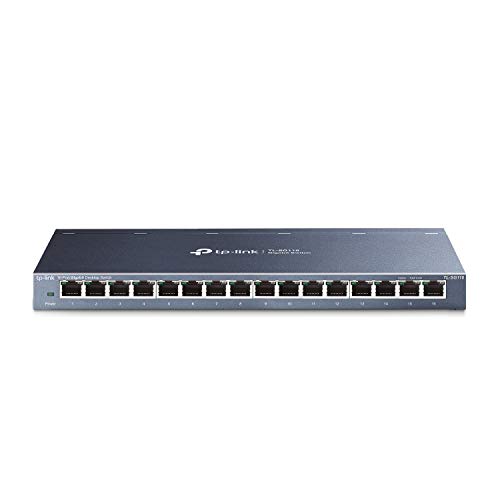
    TP-Link TL-SG116

    Best Port Count

    TP-Link TL-SG116

    Sixteen Gigabit ports in an energy-efficient, quiet unmanaged box.

    82Very Good
    Check price

Most people buy a switch by counting ports and never look at what is behind them. That is how a household with a 2.5G router ends up capping a fast NAS at Gigabit, or how a home office pays for management features it never opens. Every switch on this list costs under $150, and the real difference is port speed, how many ports you get, and whether you can configure the box at all.

We reviewed six switches covering the realistic home and small office choices: 8-port and 16-port Gigabit, two 2.5G models, and one mixed 10G and 2.5G box. Each was scored on the Primea framework, with the most weight on port speed for the money, VLAN and traffic control where offered, and how well the port count fits a desk or media closet.

Before you buy

What Actually Matters

01

Match port speed to your slowest link

A switch can only move traffic as fast as the slowest device on the path. Gigabit ports top out at 1 Gbps, 2.5G ports at 2.5 Gbps. If your router, NAS and PC are all Gigabit, paying for 2.5G changes nothing. Check the network card speed of each device before choosing the port type.

02

Managed versus unmanaged

Unmanaged switches work on plug-in and offer no settings. Managed or smart switches add a web interface for VLANs, QoS and port mirroring. That matters if you want to separate cameras or a guest network from your main devices. Look for the word VLAN and a stated VLAN count on the listing before assuming it is managed.

03

Cabling decides real 2.5G speed

A 2.5G switch only reaches 2.5 Gbps if the cable and the device at the other end support it. The TP-Link 2.5G models note that you can upgrade to 2.5 Gbps without moving to Cat6, but older cable runs still vary. Test one wall run with a 2.5G device before replacing any cabling.

04

Count the ports you will need in a year

Most buyers fill a 5-port switch within months once a TV, console, printer and access point arrive. Add up every wired device, then leave at least two ports free. An 8-port switch is the practical minimum for a home office, and a 16-port model suits a media closet or shared desk.

05

Uplink ports for servers and NAS

A few switches mix port speeds so one or two fast ports feed a server while the rest serve ordinary devices. The 10GbE model here pairs two 10Gb RJ45 ports with four 2.5Gb ports. Read the port list line by line on the listing and check that your NAS card actually supports 10GBASE-T.

In-depth reviews

Our Ranked Picks, Reviewed

1

Best Overall

NETGEAR 8-Port Gigabit Ethernet Easy Smart Managed Network Switch (GS308E)

Our verdict: Eight Gigabit ports with a real web interface, VLANs and QoS for $25 to $50.

The GS308E is an 8-port Gigabit switch with an Easy Smart web interface that runs on Windows, Mac or Linux. Inside it you can carve out as many as 64 VLANs and set QoS, IGMP snooping and mirroring, tools usually reserved for much pricier boxes.

It tops this list because it gives you control without a steep price. The TP-Link 8 Port Gigabit Switch below offers VLANs too, but only up to 32, and the NETGEAR interface has the broader toolset with port mirroring for traffic troubleshooting. The faster TP-Link 2.5G models beat it on raw speed, but only pay off if your other gear can use it.

Buy it if you want to split cameras, a home lab or guest devices onto separate VLANs. The caveat is speed: every port is 1 Gbps, so a 2.5G router or NAS will be held back.

Ports
8 x 1 Gbps
VLANs
Up to 64
Management
Web GUI, QoS, IGMP snooping
Price
$25 to $50

What we like

  • +Web GUI on any operating system
  • +Up to 64 VLANs
  • +Port mirroring for troubleshooting
  • +Eight ports at a low price

Watch out for

  • −Gigabit only
  • −Smart management has a learning curve
  • −Cannot use 2.5G devices fully

Buy it if: Home office and home lab users who want VLANs and QoS on a small budget.

Skip it if: You own 2.5G or 10G gear and need those speeds.

4

Best 10G Uplink

10Gbe Ethernet Switch Unmanaged with 2 x 10Gb RJ45 Ports + 4 x 2.5Gb Base-T

Our verdict: The only pick here with two 10Gb RJ45 ports, for a server or NAS uplink.

This unmanaged switch pairs two 10Gb RJ45 ports with four 2.5Gb Base-T ports and is sold as 2.5x faster than a standard Gigabit switch. Setup is plug-in simple, and the box costs $50 to $100.

The fourth slot reflects that it solves a narrower problem than the picks above. A fast NAS and a fast PC on the two 10G ports with everything else on 2.5G is a clean layout, but the TL-SG108S-M2 gives you twice the ports at one speed. Against the NETGEAR GS308E you trade management for raw uplink speed.

Buy it if you have a 10G NAS or workstation and a handful of 2.5G devices. The caveat is that only six ports exist in total, and the listing offers no management features.

10G ports
2 x 10Gb RJ45
2.5G ports
4 x 2.5Gb Base-T
Management
Unmanaged
Price
$50 to $100

What we like

  • +Two 10Gb RJ45 ports
  • +Four 2.5G ports alongside
  • +Simple unmanaged setup
  • +Strong value for 10G

Watch out for

  • −Only six ports total
  • −No VLANs or QoS
  • −Unnamed brand listing

Buy it if: Users with a 10G NAS or workstation plus a few 2.5G devices.

Skip it if: You need more than six ports or any managed features.

Methodology

How We Ranked These

Port speed per dollar

We compared Gigabit, 2.5G and 10G ports against the price bracket, because upgrading the wrong end of the network wastes the spend.

Management features

Switches with VLANs, QoS and port mirroring were ranked above plain unmanaged boxes only where those tools are actually usable at home.

Port count

Five, eight and sixteen ports suit very different rooms, so each pick was judged against the layout it is built for.

Cable and device fit

We noted which models need Cat6 for full speed and which run on existing cabling, since rewiring a house is the hidden cost of a faster switch.

Value within the field

Features, speed and port count were weighed against each switch's price bracket relative to the others here.

Every Primea Score uses the same weights: Performance 30% · Build & Materials 20% · Everyday Usability 20% · Value 20% · Owner Satisfaction 10%. Full scoring rules

Buyer's guide

How to Pick the Right One for You

By Port Speed

Start with the fastest link you actually own.

Your fastest deviceOur pick
Gigabit everywhere, want settingsNETGEAR 8-Port Gigabit Ethernet Easy Smart Managed Network Switch (GS308E)
2.5G router or PC, 8 devicesTP-Link TL-SG108S-M2
2.5G router or PC, 5 devicesTP-Link TL-SG105S-M2
10G NAS or server uplink10Gbe Ethernet Switch Unmanaged with 2 x 10Gb RJ45 Ports + 4 x 2.5Gb Base-T
Many Gigabit devicesTP-Link TL-SG116

By Budget

SpendOur pick
Under $25TP-Link 8 Port Gigabit Switch
$25 to $50NETGEAR 8-Port Gigabit Ethernet Easy Smart Managed Network Switch (GS308E)
$25 to $50 (2.5G)TP-Link TL-SG105S-M2
$50 to $100TP-Link TL-SG108S-M2
$50 to $100 (10G uplink)10Gbe Ethernet Switch Unmanaged with 2 x 10Gb RJ45 Ports + 4 x 2.5Gb Base-T

Gigabit vs 2.5G

Gigabit

Plenty for streaming, video calls and ordinary file copies, and the cheapest way to add ports. Picks: NETGEAR GS308E, TP-Link 8 Port Gigabit Switch, TP-Link TL-SG116.

2.5G

Worth it when your internet plan, router or NAS already exceeds 1 Gbps, and the TP-Link models claim no Cat6 upgrade is needed. Picks: TP-Link TL-SG108S-M2, TP-Link TL-SG105S-M2.

Default to Gigabit unless a device you own can already use more than 1 Gbps.

By Management Features

What you needOur pick
Plug in and forgetTP-Link TL-SG116
Web GUI, VLANs, QoS and port mirroringNETGEAR 8-Port Gigabit Ethernet Easy Smart Managed Network Switch (GS308E)
Cheapest VLAN segmentation (up to 32 VLANs)TP-Link 8 Port Gigabit Switch
Fast ports, no setupTP-Link TL-SG108S-M2

For a Home NAS Specifically

Look for

A port speed that matches your NAS network card, enough ports for the NAS, router and your PC, and a fast uplink if several people pull files at once.

In this ranking

The 10GbE unmanaged switch if your NAS has a 10G port, the TP-Link TL-SG108S-M2 if it has 2.5G, and the NETGEAR GS308E if it is Gigabit.

When to Spend More

Spend more if

You already own 2.5G or 10G hardware. The TP-Link TL-SG108S-M2 or the 10GbE switch lets you use the speed you paid for.

Save if

Everything on your network is Gigabit. The TP-Link 8 Port Gigabit Switch or NETGEAR GS308E covers it for under $50.

Questions

Frequently Asked Questions

Do I need a managed switch at home?+

Usually no. A plain switch like the TP-Link TL-SG116 works with no setup. Choose the NETGEAR GS308E or TP-Link 8 Port Gigabit Switch only if you want VLANs to separate cameras, guests or a home lab from your main devices.

What is the most common buying mistake with a 2.5G switch?+

Buying a TP-Link TL-SG108S-M2 while the router and PC are still Gigabit. Speed is set by the slowest link, so a 2.5G switch changes nothing until at least two devices on the path support 2.5 Gbps.

Is the 10G switch worth it over the 2.5G models?+

Only with a 10G NAS or workstation. The 10GbE unmanaged switch has two 10Gb RJ45 ports and four 2.5G ports, while the TP-Link TL-SG108S-M2 gives eight 2.5G ports. If nothing you own is 10G, buy the TP-Link.

How do I set up VLANs on the NETGEAR GS308E?+

Open the Easy Smart web interface from a Windows, Mac or Linux computer and assign ports to VLAN groups. Start with one spare port for a test device, confirm it works, then move cameras or guest devices over.

Will 2.5G work over my old network cables?+

TP-Link says the TL-SG105S-M2 and TL-SG108S-M2 can reach 2.5 Gbps without upgrading to Cat6, but results depend on run length and cable quality. Plug a 2.5G device into your longest existing run before ordering.

Can I chain a five-port switch off a sixteen-port one?+

Yes, a TP-Link TL-SG105S-M2 can hang off a TL-SG116 uplink. Remember the link between them runs at the slower speed, so a 2.5G switch behind a Gigabit one is capped at 1 Gbps.

Final take

For most households the NETGEAR GS308E is the right answer: eight Gigabit ports with VLANs and QoS for $25 to $50. If your devices have moved to 2.5G, step up to the TP-Link TL-SG108S-M2, or the five-port TL-SG105S-M2 for a small desk. Have a 10G NAS? The unmanaged 10GbE switch is the only pick here with two 10Gb RJ45 ports. And if you simply need lots of ports, the TP-Link TL-SG116 is the easy call.

More Ranked & Reviewed Guides