
Primea ReviewsAll Reviews

Primea Reviews is reader-supported. When you buy through our Amazon links we may earn a commission, at no extra cost to you. Rankings are set by our editors and never sold. Learn more

Ranked & Reviewed by Primea Reviews

The 6 Best Mini PC Mounting Brackets of 2026, Ranked & Reviewed

By the Primea Editorial TeamUpdated November 1, 202610 min read6 products ranked
The 6 Best Mini PC Mounting Brackets of 2026, Ranked & Reviewed

The short answer

The Adjustable Thin Client Mount is the best mini PC bracket for most buyers, with a 12 lb rating, the widest fit range and a full hardware kit under $25. The suptek is the pick for PCs that run warm, and VIVO leads on warranty. The Lenovo-specific kit only makes sense for ThinkCentre Tiny owners.

The Primea Scoreboard

Ranked & Reviewed

  1. A 12 lb metal bracket sold as a full kit for under $25.

    94Outstanding
    Check price
  2. Rust-proof steel with an open frame that vents heat.

    91Excellent
    Check price
  3. Powder-coated steel with a 3-year warranty.

    88Excellent
    Check price
  4. A full kit with an illustrated manual and scratch strips.

    85Excellent
    Check price
  5. A strap design for devices up to 17 inches around.

    82Very Good
    Check price
  6. A kit built for named ThinkCentre Tiny models.

    79Very Good
    Check price

A mount can be rated for 12 lb and still fail if it hangs from the wrong screw into the wrong material. That is the quiet truth of mini PC brackets: the metal is rarely the weak link, but the surface and fasteners often are. Hardware in the box, and what you are fixing it to, decides the outcome more than the headline weight rating.

From eight listings, six brackets made the ranking. We weighed width range, weight limit, included hardware and mounting options, then used warranty and instructions as tiebreakers. Everything here is drawn from the listings, so verify fit against your own machine.

Before you buy

What Actually Matters

01

Fit range

Adjustable brackets grip the PC between two arms, so the thickness of your machine must fall inside the stated range, such as 0.63 to 2.8 inches. A PC outside it will not seat. Measure your case, then compare with the range in the title or spec table.

02

Weight rating

Weight rating is the load the bracket is designed to carry, typically 11 or 12 lb here. Add the PC, power brick and cables. Going over risks sagging or a fall. Find the number in the bullets, and be cautious with listings, like the strap model, that give none.

03

Mounting surface

Wall, pole and under-desk installs need different fasteners, and the strongest bracket is useless on weak drywall. Look at what hardware the kit includes, then think about the surface you will screw into. Suptek and VIVO list wall, pole and desk hardware, so check that yours matches.

04

Airflow

An always-on mini PC produces heat, and a closed bracket can trap it. An open frame leaves the case exposed, which the suptek uses as a selling point. Look for open-frame in the title, and leave space around the vents wherever you mount it.

05

Warranty and manual

A warranty and a clear manual cut the risk of a poor install or a failed part. VIVO lists 3 years, while HumanCentric supplies an illustrated step-by-step manual. Check the bullets for warranty terms and whether instructions are included, particularly if this is your first mount.

In-depth reviews

Our Ranked Picks, Reviewed

1

Best Overall

Adjustable Thin Client Mini PC Mount Bracket, Complete Kit

Our verdict: A 12 lb metal bracket sold as a full kit for under $25.

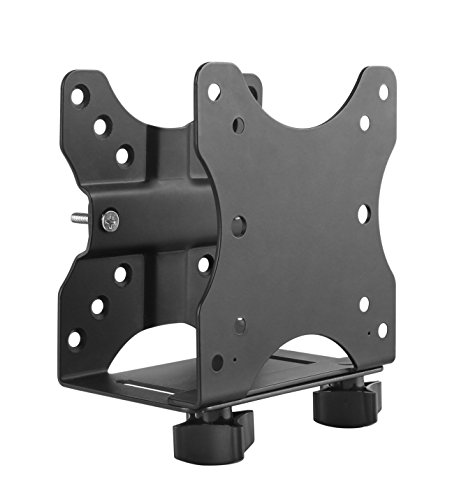
This metal thin-client bracket adjusts to fit devices 0.63 to 2.8 inches wide, supports 12 lb and ships as a complete kit. The box covers wall, under-desk and monitor-arm installs, with cable management and a pen holder added. It costs under $25.

It leads because it combines the highest listed weight rating and the widest range in the group, without raising the price bucket. The suptek and VIVO each rate 1 lb lower and accept narrower devices, so this one fits the most machines. Its extras are small touches, but the hardware coverage is the real draw.

Buy it for a first mounting job, especially if you are unsure where the PC will end up. The caveat is the unfamiliar maker and no listed warranty, which matters if you want recourse.

Width
0.63-2.8 in.
Capacity
12 lb
Material
Metal
Price
Under $25

What we like

  • +12 lb capacity
  • +Widest fit range
  • +Complete hardware kit
  • +Under $25

Watch out for

  • −Unknown brand
  • −No warranty listed

Buy it if: First-time mini PC mounters.

Skip it if: You want a named warranty.

2

Best for Cooling

suptek Thin Client Mount Bracket, Open-Frame Steel

Our verdict: Rust-proof steel with an open frame that vents heat.

Suptek's bracket is solid steel with a rust-proof coating, adjusting from 0.6 to 2.7 inches wide and rated at 11 lb. Hardware for wall, pole and under-desk mounting is included, and the frame is open. It costs under $25.

The open frame is the headline. Where a closed cradle traps heat around the case, this design leaves the sides exposed, which helps a mini PC that stays powered on all day. It trails the leader by a pound of capacity and a slightly narrower range, so it takes the second spot.

Choose it for a warm-running machine or one with side vents. The caveat is the fit limit: if your PC is thicker than 2.7 inches, the first-place kit is the better option.

Width
0.6-2.7 in.
Capacity
11 lb
Material
Steel, rust-proof coating
Frame
Open

What we like

  • +Open-frame airflow
  • +Rust-proof coating
  • +Wall, pole, desk hardware
  • +Under $25

Watch out for

  • −11 lb rating
  • −Narrower range

Buy it if: Warm-running mini PCs.

Skip it if: Your PC is wider than 2.7 inches.

3

Best Warranty

VIVO Adjustable Thin Client Mini PC Mount Bracket, Steel

Our verdict: Powder-coated steel with a 3-year warranty.

VIVO's bracket is powder-coated steel that spans 1.8 to 7.1 cm, with a 5 kg (about 11 lb) rating. Wall, VESA and pole hardware come in the box, and the maker backs it with a 3-year warranty. It falls in the under $25 bucket.

The warranty is rare at this price and is the strongest reason to pick it. It lands third because the width range is the narrowest of the three leaders, and the 11 lb rating sits below the top pick. Against the suptek, you trade open airflow for a longer guarantee.

Buy it if you want recourse should the bracket fail. The caveat is the slim fit range, so measure your PC against the 7.1 cm limit.

Width
1.8-7.1 cm
Capacity
5 kg (11 lb)
Finish
Powder-coated steel
Warranty
3 years

What we like

  • +3-year warranty
  • +Powder-coated steel
  • +Wall, VESA, pole hardware
  • +Under $25

Watch out for

  • −Narrow width range
  • −11 lb limit

Buy it if: Buyers who value a warranty.

Skip it if: Your PC is wider than 7.1 cm.

4

Best Manual

HumanCentric Thin Client Mount Bracket, Full Hardware Kit

Our verdict: A full kit with an illustrated manual and scratch strips.

HumanCentric sells a full kit for wall, under-desk and pole installs, built for devices 0.65 to 2.55 inches deep. It rates 11 lb alone, or 18 lb combined with a monitor. Silicone scratch strips and an illustrated manual are included, at $25 to $50.

The documentation sets it apart: step-by-step pictures lower the odds of a poor install, which matters when the load is a computer. It ranks fourth because it costs more than the leaders and accepts a narrower depth range than the top pick.

It suits careful first-timers who like clear instructions and protected finishes on their PC. Skip it if price is the priority, since cheaper kits above carry similar capacity. Check the depth range against your own machine first.

Depth
0.65-2.55 in.
Rating
11 lb, 18 lb combined
Extras
Scratch strips, manual
Price
$25-50

What we like

  • +Illustrated manual
  • +Scratch strips included
  • +Combined rating listed
  • +Three mounting styles

Watch out for

  • −Costs $25 to $50
  • −Narrower depth range

Buy it if: First-timers who like clear instructions.

Skip it if: You want the lowest price.

5

Best Strap Mount

Universal Wall and VESA Bracket, Adjustable Strap Mount

Our verdict: A strap design for devices up to 17 inches around.

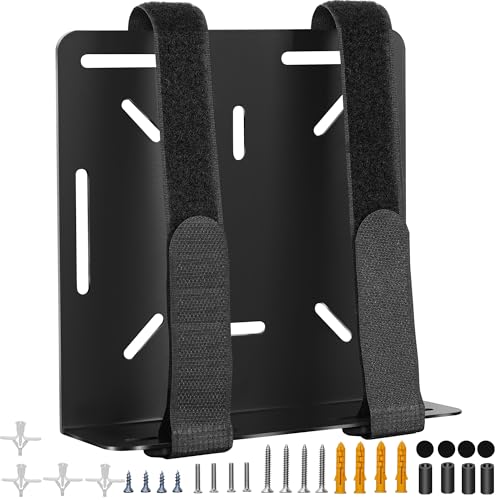
This universal strap-style bracket holds devices up to 17 inches in perimeter and names compatibility with Dell, Lenovo and HP mini PCs. It includes hardware for wall or behind-monitor mounting and costs under $25.

A strap handles shapes that rigid arms cannot, like rounded or unusually proportioned boxes. The cost is certainty: the listing gives no weight rating, so you cannot judge capacity the way you can with the clamp brackets above. That missing figure is why it ranks fifth.

Choose it for an oddly shaped PC that will not sit in a clamp. Skip it if the machine is heavy or you want a published limit. Compare your PC's perimeter to the 17 inch cap before ordering.

Fit
Up to 17 in. perimeter
Design
Adjustable strap
Brands
Dell, Lenovo, HP named
Hardware
Wall, behind monitor

What we like

  • +Strap fits odd shapes
  • +Names Dell, Lenovo, HP
  • +Wall and monitor hardware
  • +Under $25

Watch out for

  • −No weight rating
  • −17 inch perimeter cap

Buy it if: Mini PCs with irregular shapes.

Skip it if: You need a stated weight limit.

6

Best for ThinkCentre

Mini PC Mount Bracket for Lenovo ThinkCentre, Complete Kit

Our verdict: A kit built for named ThinkCentre Tiny models.

Built for named Lenovo ThinkCentre Tiny models, this kit includes wall, VESA and under-desk hardware. It adds an anti-scratch rubber mat, Velcro straps for the power adapter, screws and instructions. It is priced under $25.

It fits its target well, with an adapter strap addressing a common annoyance. But the model list is narrow and the listing states no weight rating, so it cannot compete with the universal kits for flexibility. That is the plain reason it comes last.

Buy it only if your machine is on the compatibility list. Anyone with another brand should pick the top-ranked adjustable kit. Check your exact ThinkCentre model against the listing before ordering, since a near match can fail.

Target
Lenovo ThinkCentre Tiny
Hardware
Wall, VESA, under-desk
Extras
Rubber mat, Velcro straps
Price
Under $25

What we like

  • +Built for ThinkCentre Tiny
  • +Anti-scratch rubber mat
  • +Adapter Velcro straps
  • +Screws included

Watch out for

  • −Narrow model list
  • −No weight rating

Buy it if: ThinkCentre Tiny owners.

Skip it if: Your PC is another brand.

Methodology

How We Ranked These

Fit range

We compared stated width, depth and perimeter limits.

Weight limit

We used stated ratings of about 11 to 12 lb.

Hardware

Wall, pole and desk hardware in the box counted.

Build

Steel and powder-coat finishes ranked above unspecified metal.

Support

Warranties and manuals added to the score.

Every Primea Score uses the same weights: Performance 30% · Build & Materials 20% · Everyday Usability 20% · Value 20% · Owner Satisfaction 10%. Full scoring rules

Buyer's guide

How to Pick the Right One for You

By Mounting Surface

Pick by where you install it.

SurfaceOur pick
WallAdjustable Thin Client Mini PC Mount Bracket, Complete Kit
Polesuptek Thin Client Mount Bracket
Under deskVIVO Adjustable Thin Client Mini PC Mount Bracket
Behind a monitorHumanCentric Thin Client Mount Bracket

By Budget

SpendOur pick
Under $25Adjustable Thin Client Mini PC Mount Bracket, Complete Kit
Under $25suptek Thin Client Mount Bracket
Under $25VIVO Adjustable Thin Client Mini PC Mount Bracket
$25 to $50HumanCentric Thin Client Mount Bracket

Clamp vs Strap

Clamp

Adjustable arms hold a thin box. The complete kit, suptek, VIVO and HumanCentric fit here.

Strap

A strap wraps odd shapes. The Universal strap mount is the example.

Most buyers should choose a clamp unless the PC is an odd shape.

By Support Needs

WantOur pick
WarrantyVIVO Adjustable Thin Client Mini PC Mount Bracket
Illustrated manualHumanCentric Thin Client Mount Bracket
Open-frame coolingsuptek Thin Client Mount Bracket
Brand-specificMini PC Mount Bracket for Lenovo ThinkCentre

For Pole or Wall Installs Specifically

Look for

Pole and wall hardware in the box.

In this ranking

The suptek lists wall, pole and under-desk hardware.

When to Spend More

Spend more if

You want the HumanCentric's manual and combined rating.

Save if

The complete kit at under $25 covers a normal install.

Questions

Frequently Asked Questions

Will these fit any mini PC?+

Not automatically. Check the width or depth range in the listing against your PC. The Adjustable Thin Client kit has the widest range at 0.63 to 2.8 inches, while VIVO tops out at 7.1 cm.

What is the common mistake?+

Ignoring the mounting surface. A bracket is only as secure as the wall, pole or desk it attaches to, so use anchors that suit your wall, even though the kit's screws cover common cases.

Is the HumanCentric worth more?+

Only if you want its illustrated manual, scratch strips and 18 lb combined rating with a monitor. For plain capacity, the Adjustable Thin Client kit offers 12 lb for less money.

How do I install a bracket?+

Fit the bracket to the PC first, then screw the bracket to the surface. Kits like the HumanCentric include a manual, and the suptek and VIVO ship with hardware for wall, pole and desk installs.

Does a mounted PC overheat?+

It can if vents are blocked. The suptek's open frame is designed to help heat escape. Whichever bracket you choose, leave clear space around the vents and avoid tight enclosures.

Can I use a Lenovo bracket on a Dell?+

No. The ThinkCentre kit targets named Lenovo Tiny models. For other brands, use a universal clamp such as the Adjustable Thin Client kit, or the strap bracket, which names Dell and HP compatibility.

Final take

For a first install, the Adjustable Thin Client kit offers the strongest mix of capacity, range and hardware at the lowest price bucket. Choose the suptek for airflow, VIVO for its 3-year warranty, or HumanCentric if you want a manual. Measure your PC and your mounting surface first, because the bracket can only be as secure as what holds it.

More Ranked & Reviewed Guides