
Primea ReviewsAll Reviews

Primea Reviews is reader-supported. When you buy through our Amazon links we may earn a commission, at no extra cost to you. Rankings are set by our editors and never sold. Learn more

Ranked & Reviewed by Primea Reviews

The 7 Best USB Cooling Fans for Mini PCs and Small Desktops, Ranked & Reviewed

By the Primea Editorial TeamUpdated November 3, 202610 min read7 products ranked
The 7 Best USB Cooling Fans for Mini PCs and Small Desktops, Ranked & Reviewed

The short answer

The GSCOLER X1 is the mini PC cooling fan to buy if desk noise bothers you, with 55.8 CFM at a rated 18 dB(A). The Wathai 120mm fan moves nearly the same air for a little more sound, the Easy Cloud pair covers two machines, and the AC Infinity MULTIFAN Mini is the compact fan for a cramped shelf.

The Primea Scoreboard

Ranked & Reviewed

  1. A 120mm fan rated 55.8 CFM at 18 dB(A), the quietest big-airflow fan in the group.

    94Outstanding
    Check price
  2. A slim 120mm fan with stated 56.7 CFM, 23 dBA and a 35,000 hour rating.

    92Outstanding
    Check price
  3. Two 120mm fans with a 3-speed controller, dual-ball bearings and anti-vibration feet.

    90Excellent
    Check price
  4. A 120mm fan stand with low, medium and high speeds, rubber feet and a metal grille.

    88Excellent
    Check price
  5. A 40mm fan with 12 CFM at 18 dBA and a 67,000 hour rated life.

    86Excellent
    Check price
  6. Two 40mm fans in one unit with three speeds, a hydraulic bearing and a metal frame.

    84Very Good
    Check price
  7. A 40mm fan with 3.5, 3.88 and 4.4 CFM at its three speeds and a 100cm cable.

    81Very Good
    Check price

A fan does not fix a mini PC that runs hot, and nobody says so on the box. What a small USB fan really does is sweep warm air away from the case surface and vents, which helps a chassis shed heat it already struggles to lose. That makes airflow and noise far more important than the style of the fan, and it makes placement the part that decides whether a purchase pays off.

So this ranking leads with documented airflow, rated noise and bearing type, then adds size and controls. We reviewed seven USB fans from their listings, using the figures the makers publish for CFM, decibels, RPM and rated life. A detail the listing leaves out is not credited.

Before you buy

What Actually Matters

01

Airflow in CFM

CFM is cubic feet per minute, the volume of air a fan moves. A 120mm fan lands around 55 to 57 CFM here, while 40mm fans move between 3 and 12. Look for a stated CFM on the listing, and be cautious of a fan that gives only a size.

02

Noise in dBA

Decibels are logarithmic, so a 5 dBA gap is easy to hear. A rating of 18 dB(A) is close to a quiet room, while 23 dBA is audible in silence. Slower, larger fans such as the 850 RPM GSCOLER tend to be quieter at the same airflow.

03

Bearing type

Sleeve bearings are cheapest and may get louder with age. Hydraulic bearings run smoother, and dual-ball bearings last longest, as the 67,000 hour rating on the AC Infinity shows. Check the listing for the bearing name, since it predicts long-term noise.

04

Placement and airflow direction

A fan helps most when it moves air across the case vents or over a hot surface. Blowing straight at a vent or beside it generally works better than leaving the fan to circulate room air. Try two positions and keep the vents unblocked.

05

Power and USB draw

USB fans run at 5V, and a figure like 0.2A is well within a port's limit. Powered by the mini PC itself, a fan adds a small load. Use a separate charger or hub port if you want to avoid drawing from the machine you are trying to cool.

In-depth reviews

Our Ranked Picks, Reviewed

1

Best Overall

GSCOLER X1 USB Cooling Fan, 18dB Ultra Quiet

Our verdict: A 120mm fan rated 55.8 CFM at 18 dB(A), the quietest big-airflow fan in the group.

The GSCOLER X1 is a 130 x 130 x 48.6mm unit with a 120mm fan running at 850 RPM and moving 55.8 CFM. It is rated at 18 dB(A), has an integrated 20.87 inch USB cable and a stated 40,000 hour life.

It wins because it delivers almost the airflow of the best fan here at a noticeably lower rated sound. The slow 850 RPM speed is the reason: a large, slow fan moves air with less turbulence than a small fan spinning fast. On a desk where a mini PC sits at ear height, that difference between a hum and a whisper is the point. The 20.87 inch cable is short, so you need a USB port within reach, and the 48.6mm depth means it stands taller than slimmer fans.

Buy it if the mini PC sits near you and quiet matters. Skip it if you need to squeeze a fan into a tight gap.

Airflow
55.8 CFM
Noise
18 dB(A)
Speed
850 RPM
Rated life
40,000 hours

What we like

  • +Rated 18 dB(A), very quiet
  • +55.8 CFM from a slow fan
  • +Integrated cable, no adapter needed
  • +40,000 hour rated life

Watch out for

  • −Deeper body than slim fans
  • −Short 20.87 inch cable

Buy it if: Desk users who want airflow without fan noise.

Skip it if: You need a very slim fan for a tight gap.

2

Best Documented Airflow

Wathai Cooling Case Fan, 120mm x 25mm, 5V USB

Our verdict: A slim 120mm fan with stated 56.7 CFM, 23 dBA and a 35,000 hour rating.

The Wathai is a 120 x 120 x 25mm fan drawing 5V at 0.2A and turning at 1500 RPM. It moves 56.7 CFM at 23 dBA noise, uses a sleeve bearing and has a rated life of 35,000 hours.

It places second because it moves the most air in the group but is louder than the GSCOLER by about 5 dBA, and decibels are logarithmic, so that is a clear step. Its 25mm thickness is the standard slim case-fan profile, which makes it easier to tuck against a mini PC. The listing gives the numbers many sellers hide, and that honesty is worth rewarding. A sleeve bearing is cheaper than ball types and tends to grow noisier as it ages, which is why its rated life trails the GSCOLER.

It is the right pick for buyers who want a slim fan and the most airflow. Skip it if the unit sits a foot from your ear.

Airflow
56.7 CFM
Noise
23 dBA
Speed
1500 RPM
Bearing
Sleeve, 35,000 hours

What we like

  • +Highest listed airflow, 56.7 CFM
  • +Slim 25mm body fits tight spots
  • +Noise and RPM figures published
  • +Low 5V 0.2A power draw

Watch out for

  • −Louder than the GSCOLER
  • −Sleeve bearing wears sooner

Buy it if: Buyers who want maximum airflow in a slim fan.

Skip it if: A quiet desk is your first priority.

3

Best Two-Fan Pack

Easy Cloud 120mm USB Fan, 3 Speeds, 2-Pack

Our verdict: Two 120mm fans with a 3-speed controller, dual-ball bearings and anti-vibration feet.

The Easy Cloud 2-pack gives you two 120mm fans, a 3-speed controller reaching 2000 RPM, dual-ball bearings and 8 anti-vibration feet per fan.

It ranks third because two fans in one box change what you can do. One can sit beside the mini PC and the other can cool a router, drive dock or second machine, or you keep the spare. Dual-ball bearings usually outlast sleeve types and stay quieter through years of use. The three speeds let you drop the fan low when the room is quiet. The listing does not publish CFM or decibel numbers, so we cannot rank it above the fans that do.

Buy it if you have more than one device to cool or want a spare. Skip it if documented airflow figures matter to you.

Fans
2 x 120mm
Speed
3 settings, up to 2000 RPM
Bearing
Dual-ball
Feet
8 anti-vibration per fan

What we like

  • +Two fans for one price
  • +Dual-ball bearings last longer
  • +Three-speed controller
  • +Anti-vibration feet reduce rattle

Watch out for

  • −No CFM or dB figures listed
  • −Needs two USB ports for both

Buy it if: Desks with two devices that run warm.

Skip it if: You want published airflow and noise numbers.

4

Best Speed-Switch Stand

Marame Quiet Router Cooling Fan Stand, 3 Adjustable Speeds

Our verdict: A 120mm fan stand with low, medium and high speeds, rubber feet and a metal grille.

The Marame is a 120mm fan on a stand with a three-speed switch for low, medium and high. It has 8 anti-vibration rubber feet and a metal safety wire grille, and it is sold for routers but works well beside a mini PC.

It ranks fourth because the switch gives it a useful range: run it low during a call and high during a render. Rubber feet cut the buzz that bare plastic fans create on a hard desk, which is a common complaint. The metal grille keeps cables and fingers out. What is missing is any stated CFM, noise level or bearing type, and that costs it ground against the fans above.

Choose it if you want a quiet-to-strong range on one fan. Skip it if you want hard numbers to compare.

Fan size
120mm
Speeds
Low, medium, high switch
Feet
8 rubber anti-vibration
Grille
Metal safety wire

What we like

  • +Three-speed switch on the fan
  • +Rubber feet reduce desk buzz
  • +Metal grille protects fingers
  • +Stand design sits steady

Watch out for

  • −No airflow or noise specs listed
  • −Bearing type not stated

Buy it if: Users who switch between quiet and strong modes.

Skip it if: You need published CFM and dB data.

5

Best Compact Branded Fan

AC Infinity MULTIFAN Mini, Compact 40mm x 20mm USB Fan

Our verdict: A 40mm fan with 12 CFM at 18 dBA and a 67,000 hour rated life.

The AC Infinity MULTIFAN Mini is 40 x 40 x 20mm and moves 12 CFM at 18 dBA. It has dual-ball bearings with a 67,000 hour rated life and a multi-speed controller.

It ranks fifth because 12 CFM is a fraction of what a 120mm fan moves, so it cannot sweep an entire chassis. Where it excels is longevity and noise: 67,000 hours is nearly double the best large fan here, and 18 dBA is as quiet as the GSCOLER. This is a spot fan for a tight vent gap, a shelf or an enclosure with little clearance. AC Infinity is a recognised name in small fans, which makes the figures more credible.

Buy it if space is tight and you value durability and quiet. Skip it if you need broad airflow.

Size
40 x 40 x 20mm
Airflow
12 CFM
Noise
18 dBA
Rated life
67,000 hours

What we like

  • +Longest rated life, 67,000 hours
  • +18 dBA is very quiet
  • +Dual-ball bearings
  • +Compact for tight enclosures

Watch out for

  • −Only 12 CFM of airflow
  • −Too small for whole-case cooling

Buy it if: Tight shelves and enclosures needing quiet airflow.

Skip it if: You want to cool the whole case.

6

Best Dual Small Fan

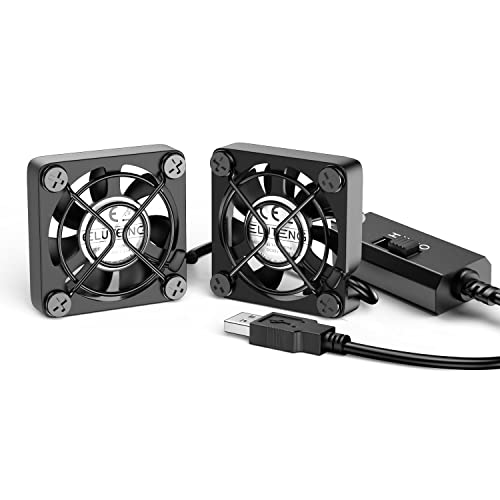
ELUTENG Dual 40mm USB Fan, 3 Speeds

Our verdict: Two 40mm fans in one unit with three speeds, a hydraulic bearing and a metal frame.

The ELUTENG Dual is a pair of 40 x 40 x 25mm fans with 3-speed control, a metal frame with finger protection and a hydraulic bearing motor.

It ranks sixth because two small fans can cover a wider patch than one but still do not match a 120mm fan for volume. The hydraulic bearing sits between sleeve and ball types: quieter than sleeve, often cheaper than ball. The metal frame feels sturdier than plastic cages and is a plus when the unit is near cables. It suits a mini PC tucked into a corner where a large fan would not fit beside it.

Buy it if you need more reach than a single 40mm fan in a tight spot. Skip it if you can fit a 120mm fan.

Size
2 x 40 x 40 x 25mm
Speeds
3 settings
Bearing
Hydraulic
Frame
Metal, finger protection

What we like

  • +Two fans cover more area
  • +Metal frame with finger guard
  • +Hydraulic bearing runs smoothly
  • +Fits where 120mm cannot

Watch out for

  • −No CFM or noise figure listed
  • −Small fans still lack volume

Buy it if: Tight corners where large fans do not fit.

Skip it if: You have room for a 120mm fan.

7

Best Spot-Cooling Trial

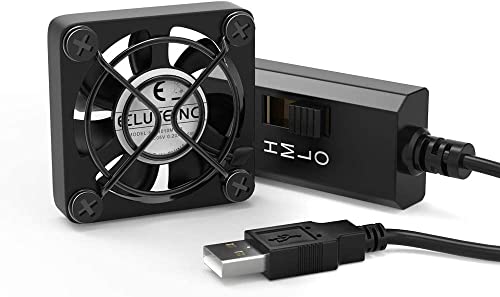
ELUTENG 40mm USB Fan with 3 Speed Control

Our verdict: A 40mm fan with 3.5, 3.88 and 4.4 CFM at its three speeds and a 100cm cable.

This ELUTENG is a single 40mm fan with three speeds giving 3.5, 3.88 and 4.4 CFM at 3.5, 4.2 and 5V. It has a metal front grill and a 100cm USB cable.

It ranks last because 4.4 CFM at best is gentle airflow, a thin breeze beside the 56.7 CFM of the Wathai. The honest numbers are useful, though, and the 100cm cable is longer than most. It is cheap enough to test whether directed spot cooling helps your setup before you buy a bigger fan, and it works as a quiet accessory fan for a hub or router.

Buy it as an inexpensive trial or for a small enclosure. Skip it if your mini PC is really hot.

Airflow
3.5 to 4.4 CFM
Voltage steps
3.5, 4.2 and 5V
Cable
100cm USB
Grill
Metal front

What we like

  • +Airflow figures are published
  • +Long 100cm USB cable
  • +Metal grill protects blades
  • +Cheap way to test spot cooling

Watch out for

  • −Airflow tops out at 4.4 CFM
  • −Too weak for a hot mini PC

Buy it if: A low-cost trial of directed spot cooling.

Skip it if: Your mini PC throttles under load.

Methodology

How We Ranked These

Airflow and noise numbers

CFM and decibel figures were the first criteria, with a preference for fans that publish them instead of vague quiet claims.

Bearing type and rated life

Sleeve, hydraulic and dual-ball bearings were compared with the rated hours listed, from 35,000 to 67,000.

Size and placement

40mm and 120mm formats were judged against the space beside a typical mini PC, including depth and cable reach.

Controls and vibration

Speed switches, anti-vibration feet and grille design were weighed for how comfortable a fan is on a working desk.

Value under $25

Every fan sits in the under $25 bracket, so the score rewards the most documented performance for that spend.

Every Primea Score uses the same weights: Performance 30% · Build & Materials 20% · Everyday Usability 20% · Value 20% · Owner Satisfaction 10%. Full scoring rules

Buyer's guide

How to Pick the Right One for You

By Fan Size

Larger, slower fans move more air with less noise, so size is the first decision.

SizeOur pick
120mm, quietestGSCOLER X1 USB Cooling Fan, 18dB Ultra Quiet
120mm, slim and strongWathai Cooling Case Fan, 120mm x 25mm, 5V USB
40mm, single, brandedAC Infinity MULTIFAN Mini, Compact 40mm x 20mm USB Fan
40mm, dualELUTENG Dual 40mm USB Fan, 3 Speeds

By Budget

SpendOur pick
Under $25, quiet deskGSCOLER X1 USB Cooling Fan, 18dB Ultra Quiet
Under $25, strongest airflowWathai Cooling Case Fan, 120mm x 25mm, 5V USB
Under $25, two devicesEasy Cloud 120mm USB Fan, 3 Speeds, 2-Pack
Under $25, test the ideaELUTENG 40mm USB Fan with 3 Speed Control

Slim Fan vs Deep Fan

Slim 25mm body

Fits next to a case in tight spaces and stands low on a shelf, but needs higher RPM for the same airflow. Picks: Wathai, ELUTENG Dual.

Deep 48mm body

A thicker housing lets a slower fan move the same air quietly, at the cost of height. Pick: GSCOLER X1.

Default to the deeper, slower fan when you have the room.

By Desk Layout

LayoutOur pick
Mini PC near your earGSCOLER X1 USB Cooling Fan, 18dB Ultra Quiet
Two devices to coolEasy Cloud 120mm USB Fan, 3 Speeds, 2-Pack
Shelf or enclosure with little gapAC Infinity MULTIFAN Mini, Compact 40mm x 20mm USB Fan
Switch between quiet and strongMarame Quiet Router Cooling Fan Stand, 3 Adjustable Speeds

For a Mini PC That Runs Warm Specifically

Look for

A 120mm fan with stated CFM, a rated noise under about 25 dBA, a good bearing and a position that puts air across the vents. Keep the unit away from walls that trap heat.

In this ranking

The GSCOLER X1 for quiet airflow, the Wathai for the most CFM and the Marame stand if you want to change speed as the load changes.

When to Spend More

Spend more if

The mini PC throttles under load or runs in a closed cabinet. A fan alone will not fix that, so consider a case with better venting or a stand that lifts the unit.

Save if

The unit is just warm to the touch. The ELUTENG 40mm is an inexpensive way to test whether directed airflow helps.

Questions

Frequently Asked Questions

Will a USB fan stop my mini PC from throttling?+

It can help if the case is shedding heat poorly, since moving air across the shell carries warmth away. If the CPU cooler inside is the bottleneck, an outside fan has limited effect. Check the temperatures in your monitoring tool before and after.

What is the most common mistake?+

Buying a fan on its look and not its numbers. Airflow, noise and bearing type decide the experience, so choose a model that publishes them. Also avoid blocking the vents with the fan itself.

Is the GSCOLER worth it over the Wathai?+

If the PC is on your desk, yes: 18 dB(A) against 23 dBA is a noticeable drop at nearly the same airflow. If it lives under a monitor or behind a screen, the Wathai's extra CFM and slimmer body matter more.

How should I position the fan?+

Aim it across the vents or the hot side of the case from a few inches away, with a clear path for air to leave. Test two or three spots, and use the lowest speed that keeps temperatures steady.

How do I keep the fan quiet over time?+

Wipe dust from the blades every few months and use anti-vibration feet or a soft mat. Dual-ball bearings stay quiet longest, while sleeve bearings may grow louder with age.

Can I power the fan from the mini PC?+

Yes, a 5V fan draws a small current, well within a USB port's limit. If you prefer, plug it into a monitor hub or charger so it keeps running when the PC sleeps.

Final take

For a desk-side mini PC, the GSCOLER X1 is the best cooling fan here, with 55.8 CFM at a rated 18 dB(A) and a 40,000 hour life. The Wathai moves the most air in a slimmer body, and the Easy Cloud pack covers two devices. The AC Infinity MULTIFAN Mini is the careful choice for tight shelves. Choose on published numbers, not on promises of silence.

More Ranked & Reviewed Guides