
Primea ReviewsAll Reviews

Primea Reviews is reader-supported. When you buy through our Amazon links we may earn a commission, at no extra cost to you. Rankings are set by our editors and never sold. Learn more

Ranked & Reviewed by Primea Reviews

The 7 Best External Cooling Fans for Mini PCs, Ranked & Reviewed

By the Primea Editorial TeamUpdated November 3, 202610 min read7 products ranked
The 7 Best External Cooling Fans for Mini PCs, Ranked & Reviewed

The short answer

The GSCOLER X1 is the best external fan for a mini PC on a quiet desk, with a 120mm fan rated at 55.8 CFM and 18 dBA. The Wathai 120mm fan has the strongest documented airflow, the Marame stand adds three speeds, and the Easy Cloud 2-pack cools both sides of a sealed box. Mac mini owners get a purpose-built mount in the IFCASE.

The Primea Scoreboard

Ranked & Reviewed

  1. A 120mm fan with 55.8 CFM at an 18 dBA rating, the best balance of airflow and silence.

    94Outstanding
    Check price
  2. A slim 120mm fan with 56.7 CFM, 23 dBA and a 35,000 hour rated life.

    92Outstanding
    Check price
  3. A 120mm fan stand with low, medium and high speeds and eight anti-vibration feet.

    90Excellent
    Check price
  4. Two 120mm fans with a 3-speed controller up to 2000 RPM for intake and exhaust cooling.

    88Excellent
    Check price
  5. A 40mm fan with dual-ball bearings rated for 67,000 hours, for an always-on mini PC.

    86Excellent
    Check price
  6. A purpose-built aluminum mount with a fan for Mac mini, supporting VESA 75mm and 100mm.

    84Very Good
    Check price
  7. Two 40mm fans in a metal frame with three speeds, for setups with almost no clearance.

    80Very Good
    Check price

The common mistake with an external fan on a mini PC is aiming it at the wrong place. A mini PC is a small sealed box with intake and exhaust vents on specific faces, and a fan that blows across the lid does very little. What helps is moving air through the vent path, or at least across the hot faces of the chassis, and that depends on fan size and placement more than any marketing number.

So this ranking leans on the figures that matter. We reviewed seven USB-powered fans from their listings and spec sheets, ranking them on airflow in CFM, noise in dBA, bearing type and rated life, and how well they fit around a compact PC. A fan cannot fix a failing thermal paste job or a throttling CPU, but it can lower case temperature by several degrees and cut the fan ramp-up noise from the PC itself.

Before you buy

What Actually Matters

01

CFM and fan size

CFM measures how much air a fan moves per minute. A 120mm fan at 55 to 57 CFM, as in the GSCOLER and Wathai, moves roughly four to five times the 12 CFM of a 40mm fan. Check whether the listing states CFM and avoid comparing across different fan sizes.

02

Noise and RPM

dBA is a loudness rating, and anything near 18 is close to silent in a quiet room. Lower RPM usually means less noise, which is why a large slow fan beats a small fast one. Be wary of listings that give no noise figure.

03

Bearing type

Sleeve bearings are cheapest and often shortest-lived, hydraulic bearings are a middle option, and dual-ball bearings usually last longest for continuous running. The AC Infinity lists 67,000 hours, while the Wathai lists 35,000. Always-on PCs need the better bearing.

04

Placement

A fan should push air along the PC's vent path or across its hottest surface. Look at where the intake and exhaust sit, then place the fan on one side with clearance. Blocking the exhaust with a fan defeats the purpose.

05

Power and control

USB fans draw modest current, around 0.2A on the Wathai. A speed switch lets you trade noise for airflow. Check that your USB port can supply the power.

In-depth reviews

Our Ranked Picks, Reviewed

1

Best Quiet Fan

GSCOLER X1 USB Cooling Fan, 18dB Ultra Quiet

Our verdict: A 120mm fan with 55.8 CFM at an 18 dBA rating, the best balance of airflow and silence.

The X1 is a 130mm by 130mm by 48.6mm housing around a 120mm fan running at 850 RPM, rated for 55.8 CFM and 18 dB(A). A 20.87 inch USB cable is built in. For a mini PC on a desk where you hear every sound, that noise rating is the headline.

It ranks first because it delivers nearly the same airflow as the Wathai at a lower speed and noise rating. A slow, large fan is the right answer for a small PC: it moves a lot of air without the whine of a small fast fan. The housing is thicker than the Wathai's slim frame, so it takes more desk room. The integrated cable also means no spare USB lead to swap.

Buy it for a home office or bedroom where silence matters. Skip it if you need a slim fan that squeezes into a tight shelf.

Airflow
55.8 CFM
Noise
18 dB(A)
Fan
120mm, 850 RPM
Size
130 x 130 x 48.6 mm

What we like

  • +Rated 18 dBA for quiet desks
  • +55.8 CFM from a slow 850 RPM fan
  • +Integrated USB cable
  • +Large fan suits small chassis

Watch out for

  • −Thicker housing takes desk room
  • −Fixed cable cannot be replaced

Buy it if: Quiet offices and bedrooms with a mini PC.

Skip it if: You need a slim fan for a tight shelf.

2

Best Documented Airflow

Wathai Cooling Case Fan, 120mm x 25mm, 5V USB

Our verdict: A slim 120mm fan with 56.7 CFM, 23 dBA and a 35,000 hour rated life.

The Wathai is a 120mm by 120mm by 25mm fan on 5V USB power, drawing 0.2A at 1500 RPM. It is rated for 56.7 CFM of airflow and 23 dBA, uses a sleeve bearing, and carries a 35,000 hour rated life.

It ranks second because it moves slightly more air than the GSCOLER on paper, but at 1500 RPM and 23 dBA it is louder, and a sleeve bearing is the simplest bearing type, usually the shortest-lived under constant use. The 25mm thickness is a real advantage in a tight spot, and 35,000 hours is still about four years of nonstop running.

Buy it if you want the strongest airflow figure and a slim fan. Skip it if noise is your priority.

Airflow
56.7 CFM
Noise
23 dBA
Speed
1500 RPM, 5V 0.2A
Bearing
Sleeve, 35,000 hours

What we like

  • +Highest documented airflow here
  • +Slim 25mm thickness
  • +Low 0.2A power draw
  • +35,000 hour rated life

Watch out for

  • −Louder than the GSCOLER
  • −Sleeve bearing is basic

Buy it if: Buyers who want strong airflow in a slim fan.

Skip it if: You want the quietest possible fan.

3

Best Adjustable Stand

Marame Quiet Router Cooling Fan Stand, 3 Adjustable Speeds

Our verdict: A 120mm fan stand with low, medium and high speeds and eight anti-vibration feet.

The Marame is a 120mm fan on a stand with a 3-speed switch, eight anti-vibration rubber feet and a metal safety wire grille. It is sold for routers but fits any small sealed box.

It ranks third because the speed switch lets you run it quietly at idle and bump it up for a long compile or video export. That flexibility beats a single-speed fan for a PC with variable load. The feet cut vibration noise on a hard desk. Unlike the top two, the listing gives no CFM or dBA figures, so we cannot compare airflow numerically.

Buy it for a mini PC that swings between idle and heavy work. Skip it if you want documented airflow numbers.

Fan
120mm
Speeds
3 (low, medium, high)
Feet
8 anti-vibration rubber
Grille
Metal safety wire

What we like

  • +Three speeds for variable loads
  • +Anti-vibration feet cut desk noise
  • +Metal safety grille
  • +Stand shape sits under or beside a PC

Watch out for

  • −No CFM or dBA figures listed
  • −Marketed for routers

Buy it if: Mini PCs with changing workloads.

Skip it if: You want listed airflow and noise numbers.

4

Best Two-Fan Setup

Easy Cloud 120mm USB Fan, 3 Speeds, 2-Pack

Our verdict: Two 120mm fans with a 3-speed controller up to 2000 RPM for intake and exhaust cooling.

The Easy Cloud pack contains two 120mm fans, a 3-speed controller that tops out at 2000 RPM, eight anti-vibration feet per fan and dual-ball bearings. Two fans let you cool both ends of a sealed PC.

It ranks fourth because a pair of fans is a more complete answer for a sealed box: one pushes cool air toward the intake while the other pulls hot air from the exhaust side. Dual-ball bearings usually outlast the sleeve bearing in the Wathai under nonstop use. The cost is double the desk space and a louder profile at 2000 RPM.

Buy it if your mini PC runs hot and you can fit two fans. Skip it if desk space is tight.

Fans
2 x 120mm
Speeds
3, up to 2000 RPM
Bearing
Dual-ball
Feet
8 anti-vibration per fan

What we like

  • +Two fans cover intake and exhaust
  • +Dual-ball bearings for long life
  • +Speeds up to 2000 RPM
  • +Anti-vibration feet on each fan

Watch out for

  • −Needs space for two fans
  • −Noisy at top speed

Buy it if: Sealed mini PCs that run hot.

Skip it if: You have limited desk space.

5

Best for Always-On Use

AC Infinity MULTIFAN Mini, Compact 40mm x 20mm USB Fan

Our verdict: A 40mm fan with dual-ball bearings rated for 67,000 hours, for an always-on mini PC.

The MULTIFAN Mini is a 40mm by 40mm by 20mm fan rated for 12 CFM at 18 dBA, with dual-ball bearings, a 67,000 hour rated life and a multi-speed controller.

It ranks fifth because small fans move little air: 12 CFM is a fraction of the 120mm models. The reason to buy it is longevity. 67,000 hours is about seven and a half years of continuous running, and it will fit where nothing else will. It suits a mini PC that sits on a shelf or in a rack and runs around the clock as a server.

Buy it for a home server or a NAS-style mini PC. Skip it if the PC is a hot gaming box that needs strong airflow.

Airflow
12 CFM
Noise
18 dBA
Size
40 x 40 x 20 mm
Bearing
Dual-ball, 67,000 hours

What we like

  • +67,000 hour rated bearing life
  • +Quiet 18 dBA rating
  • +Multi-speed controller
  • +Fits in very tight spots

Watch out for

  • −Only 12 CFM of airflow
  • −Too small for hot gaming PCs

Buy it if: Always-on mini PC servers.

Skip it if: Your PC runs hot under load.

6

Best Mac mini Mount

IFCASE Cooling Fan Mount for Mac mini

Our verdict: A purpose-built aluminum mount with a fan for Mac mini, supporting VESA 75mm and 100mm.

The IFCASE is an aluminum alloy wrap-around mount designed for the Mac mini. It supports VESA 75mm and 100mm patterns for wall, under-desk or monitor-back mounting, and it includes a USB 1.1 hub.

It ranks sixth because it is only for one machine, and the listing gives no CFM or noise figure. What it offers is integration: the fan is built into a mount that holds the Mac mini out of the way, and the aluminum body conducts some heat away.

Buy it if you own a Mac mini and want to hide it behind a monitor. Skip it for any other mini PC, as it is made for the Mac mini footprint.

Fits
Mac mini
Body
Aluminum alloy wrap-around
Mount
VESA 75mm and 100mm
Hub
USB 1.1

What we like

  • +Purpose-built for Mac mini
  • +VESA mounting options
  • +Aluminum body helps conduct heat
  • +Includes a USB hub

Watch out for

  • −Works with the Mac mini only
  • −No airflow figures listed

Buy it if: Mac mini owners who want a tidy mount.

Skip it if: You own any other mini PC.

7

Best for Tight Spaces

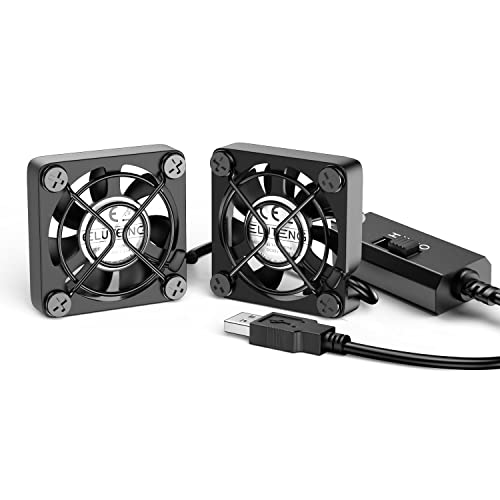
ELUTENG Dual 40mm USB Fan, 3 Speeds

Our verdict: Two 40mm fans in a metal frame with three speeds, for setups with almost no clearance.

The ELUTENG has two 40mm by 40mm by 25mm fans, a 3-speed control, a metal frame with finger protection and a hydraulic bearing motor.

It ranks last because 40mm fans are small and the listing gives no CFM or noise figure. Two of them double the coverage of a single small fan, and the metal frame gives a sturdy mount. It earns a place by fitting where a 120mm fan cannot.

Buy it if you have a cramped shelf or cabinet. Skip it if you have room for a 120mm fan, which will move far more air.

Fans
2 x 40mm
Size
40 x 40 x 25 mm each
Speeds
3
Bearing
Hydraulic

What we like

  • +Fits very tight spaces
  • +Metal frame with finger guard
  • +Three speed control
  • +Two fans for broader coverage

Watch out for

  • −No airflow figures listed
  • −Small fans move little air

Buy it if: Cramped shelves and cabinets.

Skip it if: You have space for a 120mm fan.

Methodology

How We Ranked These

Airflow

Stated CFM and fan size were compared, with documented figures weighed over unmeasured claims.

Noise

dBA ratings and RPM were reviewed, since a small PC on a desk is often in earshot.

Bearing and life

Sleeve, hydraulic and dual-ball bearings and rated hours were counted as signals of durability.

Fit and mounting

Size, feet, stands and mounts were checked for compatibility with small PCs.

Value for the price bucket

Each product was scored against the under $25 and $25 to $50 buckets.

Every Primea Score uses the same weights: Performance 30% · Build & Materials 20% · Everyday Usability 20% · Value 20% · Owner Satisfaction 10%. Full scoring rules

Buyer's guide

How to Pick the Right One for You

By Fan Size

Bigger, slower fans move more air with less noise.

SpaceOur pick
Room for a 120mm fan, quietGSCOLER X1 USB Cooling Fan, 18dB Ultra Quiet
Room for a slim 120mmWathai Cooling Case Fan, 120mm x 25mm, 5V USB
Tight shelf, small fanAC Infinity MULTIFAN Mini, Compact 40mm x 20mm USB Fan
Very cramped cabinetELUTENG Dual 40mm USB Fan, 3 Speeds

By Budget

SpendOur pick
Under $25, quietGSCOLER X1 USB Cooling Fan, 18dB Ultra Quiet
Under $25, airflowWathai Cooling Case Fan, 120mm x 25mm, 5V USB
Under $25, two fansEasy Cloud 120mm USB Fan, 3 Speeds, 2-Pack
$25 to $50IFCASE Cooling Fan Mount for Mac mini

One Fan vs Two Fans

One fan

Simpler, quieter and cheaper, and enough for most mini PCs. Picks: GSCOLER, Wathai, Marame.

Two fans

Cools both intake and exhaust sides, useful for sealed or hot boxes. Picks: Easy Cloud 2-pack, ELUTENG Dual.

Default to one large fan and add a second only if temperatures stay high.

By Workload

WorkloadOur pick
Always-on serverAC Infinity MULTIFAN Mini, Compact 40mm x 20mm USB Fan
Mixed office useMarame Quiet Router Cooling Fan Stand, 3 Adjustable Speeds
Heavy sustained loadEasy Cloud 120mm USB Fan, 3 Speeds, 2-Pack
Mac mini behind a monitorIFCASE Cooling Fan Mount for Mac mini

For a Sealed Mini PC Specifically

Look for

A large fan with documented CFM, low noise, and the option to face two sides of the chassis.

In this ranking

GSCOLER X1 for quiet single-fan cooling, Easy Cloud 2-pack for both sides, and Wathai for the most airflow.

When to Spend More

Spend more if

The PC runs constantly and you want a long bearing life. The AC Infinity or Easy Cloud suits that.

Save if

The PC runs light office tasks. The Wathai or GSCOLER is enough for under $25.

Questions

Frequently Asked Questions

Do external fans work with any mini PC?+

Yes, since they use USB power and stand beside the chassis. The IFCASE is the exception, which is built for the Mac mini. For other models, choose by fan size and available desk space.

What is the biggest mistake with mini PC cooling?+

Placing the fan where it blocks the vents or blows over the top of the lid. Aim the airflow at an intake face or across the side, and leave clearance for hot air to leave.

Is a 120mm fan worth it over a 40mm one?+

For most PCs, yes. The GSCOLER and Wathai move about 56 CFM compared with the 12 CFM of the AC Infinity MULTIFAN Mini. Choose 40mm only for tight space or always-on quiet servers.

How do I power and set these up?+

Plug the USB lead into a PC port or a powered hub. The Wathai draws 0.2A at 5V, which any USB port can supply. Place the fan, pick a speed and check temperatures after an hour.

How do I maintain them?+

Wipe dust from the blades and grille every few months, using a soft brush. Dust adds noise and cuts airflow.

Will an external fan fix a thermal throttling PC?+

It can lower case temperatures by several degrees, but it cannot repair dried thermal paste or a clogged internal heatsink. If the PC throttles at idle, open it and check.

Final take

The GSCOLER X1 is the best external fan for most mini PCs: a 120mm fan with 55.8 CFM at 18 dBA. The Wathai moves slightly more air in a slimmer body, the Easy Cloud pack cools both sides of a sealed box, and the AC Infinity MULTIFAN Mini is the long-life choice for an always-on server. Mac mini owners should look at the IFCASE mount. Pick the largest fan your desk can hold.

More Ranked & Reviewed Guides