

Primea ReviewsAll Reviews

Primea Reviews is reader-supported. When you buy through our Amazon links we may earn a commission, at no extra cost to you. Rankings are set by our editors and never sold. Learn more

Ranked & Reviewed by Primea Reviews

The 4 Best Metal Laptop Cooling Pads of 2026, Ranked & Reviewed

By the Primea Editorial TeamUpdated November 1, 20268 min read4 products ranked
The 4 Best Metal Laptop Cooling Pads of 2026, Ranked & Reviewed

The short answer

The ICE COOREL is the best metal laptop cooling pad: a real aluminum surface at about 1.35 lb, under $25. The KYOLLY adds six fans and a USB hub for desk-bound gaming laptops. The Trullypine brings twelve fans across metal mesh, and the havit is the slim mesh option for 15.6 to 17 inch laptops.

The Primea Scoreboard

Ranked & Reviewed

  1. Real aluminum in the lightest package here.

    92Outstanding
    Check price
  2. Full aluminum body, six fans, and a USB hub.

    88Excellent
    Check price
  3. Twelve fans across a large metal mesh surface.

    85Excellent
    Check price
  4. A slim metal-mesh pad with three quiet fans.

    82Very Good
    Check price

"Metal" on a cooling pad listing can mean two unrelated things. One is a solid aluminum panel that pulls heat out of the laptop base by conduction. The other is a metal mesh top that does little except let air reach the fans underneath. Buyers lump them together, then wonder why a light mesh pad behaves nothing like a solid aluminum one.

This ranking keeps to four pads whose listings actually state a metal surface, and skips any that never name the material. We scored each on surface type, fan setup, listed weight, height adjustment and size fit, reading spec sheets and owner feedback. Aluminum panels take the top two spots, mesh pads fill out the rest, with weight and fan count as the tiebreakers.

Before you buy

What Actually Matters

01

Aluminum panel versus metal mesh

A solid aluminum panel conducts heat away from the laptop base, while a metal mesh top mainly lets air pass to the fans below. The two behave differently, so lumping them together misleads. Read the listing wording: aluminum alloy or aircraft aluminum means a solid panel, while mesh means an open weave. Look for it in the title or bullets.

02

Weight

A pad rides in your bag with the laptop, so weight counts if you travel. The ICE COOREL lists about 1.35 lb, while the six-fan KYOLLY is described as heavy for travel and the Trullypine lists no weight at all. Look for a stated weight in the specs, and treat a missing figure as a warning.

03

Fan count and speed

More fans spread airflow across the base, but add noise and power draw from the USB port. One large fan, like the ICE COOREL's 160mm unit, can be quieter at similar airflow. Check RPM and dB figures where listed: the KYOLLY gives 1700 to 2400 RPM and 18dB, while the Trullypine gives neither.

04

Height adjustment

Height adjustment tilts the keyboard for typing comfort and opens a gap that improves airflow to the intake vents. Seven or nine settings allow fine tuning, while two settings are coarse. Check the count in the title or bullets, along with the angle range, such as the KYOLLY's 10 to 45 degrees.

05

Laptop size fit

Pads support a limited range of laptop sizes, such as 15.6 to 17 inches on the havit or up to 21 inches on the KYOLLY. A mismatch leaves corners unsupported and rocks the machine. Compare your laptop's screen size and weight against the stated range before buying, instead of assuming a standard fit.

In-depth reviews

Our Ranked Picks, Reviewed

1

Best Overall

ICE COOREL Aluminum Laptop Cooling Pad with 7 Height Adjustable

Our verdict: Real aluminum in the lightest package here.

The ICE COOREL is the clearest case of aluminum doing its job without the bulk. Its alloy surface sits over a single 160mm fan running 1000 to 1400 RPM, with seven height settings and two USB 2.0 ports. A large, slower fan moves air with less buzz than several small fast ones, and the panel carries heat sideways from the laptop base before the fan clears it. It weighs about 1.35 lb and sells under $25.

It ranks first because it keeps the aluminum surface the category is named for at the lightest weight here. The KYOLLY has more fans, but it is a desk fixture. The Trullypine and havit use mesh, which lets air through but has less conductive mass than a solid panel.

Buy it if you carry a laptop to class or the office. The caveat is that one fan covers less of the base, and two USB 2.0 ports are modest. Skip it if you want RGB lighting or fan count.

Surface
Aluminum alloy
Fan
One 160mm, 1000-1400 RPM
Height settings
7
Weight
About 1.35 lb

What we like

  • +Aluminum alloy surface
  • +About 1.35 lb weight
  • +Seven height settings
  • +Under $25 bucket

Watch out for

  • −Single fan
  • −Only two USB 2.0 ports

Buy it if: Travelers who want a light aluminum pad.

Skip it if: You want multiple fans and RGB.

2

Best Feature Set

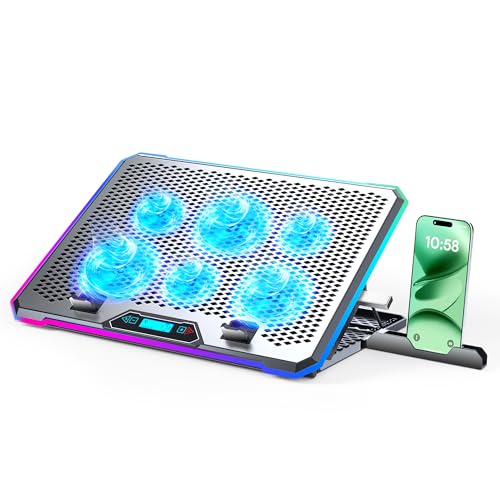
KYOLLY Aluminum Alloy RGB Gaming Laptop Cooler with 6 Fans and LCD Screen

Our verdict: Full aluminum body, six fans, and a USB hub.

The KYOLLY goes all in on features. An aircraft aluminum panel sits above six fans spinning 1700 to 2400 RPM at a rated 18dB, with nine angles from 10 to 45 degrees and a four-port USB 3.0/2.0 hub. It supports laptops up to 21 inches and 18.7 lb, so large gaming rigs fit, and it sells at $25 to $50.

It ranks second, not first, because the same six fans, panel and hub add bulk that makes it a poor traveler. Against the ICE COOREL, it offers far more airflow coverage and nine tilt positions instead of seven, at a higher bucket and a heavier build. It beats the Trullypine by pairing its fans with solid aluminum.

Buy it for a gaming laptop that stays on one desk. The caveat is the footprint, so skip it if you need to pack the pad.

Surface
Aircraft aluminum
Fans
6, 1700-2400 RPM
Angles
9, 10 to 45 degrees
USB hub
4 ports

What we like

  • +Six fans
  • +Full aluminum panel
  • +4-port USB hub
  • +Fits up to 21 inch laptops

Watch out for

  • −Heavy for travel
  • −Bulky with extras

Buy it if: Gaming laptops that stay on a desk.

Skip it if: You want a light, portable pad.

3

Best Fan Coverage on Mesh

Trullypine Laptop Cooling Pad with 12 Quiet Fans

Our verdict: Twelve fans across a large metal mesh surface.

The Trullypine spreads twelve quiet fans under a large metal mesh surface with a diamond groove pattern. It has five height settings, dual USB 2.0 ports and a three-mode LED strip. Many small fans give even coverage across a wide chassis, which helps big laptops with vents across the whole base. It sells at $25 to $50.

It ranks third because the listing gives no RPM figure and no weight, which makes it impossible to judge noise or portability against the aluminum pads. It also uses mesh, not a solid panel, so there is less heat conduction than the ICE COOREL or KYOLLY. Against the havit, it brings four times the fans and three more height settings.

Buy it if airflow coverage under a big laptop matters more than surface material. The caveat is the missing RPM, so skip it if you are noise sensitive.

Surface
Metal mesh, diamond groove
Fans
12 quiet
Height settings
5
Lighting
3-mode LED strip

What we like

  • +12 fans
  • +Large mesh surface
  • +Five height settings
  • +Dual USB ports

Watch out for

  • −No RPM listed
  • −Mesh is not solid aluminum

Buy it if: Wide airflow coverage under big laptops.

Skip it if: You want a solid aluminum panel.

4

Best Slim Mesh Pad

havit HV-F2056 15.6"-17" Laptop Cooler Cooling Pad

Our verdict: A slim metal-mesh pad with three quiet fans.

The havit HV-F2056 is the plain, slim option: a metal mesh carrying surface, three quiet fans, two height settings and an extra USB port with a power switch. It is built for 15.6 to 17 inch laptops and keeps a low profile on the desk. That switch lets you cut fan power without unplugging. It sells at $25 to $50.

It ranks last because it has the fewest height settings and no aluminum panel. The Trullypine matches its mesh with many more fans, and the ICE COOREL offers seven angles and a solid surface for under $25, which undercuts the havit's value case. Its draw is a simple, uncluttered design.

Buy it for an office desk with a 15.6 to 17 inch laptop. The caveat is the size range, so smaller laptops will leave the pad's edges unsupported. Skip it if you want fine tilt control.

Surface
Metal mesh
Fans
3 quiet
Height settings
2
Fits
15.6 to 17 in laptops

What we like

  • +Slim and portable
  • +Three quiet fans
  • +USB port with switch
  • +Simple design

Watch out for

  • −Only two height settings
  • −Not solid aluminum

Buy it if: Office workers with 15.6 to 17 inch laptops.

Skip it if: You need lots of height options.

Methodology

How We Ranked These

Surface material

We kept only pads whose listing states a metal surface, and separated aluminum from mesh.

Fan setup

We compared fan count, size, and RPM where listed.

Portability

We weighed stated weights and slim profiles.

Adjustability

We counted height settings and angle ranges.

Extras and price

We considered USB ports, lighting, and price bucket.

Every Primea Score uses the same weights: Performance 30% · Build & Materials 20% · Everyday Usability 20% · Value 20% · Owner Satisfaction 10%. Full scoring rules

Buyer's guide

How to Pick the Right One for You

By Use Case

Portable or desk-bound decides the pick.

UseOur pick
Daily carryICE COOREL Aluminum Laptop Cooling Pad
Gaming deskKYOLLY Aluminum Alloy RGB Gaming Laptop Cooler
Wide airflow coverageTrullypine Laptop Cooling Pad with 12 Quiet Fans
Slim office usehavit HV-F2056 Laptop Cooler Cooling Pad

By Budget

SpendOur pick
Under $25ICE COOREL Aluminum Laptop Cooling Pad
$25-50 feature heavyKYOLLY Aluminum Alloy RGB Gaming Laptop Cooler
$25-50 meshTrullypine Laptop Cooling Pad with 12 Quiet Fans

Aluminum vs Mesh

Aluminum

A solid conductive panel. The ICE COOREL and KYOLLY use aluminum.

Mesh

An open weave that favors airflow. The Trullypine and havit use metal mesh.

Most buyers should choose aluminum unless airflow coverage matters more.

By Laptop Size

LaptopOur pick
15.6 to 17 inchhavit HV-F2056 Laptop Cooler
Up to 21 inchKYOLLY Aluminum Alloy RGB Gaming Laptop Cooler
Typical large laptopICE COOREL Aluminum Laptop Cooling Pad

For Travelers Specifically

Look for

A listed weight under 2 lb and a slim profile.

In this ranking

The ICE COOREL Aluminum pad weighs about 1.35 lb, far lighter than the KYOLLY.

When to Spend More

Spend more if

You want a USB hub and wide fan coverage. The KYOLLY adds a 4-port hub and six fans.

Save if

You want a light aluminum pad. The ICE COOREL sits in the under $25 bucket.

Questions

Frequently Asked Questions

Does a metal pad cool better than plastic?+

The listings do not state cooling results, so we cannot rank by temperature. Aluminum like the ICE COOREL's conducts heat, but fan layout matters just as much. Judge by surface type, fan count and fit instead.

What mistake do buyers make?+

They assume aluminum and metal mesh are the same. The ICE COOREL and KYOLLY use solid aluminum panels, while the Trullypine and havit use mesh. Check the listing for panel or weave before buying.

Is the KYOLLY worth it over the ICE COOREL?+

Only for a laptop that stays on a desk. The KYOLLY has six fans, a USB hub and room for 21 inch laptops, but it is heavy for travel. The ICE COOREL is the better carry.

How do I set one up?+

Place the laptop on the pad and plug the USB cable into your laptop. Pick a height that suits your typing angle, like one of the ICE COOREL's seven settings, and use the havit's power switch to turn fans off.

Do pads need cleaning?+

Dust gathers on fans and mesh. Unplug the pad, wipe the surface, and use compressed air through the fan openings every few weeks. The Trullypine's twelve fans give dust more places to collect.

Will it fit a small laptop?+

Check the listed size range first. The havit fits 15.6 to 17 inch laptops, so smaller machines may overhang or tip. The KYOLLY supports up to 21 inches, which is the safer pick for large gaming laptops.

Final take

Buy the ICE COOREL if you want actual aluminum in a package light enough to travel. Move to the KYOLLY for a gaming laptop that stays on a desk, the Trullypine for broad airflow under a big machine, and the havit for plain office use. Decide between solid aluminum and mesh before you compare fan counts.

More Ranked & Reviewed Guides