
Primea ReviewsAll Reviews

Primea Reviews is reader-supported. When you buy through our Amazon links we may earn a commission, at no extra cost to you. Rankings are set by our editors and never sold. Learn more

Ranked & Reviewed by Primea Reviews

The 8 Best Lockable Laptop Charging Carts of 2026, Ranked & Reviewed

By the Primea Editorial TeamUpdated November 1, 202610 min read8 products ranked
The 8 Best Lockable Laptop Charging Carts of 2026, Ranked & Reviewed

The short answer

The POCHAR 30 is the best lockable laptop charging cart, with front and rear key locks, two keys each and room for 30 devices. The Pearington 20 stands out for two locking casters, and the Meteteel 20 arrives fully assembled. The Learniture is the only cart under $200, at 12 devices with a single lock point.

The Primea Scoreboard

Ranked & Reviewed

  1. Large capacity with locks on both the front and rear.

    95Outstanding
    Check price
  2. Locking doors plus two locking casters for a cart that stays put.

    92Outstanding
    Check price
  3. A 20 device cart that arrives assembled with front and back locks.

    89Excellent
    Check price
  4. Locking doors plus a chain hook anchor point.

    86Excellent
    Check price
  5. A 30 device cart with secure lockable storage.

    84Very Good
    Check price
  6. A 16 device cart that adds surge protection to the lock.

    82Very Good
    Check price
  7. A 16 device security cabinet design in black.

    80Very Good
    Check price
  8. The most affordable lockable station here, for 12 devices.

    78Very Good
    Check price

Most buyers choose a charging cart by device count and only later discover that a lock on one door does not secure the back. A cart with a locked front and an open rear panel protects nothing from anyone willing to walk around it, so lock layout matters as much as capacity. Key count matters too, because one lost key can turn a locked cart into a headache.

We reviewed eight lockable carts on paper, comparing capacity, lock placement, mobility features and price bucket. We ranked them for classroom and shared-office use, and every one of them lists a lock. Capacities run from 12 to 30 devices, and seven of the eight sit in the same $200 to $500 bucket, so the differences are in the details.

Before you buy

What Actually Matters

01

Capacity

Capacity is the number of devices a cart holds. Pick one slightly larger than your set so you can grow, and check that the listing names the device types and sizes it fits, such as 14 inch laptops. Slot width limits matter more than the bay count. Chromebooks in thick cases may not fit in every bay.

02

Lock placement

A lock on the front only leaves the back open on some carts. Front and rear locks secure both sides. Look for the words front and rear or back door locks in the bullets. The POCHAR 30 and Meteteel 20 list both, and the Pearington 30 and AQNIEGEP leave placement vague, so ask before buying.

03

Locking casters

Casters let you move a cart between rooms, and locking ones stop it rolling while you load. The Pearington 20 lists two locking wheels. Check for locking wheel wording, and note that a cart that stays in one room needs them less. Hard floors and ramps make the feature far more useful, and a locked wheel also keeps the cart from creeping during loading.

04

Surge protection

Surge protection guards devices from power spikes during charging. The VEVOR is the only cart here that lists it by name. Look for it in the listing, and ask whether the cart includes a protected strip. If it does not, plan to plug the cart into a protected circuit instead, and have an electrician check the load.

05

Anchor points

A chain hook lets you tether the cart to a fixed object. It adds theft resistance in shared spaces, where the easiest target is the whole cart. The POCHAR 20 lists one. Check whether the listing mentions an anchor point, and plan the wall bracket or fixture before the cart arrives, because a chain is useless without a solid anchor.

In-depth reviews

Our Ranked Picks, Reviewed

1

Best Overall

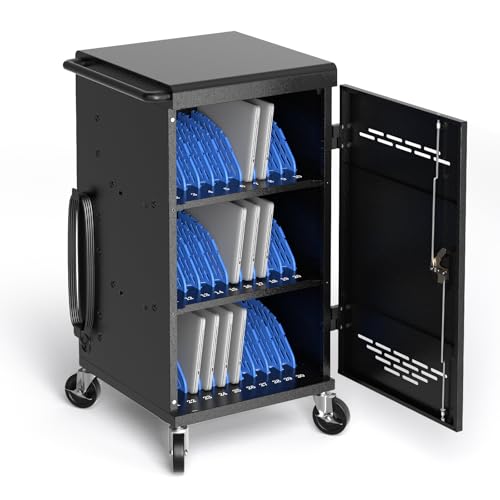
POCHAR 30 Unit Device Charging Station for Chromebook, iPad, 14'' Laptop

Our verdict: Large capacity with locks on both the front and rear.

The POCHAR 30 holds 30 devices, including Chromebooks, iPads and 14 inch laptops. It has front and rear key locks, with two keys supplied for each. A rear lock closes the gap that most carts leave open: on a cart with locked front doors only, the cable-side panel offers a way to walk off with a device.

It wins because 30 slots cover a full classroom and the lock layout is documented. The Pearington 30 offers the same capacity, but its listing states only secure lockable storage with no layout, so you cannot verify the rear. The tradeoff is a bigger frame and a price in the $200 to $500 bucket.

Choose it for a full class set. The caveat is footprint: 30 slots take real floor space, so measure the room and doorways before ordering.

Capacity
30 devices
Locks
Front and rear key locks
Keys
2 per lock
Compatible
Chromebook, iPad, 14 inch laptop

What we like

  • +30 device capacity
  • +Front and rear locks
  • +Two keys per lock
  • +Fits Chromebooks and iPads

Watch out for

  • −Large footprint
  • −Higher price tier

Buy it if: Full classroom device sets.

Skip it if: You manage only a few devices.

2

Best Mid-Size Mobile Cart

Pearington 20 Device Mobile Charging and Storage Cart for iPads, Chromebooks

Our verdict: Locking doors plus two locking casters for a cart that stays put.

The Pearington 20 holds 20 devices behind door locks and rolls on casters, two of which lock. It suits iPads and Chromebooks and sits in the $200 to $500 bucket. Locking casters matter for a shared cart. Without them, a loaded cart on a sloped or slick floor drifts while students plug in devices.

Second place reflects that detail, which the other 20 device carts do not list. The Meteteel lists front and back locks but no locking wheels, and the POCHAR 20 lists an anchor point instead. It holds fewer devices than the POCHAR 30, and the lock listing names door locks without saying front and rear.

Pick it for mid-size classes that share a cart between rooms. The caveat is that missing rear-lock detail: ask the seller whether both sides lock before you assume so.

Capacity
20 devices
Locks
Door locks
Casters
2 locking wheels
Compatible
iPads, Chromebooks

What we like

  • +Locking casters
  • +Door locks
  • +20 device capacity
  • +Mobile design

Watch out for

  • −Fewer slots than 30 device carts
  • −Higher price tier

Buy it if: Shared carts moved between rooms.

Skip it if: You need more than 20 slots.

3

Best Fully Assembled

Meteteel Fully Assembled 20 Device Laptop Charging Cart for School (Black)

Our verdict: A 20 device cart that arrives assembled with front and back locks.

The Meteteel holds 20 devices, ships fully assembled and has front and back door locks, in the $200 to $500 bucket. Arriving built is a real saving. Charging carts take hours to assemble from flat pack, and a rollout before a school term rarely has the staff time to spare.

Third spot comes down to the fact that it matches the Pearington on capacity but does not list locking casters, and it has the front and back lock layout that the Pearington leaves unspecific. On security alone, it beats the Pearington. On mobility it loses.

It suits schools without time for assembly, particularly where the cart stays in one room. The caveat is the wheels: if you plan to move it daily, the lack of locking casters means you will need to chock the wheels or find a flat floor.

Capacity
20 devices
Locks
Front and back
Assembly
Fully assembled
Finish
Black

What we like

  • +Arrives assembled
  • +Front and back locks
  • +20 device capacity
  • +School focused

Watch out for

  • −No locking casters listed
  • −Higher price tier

Buy it if: Schools that want it ready to roll.

Skip it if: You want locking wheels.

4

Best for Anchoring

POCHAR 20 Device Laptop Charging Cart for iPads Chromebooks, Tablet Charging Station

Our verdict: Locking doors plus a chain hook anchor point.

This POCHAR holds 20 devices behind locking doors and adds a chain hook anchor point, in the $200 to $500 bucket. An anchor point lets you chain the cart to a wall bracket or heavy fixture, which defeats the simplest theft method: wheeling the whole cart out of the room.

Fourth position follows from the fact that the anchor tethers the cart to a fixed object, which others here do not list, while the Pearington 20 trades that for locking casters. It also lists no rear lock, so anchoring protects the whole cart but not necessarily its back panel. It is the sharpest pick for loss prevention.

Choose it where theft is the concern, such as an open shared space. The caveat is the lock layout: the listing mentions locking doors only, so confirm the rear before buying.

Capacity
20 devices
Locks
Locking doors
Anchor
Chain hook point
Compatible
iPads, Chromebooks, tablets

What we like

  • +Chain anchor point
  • +Locking doors
  • +20 device capacity
  • +Tablet friendly

Watch out for

  • −Rear lock not listed
  • −Higher price tier

Buy it if: Spaces where theft is a concern.

Skip it if: You want front and rear locks.

5

Best Large Pearington

Pearington 30 Device Mobile Charging/Storage Cart for iPads, Tablets, Laptop

Our verdict: A 30 device cart with secure lockable storage.

The Pearington 30 holds 30 devices in secure lockable storage, in the $200 to $500 bucket, and it is a mobile cart for iPads, tablets and laptops. It is the same capacity as the leading POCHAR, so a large class can use it without splitting the set.

Fifth place is explained by the fact that its lock details are less specific than the POCHAR 30, which names front and rear key locks and two keys each. Storage described as secure and lockable does not tell you where the locks sit. It also gives no caster details, though the title says mobile, unlike the Pearington 20's two locking wheels.

It suits large sets in one room. The caveat is verification: ask for lock placement and key count, because this listing does not provide them.

Capacity
30 devices
Storage
Secure lockable
Compatible
iPads, tablets, laptops
Mobility
Mobile cart

What we like

  • +30 device capacity
  • +Lockable storage
  • +Mobile cart
  • +Works with tablets

Watch out for

  • −Lock layout not detailed
  • −Higher price tier

Buy it if: Large device sets in one building.

Skip it if: You want a stated rear lock.

6

Best Surge Protected

VEVOR 16 Device Charging Station with Lock & Key, Mobile Charging Cart

Our verdict: A 16 device cart that adds surge protection to the lock.

The VEVOR holds 16 devices, comes with a lock and key and lists surge protection, in the $200 to $500 bucket. Surge protection is rarer than you would expect on a charging cart. A spike on a classroom circuit can reach every charger at once, and a protected strip is the cheapest insurance for a fleet.

Sixth place is down to the fact that it has fewer slots than the 20 device carts in the same price bucket. For a set of 16 or fewer, that is no handicap, and the surge protection is a distinct benefit that most carts above do not list. It beats the AQNIEGEP on documented lock and power details.

Choose it for a smaller set where power safety matters. The caveat is room to grow: a school adding devices will outgrow 16 slots quickly.

Capacity
16 devices
Lock
Lock and key
Power
Surge protected
Mobility
Mobile cart

What we like

  • +Surge protection
  • +Lock and key
  • +Mobile cart
  • +16 device capacity

Watch out for

  • −Fewer slots than rivals
  • −Same price tier as larger carts

Buy it if: Small sets where power safety matters.

Skip it if: You need 20 or more slots.

7

Best Cabinet Style

AQNIEGEP 16-Device Charging Station, Black

Our verdict: A 16 device security cabinet design in black.

The AQNIEGEP holds 16 devices in a security cabinet design, in the $200 to $500 bucket, with a black finish. An enclosed cabinet hides what is inside and keeps cords out of sight, which suits a shared office more than an open rack does.

Seventh place follows from the fact that the listing gives less detail on locks than the VEVOR, which names a lock and key, and it lists no surge protection. With capacity equal to the VEVOR, that leaves the cabinet look as its main distinction. Sparse lock detail also makes the security claim hard to verify.

It suits shared spaces that want an enclosed look. The caveat is documentation: ask the seller how many locks and keys it has, and whether power protection is included.

Capacity
16 devices
Design
Security cabinet
Finish
Black
Price tier
$200 to $500

What we like

  • +Security cabinet design
  • +16 device capacity
  • +Black finish
  • +Enclosed storage

Watch out for

  • −Lock details sparse
  • −No surge protection listed

Buy it if: Shared spaces wanting an enclosed look.

Skip it if: You want listed surge protection.

8

Best Small Group Budget

Learniture Structure Series 12-Device Charging Station for Laptops and Tablets

Our verdict: The most affordable lockable station here, for 12 devices.

The Learniture holds 12 devices with a one-point lock and cable grommet holes, in the $100 to $200 bucket, the lowest price tier in this ranking. A one-point lock secures the door with one latch, which is enough for a small office but less robust than a multi-point or front and rear layout.

Eighth place is down to the fact that it holds the fewest devices and uses a single lock point. Grommet holes are handy for routing power cords through the back, and the compact size fits tight offices. The lower price is the reward, a full bucket under every other cart here.

Buy it for a small group or office with a dozen devices. The caveat is capacity and security: nothing here allows you to grow, and a single lock point is the weakest layout in the ranking.

Capacity
12 devices
Lock
One-point lock
Cables
Grommet holes
Price tier
$100 to $200

What we like

  • +Lowest price tier
  • +Cable grommet holes
  • +One-point lock
  • +Compact 12 slots

Watch out for

  • −Only 12 devices
  • −Single lock point

Buy it if: Small groups and small offices.

Skip it if: You have more than 12 devices.

Methodology

How We Ranked These

Capacity

We compared device counts from 12 up to 30 against typical class sizes.

Lock design

We checked whether front, rear or single locks are listed and how many keys come supplied.

Mobility

We noted casters and whether they lock.

Power safety

We flagged carts that list surge protection.

Price tier

We grouped each cart by its price bucket and extras.

Every Primea Score uses the same weights: Performance 30% · Build & Materials 20% · Everyday Usability 20% · Value 20% · Owner Satisfaction 10%. Full scoring rules

Buyer's guide

How to Pick the Right One for You

By Class Size

Match slots to your device count.

DevicesOur pick
Up to 12Learniture Structure Series 12-Device Station
Up to 16VEVOR 16 Device Charging Station
Up to 20Pearington 20 Device Mobile Cart
Up to 30POCHAR 30 Unit Device Charging Station

By Budget

SpendOur pick
$100 to $200Learniture Structure Series 12-Device Station
$200 to $500, 16 devicesVEVOR 16 Device Charging Station
$200 to $500, 20 devicesMeteteel Fully Assembled 20 Device Cart
$200 to $500, 30 devicesPOCHAR 30 Unit Device Charging Station

Front and Rear Locks vs Single Lock

Front and rear locks

Secures both sides. The POCHAR 30 and Meteteel 20 list both.

Single lock

Simpler and cheaper. The Learniture 12 uses a one-point lock.

Most buyers should default to front and rear locks.

By Mobility Need

NeedOur pick
Rolls between roomsPearington 20 Device Mobile Cart
Stays in one room, anchoredPOCHAR 20 Device Laptop Charging Cart
Arrives ready to useMeteteel Fully Assembled 20 Device Cart
Surge protected mobile cartVEVOR 16 Device Charging Station

For School Theft Prevention Specifically

Look for

Locks on both sides, supplied spare keys, and an anchor point.

In this ranking

The POCHAR 30 lists two keys per lock, and the POCHAR 20 lists a chain hook anchor point.

When to Spend More

Spend more if

You have a full class set, where the POCHAR 30 provides 30 slots and two locks.

Save if

You have a small group, where the Learniture 12 is in the lowest price tier.

Questions

Frequently Asked Questions

Can these carts hold both iPads and laptops?+

Several list iPads, Chromebooks, tablets and laptops. Check the maximum device size, such as 14 inches on the POCHAR 30, and measure any device that wears a thick case, because slot width is rarely listed.

Do I need two locks?+

It is better, because a front-only lock can leave the rear open. The POCHAR 30 and Meteteel 20 list both sides, while carts like the Learniture use a single lock point, which a determined thief can defeat more easily.

Is a 30 device cart worth it over a 20 device one?+

Only if your set is larger than 20. Otherwise a smaller cart takes less room and costs less to power. The POCHAR 30 and Pearington 30 are the large options, and both sit in the $200 to $500 bucket.

How do I set up a cart?+

The Meteteel arrives fully assembled, which saves hours. Others may need assembly, so check each listing and plan time for it. Tighten caster bolts and test the locks before loading devices, then label each bay.

How do I keep devices safe from power surges?+

The VEVOR lists surge protection. For others, check the listing or use a protected power source. Do not chain extension cords behind a cart that holds 20 or 30 chargers, since overloaded cords overheat.

What if I lose a key?+

The POCHAR 30 supplies two keys for each lock. Keep spares stored separately in an office safe, and label them clearly. If all keys are lost, contact the seller before forcing the lock.

Final take

Buy the POCHAR 30 for a full classroom set where security matters. Choose the Pearington 20 for a cart that moves between rooms, and the Meteteel 20 when nobody has time to assemble one. Smaller offices can save with the Learniture, at the cost of a single lock point.

More Ranked & Reviewed Guides