

Primea ReviewsAll Reviews

Primea Reviews is reader-supported. When you buy through our Amazon links we may earn a commission, at no extra cost to you. Rankings are set by our editors and never sold. Learn more

Ranked & Reviewed by Primea Reviews

The 7 Best Laptop Cooling Pads for Lenovo LOQ, Ranked & Reviewed

By the Primea Editorial TeamUpdated November 4, 20269 min read7 products ranked
The 7 Best Laptop Cooling Pads for Lenovo LOQ, Ranked & Reviewed

The short answer

The llano V12 is the cooling pad to buy for a Lenovo LOQ: a 5.5 inch turbo fan, a removable dust filter and a reinforced chassis for 15.6 inch and larger laptops. The IETS GT500 is the pick for maximum airflow if you can live with fan noise. The ICE COOREL is the budget multi-fan choice, and the Razer adjusts its fan speed by itself.

The Primea Scoreboard

Ranked & Reviewed

  1. Focused turbo airflow that keeps working through marathon LOQ gaming nights.

    93Outstanding
    Check price
  2. A turbo fan that spins up to 5000 RPM with a sealed foam chamber.

    91Excellent
    Check price
  3. A 140mm fan up to 3000 RPM that adjusts its own speed.

    88Excellent
    Check price
  4. Six fans, six height settings and an LCD speed readout at a budget price.

    86Excellent
    Check price
  5. A V12 with three smart-software modes and a USB 3.0 hub, at a higher price.

    84Very Good
    Check price
  6. A slim, USB-powered three-fan pad for everyday use and light gaming.

    81Very Good
    Check price
  7. A metal-mesh pad with three quiet fans for lighter gaming.

    79Very Good
    Check price

A cooling pad does nothing for a gaming laptop unless its air actually reaches the intake grille on the underside. That is the mistake behind most disappointing pads: a big fan sitting under the wrong part of the chassis, blowing past the vents instead of into them. A LOQ pulls air from the bottom, so where the pad's airflow lands matters more than the number of fans.

We ranked seven pads that suit a Lenovo LOQ by how they move air, how loud they get and how well they seal against the laptop base. Turbo fans and sealed foam designs rose to the top because they push concentrated air into the intake. Multi-fan pads are cheaper but spread the same airflow thin. Dust filters, USB hubs and software control broke the ties.

Before you buy

What Actually Matters

01

Turbo fan vs multi-fan

A single large turbo fan forces air through a narrow nozzle, so it can push airflow into a laptop's intake. Several small fans move air in general but spread it out. Look for the words turbo or turbofan and a sealed foam ring in the listing for focused cooling on a gaming laptop.

02

Intake alignment

Laptops pull cool air in through grilles under the base, and a pad only helps if its fan sits under them. Flip your LOQ over and note the grille position before buying. Look for pads with a wide fan opening or adjustable frame, like the Razer's magnetic sizes.

03

Noise at full speed

Higher RPM moves more air but also makes more noise, and the loudest pads can rival the laptop's own fans. Check for a variable speed knob so you can run slower most of the time. Look for the stated RPM range, such as 0 to 5000 on the IETS GT500.

04

Dust filtration

Fans pull in lint and pet hair, which clogs bearings and the laptop's own intake. A removable dust filter lets you rinse it instead of replacing the pad. Check the listing for a named filter, as on the llano V12 and V12 Ultra, and clean it every few months.

05

Power source

Pads either run from a USB port or need a wall adapter. Adapter-powered models like the llano V12 deliver more power to the fan but tie you to an outlet, while USB-only pads like the TECKNET travel easily. Check the listing for adapter wattage, 36W in the V12's case.

In-depth reviews

Our Ranked Picks, Reviewed

1

Best Overall

llano V12 Gaming Laptop Cooling Pad Laptop Cooler Fan Stand

Our verdict: Focused turbo airflow that keeps working through marathon LOQ gaming nights.

The llano V12 uses a 5.5 inch turbo booster fan on a reinforced chassis that fits 15.6 to 19 inch laptops, powered through a 36W adapter. It adds a removable dust filter and a 3-port USB hub for peripherals.

It takes the top spot because the combination is rare at this price. A turbo fan concentrates airflow onto the laptop's intake, which a bank of small fans cannot do, and the dust filter protects the fan itself from the lint that kills cheaper pads. Against the IETS GT500, the V12 gives up a little peak speed but adds the filter. Against the V12 Ultra, it skips the software layer and costs less.

Buy it if your LOQ runs a long gaming session or a 4K export. The caveat is the power adapter, which needs a wall outlet nearby, and the hub passes peripherals only.

Fan
5.5 inch turbo booster
Laptop fit
15.6 to 19 inch
Power
36W adapter
Extras
Dust filter, 3-port USB hub

What we like

  • +Concentrated turbo fan airflow
  • +Removable dust filter
  • +Reinforced chassis, 19 inch fit
  • +Three-port USB hub

Watch out for

  • −Needs a wall power adapter
  • −Hub carries peripherals only
  • −Pricier than multi-fan pads

Buy it if: LOQ owners who play for hours and want the strongest sustained cooling.

Skip it if: You travel light and want a pad that runs off USB alone.

2

Best for Maximum Airflow

IETS GT500 Powerful Turbo-Fan (5000 RPM) Laptop Cooling Pad

Our verdict: A turbo fan that spins up to 5000 RPM with a sealed foam chamber.

The IETS GT500 pairs a turbofan with variable speed from 0 to 5000 RPM and a sealed foam ring that closes the gap between pad and laptop. Bottom air intake design is its target, and a 3-port USB hub is built in.

Sealing is the point: air has nowhere to escape except into the intake, so the airflow is more effective than the open fans on the ICE COOREL. It ranks second because the top speed is loud, and the llano V12 adds a dust filter that the GT500 does not document. Against the Razer, it moves more air for less money, though it lacks automatic fan control.

Buy it if raw cooling matters and you wear headphones. The caveat is noise at maximum speed, which is high enough to hear over a game, so run it at a lower setting for most sessions.

Fan
Turbofan, 0 to 5000 RPM
Airflow design
Sealed foam, bottom intake
Hub
3-port USB
Control
Variable speed

What we like

  • +Highest fan speed in the ranking
  • +Sealed foam directs air
  • +Variable speed control
  • +Three-port USB hub

Watch out for

  • −Loud at maximum speed
  • −No dust filter listed
  • −No automatic fan control

Buy it if: LOQ owners chasing the lowest temperatures in demanding games.

Skip it if: You play with speakers or share a quiet room.

3

Best Automatic Control

Razer Laptop Cooling Pad Adaptive Smart, Intelligent Fan Control

Our verdict: A 140mm fan up to 3000 RPM that adjusts its own speed.

Razer's pad has a 140mm brushless fan reaching 3000 RPM, an airtight foam-sealed pressure chamber, three magnetic frame sizes and a 3-port USB Type-A hub. Fan speed adjusts automatically with the laptop's heat.

Automatic control is the reason to own it: the fan stays quiet when the LOQ is idle and ramps up when a game starts, so you never set speed by hand. It ranks third because the fan tops out at 3000 RPM, well below the IETS GT500's 5000, and it costs more. The frame sizes are a plus for a snug fit on different laptop widths.

Buy it if you want cooling you set once and forget. The caveat is the price premium, which buys convenience more than extra airflow, and the lower RPM ceiling for the hottest games.

Fan
140mm brushless, 3000 RPM
Control
Automatic speed
Fit
3 magnetic frame sizes
Hub
3-port USB Type-A

What we like

  • +Automatic fan speed control
  • +Airtight foam-sealed chamber
  • +Three magnetic frame sizes
  • +Quiet when the laptop idles

Watch out for

  • −Premium price tier
  • −3000 RPM ceiling only
  • −No dust filter listed

Buy it if: Owners who want quiet, automatic cooling that needs no adjusting.

Skip it if: You want the most airflow for the money.

4

Best Budget Multi-Fan

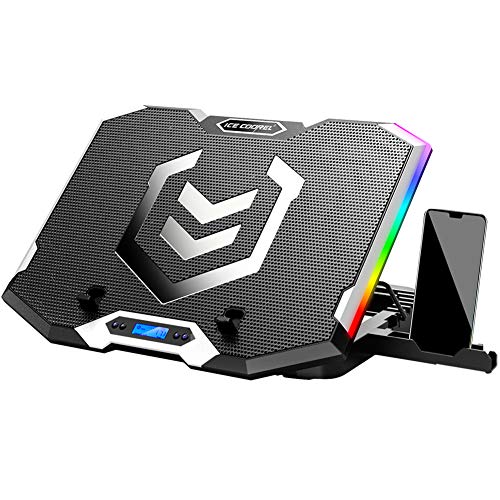
ICE COOREL Gaming Laptop Cooling Pad, 6 RGB Fans, LCD Screen

Our verdict: Six fans, six height settings and an LCD speed readout at a budget price.

The ICE COOREL has six fans across the top and bottom vents, six height settings, an LCD that shows fan speed, seven RGB lighting modes and two USB ports.

It ranks fourth because it is the strongest of the cheaper pads, and that is the honest position. Six small fans move a lot of air in total, but they spread it across the base instead of focusing it on the LOQ's intake, which is why it trails the three turbo-fan picks. The six height settings let you angle the laptop to a comfortable typing position, something the sealed pads offer little of. Against the TECKNET, it has twice the fans and an LCD.

Buy it if you want real cooling and a rich feature set without turbo-fan prices. The caveat is that RGB and fan noise will not suit a quiet room.

Fans
6, top and bottom vents
Height
6 settings
Display
LCD fan speed
Ports
2 USB

What we like

  • +Six fans for broad airflow
  • +Six height settings
  • +LCD fan speed readout
  • +Lowest cost tier

Watch out for

  • −Airflow spread, not focused
  • −RGB lighting adds nothing
  • −Six fans add noise

Buy it if: Budget buyers who want real multi-fan cooling and angle control.

Skip it if: You want focused airflow and a sealed fit.

5

Best Software Control

llano V12 Ultra Laptop Cooling Pad with Smart Software Control

Our verdict: A V12 with three smart-software modes and a USB 3.0 hub, at a higher price.

The V12 Ultra keeps the 5.5 inch turbo fan, now rated up to 2800 RPM, and adds AI smart software control with 3 modes. It fits 15.6 to 19 inch gaming laptops, includes a removable dust filter and a USB 3.0 hub with one input and three outputs.

It ranks below the standard V12 because it costs more and the extra is software, not cooling. A fan capped at 2800 RPM is slower than the GT500's 5000, so the Ultra relies on the sealed turbo design instead of raw speed. The USB 3.0 hub is a real upgrade for a LOQ, since it passes through faster data than older hubs.

Buy it if you like software to manage the fan for you. The caveat is the cost, which is the highest tier here, and the extra software to install.

Fan
5.5 inch turbo, up to 2800 RPM
Control
AI software, 3 modes
Hub
USB 3.0, 1 in 3 out
Filter
Removable dust filter

What we like

  • +Software-managed fan modes
  • +USB 3.0 hub
  • +Removable dust filter
  • +Fits up to 19 inch laptops

Watch out for

  • −Highest price tier
  • −Lower RPM than the GT500
  • −Needs software installed

Buy it if: Owners who prefer app-driven fan profiles and a faster USB hub.

Skip it if: You would rather save the money and use the standard V12.

6

Best Everyday Pad

TECKNET Laptop Cooling Pad, Portable Slim Laptop Cooler

Our verdict: A slim, USB-powered three-fan pad for everyday use and light gaming.

The TECKNET has three 110mm fans turning at 1200 RPM, runs from a USB port with no adapter, has two height settings, double USB ports and rubber surface pads to hold the laptop in place.

The USB-only power is its charm: it plugs into the LOQ and goes anywhere, unlike the adapter-powered V12. It ranks sixth because 1200 RPM fans move far less air than the turbo designs and cannot seal against the chassis, so heavy gaming sessions will not see a large drop. Against the havit, it offers the same low cost with a more stable base.

Buy it if you use the LOQ for school or work and game occasionally. The caveat is performance: this is a comfort and light-cooling pad, not a replacement for a turbo fan.

Fans
3 x 110mm, 1200 RPM
Power
USB, no adapter
Height
2 settings
Ports
Double USB

What we like

  • +Runs off USB alone
  • +Slim and portable
  • +Rubber pads hold laptop
  • +Low cost

Watch out for

  • −1200 RPM, modest airflow
  • −Only two height settings
  • −Not sealed to the chassis

Buy it if: Students and workers who game lightly and carry the pad in a bag.

Skip it if: You play demanding games for hours.

7

Best Low-Cost Pad

havit HV-F2056 15.6"-17" Laptop Cooler Cooling Pad

Our verdict: A metal-mesh pad with three quiet fans for lighter gaming.

The havit HV-F2056 is a slim pad for 15.6 to 17 inch laptops, with three quiet fans, a metal mesh surface, two height settings and an extra USB port.

Quiet is the selling point, and also the limit: fans that run softly move less air, so it ranks last for demanding games. The metal mesh surface does help, since it conducts a little heat from the base and lets air pass through. It is limited to laptops up to 17 inches, which still covers the LOQ. Against the TECKNET, it is similar in cost and cooling, so choose it for the mesh and the quieter fans.

Buy it if your LOQ plays lighter games or a mix of work and play. The caveat is that this pad lowers temperatures a few degrees at best, and sustained heavy sessions need a turbo pad.

Fit
15.6 to 17 inch
Fans
3 quiet fans
Surface
Metal mesh
Height
2 settings

What we like

  • +Quiet fans
  • +Metal mesh surface
  • +Slim and portable
  • +Lowest cost tier

Watch out for

  • −Limited airflow
  • −Two height settings only
  • −Capped at 17 inch laptops

Buy it if: LOQ owners who play lighter or shorter sessions and want it quiet.

Skip it if: You run demanding games for long stretches.

Methodology

How We Ranked These

Airflow design

Turbo fans and sealed foam designs outrank open multi-fan pads because they concentrate air at the intake.

Fan speed and noise

Stated RPM was weighed against the noise it brings, since a fan you switch off helps no one.

Fit for 15.6 inch laptops

Each pad's stated laptop range was checked against the LOQ's size, with larger ranges ranked higher.

Power and portability

USB-only pads were credited for travel, adapter-powered pads for cooling headroom.

Extras that matter

Dust filters, hubs and height settings counted only where they improve cooling or comfort.

Every Primea Score uses the same weights: Performance 30% · Build & Materials 20% · Everyday Usability 20% · Value 20% · Owner Satisfaction 10%. Full scoring rules

Buyer's guide

How to Pick the Right One for You

By Cooling Power

How hard does your LOQ run, and for how long?

Your useOur pick
Long demanding gaming sessionsllano V12 Gaming Laptop Cooling Pad
Maximum airflow, noise acceptableIETS GT500 Powerful Turbo-Fan (5000 RPM)
Automatic cooling, set and forgetRazer Laptop Cooling Pad Adaptive Smart
Mixed gaming and workICE COOREL Gaming Laptop Cooling Pad, 6 RGB Fans
Light gaming and studyTECKNET Laptop Cooling Pad, Portable Slim

By Budget

SpendOur pick
$25 to $50ICE COOREL Gaming Laptop Cooling Pad
$25 to $50 (USB powered)TECKNET Laptop Cooling Pad, Portable Slim
$25 to $50 (quiet)havit HV-F2056 Laptop Cooler
$50 to $100llano V12 Gaming Laptop Cooling Pad
$50 to $100 (max airflow)IETS GT500 Powerful Turbo-Fan (5000 RPM)
$100 to $200Razer Laptop Cooling Pad Adaptive Smart

Turbo Fan vs Multi-Fan

Turbo fan

One strong fan with a sealed foam ring forces air straight into the intake. It cools more but runs louder. Picks: llano V12, IETS GT500, Razer, V12 Ultra.

Multi-fan

Several small fans spread air gently and cost less, but cool less. Picks: ICE COOREL, TECKNET, havit.

Take a turbo fan for gaming, multi-fan for everyday use and comfort.

By Power Source

What you needOur pick
Wall adapter, strongest fanllano V12 Gaming Laptop Cooling Pad
USB only, travel friendlyTECKNET Laptop Cooling Pad, Portable Slim
Software-managed fanllano V12 Ultra Laptop Cooling Pad
Quiet USB padhavit HV-F2056 Laptop Cooler
Low-cost multi-fan with LCDICE COOREL Gaming Laptop Cooling Pad

For Lenovo LOQ Laptops Specifically

Look for

A pad rated for 15.6 inch laptops, with a fan that lines up with the underside grille. Prefer a sealed foam ring and a variable speed control.

In this ranking

The llano V12 fits 15.6 to 19 inch laptops and has a dust filter. The IETS GT500 gives the most sealed airflow for the bottom intake.

When to Spend More

Spend more if

You play for hours or hear the laptop fans roar. The llano V12 or IETS GT500 gives a clear step up from basic pads, and the Razer adds automatic control.

Save if

You mostly study and stream. The TECKNET or havit gives modest cooling for the least money.

Questions

Frequently Asked Questions

Will these cooling pads fit a Lenovo LOQ?+

Most list 15.6 inch support, which covers the 15.6 inch LOQ. The llano V12 fits up to 19 inches and the havit up to 17 inches, so check your laptop size against the listing before ordering.

What is the biggest mistake buying a cooling pad for a LOQ?+

Buying on fan count. Six fans on the ICE COOREL spread air thin, while a single turbo fan like the llano V12 aims it at the intake. Match the fan position to your laptop's grille first.

Is the Razer worth it over the IETS GT500?+

Only if you value automatic control. The Razer tops out at 3000 RPM and costs more, while the IETS GT500 reaches 5000 RPM. For raw cooling, the IETS wins, but the Razer is quieter.

How do I set up a turbo-fan pad?+

Place the pad on a flat desk, set the laptop on top so the fan sits under the intake grille, and plug in power. For the llano V12, use the included 36W adapter and start on a low fan speed.

How often should I clean a cooling pad?+

Every month or two, more often in dusty rooms. Remove the llano V12's dust filter and rinse it, then wipe the fan blades with a dry cloth. Pads without filters, such as the IETS, need blade cleaning.

Can a cooling pad replace repasting or cleaning the laptop?+

No. A pad lowers intake air temperature but cannot fix clogged internal fans or dried paste. If the LOQ still runs hot with the Razer or llano V12 under it, the laptop needs cleaning.

Final take

The llano V12 is the best cooling pad for a Lenovo LOQ because it focuses airflow with a turbo fan and protects itself with a dust filter. The IETS GT500 is the pick if you want maximum airflow and can live with noise, and the Razer suits owners who want automatic control. On a tight budget, the ICE COOREL is the best of the multi-fan pads.

More Ranked & Reviewed Guides