
Primea ReviewsAll Reviews

Primea Reviews is reader-supported. When you buy through our Amazon links we may earn a commission, at no extra cost to you. Rankings are set by our editors and never sold. Learn more

Ranked & Reviewed by Primea Reviews

The 4 Best High-Speed Document Scanners of 2026, Ranked & Reviewed

By the Primea Editorial TeamUpdated November 1, 20269 min read4 products ranked
The 4 Best High-Speed Document Scanners of 2026, Ranked & Reviewed

The short answer

The Epson ES-400 II is the best high-speed document scanner, a 50-sheet duplex desktop model with ultrasonic double-feed detection. The ScanSnap iX2400 offers a 100-sheet feeder rated at 45 ppm with one-touch operation, and the iX2500 adds Wi-Fi 6, a touchscreen and a multi-feed sensor. The Epson ES-580W is the wireless-first option, though it lists no feeder size or speed.

The Primea Scoreboard

Ranked & Reviewed

  1. Duplex batch scanning with ultrasonic double-feed detection.

    93Outstanding
    Check price
  2. A 100-sheet feeder rated up to 45 ppm with one-touch operation.

    90Excellent
    Check price
  3. Wi-Fi 6, USB-C, a touchscreen and a multi-feed sensor.

    87Excellent
    Check price
  4. A wireless-first Epson desktop duplex scanner.

    84Very Good
    Check price

A scanner's rated speed means little if it jams, double-feeds or makes you refeed pages. For a stack of eighty sheets, a reliable feeder and a double-feed alarm matter more than the headline pages per minute, because one missed page found at the end of a batch costs more time than a slower scan ever would. Speed is also a best case: color duplex always runs slower than the figure on the box.

Four scanners were checked against the Primea framework, with feeder size, double-feed detection, rated speed, software and connection weighing most. Prices appear as buckets. Two ScanSnap models and two Epson models cover the field, and the differences come down to sensors, feeder capacity and whether you want Wi-Fi.

Before you buy

What Actually Matters

01

Feeder capacity

The feeder is the tray that holds your stack. A 100-sheet feeder fits a big batch in one go, while 50 sheets suits smaller stacks. Check the sheet count in the listing, and match it to your biggest regular batch, because a feeder you must refill mid-job breaks the flow. Fan the pages first to reduce jams.

02

Double-feed detection

Double-feeds happen when two pages pull through at once, so one is missed. Ultrasonic and multi-feed sensors catch it. Look for those words in the specs, as on the ES-400 II and iX2500, and treat their absence as a gap, and note that the iX2400 lists none, which matters for important documents. A missed page in a contract is costly.

03

Rated speed

Pages per minute is a best-case figure, usually for black-and-white at low resolution. Color duplex scans are slower. Treat 45 ppm as a ceiling for plain black-and-white pages, and read reviews of real batches, since a jam or a rescan costs more time than a few extra pages per minute saves.

04

OCR and software

Searchable PDFs let you find text later. Check for named software such as ScanSmart or ScanSnap Home and OCR support, because searching later beats rereading. Software also decides how files get named and filed, so a good suite saves time on every batch you run. Confirm that searchable output is built in, and check whether the software runs on your computer.

05

Wired vs wireless

USB is faster and more stable for big batches, while wireless is convenient for shared use. Confirm both are offered, as on the iX2500 and ES-580W, and check the wireless band on your office network. A wired connection is a safer default for heavy batches. Wireless suits quick single sheets.

In-depth reviews

Our Ranked Picks, Reviewed

1

Best Overall

Epson Workforce ES-400 II High-Speed Color Duplex Desktop Document Scanner

Our verdict: Duplex batch scanning with ultrasonic double-feed detection.

The ES-400 II is a color duplex desktop scanner with a 50-sheet ADF and ultrasonic double-feed detection. It supports a TWAIN driver, searchable PDF OCR through Epson ScanSmart, auto crop and blank-page removal, in the $200 to $500 bucket. Ultrasonic sensing measures how much material is passing, which catches two sheets stuck together before one disappears from the file.

It wins on reliability: the sensor protects the batch, and the feeder is big enough for most home offices. The ScanSnap models hold more paper, but the iX2400 lists no double-feed sensor.

Buy it for home offices with regular mixed stacks. The caveats are that it is desktop only and has a smaller feeder than the ScanSnaps. Skip it if you need a portable scanner.

Feeder
50-sheet ADF, duplex
Detection
Ultrasonic double-feed
Software
Epson ScanSmart, TWAIN
Price
$200-500

What we like

  • +Ultrasonic double-feed detection
  • +50-sheet duplex feeder
  • +Searchable PDF OCR
  • +Auto crop, blank removal

Watch out for

  • −Desktop only
  • −Smaller feeder than ScanSnaps

Buy it if: Home offices with regular mixed stacks.

Skip it if: You need a portable scanner.

2

Best One-Touch

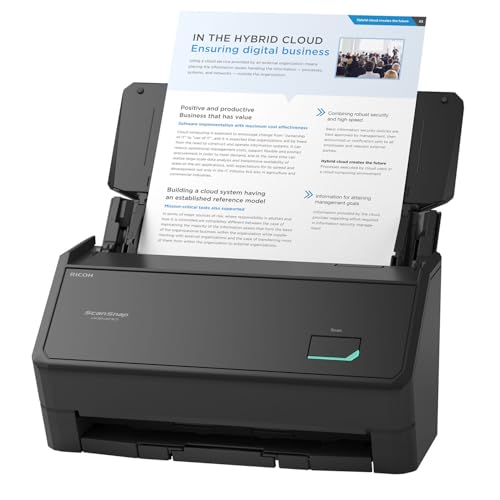
ScanSnap iX2400 High-Speed One-Touch Button Color Document Scanner

Our verdict: A 100-sheet feeder rated up to 45 ppm with one-touch operation.

The iX2400 has a 100-sheet feeder, rated up to 45 pages per minute, and connects by wired USB only. ScanSnap Home software handles one-touch scan and drag-and-drop, with auto de-skew and blank-page removal, in the $200 to $500 bucket. A feeder that holds a hundred sheets lets you load a large pile and walk away.

It ranks second because it has the biggest feeder and the simplest control, but it lists no double-feed sensor, so a stuck pair could slip through unnoticed. The ES-400 II protects against that.

Buy it for people who want simple one-button scanning. The caveats are USB only and no double-feed sensor listed. Skip it if you want wireless.

Feeder
100 sheets
Speed
Up to 45 ppm rated
Connection
Wired USB only
Price
$200-500

What we like

  • +100-sheet feeder
  • +One-touch operation
  • +Auto de-skew
  • +Blank-page removal

Watch out for

  • −USB only
  • −No double-feed sensor listed

Buy it if: People who want simple one-button scanning.

Skip it if: You want wireless.

3

Best Wireless Features

ScanSnap iX2500 Wireless or USB High-Speed Document Scanner

Our verdict: Wi-Fi 6, USB-C, a touchscreen and a multi-feed sensor.

The iX2500 has a 100-sheet feeder rated up to 45 pages per minute, Wi-Fi 6 and USB-C. It adds a multi-feed sensor, a brake roller system, a touchscreen with customizable profiles and cloud service support. A multi-feed sensor is the detail the iX2400 lacks, and a touchscreen sets up destinations on the device.

It ranks third because the price is not confirmed and wireless is slower for big batches than USB. It is the most complete scanner on paper.

Buy it for shared offices wanting wireless scanning. The caveats are an unconfirmed price and slower wireless batches. Skip it if you only scan over USB, where the iX2400 costs less.

Feeder
100 sheets
Speed
Up to 45 ppm rated
Connection
Wi-Fi 6 and USB-C
Detection
Multi-feed sensor

What we like

  • +Wi-Fi 6 and USB-C
  • +Multi-feed sensor
  • +Touchscreen profiles
  • +Cloud service support

Watch out for

  • −Price not confirmed
  • −Wireless slower for batches

Buy it if: Shared offices wanting wireless scanning.

Skip it if: You only scan over USB.

4

Best Wireless Epson

Epson Workforce ES-580W Wireless Color Duplex Desktop Document Scanner

Our verdict: A wireless-first Epson desktop duplex scanner.

The ES-580W is a wireless and USB duplex desktop scanner with a TWAIN driver, searchable PDF OCR, auto crop and blank-page removal, in the $200 to $500 bucket. Wireless by default makes it flexible in a shared space.

It ranks last because the listing gives no feeder size or rated speed, so it is harder to judge against the others. Without those figures, you cannot size it to your batch.

Buy it for wireless-first Epson fans. The caveats are the unlisted feeder size and speed. Skip it if you want stated speed and feeder numbers.

Type
Desktop duplex
Connection
Wireless and USB
Software
TWAIN, searchable PDF
Price
$200-500

What we like

  • +Wireless by default
  • +Duplex scanning
  • +Searchable PDF OCR
  • +Auto crop, blank removal

Watch out for

  • −Feeder size unlisted
  • −Speed unlisted

Buy it if: Wireless-first Epson fans.

Skip it if: You want stated speed and feeder numbers.

Methodology

How We Ranked These

Feeder Size

Sheets the ADF holds before you must reload.

Rated Speed

Listed pages per minute, treated as a ceiling.

Feed Reliability

Double-feed sensors and brake rollers that prevent skipped pages.

Software

OCR, cropping, blank removal and driver support.

Connectivity

USB, Wi-Fi and cloud options.

Every Primea Score uses the same weights: Performance 30% · Build & Materials 20% · Everyday Usability 20% · Value 20% · Owner Satisfaction 10%. Full scoring rules

Buyer's guide

How to Pick the Right One for You

By Batch Size

Match feeder size to your usual stack.

Typical batchOur pick
Under 50 pagesEpson ES-400 II
50 to 100 pagesScanSnap iX2400
Shared office batchesScanSnap iX2500
Mixed small batches, wirelessEpson ES-580W

By Budget

SpendOur pick
$200-500, reliabilityEpson ES-400 II
$200-500, large feederScanSnap iX2400
$200-500, wireless EpsonEpson ES-580W
Price unconfirmed, full featuresScanSnap iX2500

Wired vs Wireless

Wired

Stable and faster for large batches. Picks: Epson ES-400 II, ScanSnap iX2400.

Wireless

Convenient for shared setups. Picks: ScanSnap iX2500 and Epson ES-580W.

Most buyers should default to wired USB unless sharing between devices.

By Software Preference

You preferOur pick
TWAIN and ScanSmartEpson ES-400 II
One-touch scan and drag-dropScanSnap iX2400
Touchscreen profilesScanSnap iX2500
Epson wirelessEpson ES-580W

For Home Offices Specifically

Look for

Double-feed detection and searchable PDF OCR.

In this ranking

The Epson ES-400 II offers ultrasonic double-feed detection and searchable PDF OCR.

When to Spend More

Spend more if

You need a touchscreen and wireless: the ScanSnap iX2500 adds both.

Save if

You only need desktop duplex: the Epson ES-400 II covers it at $200-500.

Questions

Frequently Asked Questions

Which scanner has the biggest feeder?+

Both ScanSnap models list 100-sheet feeders, double the Epson ES-400 II's 50 sheets. The ES-580W does not state its feeder size, so it is hard to compare.

What mistake do people make?+

Trusting rated speed and ignoring the double-feed sensor. Color duplex runs slower and double-feeds waste time, so favor a scanner with a feed sensor. The ES-400 II and iX2500 both list one, and the iX2400 does not.

Is the iX2500 worth it over the iX2400?+

If you want Wi-Fi 6, a touchscreen and a multi-feed sensor, yes. For wired use, the iX2400 is simpler and costs less. The extra features mostly help shared offices.

How do I set one up?+

Install the maker's software first, connect via USB or Wi-Fi and run a test scan following the manual. Use a short test stack first, then check that files are named and sorted correctly.

How should I maintain it?+

Clean the rollers and glass per the manual, roughly every few hundred pages. Brake roller systems like the iX2500's wear over time, so replace them on schedule, or pages start to slip through.

Can they scan thick items?+

Our data does not cover it for these, so check the listing before scanning thick or odd-sized items. Use a flatbed or overhead scanner for books and fragile paper, since feeders can damage them.

Final take

Buy the ES-400 II for mixed stacks where a missed page would hurt, and the iX2400 for the biggest batches with simple controls. The iX2500 suits shared offices that want wireless scanning, and the ES-580W is for Epson fans who accept missing numbers. Treat rated speed as a ceiling, and look for a double-feed sensor.

More Ranked & Reviewed Guides