
Primea ReviewsAll Reviews

Primea Reviews is reader-supported. When you buy through our Amazon links we may earn a commission, at no extra cost to you. Rankings are set by our editors and never sold. Learn more

Ranked & Reviewed by Primea Reviews

The 6 Best Book and Document Scanners of 2026, Ranked & Reviewed

By the Primea Editorial TeamUpdated November 1, 202610 min read6 products ranked
The 6 Best Book and Document Scanners of 2026, Ranked & Reviewed

The short answer

The CZUR ET24 Pro is the best scanner for books, an A3 overhead model with auto-flatten curve correction and OCR software. The CZUR Shine Ultra offers the same idea portably for less, and the VIISAN handles oversized A2 and A3 material. For loose paper, the ScanSnap iX2400 leads with a 100-sheet feeder, ahead of the Epson ES-400 II and the compact ScanSnap iX1300.

The Primea Scoreboard

Ranked & Reviewed

  1. The most capable overhead scanner for bound books.

    94Outstanding
    Check price
  2. The same curve-correcting idea at a much lower price.

    90Excellent
    Check price
  3. A large-format overhead scanner for big bound material.

    87Excellent
    Check price
  4. A 100-sheet duplex ADF for loose documents.

    85Excellent
    Check price
  5. A 50-sheet duplex ADF with searchable PDF output.

    83Very Good
    Check price
  6. A compact 30 ppm duplex scanner that connects wirelessly.

    80Very Good
    Check price

The costly mistake in this category is expecting one machine to do both jobs. A sheet-fed scanner with an automatic document feeder races through loose pages, and it cannot take a bound book without cutting the spine out. An overhead book scanner copes with a thick volume gracefully and then crawls through a stack of invoices one page at a time. Decide which pile you actually have.

Our editors compared six scanners, three overhead models for books and three sheet-fed models for paper, from their published specs, then scored each one on the Primea framework. Capture area, curve correction, feeder size and OCR carried the most weight. Prices are buckets only, and nothing here substitutes for checking your largest book against the capture area.

Before you buy

What Actually Matters

01

Overhead or sheet-fed

Overhead scanners capture a page from above, so they can handle bound books without damage. Sheet-fed scanners pull paper through a feeder and cannot take a bound book. Check the listing for the words overhead or ADF, because a scanner that cannot take your material is useless regardless of its speed. Read the first line of the listing before the specs.

02

Curve correction

Pages in a book curve near the spine and distort the text. Auto-flatten software corrects that. Look for flatten or curve correction in the title or bullets, since without it the inner margin of every page needs manual fixing, which defeats the point of scanning a whole book quickly. Check a sample image for gutter distortion.

03

Capture area

Capture area is the largest page the scanner can image in one shot. A3 captures larger pages than A4, and oversized books need A2. Check the listed paper size against your largest book before ordering, and remember to include the open spread, not just a single page, in your measurement. The camera sees the full spread.

04

ADF capacity

The sheet count tells you how many pages scan in one pass, from 50 up to 100 here. A larger feeder saves reloading and supervision. Look for the number in the listing, and match it to the stack you scan at once, since small feeders interrupt a big job every few minutes. Count your typical stack before you buy.

05

OCR and software

OCR turns scans into searchable text. Some models bundle it, others rely on separate software. Check whether searchable PDF output is listed, as with the CZUR ET24 Pro and Epson ES-400 II, and remember that accuracy depends on page quality, so poor scans produce poor text. Scan at the highest quality your files can bear.

In-depth reviews

Our Ranked Picks, Reviewed

1

Best for Books

CZUR ET24 Pro Book Scanner, A3 Overhead Scanner with Auto-Flatten Curve Correction

Our verdict: The most capable overhead scanner for bound books.

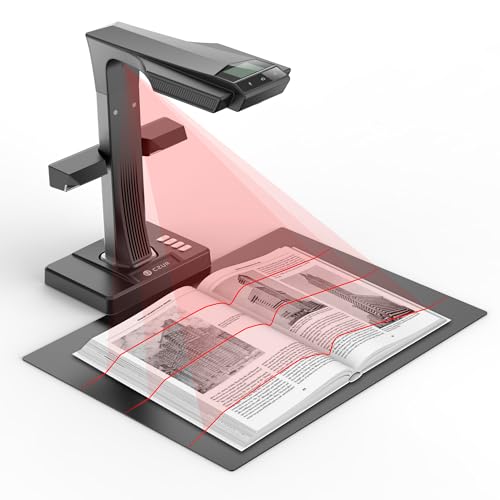
The ET24 Pro is an A3 overhead book scanner with auto-flatten curve correction for spine curvature and OCR software included. It sits above $500, making it the priciest scanner here. The camera looks down at the open pages, so the book never leaves the cradle, and software flattens the curved text near the spine.

It ranks first because it is built for books, and curve correction is the feature that decides whether text near the gutter is readable or warped. The Shine Ultra matches the idea at a lower price, but with a smaller capture area.

Buy it if you digitize bound books regularly. The caveats are the top price tier and the lack of any document feeder. Skip it if your work is mostly loose pages, because a feeder scanner finishes a stack in minutes.

Capture area
A3 overhead
Curve correction
Auto-flatten
Feeder
None (ADF absent)
OCR
Software included

What we like

  • +A3 capture area
  • +Auto-flatten curve correction
  • +OCR software included
  • +Gentle on books

Watch out for

  • −Highest price tier
  • −No document feeder

Buy it if: Anyone digitizing bound books regularly.

Skip it if: Your work is mostly loose pages.

2

Best Budget Book Scanner

CZUR Shine Ultra Book Scanner, Portable Overhead Scanner with Auto-Flatten

Our verdict: The same curve-correcting idea at a much lower price.

The Shine Ultra is a portable overhead scanner with auto-flatten curve correction, in the $100 to $200 range. It is built for book digitization and has no ADF. Portability matters for students and researchers who scan at a library table and then pack up.

It ranks second because it costs far less than the ET24 Pro while keeping curve correction, which is the essential feature. What you give up is the A3 capture area and the fuller package. The VIISAN covers larger material but costs more.

Buy it for budget scanning of occasional books. The caveats are a smaller capture area and no document feeder. Skip it if you need to scan A3 pages in one shot, where the ET24 Pro is the right tool.

Design
Portable overhead
Curve correction
Auto-flatten
Feeder
None
Price tier
$100-200

What we like

  • +Portable design
  • +Auto-flatten correction
  • +Much lower price
  • +Book-specific

Watch out for

  • −Smaller than the Pro
  • −No document feeder

Buy it if: Budget buyers with occasional books to scan.

Skip it if: You need an A3 capture area.

3

Best for Oversized Books

VIISAN Large Format A2/A3 Book and Document Scanner, Overhead Design

Our verdict: A large-format overhead scanner for big bound material.

The VIISAN is an overhead scanner with an A2/A3 capture area and overhead LED lighting, in the $200 to $500 range. It is book-specific and has no ADF. Even light across a wide page cuts glare and shadow, which is the usual flaw of overhead capture on glossy pages.

It ranks third because it targets a narrower need, oversized books and large documents, which most buyers do not have. For standard books, the cheaper CZUR models cover the job. Its larger footprint also needs real desk space.

Buy it for libraries and hobbyists with oversized volumes, maps or art books. The caveats are the bigger footprint and the absence of a document feeder. Skip it if your books and papers are standard size.

Capture area
A2/A3
Design
Overhead
Lighting
Overhead LED
Feeder
None

What we like

  • +A2/A3 capture area
  • +Overhead LED lighting
  • +Book-specific
  • +Handles large format

Watch out for

  • −Bigger footprint
  • −No document feeder

Buy it if: Libraries and hobbyists with oversized books.

Skip it if: Your books and papers are standard size.

4

Best Document Scanner

ScanSnap iX2400 High-Speed One-Touch Button Color Document Scanner

Our verdict: A 100-sheet duplex ADF for loose documents.

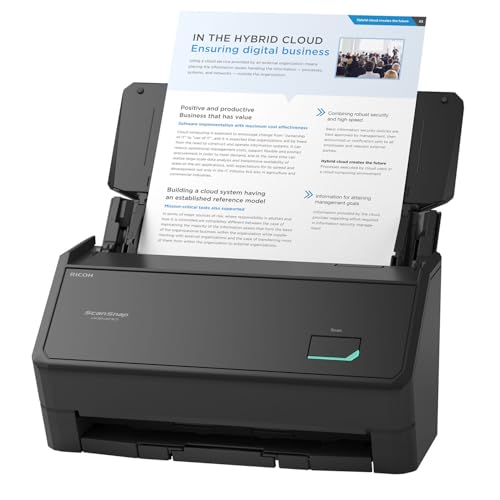
The iX2400 has a 100-sheet ADF, high-speed duplex scanning and one-touch scanning, in the $200 to $500 range. It also deskews pages and removes blank ones automatically. A big feeder lets you load a month of paperwork and leave, which beats babysitting a small tray.

It ranks fourth because it cannot handle bound books, so it is a different tool from the overhead scanners above, and it only wins if paper is your pile. Within sheet-fed models, it leads on feeder size and speed.

Buy it for a home office with stacks of paperwork. The caveats are that it cannot scan bound books and it sits in a mid-high price tier. Skip it if your main need is books.

Feeder
100-sheet ADF
Scanning
Duplex, high speed
Processing
Auto de-skew, blank removal
Control
One-touch button

What we like

  • +100-sheet ADF
  • +Duplex scanning
  • +Blank page removal
  • +One-touch scan

Watch out for

  • −Cannot scan bound books
  • −Mid-high price tier

Buy it if: Home offices with stacks of paperwork.

Skip it if: Your main need is books.

5

Best Document Pairing

Epson Workforce ES-400 II High-Speed Color Duplex Desktop Document Scanner

Our verdict: A 50-sheet duplex ADF with searchable PDF output.

The ES-400 II offers a 50-sheet ADF, duplex scanning, searchable PDF OCR and a TWAIN driver, in the $200 to $500 range. It does not scan bound books. Searchable PDF output means you can find a phrase across your whole archive instead of filing paper by hand.

It ranks fifth because its feeder holds half what the iX2400 does. The TWAIN driver adds compatibility with older imaging software, which suits some office setups. Against the iX1300, it has the bigger feeder.

Buy it for offices that need searchable PDFs from paper. The caveats are the smaller feeder and no book scanning. Skip it if you scan bound books, which would damage the spine on any feeder.

Feeder
50-sheet ADF
Scanning
Duplex color
OCR
Searchable PDF
Driver
TWAIN

What we like

  • +50-sheet ADF
  • +Searchable PDF OCR
  • +Duplex scanning
  • +TWAIN driver

Watch out for

  • −Smaller feeder
  • −Cannot scan books

Buy it if: Offices that need searchable PDFs from paper.

Skip it if: You scan bound books.

6

Best for Small Desks

ScanSnap iX1300 Wireless or USB Double-Sided Color Document Scanner

Our verdict: A compact 30 ppm duplex scanner that connects wirelessly.

The iX1300 has a compact ADF, double-sided scanning at 30 pages per minute and wireless or USB connectivity, in the $200 to $500 range. It also deskews pages and optimizes color. Wireless scanning lets a small desk stay free of cables, and the body is slim enough for a shelf.

It ranks last because it is the slowest and smallest of the document scanners. At 30 pages per minute it is fine for a few forms a week and slow for archives.

Buy it for small desks with occasional paperwork. The caveats are the speed and no book scanning. Skip it if you scan large stacks daily, because the iX2400 or ES-400 II will finish in a fraction of the time.

Speed
30 ppm
Scanning
Double-sided
Connection
Wireless or USB
Size
Compact ADF

What we like

  • +Compact body
  • +Wireless or USB
  • +Duplex scanning
  • +Auto de-skew

Watch out for

  • −Slowest here
  • −Cannot scan books

Buy it if: Small desks with occasional paperwork.

Skip it if: You scan large stacks daily.

Methodology

How We Ranked These

Job fit

We separated overhead book scanners from sheet-fed document scanners and ranked within the job each does best.

Curve correction

Auto-flatten ranked high for book scanners because spines bow pages.

Feeder capacity

ADF sheet count and duplex scanning decided the document scanners.

Software

Included OCR and deskew features added value.

Footprint and price

Desk space and cost were weighed against capability.

Every Primea Score uses the same weights: Performance 30% · Build & Materials 20% · Everyday Usability 20% · Value 20% · Owner Satisfaction 10%. Full scoring rules

Buyer's guide

How to Pick the Right One for You

By Material Scanned

What you scan decides which type of scanner you need.

You scanOur pick
Bound books regularlyCZUR ET24 Pro
Books occasionallyCZUR Shine Ultra
Oversized booksVIISAN A2/A3
Stacks of paperScanSnap iX2400

By Budget

SpendOur pick
$100-200CZUR Shine Ultra
$200-500, booksVIISAN A2/A3
$200-500, documentsScanSnap iX2400
$500+CZUR ET24 Pro

Overhead vs Sheet-Fed

Overhead

Scans from above so books stay open. The CZUR ET24 Pro, Shine Ultra and VIISAN fit here.

Sheet-fed

Pulls loose paper through an ADF, fast but not for bound books. The ScanSnap and Epson models fit here.

Most buyers should default to sheet-fed unless books are the main job.

By Document Workflow

You needOur pick
Largest feederScanSnap iX2400
Searchable PDFEpson ES-400 II
Wireless scanningScanSnap iX1300
Curve correctionCZUR ET24 Pro

For Small Desks Specifically

Look for

A compact body and a connection type that avoids extra cables.

In this ranking

The ScanSnap iX1300 is compact with wireless or USB, and the Shine Ultra is the portable overhead option.

When to Spend More

Spend more if

You scan books often. The CZUR ET24 Pro gives the A3 area and curve correction.

Save if

You scan books rarely. The CZUR Shine Ultra costs in the $100-200 range.

Questions

Frequently Asked Questions

Can a document scanner scan a book?+

Not a bound book. Sheet-fed scanners like the ScanSnap and Epson models pull paper through, so they need loose pages. Use an overhead scanner like the CZUR ET24 Pro for books, since a feeder will tear the binding.

What is the biggest mistake buyers make?+

Buying one type and expecting both jobs. Choose overhead for books and sheet-fed for paper, then check the capture area or feeder size against your biggest item.

Is the CZUR ET24 Pro worth it over the Shine Ultra?+

If you scan books regularly, the A3 area and fuller package help. For occasional use the Shine Ultra is enough, and it costs far less. The curve correction is the same idea in a smaller frame.

How do I set up an overhead scanner?+

Place it on a flat desk, connect it, and install the included software. Position the book under the camera and scan. Keep lighting steady to avoid shadows near the spine, and press the pages flat with the supplied tool or a clean sheet of glass.

Do I need OCR?+

If you want to search text in scans, yes. The CZUR ET24 Pro bundles OCR, and the Epson lists searchable PDFs, so you can search an archive afterward. Check the output language settings first.

Can I use two scanners together?+

Yes, many people pair an overhead scanner for books with a sheet-fed model for paperwork. A CZUR for books and a ScanSnap for paper cover both jobs. The two machines together cost less than one oversized scanner.

Final take

Buy an overhead scanner like the CZUR ET24 Pro if books are your main job, and a sheet-fed ScanSnap or Epson if paper is. The Shine Ultra is the budget way into book scanning, and the VIISAN is for oversized volumes. No document scanner here can take a bound book, so pair two machines only if you truly have both piles.

More Ranked & Reviewed Guides