
Primea ReviewsAll Reviews

Primea Reviews is reader-supported. When you buy through our Amazon links we may earn a commission, at no extra cost to you. Rankings are set by our editors and never sold. Learn more

Ranked & Reviewed by Primea Reviews

The 6 Best Document Scanners for Invoices and Small-Business Paperwork in 2026, Ranked & Reviewed

By the Primea Editorial TeamUpdated November 3, 202610 min read6 products ranked
The 6 Best Document Scanners for Invoices and Small-Business Paperwork in 2026, Ranked & Reviewed

The short answer

The ScanSnap iX2400 is the best document scanner for invoices if you process them in volume, with a 100-sheet feeder and a one-touch workflow. The Epson ES-400 II is the better pick for messy mixed-size batches thanks to ultrasonic double-feed detection, the Epson ES-580W adds wireless scanning, and the Canon imageFORMULA R10 is the portable choice with an honest 500 scans per day rating.

The Primea Scoreboard

Ranked & Reviewed

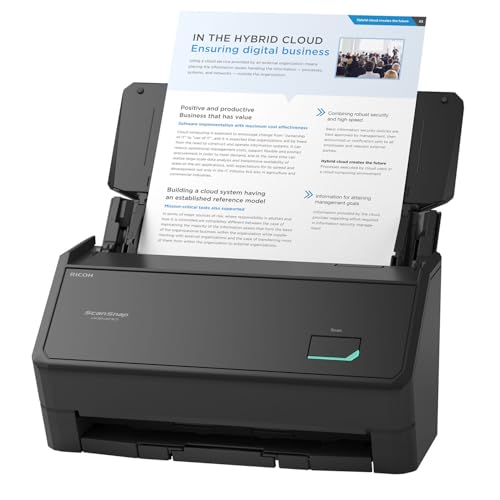
  1. A 100-sheet feeder, up to 45 ppm and a one-touch button for accounts-payable volume.

    95Outstanding
    Check price
  2. Ultrasonic double-feed detection and auto crop make messy mixed-size invoice piles painless.

    93Outstanding
    Check price
  3. A proven wireless and USB desktop scanner with OCR, auto crop and blank-page removal.

    90Excellent
    Check price
  4. A compact duplex scanner at 30 ppm that scans straight to the cloud without a computer.

    87Excellent
    Check price
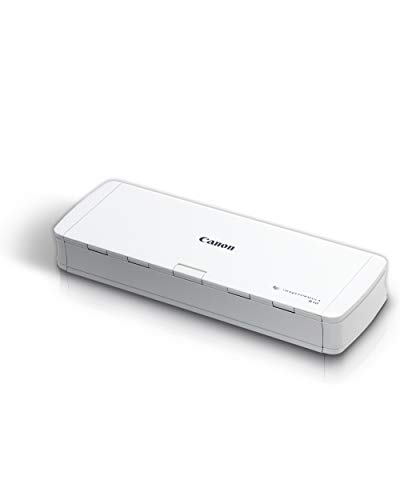
  5. A 1.7 lb USB-powered duplex scanner with an honest 500 scans per day rating.

    84Very Good
    Check price
  6. A compact one-sided sheetfed scanner with HP WorkScan for light, occasional invoice work.

    80Very Good
    Check price

Most bookkeepers choose a scanner by pages per minute, then discover the real bottleneck is rescanning. Invoices arrive as a messy pile: thermal receipts, folded statements, half-sheets and the odd stapled packet. A scanner that is fast on clean letter paper but double-feeds or skews on that pile costs more time than a slower, smarter one. What you want is a feeder that handles mixed sizes, detects a double feed and files the PDF where your accounting tool can find it.

We ranked six scanners from their spec sheets and listings, looking at feeder capacity, duplex speed, skew and double-feed handling, OCR software and connectivity. None of the six on this list extracts invoice fields such as totals automatically; they produce clean, searchable PDFs, and your accounting software does the rest. Daily volume and batch mix decided the order.

Before you buy

What Actually Matters

01

Feeder capacity and duty rating

A feeder holds the stack you load at once, and a duty rating states how many scans a day the machine is built for. A 100-sheet feeder suits weekly batches, while a 20-sheet one suits a handful. Check both numbers on the listing, since the Canon R10 states its 500 scans per day rating.

02

Double-feed detection

A double feed happens when two sheets pass through together, and the scanner records one. Ultrasonic sensors, as on the Epson ES-400 II, catch the extra thickness even on thin paper. Without detection, you may only notice a missing invoice at tax time.

03

Mixed-size handling

Invoices come as letter pages, half-sheets and narrow receipts. Auto crop and automatic size detection trim each page to its own boundaries, and de-skew straightens a crooked feed. Look for these terms rather than just the paper size range.

04

OCR and filing software

OCR turns a scanned image into searchable text, so you can find an invoice by vendor name. A TWAIN driver lets other programs control the scanner directly. None of these scanners list automatic extraction of invoice fields, so plan to import PDFs into your accounting tool.

05

Connectivity

USB is dependable and simple, wireless lets several desks share one scanner, and standalone cloud scanning skips the computer. Think about who needs access. A solo bookkeeper rarely needs wireless, while an office of five usually does.

In-depth reviews

Our Ranked Picks, Reviewed

1

Best Overall

ScanSnap iX2400 High-Speed One-Touch Button Color Document Scanner

Our verdict: A 100-sheet feeder, up to 45 ppm and a one-touch button for accounts-payable volume.

The iX2400 has a 100-sheet automatic feeder that scans up to 45 pages per minute, with automatic document size detection and de-skew. It connects over USB and uses ScanSnap Home software for one-touch scan-and-file. It sits in the $200 to $500 bracket.

It wins because invoice work is a volume problem: a big feeder means you load a month of bills once instead of ten times. The one-touch button matters more than it sounds, since a scan that takes one press gets done and a scan that takes five clicks gets postponed. Auto size detection handles the mix of letter pages and half-sheets. It is wired only, unlike the Epson ES-580W, so it needs a computer nearby.

Buy it if you process dozens of invoices a week. Skip it if you need wireless or a travel-size scanner.

Feeder
100 sheets
Speed
Up to 45 ppm
Software
ScanSnap Home, one-touch
Connection
Wired USB

What we like

  • +Large 100-sheet feeder
  • +Up to 45 pages per minute
  • +One-touch scan and file
  • +Auto size detection and de-skew

Watch out for

  • −Wired USB only
  • −Bulky for a small desk

Buy it if: Small businesses processing a high volume of invoices weekly.

Skip it if: You want wireless scanning or something portable.

2

Best for Mixed Batches

Epson Workforce ES-400 II High-Speed Color Duplex Desktop Document Scanner

Our verdict: Ultrasonic double-feed detection and auto crop make messy mixed-size invoice piles painless.

The ES-400 II has a 50-sheet duplex feeder, ultrasonic double-feed detection, dynamic skew correction and auto crop for mixed-size batches. It includes a TWAIN driver and searchable PDF OCR, and pricing runs $200 to $500.

Second place follows because it protects you against the failure that wastes the most time: a double feed that silently skips an invoice. Ultrasonic sensors detect two sheets stuck together by sensing the extra layer of paper, which works even on thin receipts. Auto crop trims each page to its own size, so a till slip and a letter page can share a batch. The listing does not mention automated invoice-data extraction. Its feeder is half the size of the ScanSnap's.

Choose it if your invoice stack is a mix of sizes. Skip it if raw volume matters most.

Feeder
50 sheets, duplex
Detection
Ultrasonic double-feed
Software
TWAIN driver, searchable PDF OCR
Batches
Auto crop, skew correction

What we like

  • +Ultrasonic double-feed detection
  • +Auto crop for mixed sizes
  • +Searchable PDF OCR included
  • +TWAIN driver for accounting tools

Watch out for

  • −Smaller feeder than the iX2400
  • −No invoice-data extraction listed

Buy it if: Bookkeepers scanning mixed piles of receipts and invoices.

Skip it if: You scan more than a hundred pages per batch.

3

Best Wireless Pick

Epson Workforce ES-580W Wireless Color Duplex Desktop Document Scanner

Our verdict: A proven wireless and USB desktop scanner with OCR, auto crop and blank-page removal.

The ES-580W scans wirelessly or over USB, includes a TWAIN driver and searchable PDF OCR, and offers auto crop and blank-page removal. Pricing runs $200 to $500, and it has the largest review base among the wireless invoice picks in this guide.

Third place follows because wireless scanning means the scanner can sit anywhere and send documents to several people in an office. Blank-page removal is a quiet time saver when you scan duplex and half the sheets are empty on the back. Against the ES-400 II, it trades the ultrasonic double-feed detection that the listing names for the freedom of a wireless connection.

Pick it if your office shares one scanner. Skip it if reliability against double feeds is your priority.

Connection
Wireless and USB
Software
TWAIN driver, searchable PDF OCR
Batches
Auto crop, blank-page removal
Bracket
$200 to $500

What we like

  • +Wireless and USB connections
  • +Blank-page removal saves cleanup
  • +Auto crop for mixed sizes
  • +Searchable PDF OCR included

Watch out for

  • −No ultrasonic detection listed
  • −Same price tier as better feeders

Buy it if: Shared offices that want wireless scanning from any desk.

Skip it if: You rely on double-feed detection for thin receipts.

4

Best Compact Cloud Scanner

ScanSnap iX1300 Wireless or USB Double-Sided Color Document Scanner

Our verdict: A compact duplex scanner at 30 ppm that scans straight to the cloud without a computer.

The iX1300 is a compact duplex scanner at 30 pages per minute, with a small feeder hopper, auto de-skew and color optimization. It can scan standalone to the cloud, connects wirelessly or via USB and handles thick items such as cards. Pricing falls between $200 and $500.

Fourth place follows because it prioritizes small footprint over capacity: the hopper is compact, so large invoice batches need several loads. The standalone cloud scanning is the standout, since a single button sends the file to cloud storage without a PC running. It undercuts the iX2400 in size and speed, though not in price tier, so choose it for the space saving.

Buy it if your desk is small and you file to the cloud. Skip it if you scan large stacks.

Speed
30 ppm duplex
Filing
Standalone scan to cloud
Connection
Wireless or USB
Media
Thick items and cards

What we like

  • +Compact desktop footprint
  • +Scans to cloud without a PC
  • +Handles thick items and cards
  • +Auto de-skew and color optimization

Watch out for

  • −Small feeder hopper
  • −Slower than the iX2400

Buy it if: Small desks that file invoices straight to cloud storage.

Skip it if: You scan large stacks in one go.

5

Best Portable Scanner

Canon imageFORMULA R10 Portable Document Scanner, USB Powered, Duplex

Our verdict: A 1.7 lb USB-powered duplex scanner with an honest 500 scans per day rating.

The imageFORMULA R10 is a USB-powered duplex scanner with a 20-sheet feeder, a stated 500 scans per day duty rating and a weight of 1.7 pounds. Street pricing is $100 to $200.

Fifth place follows because the 20-sheet hopper and portable build suit modest volumes. The daily rating is the useful part: knowing the maker's limit lets you plan capacity honestly, which many listings avoid. The tradeoff is a small feeder, so a long stack needs refilling several times, and no double-feed sensor is named. Against the HP below, it adds duplex and a feeder.

It suits a bookkeeper who carries a scanner between clients. Skip it if you scan hundreds of invoices a day.

Feeder
20 sheets, duplex
Duty rating
500 scans per day
Weight
1.7 lb
Power
USB powered

What we like

  • +Stated 500 scans daily limit
  • +Light 1.7 lb body
  • +USB powered, no adapter
  • +Duplex scanning included

Watch out for

  • −Only a 20-sheet feeder
  • −No double-feed sensor named

Buy it if: Mobile bookkeepers and home offices with modest volume.

Skip it if: You scan large daily batches.

6

Best for Occasional Use

HP Small USB Document & Photo Scanner for Portable 1-Sided Sheetfed Digital Scanning

Our verdict: A compact one-sided sheetfed scanner with HP WorkScan for light, occasional invoice work.

The HP is a small, portable scanner that feeds one sheet at a time and scans one side only. It includes HP WorkScan software, works on PC and Mac, and costs $100 to $200.

Last place follows because one-sided, single-sheet scanning is slow for stacks and cannot capture both sides of a two-page invoice in one pass. For a handful of invoices a month, though, it is compact and simple, and Mac compatibility is welcome. Next to the Canon, it gives up duplex and a feeder in return for a smaller footprint.

Buy it for occasional invoices and receipts. Skip it if you scan more than a few pages at a time.

Scanning
1-sided, sheetfed
Software
HP WorkScan
Compatibility
PC and Mac
Bracket
$100 to $200

What we like

  • +Small and portable
  • +Works with PC and Mac
  • +HP WorkScan software included
  • +Simple for occasional use

Watch out for

  • −One-sided scanning only
  • −Slow for large stacks

Buy it if: Occasional invoice and receipt scanning on a tight budget.

Skip it if: You need duplex or a multi-sheet feeder.

Methodology

How We Ranked These

Feeder and speed

Feeder capacity from 20 to 100 sheets and rated speeds were compared against realistic invoice batch sizes.

Double-feed and skew handling

Ultrasonic detection, de-skew and auto crop were weighted heavily, since mixed invoice piles fail on these points.

Software and OCR

TWAIN drivers, searchable PDF OCR, one-touch filing and cloud scanning were scored for how easily files reach accounting tools.

Connectivity and size

Wired, wireless and USB-powered designs were compared for desk footprint and flexibility.

Value in bracket

Each scanner was judged against the $100 to $200 and $200 to $500 brackets in this ranking.

Every Primea Score uses the same weights: Performance 30% · Build & Materials 20% · Everyday Usability 20% · Value 20% · Owner Satisfaction 10%. Full scoring rules

Buyer's guide

How to Pick the Right One for You

By Daily Invoice Volume

Volume decides how much feeder and speed you need.

VolumeOur pick
Dozens per week, large batchesScanSnap iX2400 High-Speed One-Touch Button Color Document Scanner
Mixed-size daily pilesEpson Workforce ES-400 II High-Speed Color Duplex Desktop Document Scanner
Up to a few hundred scans a dayCanon imageFORMULA R10 Portable Document Scanner, USB Powered, Duplex
A few per monthHP Small USB Document & Photo Scanner for Portable 1-Sided Sheetfed Digital Scanning

By Budget

SpendOur pick
$100 to $200Canon imageFORMULA R10 Portable Document Scanner, USB Powered, Duplex
$100 to $200 (occasional)HP Small USB Document & Photo Scanner for Portable 1-Sided Sheetfed Digital Scanning
$200 to $500 (compact)ScanSnap iX1300 Wireless or USB Double-Sided Color Document Scanner
$200 to $500 (volume)ScanSnap iX2400 High-Speed One-Touch Button Color Document Scanner

Wired vs Wireless

Wired

Simple, reliable and fast to set up, with the computer sitting right beside the scanner. Picks: ScanSnap iX2400, Epson ES-400 II, Canon R10, HP.

Wireless or cloud

Lets several desks share a scanner or file to the cloud without a PC. Picks: Epson ES-580W, ScanSnap iX1300.

Choose wired unless more than one person needs the scanner.

By Document Mix

DocumentsOur pick
Letter-size invoices onlyScanSnap iX2400 High-Speed One-Touch Button Color Document Scanner
Receipts mixed with invoicesEpson Workforce ES-400 II High-Speed Color Duplex Desktop Document Scanner
Thick items and cardsScanSnap iX1300 Wireless or USB Double-Sided Color Document Scanner
Pages with blank backsEpson Workforce ES-580W Wireless Color Duplex Desktop Document Scanner

For Accounts-Payable Workflows Specifically

Look for

A large feeder, double-feed detection, searchable PDF OCR and a driver your accounting software recognizes. Stated daily limits help with capacity planning.

In this ranking

The ScanSnap iX2400 for volume, the Epson ES-400 II for accuracy on mixed piles and the Canon R10 when you must scan on the road.

When to Spend More

Spend more if

You scan every day, handle mixed paper or share the scanner. The ScanSnap iX2400 and Epson ES-400 II earn the $200 to $500 bracket.

Save if

You scan a few invoices a week. The Canon R10 covers that for $100 to $200.

Questions

Frequently Asked Questions

Can these scanners pull invoice totals automatically?+

The listings describe searchable PDF OCR and one-touch filing, not automatic field extraction. You get readable, searchable files that your accounting software or a separate tool can then process.

What is the most common mistake when buying one?+

Choosing on pages per minute. A fast scanner that double-feeds or skews wastes time on rescans. Look at feeder size, double-feed detection and auto crop first.

Is the ScanSnap iX2400 worth it over the Epson ES-400 II?+

For sheer volume, yes: it holds 100 sheets against 50 and runs at up to 45 ppm. If your piles are messy and mixed, the Epson's ultrasonic double-feed detection and auto crop may save more time overall.

How do I set one up for my accounting tool?+

Install the maker's software, scan a test page and save it as a searchable PDF in a watched folder. Many accounting tools can import from that folder. A TWAIN driver, as on the Epson models, lets compatible programs scan directly.

How do I keep the scanner working well?+

Clean the rollers and glass with the recommended cloth every few thousand scans, remove staples and clips first, and fan the stack before loading. Dust on the glass is the usual cause of vertical lines.

Can I scan thermal receipts?+

Yes, but they fade, so scan them early. Auto crop handles the narrow width on the Epson models. Fed by hand or with a carrier sheet, they scan reliably on most desktop units.

Final take

The ScanSnap iX2400 is the best document scanner for invoices if you handle real volume, with a 100-sheet feeder, up to 45 ppm and one-touch filing. The Epson ES-400 II is the smarter buy for messy mixed piles, the ES-580W adds wireless sharing, and the ScanSnap iX1300 suits small desks and cloud filing. The Canon R10 and HP cover light, mobile needs. Pick the feeder to match your stack, not the speed claim.

More Ranked & Reviewed Guides