
Primea ReviewsAll Reviews

Primea Reviews is reader-supported. When you buy through our Amazon links we may earn a commission, at no extra cost to you. Rankings are set by our editors and never sold. Learn more

Ranked & Reviewed by Primea Reviews

The 5 Best Document Scanners for Computers of 2026, Ranked & Reviewed

By the Primea Editorial TeamUpdated November 1, 202610 min read5 products ranked
The 5 Best Document Scanners for Computers of 2026, Ranked & Reviewed

The short answer

The Epson ES-400 II is the best document scanner for computers, pairing a TWAIN driver and the full ScanSmart suite with a 50-sheet duplex feeder. The ScanSnap iX2400 is the wired pick with a 100-sheet feeder, and the Brother DS-740D lists drivers for Windows, Mac and Linux. The Canon R10 needs no software install, and the Brother DS-640 is the budget multi-OS choice.

The Primea Scoreboard

Ranked & Reviewed

  1. A TWAIN driver and full software suite behind a 50-sheet duplex feeder.

    94Outstanding
    Check price
  2. Wired USB, a 100-sheet feeder and one-touch scanning.

    91Excellent
    Check price
  3. Broad driver support plus duplex in a compact body.

    88Excellent
    Check price
  4. Built-in software means nothing to install.

    85Excellent
    Check price
  5. The broadest driver list at a low price, but single-sided.

    82Very Good
    Check price

Scanner reviews rarely mention that the biggest headache sits on the computer side. A driver that will not install, or bundled software that fights your operating system, wastes more time than a slow motor ever will. Before speed, compare how each scanner talks to your machine: which driver standards it lists, what software it forces on you, and whether anything needs installing at all.

Five scanners were weighed against the Primea framework, with driver coverage, bundled software, setup friction, feeder size and connection counting most. Prices appear as buckets, and driver notes come from each listing. Eight scanners were reviewed and the five here cover the clearest cases, from a plug-in Canon to a Brother that lists Windows, Mac and Linux drivers.

Before you buy

What Actually Matters

01

Driver standards

TWAIN and WIA are Windows scanner standards, ICA is Mac and SANE is Linux. A scanner that lists all four works across systems. Look for the driver list in the specs, and match it to the operating systems you actually use, because a scanner with no driver for your machine is just a paperweight. Check the operating system version too, since old drivers vanish.

02

Software bundle

Bundled software handles OCR, PDF creation and cloud sending. A richer suite saves buying separate tools. Check the listing for OCR and conversion features, and note which suites are tied to the scanner, since proprietary software can limit how you use it with other programs. Updates also matter, because abandoned apps stop working.

03

Setup friction

Built-in software avoids installs, but proprietary suites may limit choice. Decide whether you want convenience or a standard driver. A plug-and-scan model suits laptops and shared machines, while a TWAIN model suits desks that run document management tools. Choose the route that saves you the most steps.

04

Feeder and duplex

A feeder holds the stack and duplex scans both sides. Both matter if you scan more than a few pages. Find feeder capacity in the title or bullets, such as 100 sheets on the iX2400 and 20 on the R10, and decide how often you reload. Duplex halves the number of passes on two-sided pages.

05

Power and connection

USB-powered scanners avoid a wall adapter, and wired connections avoid wireless drops. Check whether the listing says USB powered or wired USB. A scanner you can plug into a laptop on the road is useful, while a wired desk model avoids network troubles. Check the cable length too.

In-depth reviews

Our Ranked Picks, Reviewed

1

Best Overall

Epson Workforce ES-400 II High-Speed Color Duplex Desktop Document Scanner

Our verdict: A TWAIN driver and full software suite behind a 50-sheet duplex feeder.

The ES-400 II pairs a TWAIN driver with the full ScanSmart software suite, a 50-sheet duplex feeder, searchable PDF OCR and Word or Excel conversion. Auto crop and blank-page removal are included, in the $200 to $500 bucket. TWAIN is a standard driver that many document programs recognize, which keeps the scanner usable beyond the maker's own software.

It wins here because the TWAIN driver and the suite give you both a standard route and a full toolkit. The iX2400 has a bigger feeder but a proprietary software path.

Buy it for a desktop PC feeding scans into document tools. The caveats are the $200 to $500 price and a smaller feeder than the iX2400. Skip it if you only scan a few pages a week.

Driver
TWAIN, ScanSmart suite
Feeder
50-sheet ADF, duplex
OCR
Searchable PDF, Word/Excel
Cleanup
Auto crop, blank-page removal

What we like

  • +TWAIN driver
  • +Word/Excel conversion
  • +50-sheet duplex feeder
  • +Full software suite

Watch out for

  • −$200-500 price bucket
  • −Smaller feeder than iX2400

Buy it if: A desktop PC feeding scans into document tools.

Skip it if: You only scan a few pages a week.

2

Best Wired Reliability

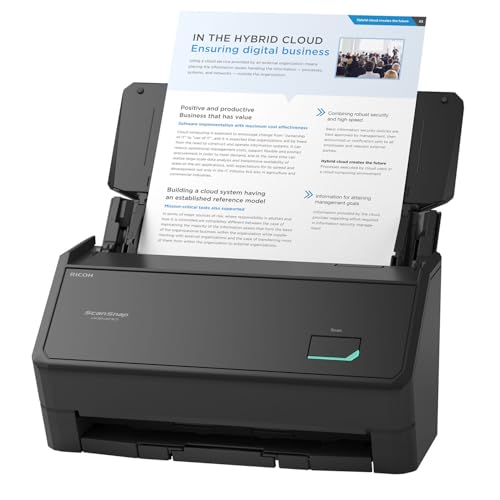
ScanSnap iX2400 High-Speed One-Touch Button Color Document Scanner

Our verdict: Wired USB, a 100-sheet feeder and one-touch scanning.

The iX2400 connects over wired USB, which avoids wireless driver complexity, and ships with the ScanSnap Home all-in-one software. It has a 100-sheet feeder and one-touch scan with drag-and-drop to apps, in the $200 to $500 bucket. A wired connection has no pairing or network settings to break.

It ranks second because it relies on proprietary software rather than a standard driver, which can limit which programs can control it. The speed and feeder are strong, though.

Buy it for a desk where the computer sits within cable reach. The caveats are no wireless option and proprietary software. Skip it if you want a standard TWAIN driver.

Connection
Wired USB
Feeder
100 sheets
Software
ScanSnap Home
Scan
One-touch, drag-drop to apps

What we like

  • +100-sheet feeder
  • +Wired USB reliability
  • +One-touch scanning
  • +Unified software

Watch out for

  • −No wireless option
  • −Proprietary software

Buy it if: A desk with the computer within cable reach.

Skip it if: You want a standard TWAIN driver.

3

Best Duplex Compact

Brother DS-740D Duplex Compact Mobile Document Scanner

Our verdict: Broad driver support plus duplex in a compact body.

The DS-740D supports TWAIN and WIA on PC, ICA on Mac and SANE on Linux. It scans duplex, comes with the free iPrint&Scan desktop app and has a desk-saving design, in the $100 to $200 bucket. Four driver standards mean a household with mixed machines can share one scanner.

It ranks third because it takes the DS-640's driver coverage and adds duplex, but the feeder size is not listed. It costs less than the Epson and offers broader operating system support.

Buy it for mixed operating system households. The caveats are an unlisted feeder size and a compact build. Skip it if you scan large stacks.

Drivers
TWAIN, WIA, ICA, SANE
Duplex
Yes
App
Free iPrint&Scan
Price bucket
$100-200

What we like

  • +Windows, Mac and Linux drivers
  • +Duplex scanning
  • +Free desktop app
  • +Desk-saving design

Watch out for

  • −Feeder size not listed
  • −Compact build

Buy it if: Mixed operating system households.

Skip it if: You scan large stacks.

4

Easiest Setup

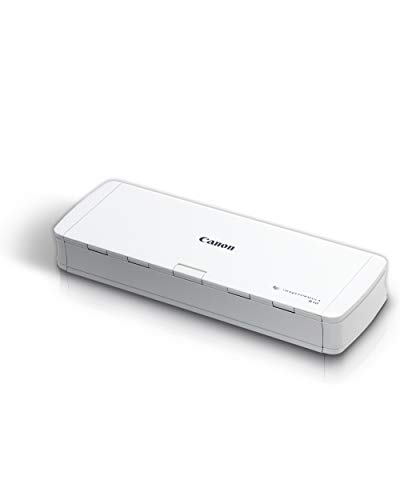
Canon imageFORMULA R10 Portable Document Scanner, USB Powered, Duplex

Our verdict: Built-in software means nothing to install.

The Canon R10 is a USB-powered portable duplex scanner with a 20-sheet feeder. Its software is built in with no separate installation, updates automatically and works with Windows and Mac, in the $100 to $200 bucket. Built-in software avoids driver conflicts entirely.

It ranks fourth because 20 sheets is small and Linux is not listed, but nothing needs installing. For a laptop user who dislikes software, that matters more than feeder size.

Buy it for laptop users who want plug-and-scan. The caveats are the 20-sheet feeder and no Linux listing. Skip it if you scan big stacks or use Linux.

Feeder
20-sheet ADF, duplex
Power
USB powered
Software
Built in, auto-updating
OS
Windows and Mac

What we like

  • +No software to install
  • +USB powered
  • +Duplex scanning
  • +Auto-updating software

Watch out for

  • −Only 20-sheet feeder
  • −Linux not listed

Buy it if: Laptop users who want plug-and-scan.

Skip it if: You scan big stacks or use Linux.

5

Best Budget Multi-OS

Brother DS-640 Compact Mobile Document Scanner

Our verdict: The broadest driver list at a low price, but single-sided.

The DS-640 supports TWAIN and WIA on PC, ICA on Mac and SANE on Linux, with image optimization, bundled OCR software and a free iPrint&Scan desktop app, in the $100 to $200 bucket. It has the broadest driver list at a low price.

It ranks last because the DS-740D adds duplex at the same price bucket, so the DS-640 is the plainer choice. Single-sided scanning means flipping double-sided pages by hand.

Buy it for occasional scans on a mixed OS setup. The caveats are no listed duplex and a compact feed. Skip it if you scan double-sided paper often.

Drivers
TWAIN, WIA, ICA, SANE
Software
OCR included
App
Free iPrint&Scan
Price bucket
$100-200

What we like

  • +Windows, Mac and Linux drivers
  • +OCR software included
  • +Free desktop app
  • +Image optimization

Watch out for

  • −Duplex not listed
  • −Compact feed

Buy it if: Occasional scans on a mixed OS setup.

Skip it if: You scan double-sided paper often.

Methodology

How We Ranked These

Driver support

We compared TWAIN, WIA, ICA and SANE coverage across operating systems.

Software bundle

We checked for OCR, conversion and desktop apps in the box.

Feeder and duplex

We weighed feeder size and double-sided scanning.

Setup friction

We noted built-in software and wired versus wireless connections.

Value

We placed each scanner in its price bucket.

Every Primea Score uses the same weights: Performance 30% · Build & Materials 20% · Everyday Usability 20% · Value 20% · Owner Satisfaction 10%. Full scoring rules

Buyer's guide

How to Pick the Right One for You

By Operating System

Check the driver list first.

SystemOur pick
Windows with document toolsEpson Workforce ES-400 II High-Speed Color Duplex Desktop Document Scanner
Mixed Windows, Mac and LinuxBrother DS-740D Duplex Compact Mobile Document Scanner
Windows or Mac, no installCanon imageFORMULA R10 Portable Document Scanner, USB Powered, Duplex
Linux, budgetBrother DS-640 Compact Mobile Document Scanner

By Budget

SpendOur pick
$100-200, duplexBrother DS-740D Duplex Compact Mobile Document Scanner
$100-200, no installCanon imageFORMULA R10 Portable Document Scanner, USB Powered, Duplex
$100-200, basicBrother DS-640 Compact Mobile Document Scanner
$200-500, softwareEpson Workforce ES-400 II High-Speed Color Duplex Desktop Document Scanner
$200-500, volumeScanSnap iX2400 High-Speed One-Touch Button Color Document Scanner

Standard Driver vs Built-In Software

Standard driver

TWAIN and WIA work with many apps. The Epson and both Brothers list them.

Built-in software

Nothing to install and updates itself. The Canon R10 works this way, as does the ScanSnap with its own suite.

Pick TWAIN if you use document software, and built-in software if you want to plug in and go.

By Volume

PagesOur pick
A few pages a weekBrother DS-640 Compact Mobile Document Scanner
Small batchesCanon imageFORMULA R10 Portable Document Scanner, USB Powered, Duplex
Regular 50-page jobsEpson Workforce ES-400 II High-Speed Color Duplex Desktop Document Scanner
100-page stacksScanSnap iX2400 High-Speed One-Touch Button Color Document Scanner

For Laptop Users Specifically

Look for

USB power, built-in software and a small body.

In this ranking

The Canon R10 is USB powered with built-in, auto-updating software.

When to Spend More

Spend more if

You want a full software suite. The Epson adds ScanSmart and Word/Excel conversion.

Save if

You scan occasionally. The Brother models sit in the $100-200 bucket.

Questions

Frequently Asked Questions

Which scanner works on Linux?+

The Brother DS-640 and DS-740D list SANE driver support. The others do not list Linux, so Linux users should treat the Epson and ScanSnap as unconfirmed and check the maker's driver page first.

Do I need to install software?+

The Canon R10 has built-in software with nothing to install. The Epson and ScanSnap use their own suites, which you must set up, and the Brother models offer the free iPrint&Scan app.

Is the DS-740D worth it over the DS-640?+

If you scan double-sided paper, yes, since it adds duplex. Both share the same driver list and price bucket, so duplex is the only reason to pay for the newer model. Count how many two-sided pages you scan.

What is TWAIN?+

A common scanner driver standard that many apps support. The Epson and Brother models list it, so they work with a wide range of document programs. The Canon R10 lists no TWAIN, relying on built-in software.

Can I scan to Word or Excel?+

The Epson ES-400 II lists Word and Excel conversion along with searchable PDF OCR, so it can turn a printed table into an editable file. Check the results, because OCR is imperfect on tables.

Is wired better than wireless?+

Wired USB avoids wireless drops. The ScanSnap iX2400 is wired only, which suits a desk with a nearby computer. It has no wireless mode to configure, so setup is plug in and scan.

Final take

Buy the ES-400 II for a desktop PC feeding scans into document tools, and the iX2400 for a wired, high-volume desk. The DS-740D suits mixed operating systems, the R10 suits a laptop that wants plug-and-scan, and the DS-640 is the low-cost multi-OS option. Check the driver list against your computer before you buy.

More Ranked & Reviewed Guides