
Primea ReviewsAll Reviews

Primea Reviews is reader-supported. When you buy through our Amazon links we may earn a commission, at no extra cost to you. Rankings are set by our editors and never sold. Learn more

Ranked & Reviewed by Primea Reviews

The 6 Best Document Scanners for Lawyers of 2026, Ranked & Reviewed

By the Primea Editorial TeamUpdated November 1, 202610 min read6 products ranked
The 6 Best Document Scanners for Lawyers of 2026, Ranked & Reviewed

The short answer

The ScanSnap iX2400 is the best document scanner for lawyers because its 100-sheet feeder and 45 ppm suit heavy litigation intake. The Epson ES-580W adds wireless and searchable PDF OCR, and the ES-400 II is the wired 50-sheet workhorse. The ScanSnap iX1300 suits solo attorneys, the Canon R30 needs no software install, and the R10 is the portable choice for depositions.

The Primea Scoreboard

Ranked & Reviewed

  1. The best fit for heavy litigation document intake.

    95Outstanding
    Check price
  2. Wireless and USB with searchable PDF OCR built in.

    92Outstanding
    Check price
  3. A 50-sheet duplex workhorse without the wireless question.

    89Excellent
    Check price
  4. Compact scanning with cloud filing for solo attorneys.

    86Excellent
    Check price
  5. Plug-and-scan with no software to install.

    83Very Good
    Check price
  6. The one to carry to depositions and client sites.

    80Very Good
    Check price

A law office does not fail at scanning because the machine is slow. It fails because a deposition exhibit turns out to be legal length, or because a convenient wireless model quietly routes privileged files through a service nobody reviewed. Match the scanner to your document mix and your confidentiality rules before you worry about pages per minute.

We ranked six scanners using their listed feeder size, speed, connectivity, software and duty rating, and scored them on the Primea framework. Several listings leave out legal-size feeder behavior, which for this audience is a real gap, so we mark those down. Nothing here replaces a conversation with your IT or compliance lead, and no scanner removes your own duty to protect client files.

Before you buy

What Actually Matters

01

Feeder capacity

Feeder capacity is the number of sheets the automatic tray holds. A bigger one means fewer reloads on discovery batches and less supervision. Look for the sheet count in the specs, such as 100 on the iX2400 versus 20 on the R10, and match it to the thickest stack you scan in one sitting. Reloading a feeder mid-batch is where pages jam or go missing.

02

Legal-size support

Legal-size support matters because legal pages are longer than letter, and some feeders slow down or use a different paper path for them. Several listings here do not confirm it. Check the maximum page length in the product details, and feed a legal sample before committing to a purchase. Many offices discover the problem only at the first oversized exhibit.

03

Connectivity and confidentiality

Connectivity and confidentiality go together. Wireless and cloud scanning are convenient but send privileged material through more systems, while wired USB keeps it simpler. Check how the scanner encrypts traffic and where files land before use, and ask whether your ethics guidance restricts cloud storage of client files. When in doubt, keep scanning wired.

04

OCR and file cleanup

OCR turns a scan into searchable text, which is vital for finding a clause fast. Auto crop and blank-page removal save cleanup time on mixed stacks. Look for searchable PDF named in the listing, as on the ES-580W, and confirm whether OCR runs on the scanner or in separate software. A scan you cannot search is only a picture of paper.

05

Duty rating

Duty rating is how many scans a day a scanner is built for. A scanner pushed beyond it will wear out early. The R10 lists 500 per day, and the higher-end models list none. Look for a daily rating and match it to your busiest week of volume. Light-duty units fail first during a discovery push.

In-depth reviews

Our Ranked Picks, Reviewed

1

Best Overall

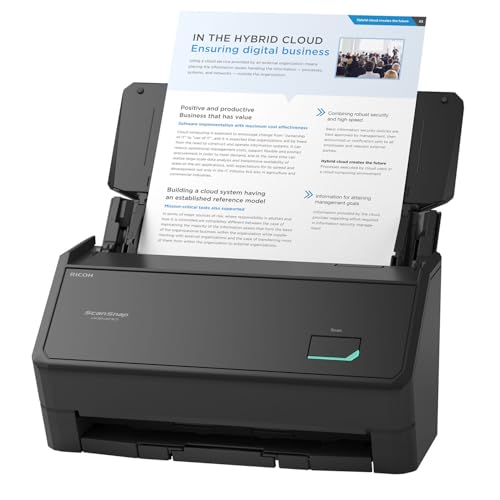
ScanSnap iX2400 High-Speed One-Touch Button Color Document Scanner

Our verdict: The best fit for heavy litigation document intake.

The ScanSnap iX2400 has a 100-sheet feeder and scans up to 45 ppm over wired USB. One-touch scanning with drag-and-drop filing keeps busy staff out of settings menus, and auto de-skew and blank-page removal clean files as they come in. A big feeder matters in discovery, where stopping every 50 sheets to reload breaks the rhythm.

It tops the Epson ES-580W because the larger feeder handles bigger batches in one load. The tradeoff is no wireless mode, which some firms actually prefer for privileged files.

Buy it for heavy litigation document intake. The caveat is that it needs ScanSnap Home software and has a wired connection only, so skip it if you want wireless scanning from your desk. At $200 to $500, it is priced for the workload.

Feeder
100 sheets
Speed
Up to 45 ppm
Connection
Wired USB
Price bucket
$200-500

What we like

  • +100-sheet feeder
  • +Up to 45 ppm
  • +One-touch scanning
  • +Auto de-skew, blank removal

Watch out for

  • −Wired only
  • −Needs ScanSnap Home software

Buy it if: Firms with high-volume litigation support intake.

Skip it if: You want wireless scanning from the desk.

2

Best Wireless

Epson Workforce ES-580W Wireless Color Duplex Desktop Document Scanner

Our verdict: Wireless and USB with searchable PDF OCR built in.

The ES-580W is a duplex desktop scanner that works over wireless or USB, with a TWAIN driver and searchable PDF OCR. Auto crop and blank-page removal clean files as they scan. OCR is the lawyer's feature: searchable text lets you find a clause across a stack of PDFs, instead of rereading each page.

It sits below the iX2400 because the spec sheet lists no feeder size or speed advantage, but above the ES-400 II for adding wireless. The tradeoff is that wireless widens your confidentiality exposure.

Buy it if you want placement flexibility. The caveats are unconfirmed legal-size speed and the need to verify wireless encryption. Skip it if your policy bans wireless on privileged files, since you can simply use the wired ES-400 II for less risk.

Connection
Wireless + USB
Duplex
Yes
OCR
Searchable PDF
Price bucket
$200-500

What we like

  • +Wireless and USB
  • +Searchable PDF OCR
  • +TWAIN driver
  • +Auto crop

Watch out for

  • −Legal-size speed unconfirmed
  • −Verify wireless encryption

Buy it if: Firms that want wireless placement flexibility.

Skip it if: Your policy bans wireless on privileged files.

3

Best Wired Desktop

Epson Workforce ES-400 II High-Speed Color Duplex Desktop Document Scanner

Our verdict: A 50-sheet duplex workhorse without the wireless question.

The ES-400 II is a color duplex desktop scanner with a 50-sheet feeder, a TWAIN driver, auto crop and blank-page removal. It sits in the $200 to $500 bucket. A TWAIN driver lets many case management and imaging programs control the scanner directly, which suits practices with established document systems.

It ranks below the ES-580W on connectivity and below the iX2400 on feeder size. The tradeoff is half the feeder of the ScanSnap in exchange for a simpler wired setup with no wireless question to answer.

It fits mid-size practices doing steady batch scanning. The caveats are that legal-size support is not explicitly confirmed and the smaller feeder means more reloading. Skip it if you regularly feed large discovery stacks, where the iX2400 saves real time.

Feeder
50 sheets
Duplex
Yes
Driver
TWAIN
Price bucket
$200-500

What we like

  • +50-sheet duplex feeder
  • +TWAIN driver
  • +Auto crop
  • +Blank-page removal

Watch out for

  • −Legal-size support unconfirmed
  • −Smaller feeder than iX2400

Buy it if: Mid-size practices doing steady batch scanning.

Skip it if: You regularly feed large discovery stacks.

4

Best Compact

ScanSnap iX1300 Wireless or USB Double-Sided Color Document Scanner, White

Our verdict: Compact scanning with cloud filing for solo attorneys.

The iX1300 has a compact feeder, scans duplex at 30 ppm and can scan to the cloud without a computer. It connects wirelessly or over USB, handles thick items and cards, and applies auto de-skew and color optimization. Standalone cloud scanning means a signed form can land in storage straight from the scanner.

It ranks under the ES-400 II because the hopper is smaller, but its footprint and standalone mode suit a small desk. Against the ES-580W, it trades some feeder size for portability.

Best for solo attorneys with limited space. The caveat is that cloud scanning needs vetting, because privileged material leaves the building. Skip it if you scan large batches daily, since the small hopper will slow you down.

Speed
30 ppm duplex
Connection
Wireless or USB
Cloud
Standalone scan-to-cloud
Price bucket
$200-500

What we like

  • +Compact footprint
  • +Scan to cloud standalone
  • +Handles cards and thick items
  • +Auto de-skew

Watch out for

  • −Small feeder hopper
  • −Cloud needs vetting

Buy it if: Solo attorneys with limited desk space.

Skip it if: You scan large batches daily.

5

Easiest Setup

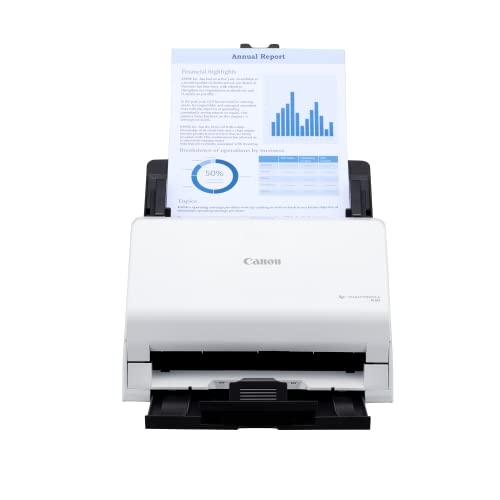
Canon imageFORMULA R30 Office Document Scanner

Our verdict: Plug-and-scan with no software to install.

The Canon imageFORMULA R30 is an office-class duplex scanner with an auto document feeder that works plug-and-scan with no software installation. Needing no software helps in offices where staff cannot install programs and nobody is on call for IT. Expect to pay $200 to $500.

It ranks below the ScanSnap and Epson models because its listing gives fewer performance specifics, such as speed and feeder capacity. The tradeoff is that it asks nothing of your IT setup, which is valuable if setup is the obstacle. It has no cloud or wireless mode to review.

It suits legal offices without dedicated IT. The caveat is the missing speed figure, so skip it if you need documented high-volume throughput, and check the maximum page length for legal paper before buying.

Setup
No software install
Duplex
Yes
Feeder
Auto document feeder
Price bucket
$200-500

What we like

  • +No software to install
  • +Duplex scanning
  • +Office-class design
  • +Little IT burden

Watch out for

  • −Fewer specs listed
  • −No stated speed

Buy it if: Legal offices without dedicated IT.

Skip it if: You need documented high-volume speed.

6

Best Portable

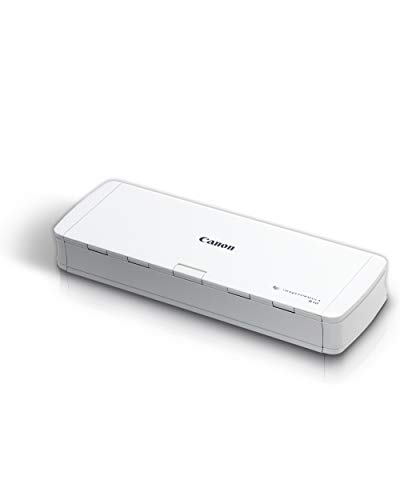
Canon imageFORMULA R10 Portable Document Scanner, USB Powered, Duplex

Our verdict: The one to carry to depositions and client sites.

The Canon imageFORMULA R10 weighs 1.7 lb, runs on USB power and has a 20-sheet duplex feeder with a stated 500 scans per day rating. It costs $100 to $200. A daily rating is an honest spec: it tells you the scanner is built for occasional bursts, not a record room.

It ranks last only because the daily rating and feeder suit light loads, not a litigation room. It is the cheapest here and the only one you would put in a briefcase for an off-site deposition.

Buy it for off-site work, such as depositions and client visits. The caveat is the 500 scans per day limit and the 20-sheet feeder. Skip it if you need a main office workhorse, because it will wear out under steady volume.

Weight
1.7 lb
Feeder
20 sheets, duplex
Rating
500 scans/day
Price bucket
$100-200

What we like

  • +1.7 lb and portable
  • +USB powered
  • +Duplex feeder
  • +Lowest price bucket here

Watch out for

  • −20-sheet feeder
  • −500 scans per day limit

Buy it if: Attorneys scanning at depositions or client sites.

Skip it if: You need a main office workhorse.

Methodology

How We Ranked These

Feeder capacity

Larger automatic feeders ranked higher for batch discovery work.

Duplex and speed

We weighed listed ppm and duplex support.

Confidentiality fit

Wired, standalone and wireless modes were judged against privileged-file concerns.

OCR and cleanup

Searchable PDF, auto crop and blank-page removal counted toward filing efficiency.

Setup and portability

Plug-and-scan simplicity and weight mattered for small practices.

Every Primea Score uses the same weights: Performance 30% · Build & Materials 20% · Everyday Usability 20% · Value 20% · Owner Satisfaction 10%. Full scoring rules

Buyer's guide

How to Pick the Right One for You

By Practice Size

Match the scanner to how much paper moves through.

PracticeOur pick
High-volume litigationScanSnap iX2400 High-Speed One-Touch Button Color Document Scanner
Mid-size steady batchesEpson Workforce ES-400 II High-Speed Color Duplex Desktop Document Scanner
Solo attorneyScanSnap iX1300 Wireless or USB Double-Sided Color Document Scanner, White

By Budget

SpendOur pick
$100-200Canon imageFORMULA R10 Portable Document Scanner, USB Powered, Duplex
$200-500ScanSnap iX2400 High-Speed One-Touch Button Color Document Scanner

Wired vs Wireless

Wired

The ScanSnap iX2400 and Epson ES-400 II keep files on a direct connection with fewer exposure points.

Wireless

The Epson ES-580W and ScanSnap iX1300 offer flexible placement and cloud options but need security review.

Most firms should default to wired unless wireless placement is genuinely needed.

By Setup Burden

SituationOur pick
No IT staffCanon imageFORMULA R30 Office Document Scanner
Scan to cloud, small deskScanSnap iX1300 Wireless or USB Double-Sided Color Document Scanner, White
TWAIN workflowEpson Workforce ES-400 II High-Speed Color Duplex Desktop Document Scanner

For Off-Site Depositions Specifically

Look for

Low weight, USB power and a duplex feeder.

In this ranking

The Canon R10 weighs 1.7 lb, is USB powered and has a 20-sheet duplex feeder.

When to Spend More

Spend more if

You process discovery boxes, where the 100-sheet iX2400 saves reloads.

Save if

Volume is light, so the Canon R10 or R30 is enough.

Questions

Frequently Asked Questions

Will these scan legal-size paper?+

Several listings do not explicitly confirm legal-size feeder speed. Check the maximum page length on the product page before buying, and test a legal page on arrival. A scanner that cannot take your longest page is the wrong scanner, however fast it runs.

What is the biggest mistake lawyers make buying a scanner?+

Ignoring confidentiality. A wireless or cloud scanner, such as the ES-580W or iX1300, needs a security review before it touches privileged files. A wired iX2400 avoids the question, since nothing leaves the building unless you send it. Ask your IT lead which route your bar guidance allows.

Is the ScanSnap iX2400 worth it over the Epson ES-400 II?+

If you feed large batches, yes, because its feeder is double the size at 100 sheets. For lighter use the Epson ES-400 II is enough.

Do I need special software?+

The iX2400 uses ScanSnap Home and the Epsons offer TWAIN drivers. The Canon R30 needs no software installation, which helps in offices without IT support.

Can the portable R10 be my main scanner?+

It carries a 500 scans per day rating and a 20-sheet feeder, so it suits light or off-site work rather than heavy volume. Keep a desktop model like the ES-400 II for the main office, and use the R10 for travel only.

Does OCR matter for legal work?+

Yes, searchable PDFs make finding clauses fast. The Epson ES-580W lists searchable PDF OCR, so a single contract can be searched across a folder, which saves hours during review. The ES-400 II also offers TWAIN, so check your software.

Final take

For high-volume intake, buy the iX2400 and keep it wired. The ES-580W is right if your policy allows wireless placement, and the ES-400 II is a steady mid-size choice. Solo practitioners will be happy with the iX1300, and the R30 suits an office without IT. Carry the R10 to client sites. Whichever you choose, confirm legal-size handling and where scanned files are stored.

More Ranked & Reviewed Guides