
Primea ReviewsAll Reviews

Primea Reviews is reader-supported. When you buy through our Amazon links we may earn a commission, at no extra cost to you. Rankings are set by our editors and never sold. Learn more

Ranked & Reviewed by Primea Reviews

The 6 Best Document Scanners for Searchable PDFs and Paperless Offices, Ranked & Reviewed

By the Primea Editorial TeamUpdated November 3, 202611 min read6 products ranked
The 6 Best Document Scanners for Searchable PDFs and Paperless Offices, Ranked & Reviewed

The short answer

The ScanSnap iX2500 is the document scanner to buy for a serious paperless archive, with a 100-sheet feeder, a touchscreen with personal profiles and Wi-Fi 6. The Epson Workforce ES-580W is the best all-round wireless desktop scanner with ScanSmart OCR, and the ScanSnap iX1300 is the compact choice for a small home office. The Canon R10 is the one to throw in a bag.

The Primea Scoreboard

Ranked & Reviewed

  1. A 100-sheet feeder, Wi-Fi 6 and a touchscreen with personal profiles for large archives.

    95Outstanding
    Check price
  2. Wireless duplex scanning with ScanSmart searchable PDF and Word or Excel conversion.

    92Outstanding
    Check price
  3. A compact 30ppm duplex scanner with auto color optimization and de-skew for clean OCR input.

    89Excellent
    Check price
  4. A 50-sheet feeder with searchable PDF OCR, auto crop and blank-page removal.

    87Excellent
    Check price
  5. An office-class duplex feeder scanner with bundled searchable PDF OCR.

    84Very Good
    Check price
  6. A 1.7 lb USB-powered duplex scanner with a 20-sheet feeder and built-in searchable PDF conversion.

    81Very Good
    Check price

Searchable PDFs begin with the scan, not the software. Optical character recognition can only read what the scanner captured, so a crooked page, a faint print or a lopsided feed produces text that cannot be found later. Buyers who chase OCR features and ignore the feeder usually discover this after the first hundred pages.

This ranking is therefore built around feed quality, automatic cleanup and the OCR workflow each scanner ships with. We reviewed six models from their listings and maker descriptions, comparing feeder size, duplex scanning, wireless options and bundled software. We ranked by how well each should handle a steady stream of mixed paper, and we mention when a listing leaves out a figure.

Before you buy

What Actually Matters

01

Feeder capacity

The automatic document feeder holds the stack while the scanner pulls pages through. A 20-sheet hopper needs frequent reloading, while a 100-sheet one handles a batch unattended. Count how much paper you scan at once and pick a feeder that covers it.

02

Duplex scanning speed

Duplex means both sides of a page are captured in one pass. Pages per minute figures, like the 30ppm on the iX1300, tell you the rate. Always check whether the number applies to duplex or single-sided scanning.

03

OCR software quality

OCR turns the scan image into searchable text. Most scanners bundle a program, such as ScanSmart or the ScanSnap software, that outputs searchable PDFs. Look for named software on the listing, and for extras like Word and Excel conversion if you edit forms.

04

Automatic cleanup

De-skew, auto crop and blank-page removal fix the errors that damage OCR. They also save hours of manual editing on a large archive. Look for these feature names when comparing models.

05

Connection and workflow

Wireless scanning lets the device sit away from your computer, while USB is steady and simple. Standalone scan-to-cloud works without a PC. Think about where the scanner will live and who will use it.

In-depth reviews

Our Ranked Picks, Reviewed

1

Best Archive Scanner

ScanSnap iX2500 Wireless or USB High-Speed Document Scanner

Our verdict: A 100-sheet feeder, Wi-Fi 6 and a touchscreen with personal profiles for large archives.

The iX2500 is the flagship of the ScanSnap range, with a 100-sheet feeder, a touchscreen with personalized profiles, Wi-Fi 6 and USB-C. The listing highlights high-resolution scanning, which gives the OCR engine a cleaner source to read.

First place goes to it because large archive projects reward a big feeder and an efficient workflow. A 100-sheet hopper lets you load a stack of invoices and walk away, and profiles on the touchscreen mean one button press sends a batch to the right folder or cloud service without opening a computer. The cost is the main drawback, as this is the priciest scanner here, and its size takes more desk space than the compact models.

Buy it if you are digitizing years of paper or running a small office. Skip it if you scan a handful of pages each week.

Feeder
100 sheets
Connectivity
Wi-Fi 6 and USB-C
Controls
Touchscreen with profiles
Scanning
High-resolution duplex

What we like

  • +100-sheet feeder for big batches
  • +Touchscreen profiles speed workflows
  • +Wi-Fi 6 and USB-C connections
  • +High-resolution scanning helps OCR

Watch out for

  • −Priciest scanner in this ranking
  • −Needs more desk space

Buy it if: Large paperless archives and small offices.

Skip it if: You scan only a few pages a week.

2

Best All-Rounder

Epson Workforce ES-580W Wireless Color Duplex Desktop Document Scanner

Our verdict: Wireless duplex scanning with ScanSmart searchable PDF and Word or Excel conversion.

The ES-580W is Epson's wireless desktop scanner, with duplex scanning and ScanSmart software that creates searchable PDFs and converts to Word and Excel files. It is listed in the $200 to $500 bracket and connects over wireless or USB.

It lands second because it covers the whole OCR workflow in one box. Beyond PDFs, the Word and Excel conversion is useful for forms and tables you want to edit, and wireless operation means the scanner can sit on a shelf instead of beside your computer. Compared with the iX2500, it gives up the large feeder and the touchscreen profiles, but at a far lower cost.

Get it for a home or small business office with moderate volumes. Skip it if you routinely scan stacks of a hundred sheets.

Scanning
Color duplex
Connectivity
Wireless and USB
Software
ScanSmart OCR
Price bracket
$200 to $500

What we like

  • +ScanSmart makes searchable PDFs
  • +Word and Excel conversion included
  • +Wireless scanning from anywhere
  • +Color duplex in one pass

Watch out for

  • −Smaller feeder than the ScanSnap flagship
  • −No touchscreen on the unit

Buy it if: Home and small business offices.

Skip it if: You scan stacks of a hundred sheets.

3

Best Compact Scanner

ScanSnap iX1300 Wireless or USB Double-Sided Color Document Scanner

Our verdict: A compact 30ppm duplex scanner with auto color optimization and de-skew for clean OCR input.

The iX1300 is a compact double-sided scanner with a small automatic feeder, rated at 30 pages per minute in duplex mode. It adds auto color optimization and de-skew, supports cloud services and can scan to the cloud on its own. The listing places it in the $200 to $500 bracket.

Third place reflects a smart design for small spaces. De-skew straightens a page that fed at an angle, which protects OCR accuracy, and color optimization cleans up faint originals. The small feeder is the compromise, because a long document needs reloading several times. It trails the Epson on software extras like Word and Excel conversion, but its standalone scan-to-cloud feature means you do not always need a computer.

Pick it for a desk where space is tight and volumes are low. Skip it for regular large batches.

Speed
30ppm duplex
Feeder
Compact ADF hopper
Cleanup
De-skew, auto color
Cloud
Standalone scan-to-cloud

What we like

  • +Compact for small desks
  • +De-skew straightens crooked pages
  • +Scans to the cloud standalone
  • +30ppm duplex speed

Watch out for

  • −Small feeder needs reloading
  • −Fewer software extras than Epson

Buy it if: Small home offices with limited desk space.

Skip it if: You scan long documents in one go.

4

Best Wired Workhorse

Epson Workforce ES-400 II High-Speed Color Duplex Desktop Document Scanner

Our verdict: A 50-sheet feeder with searchable PDF OCR, auto crop and blank-page removal.

The ES-400 II is a high-speed color duplex desktop scanner with a 50-sheet automatic feeder and searchable PDF OCR. Auto crop and blank-page removal are included, and the listing sits in the $200 to $500 bracket.

It ranks fourth because the feeder is bigger than any compact model, and blank-page removal saves a surprising amount of time when you scan double-sided paper with empty backs. Automatic cropping also trims shadows and borders that confuse OCR. The limits are on connection: the listing describes a desktop model without the wireless operation of the ES-580W, so it must stay tethered to a computer.

Choose it if your scanner lives beside your computer and you handle regular stacks of paper. Skip it if you want to scan from a phone or tablet.

Feeder
50 sheets
Scanning
Color duplex
OCR
Searchable PDF
Cleanup
Auto crop, blank-page removal

What we like

  • +50-sheet feeder for regular stacks
  • +Blank-page removal saves time
  • +Auto crop trims borders
  • +Searchable PDF OCR included

Watch out for

  • −Listing mentions no wireless use
  • −Needs a tethered computer

Buy it if: Desks that scan regular stacks of paper.

Skip it if: You want wireless or mobile scanning.

5

Best Office Style

Canon imageFORMULA DR-C225 II Office Document Scanner

Our verdict: An office-class duplex feeder scanner with bundled searchable PDF OCR.

The DR-C225 II is part of Canon's imageFORMULA line, designed for business use with a duplex automatic feeder and bundled searchable PDF OCR. It is in the $200 to $500 bracket, and the listing provides few numeric specifications.

Fifth place is down to missing detail. Canon's office scanners have a good reputation for reliable feeding, and the business orientation suggests a machine built to handle daily use. But the listing does not state feeder capacity or speed, so it is hard to compare with the Epson and ScanSnap entries on paper. It also lacks the wireless and cloud features that newer rivals promote.

Buy it if you want a conventional office scanner from a long-standing brand. Skip it if you want precise published figures before you commit.

Class
Office-class duplex ADF
OCR
Bundled searchable PDF
Line
Canon imageFORMULA
Price bracket
$200 to $500

What we like

  • +Office-focused build and design
  • +Bundled searchable PDF software
  • +Duplex feeder included
  • +Established Canon scanner line

Watch out for

  • −Feeder size is not listed
  • −No wireless or cloud emphasis

Buy it if: Conventional offices that want a wired scanner.

Skip it if: You need published speed and feeder specs.

6

Best Portable Scanner

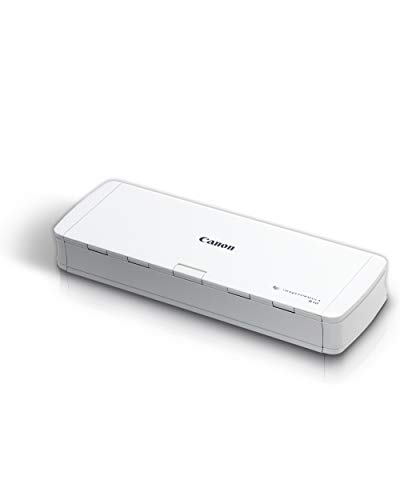
Canon imageFORMULA R10 Portable Document Scanner

Our verdict: A 1.7 lb USB-powered duplex scanner with a 20-sheet feeder and built-in searchable PDF conversion.

The R10 is a 1.7 lb portable scanner powered by USB, with a 20-sheet duplex feeder, a rating of 500 scans per day and built-in searchable PDF conversion. It is listed in the $100 to $200 bracket, the lowest tier here.

It closes the list because capacity limits its role. Twenty sheets per load and a daily rating of 500 scans suit a traveler or a home user, not a busy office. The weight and USB power are its real strengths: it can go in a laptop bag and scan receipts and contracts on the road, which none of the desktop models can do.

Get it for light volumes, travel or a shared household. Skip it if you digitize large archives, where the feeder will slow you down.

Weight
1.7 lb
Feeder
20 sheets, duplex
Rating
500 scans per day
Power
USB

What we like

  • +1.7 lb and bag friendly
  • +USB powered with no adapter
  • +Duplex scanning of two sides
  • +Lowest price in the ranking

Watch out for

  • −Small 20-sheet feeder
  • −Daily duty rating is limited

Buy it if: Travelers and light home use.

Skip it if: You scan large archives.

Methodology

How We Ranked These

Feeder and duplex

Automatic feeder size and double-sided scanning were compared, since they decide how much paper you can process in a single pass.

OCR workflow

Bundled software, searchable PDF creation and file conversion were reviewed for how easily a scan becomes a findable document.

Image cleanup

De-skew, auto crop, blank-page removal and color optimization were weighed because cleaner scans produce more accurate text recognition.

Connectivity

Wireless, USB-C and standalone cloud scanning were checked against how and where each device is meant to be used.

Value by tier

Models were set against the $100 to $200 and $200 to $500 brackets, with the iX2500 judged as a premium archive tool.

Every Primea Score uses the same weights: Performance 30% · Build & Materials 20% · Everyday Usability 20% · Value 20% · Owner Satisfaction 10%. Full scoring rules

Buyer's guide

How to Pick the Right One for You

By Monthly Volume

The amount of paper you scan decides the feeder you need.

VolumeOur pick
Large archive projectsScanSnap iX2500 Wireless or USB High-Speed Document Scanner
Regular office stacksEpson Workforce ES-400 II High-Speed Color Duplex Desktop Document Scanner
Moderate home officeEpson Workforce ES-580W Wireless Color Duplex Desktop Document Scanner
Occasional pagesCanon imageFORMULA R10 Portable Document Scanner

By Budget

SpendOur pick
$100 to $200Canon imageFORMULA R10 Portable Document Scanner
$200 to $500 (wireless)Epson Workforce ES-580W Wireless Color Duplex Desktop Document Scanner
$200 to $500 (compact)ScanSnap iX1300 Wireless or USB Double-Sided Color Document Scanner
Premium archive tierScanSnap iX2500 Wireless or USB High-Speed Document Scanner

Desktop vs Portable

Desktop scanner

Bigger feeder, faster throughput and sturdier paper handling, but it needs a permanent spot. Picks: iX2500, ES-580W, ES-400 II, DR-C225 II, iX1300.

Portable scanner

Light and USB powered, so it travels with a laptop, though capacity is limited. Pick: Canon R10.

Default to a desktop model unless you need to scan away from a desk.

By Connection

ConnectionOur pick
Wi-Fi 6 with touchscreenScanSnap iX2500 Wireless or USB High-Speed Document Scanner
Wireless or USBEpson Workforce ES-580W Wireless Color Duplex Desktop Document Scanner
Scan-to-cloud without a PCScanSnap iX1300 Wireless or USB Double-Sided Color Document Scanner
Wired desktopCanon imageFORMULA DR-C225 II Office Document Scanner

For Tax and Receipt Archives Specifically

Look for

Duplex scanning, auto cleanup and searchable PDF output, so receipts and statements can be found by keyword later.

In this ranking

Epson ES-580W for the Word and Excel extras, and ScanSnap iX1300 for a small desk.

When to Spend More

Spend more if

You digitize hundreds of pages at a time or run a small office. The ScanSnap iX2500 saves time at scale.

Save if

You scan only now and then. The Canon R10 handles light work for the least.

Questions

Frequently Asked Questions

Do I need special software to make a searchable PDF?+

Most scanners bundle OCR software that does it automatically. Epson's ScanSmart and the ScanSnap and Canon packages each create searchable PDFs. You can also run OCR in separate software afterward.

What is the biggest mistake when digitizing paper?+

Scanning at a low resolution to save space. Faint or small print then fails OCR and the PDF is not truly searchable. Use a sensible setting and let the scanner clean up the page.

Is the ScanSnap iX2500 worth it over the Epson ES-580W?+

For large archives, yes, because the 100-sheet feeder and profile buttons save real time. For moderate volumes the ES-580W gives most of the capability at a much lower price.

How do I scan a mixed stack of paper?+

Sort fragile or odd-sized pages out, then feed matching sizes together. Remove staples and unfold corners first. Run a test sheet to confirm the settings before a big batch.

How do I keep a scanner working well?+

Clean the rollers and glass with a lint-free cloth and the maker's recommended cleaner. Dust and paper debris cause streaks and misfeeds. Follow the roller replacement schedule in the manual.

Can these scanners handle receipts and plastic cards?+

Many handle thin receipts, though very small slips may need a carrier sheet. Plastic cards can run through some models if the manual allows it. Check the listing before feeding unusual media.

Final take

For a serious paperless archive, the ScanSnap iX2500 is the best scanner for searchable PDFs here, with a 100-sheet feeder and touchscreen profiles. The Epson Workforce ES-580W is the best all-round pick for most offices, and the ScanSnap iX1300 suits small desks. The Canon R10 covers travel and light use. Match the feeder to your stack size and you will enjoy the results.

More Ranked & Reviewed Guides