
Primea ReviewsAll Reviews

Primea Reviews is reader-supported. When you buy through our Amazon links we may earn a commission, at no extra cost to you. Rankings are set by our editors and never sold. Learn more

Ranked & Reviewed by Primea Reviews

The 6 Best Gaming Laptop Cooling Pads for Sustained Play in 2026, Ranked & Reviewed

By the Primea Editorial TeamUpdated November 3, 202610 min read6 products ranked
The 6 Best Gaming Laptop Cooling Pads for Sustained Play in 2026, Ranked & Reviewed

The short answer

The llano V12 is the pad to buy for long gaming and rendering sessions, with a 5.5 inch turbo fan, sealed foam and a stated 44 degree Celsius drop. The Razer Adaptive Smart pad is the best for people who hate fiddling with fan speed, the ChillCore suits large 17 to 19 inch laptops, and the Kootek and LIANGSTAR keep the cost under $25.

The Primea Scoreboard

Ranked & Reviewed

  1. A turbo fan with sealed foam and a documented thermal claim, built for long gaming sessions.

    94Outstanding
    Check price
  2. A 140mm fan that adjusts itself to temperature, with Synapse fan curves and magnetic frames.

    92Outstanding
    Check price
  3. Nine fans covering the top and bottom vents of a big 17 to 19 inch gaming laptop.

    89Excellent
    Check price
  4. Nine fans with stepless speed to 2600 RPM and a stated noise figure under 40dB.

    87Excellent
    Check price
  5. Six fans with independent zone control, a metal mesh top and a phone holder, under $25.

    84Very Good
    Check price
  6. Five fans with staged 1, 4 or 5 fan control and a dual USB hub for thin gaming laptops.

    81Very Good
    Check price

A cooling pad cannot fix a laptop that is thermal throttling because of a clogged heatsink, a dried-out paste job or a power profile set too high. That is the buyer mistake we see most: people blame the pad, when the real culprit sits inside the chassis. What a good pad does is feed the intake vents cooler air, and that only works if the fan sits under the vents and the foam seals the gap.

So this ranking sorts pads by design rather than fan count. We reviewed six models from the listings and spec sheets, focusing on where the fans sit, how the pad seals to the laptop, noise, height and tilt adjustment, and which laptop sizes it fits. Temperature drops quoted here are manufacturer claims, not measurements of ours.

Before you buy

What Actually Matters

01

Fan type and sealing

A turbo blower creates air pressure, while a grid of axial fans moves volume with less force. Pressure matters when your laptop has narrow bottom vents, and sealing foam stops that air from escaping around the pad. On a listing, look for the words blower, turbo or sealed foam rather than just a fan count.

02

Laptop size match

A pad built for 12 to 15.6 inches will not support a 17 inch machine, and one built for 19 inches may overhang a small ultrabook. The fan position also has to line up with your intake vents, so check where yours sit on the bottom plate. The size range in the title is a hard limit, not a suggestion.

03

Noise and fan control

Fans at maximum are loud, which is why speed control matters more than top speed. Stepless dials, zone control and automatic profiles let you run quietly at idle and ramp up under load. Treat any noise figure as a manufacturer claim measured under its own conditions.

04

Height and tilt

Raising the laptop opens space under the chassis, and a tilt improves wrist angle for typing. More height settings give you more choices, but a pad with a very steep tilt can strain your wrists when gaming. Check the range of positions on the listing.

05

Power source

Most pads draw power from a laptop USB port, which costs you a port and can add small load to the laptop. Larger designs use an external adapter, like the llano V12's 36W brick. Decide which port trade you prefer before buying.

In-depth reviews

Our Ranked Picks, Reviewed

1

Best for Sustained Load

llano V12 Gaming Laptop Cooling Pad Laptop Cooler Laptop Cooling Fan Stand

Our verdict: A turbo fan with sealed foam and a documented thermal claim, built for long gaming sessions.

The V12 uses a 5.5 inch turbo fan with sealed foam around the opening, which forces air into the laptop intake instead of letting it escape around the edges. The maker states a 44 degree Celsius reduction in CPU and GPU temperature within 90 seconds, and the pad is reinforced for 15.6 to 19 inch laptops, powered by a 36W external adapter, with a removable dust filter and RGB lighting.

It ranks first because it is the one design here that targets sustained heat with a sealed airflow path rather than a grid of small fans. A turbo blower creates pressure, which is what matters when the laptop's intake vents are narrow. The tradeoff is noise: the maker lists up to 70 dB, and an external 36W adapter means an extra brick on the desk.

Buy it if you play or render for hours at a time on a 15.6 to 19 inch laptop. Skip it if you want near-silence, since turbo fans are the loudest option.

Fan
5.5 inch turbo with sealed foam
Fits
15.6 to 19 inch laptops
Power
36W external adapter
Noise
Up to 70dB stated

What we like

  • +Sealed turbo fan builds pressure
  • +Documented 44C reduction claim
  • +Reinforced for large laptops
  • +Removable dust filter

Watch out for

  • −Loudest design in the group
  • −Needs a separate power brick

Buy it if: Gamers and renderers running full load for hours.

Skip it if: You want a quiet pad for a bedroom or library.

2

Best Auto Fan Control

Razer Laptop Cooling Pad Adaptive Smart, Intelligent Fan Control

Our verdict: A 140mm fan that adjusts itself to temperature, with Synapse fan curves and magnetic frames.

Razer's pad uses a 140mm brushless fan that spins up to 3000 RPM and adjusts speed automatically with temperature. It has three magnetic frames that fit laptops from 14 to 18 inches, lets you set preset or custom fan curves in Razer Synapse, and adds remappable buttons and Chroma RGB.

It ranks second because the automatic control solves the real annoyance with cooling pads: running full blast during web browsing, then being too slow when a game loads. The adaptive profile balances noise and airflow without you reaching for a dial. It sits behind the llano on pure thermal intent, since a single large fan is less focused than a sealed blower, and it sits in the $100 to $200 bracket.

Buy it if you already live in the Razer ecosystem or want a pad that tunes itself. Skip it if you refuse to install software.

Fan
140mm brushless, up to 3000 RPM
Fits
14 to 18 inch laptops
Control
Auto, Synapse fan curves
Price bracket
$100 to $200

What we like

  • +Adjusts fan speed automatically
  • +Custom fan curves in Synapse
  • +Magnetic frames fit 14 to 18 inch
  • +Remappable buttons included

Watch out for

  • −Priciest pad here
  • −Best features need Synapse software

Buy it if: Razer users who want quiet when idle and airflow when hot.

Skip it if: You want the lowest price per degree of cooling.

3

Best for Large Laptops

ChillCore Laptop Cooling Pad, RGB Lights Laptop Cooler 9 Fans for 15.6-19.3 Inch Laptops

Our verdict: Nine fans covering the top and bottom vents of a big 17 to 19 inch gaming laptop.

The ChillCore has nine fans arranged to cover both the top and bottom vent zones, eight height settings, an LCD fan-speed display and ten RGB modes. It fits 15.6 to 19.3 inch laptops, which makes it one of the few pads that accommodates the very large desktop-replacement machines.

It ranks third because many big gaming laptops exhaust heat from several places, not just the centre, and a wide fan array reaches more of them than a single blower can. The cost is that nine smaller fans move less air each, so you rely on coverage over pressure. Next to the llano above it, the ChillCore is gentler on total cooling punch but friendlier on price, sitting in the $25 to $50 bracket.

Buy it if your laptop is 17 inches or bigger and has vents spread across the base. Skip it if you want a single focused airflow path.

Fans
9 across the base
Fits
15.6 to 19.3 inch laptops
Height
8 settings
Display
LCD fan speed readout

What we like

  • +Fits laptops up to 19.3 inches
  • +Nine fans cover multiple vents
  • +LCD shows fan speed
  • +Eight height positions

Watch out for

  • −Small fans move less air each
  • −RGB modes add little value

Buy it if: Owners of 17 to 19 inch laptops with spread-out vents.

Skip it if: Your laptop has a single intake and you want focused airflow.

4

Best Quiet Spec

TECKNET Laptop Cooling Pad with Phone Stand, Laptop Cooler for 12-15.6 Inch

Our verdict: Nine fans with stepless speed to 2600 RPM and a stated noise figure under 40dB.

The TECKNET pad runs nine fans on a stepless dial that tops out at 2600 RPM, with a claimed noise level under 40dB, five height settings that reach up to 6 inches, and a tilt of up to 34 degrees. Two USB ports include one free for peripherals, and it fits laptops from 12 to 15.6 inches.

It ranks fourth because the stated noise figure and stepless dial make it the best choice for ultrabooks and mid-size gaming laptops where fan noise matters, but it does not fit the biggest machines. The tilt range helps typing posture as well as cooling, which is useful if the pad also serves as a work stand. Unlike the llano, it relies on many small fans, so it is better at moderate loads than sustained peaks.

Buy it if you have a gaming ultrabook up to 15.6 inches and care about noise. Skip it if you own a 17 inch machine.

Fans
9, stepless to 2600 RPM
Noise
Under 40dB stated
Height
5 settings, up to 6 in, 34 degree tilt
Fits
12 to 15.6 inch laptops

What we like

  • +Stated noise under 40dB
  • +Stepless speed control
  • +Wide height and tilt range
  • +Free USB port for peripherals

Watch out for

  • −Does not fit 17 inch laptops
  • −Many small fans move less air

Buy it if: Gaming ultrabook owners under 15.6 inches.

Skip it if: Your laptop is larger than 15.6 inches.

5

Best Budget Zone Control

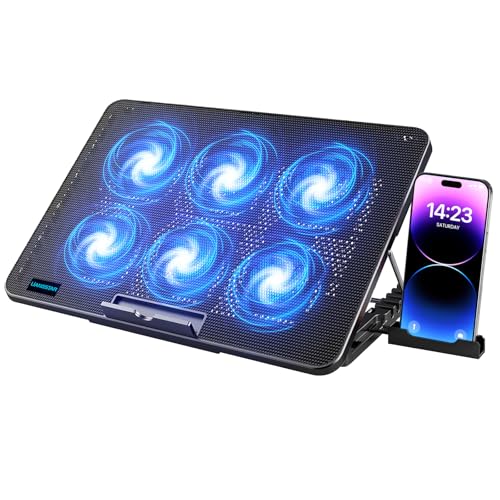
LIANGSTAR Laptop Cooling Pad, Laptop Cooler with 6 Quiet Fans for 12-17 Inch Notebook Gaming

Our verdict: Six fans with independent zone control, a metal mesh top and a phone holder, under $25.

The LIANGSTAR pad has six fans with independent zone control, seven height settings, a diamond-groove metal mesh surface, two USB ports and a phone holder. It fits 12 to 17 inch notebooks and sits in the under $25 bracket.

It ranks fifth because independent zone control is rare at this price and lets you spin up only the fans under the hot part of the laptop. That saves noise and gives it more flexibility than a single-knob budget pad. The metal mesh top helps heat spread and resists the sag that thin plastic tops develop. The compromise is fan power: it will not match a turbo blower under heavy load.

Buy it if you want adjustable airflow at the lowest price bracket. Skip it if your laptop runs very hot and needs serious pressure.

Fans
6 with zone control
Surface
Diamond-groove metal mesh
Height
7 settings
Fits
12 to 17 inch laptops

What we like

  • +Independent fan zone control
  • +Metal mesh surface
  • +Phone holder and two USB ports
  • +Lowest price bracket

Watch out for

  • −Modest airflow under heavy load
  • −Plastic frame feels basic

Buy it if: Budget gamers who want to steer airflow to hot spots.

Skip it if: Your laptop throttles badly and needs strong pressure.

6

Best Simple Budget Pad

Kootek Laptop Cooling Pad Cooler Stand with 5 Quiet Fans for 12 to 17 Inch Laptops

Our verdict: Five fans with staged 1, 4 or 5 fan control and a dual USB hub for thin gaming laptops.

The Kootek offers five fans that you can run as one, four or all five, six height settings, a dual USB hub and blue LED fan indicators. It fits 12 to 17 inch laptops and costs under $25.

Last place goes to the Kootek because staged fan count is cruder than independent zone control, and the design does not seal around your intake. It still deserves a place because a simple, dependable fan array under a thin laptop is enough for light gaming and long video calls. The USB hub passes through a useful port, which is a small convenience when your laptop has few.

Buy it if you have a thin gaming laptop and a tight budget. Skip it if you play demanding games for hours, where a sealed or higher pressure pad does more.

Fans
5, staged 1, 4 or 5 fan control
Height
6 settings
Ports
Dual USB hub
Fits
12 to 17 inch laptops

What we like

  • +Simple staged fan control
  • +Dual USB hub
  • +Six height settings
  • +Budget-friendly price

Watch out for

  • −Cruder fan control
  • −Not suited to heavy gaming loads

Buy it if: Owners of thin gaming laptops with moderate heat.

Skip it if: You run demanding games for hours at a time.

Methodology

How We Ranked These

Airflow design

We compared blower, large single fan and multi-fan layouts for how well each can push air into the laptop intake.

Laptop size fit

Supported screen sizes, from 12 to 19.3 inches, were checked against the listing so buyers know which pads match which laptops.

Noise

Stated noise figures and fan speed ranges were weighed, with credit for stepless control and automatic profiles.

Adjustability and ergonomics

Height settings, tilt, USB pass-through and surface material were scored for how they suit a desk.

Value by bracket

Each pad was judged within the under $25, $25 to $50, $50 to $100 and $100 to $200 brackets it occupies.

Every Primea Score uses the same weights: Performance 30% · Build & Materials 20% · Everyday Usability 20% · Value 20% · Owner Satisfaction 10%. Full scoring rules

Buyer's guide

How to Pick the Right One for You

By Laptop Size

Size is the first filter, because the wrong pad simply will not fit.

Laptop screenOur pick
12 to 15.6 inchTECKNET Laptop Cooling Pad with Phone Stand, Laptop Cooler for 12-15.6 Inch
15.6 to 17 inchllano V12 Gaming Laptop Cooling Pad Laptop Cooler Laptop Cooling Fan Stand
17 to 19.3 inchChillCore Laptop Cooling Pad, RGB Lights Laptop Cooler 9 Fans for 15.6-19.3 Inch Laptops
14 to 18 inch, Razer ecosystemRazer Laptop Cooling Pad Adaptive Smart, Intelligent Fan Control

By Budget

SpendOur pick
Under $25LIANGSTAR Laptop Cooling Pad, Laptop Cooler with 6 Quiet Fans for 12-17 Inch Notebook Gaming
Under $25 (simplest)Kootek Laptop Cooling Pad Cooler Stand with 5 Quiet Fans for 12 to 17 Inch Laptops
$25 to $50ChillCore Laptop Cooling Pad, RGB Lights Laptop Cooler 9 Fans for 15.6-19.3 Inch Laptops
$50 to $100llano V12 Gaming Laptop Cooling Pad Laptop Cooler Laptop Cooling Fan Stand

Turbo Blower vs Multi-Fan Array

Turbo blower

One large fan with sealed foam builds pressure and targets the intake directly, at the cost of more noise. Pick: llano V12.

Multi-fan array

Several smaller fans cover a larger area with less noise and finer control, but less pressure. Picks: ChillCore, TECKNET, LIANGSTAR and Kootek.

Default to the turbo blower if your laptop throttles under load.

By Noise Preference

PriorityOur pick
Quietest stated figureTECKNET Laptop Cooling Pad with Phone Stand, Laptop Cooler for 12-15.6 Inch
Automatic balanceRazer Laptop Cooling Pad Adaptive Smart, Intelligent Fan Control
Choose which fans spinLIANGSTAR Laptop Cooling Pad, Laptop Cooler with 6 Quiet Fans for 12-17 Inch Notebook Gaming
Maximum cooling, noise acceptablellano V12 Gaming Laptop Cooling Pad Laptop Cooler Laptop Cooling Fan Stand

For Long Gaming Sessions Specifically

Look for

A sealed airflow path, a fan placed under your intake vents, and a way to adjust speed so you are not deafened during menus.

In this ranking

The llano V12 for pure thermal intent, the Razer Adaptive Smart for automatic control, and the ChillCore for 17 to 19 inch laptops.

When to Spend More

Spend more if

Your laptop throttles in long sessions or you want automatic fan control. The llano V12 and the Razer Adaptive Smart earn the extra spend.

Save if

You play lighter games or mostly browse. The Kootek or LIANGSTAR keeps your laptop cooler for under $25.

Questions

Frequently Asked Questions

Will a cooling pad work with any gaming laptop?+

Mostly yes, as long as the size range matches and your laptop has bottom intake vents. Laptops with mostly rear or side intakes benefit less, so check where your vents sit before buying.

What is the biggest mistake with cooling pads?+

Expecting a pad to cure thermal throttling from dust or old thermal paste. Clean the vents first and check power settings, then use the pad to add airflow on top.

Is the Razer pad worth it over the llano V12?+

It is if you value automatic fan speed and Synapse control more than raw pressure. The llano V12 is the better pure cooler, and the Razer is the smarter and quieter day-to-day companion.

How hard is setup?+

Place the laptop on the pad, connect USB or the external adapter, and set the fan speed. Magnetic frames on the Razer need a quick fit for your laptop size.

How do I maintain a cooling pad?+

Clean dust from the fan grille with a soft brush or compressed air every few months. Models with a removable dust filter, like the llano V12, make this easier.

Does a cooling pad make my laptop last longer?+

Lower temperatures reduce thermal stress on components, which can help over years, but the effect is hard to quantify. Think of it as comfort and performance consistency rather than a guarantee.

Final take

For heavy gaming and rendering, the llano V12 is the best gaming laptop cooling pad here, with a sealed turbo fan and a documented thermal claim. The Razer Adaptive Smart is the pad to buy if you want it to manage itself, and the ChillCore fits the biggest laptops. If budget is tight, the LIANGSTAR gives you real zone control for under $25. Match the size first and the fan design second, and your laptop will run cooler.

More Ranked & Reviewed Guides