

Primea ReviewsAll Reviews

Primea Reviews is reader-supported. When you buy through our Amazon links we may earn a commission, at no extra cost to you. Rankings are set by our editors and never sold. Learn more

Ranked & Reviewed by Primea Reviews

The 5 Best Focusrite Audio Interfaces of 2026, Ranked & Reviewed

By the Primea Editorial TeamUpdated November 4, 202610 min read5 products ranked
The 5 Best Focusrite Audio Interfaces of 2026, Ranked & Reviewed

The short answer

The Scarlett 2i2 4th Gen is our top pick for most home studios: two inputs, two outputs and the fourth-generation preamps. The 4i4 suits musicians who want extra routing, the Solo 4th Gen is the lean choice for one voice or one guitar, and the 16i16 is for producers who record a full band. The 3rd Gen Solo is the budget fallback.

The Primea Scoreboard

Ranked & Reviewed

  1. Two inputs, two outputs and 4th-generation preamps for the typical home studio.

    94Outstanding
    Check price
  2. Four inputs and four outputs, pitched as the music maker's studio hub.

    91Excellent
    Check price
  3. The songwriter's interface: one mic or instrument at a time, in the newest generation.

    89Excellent
    Check price
  4. Sixteen inputs and outputs for producers who capture everything at once.

    87Excellent
    Check price
  5. The previous-generation Solo, still pitched for guitar and vocal takes.

    84Very Good
    Check price

The Scarlett naming scheme is the whole buying guide, if you read it. The first number is how many inputs the box accepts, the second is how many outputs it sends, so a 2i2 handles two sources in and two channels out. Most buyers overpay for inputs they never plug into, or underbuy and discover they cannot record a guitar and a vocal at once.

We ranked five Focusrite Scarlett interfaces by fit: how many inputs your session really needs, which generation you are getting, and what the listing commits to. These product pages are short on numbers, so we lean on the model names and the few specs stated, and we flag where a figure should be checked before ordering.

Before you buy

What Actually Matters

01

Input count

The first number in a name like 2i2 is the number of inputs. It sets how many sources you can record at once. A vocalist needs one, a duet needs two, a drum kit needs several. Match it to your busiest session rather than your typical one, and leave room for a second mic.

02

Output count

The second number is outputs, which feed monitors, headphones and outboard gear. Two outputs cover a pair of speakers. Four, as on the 4i4, let you send a separate headphone mix or route to hardware. Check the output count if you plan to use reamp boxes, extra monitors or a talkback setup.

03

Preamps and Hi-Z

A preamp raises a microphone's weak signal to a usable level, and a Hi-Z input is built for instruments like guitar. The 2i2 listing cites 4th-generation mic preamps and Hi-Z inputs. Check how many inputs offer mic preamps, because not every input on a larger box does, and confirm the Hi-Z input is a separate connection if you plan to plug in a guitar or bass directly.

04

Dynamic range and conversion

Dynamic range is the span between the noise floor and the loudest clean signal, and conversion rate sets sampling detail. The 2i2 cites 120dB, the Solo 4th Gen 24-bit/192kHz. These are good figures on paper. Check what the listing actually states, and ignore marketing like audio quality beyond its class, which no listing backs with a measurement. For speech and demos, any of these converters is more than enough.

05

Generation and software

Newer generations bring updated electronics and software tools. The 4th Gen line replaces the 3rd Gen Solo, which is why the older unit sits at the bottom. Look for generation in the product name, confirm you are comparing like with like, and check that your operating system and recording software are supported by the current driver before you order.

In-depth reviews

Our Ranked Picks, Reviewed

1

Best Overall

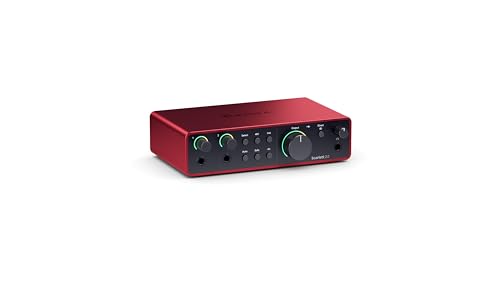
Focusrite Scarlett 2i2 4th Gen USB-C Audio Interface

Our verdict: Two inputs, two outputs and 4th-generation preamps for the typical home studio.

The 2i2 4th Gen is Focusrite's artist interface: two inputs and two outputs over USB-C. A related listing for the same model cites 4th-generation mic preamps, Hi-Z instrument and line inputs, and a 120dB dynamic range.

It wins because two inputs cover the most common home session, a vocal plus a guitar or a stereo pair, without the cost of channels you leave empty. It beats the Solo 4th Gen by letting you record two sources at once, and it undercuts the 4i4 on price.

Buy it for singer-songwriters, podcasters with a guest and anyone building a first studio. Four inputs are out of reach, so a drum kit with several mics needs the 4i4 or larger.

I/O
2 in, 2 out
Connection
USB-C
Dynamic range
120dB (related listing)
Price band
$200 to $500

What we like

  • +Two inputs for duets
  • +4th-gen mic preamps
  • +Hi-Z instrument input
  • +USB-C connection

Watch out for

  • −Only two inputs
  • −Costs more than the Solo

Buy it if: Home studios recording a voice plus an instrument.

Skip it if: You need to record drums or several mics at once.

2

Best for More Routing

Focusrite Scarlett 4i4 4th Gen USB-C Audio Interface

Our verdict: Four inputs and four outputs, pitched as the music maker's studio hub.

The 4i4 4th Gen offers four inputs and four outputs over USB-C. Its listing calls it the music maker's studio hub, ready for all your gear.

It ranks second because the extra pair of inputs and outputs matters for people with hardware synths, a drum machine or separate monitor and headphone mixes. Against the 2i2 it asks for a similar price band, so the question is whether you will use the channels.

Buy it if your studio includes outboard gear that needs its own feed. The listing gives no mic-preamp count, so check how many of the four inputs have a mic preamp before assuming four microphones at once.

I/O
4 in, 4 out
Connection
USB-C
Generation
4th Gen
Price band
$200 to $500

What we like

  • +Four inputs and four outputs
  • +Room for hardware synths
  • +4th-gen platform
  • +Same price band as the 2i2

Watch out for

  • −Mic-preamp count not stated
  • −Overkill for solo recording

Buy it if: Musicians with synths, drum machines or outboard gear.

Skip it if: You record one voice or one guitar at a time.

3

Best for One Voice

Focusrite Scarlett Solo 4th Gen USB-C Audio Interface

Our verdict: The songwriter's interface: one mic or instrument at a time, in the newest generation.

The Solo 4th Gen is aimed at songwriters and lists studio-quality sound. A related Solo listing cites 24-bit/192kHz A/D conversion over USB 2.0.

It ranks third because the Solo is built around a single performer, which suits a solo vocalist, streamer or guitarist but not a duet or an interview. In exchange it is the cheapest 4th-generation unit, in the $100 to $200 band, and it improves on the 3rd Gen Solo with newer electronics.

Buy it for voice-overs, streaming or songwriting alone at a desk. If you suspect you will want a second performer on the recording within a year, step up to the 2i2 instead of outgrowing the Solo and paying twice.

Design
Single-performer Solo
Conversion
24-bit/192kHz (related listing)
Connection
USB-C
Price band
$100 to $200

What we like

  • +Cheapest 4th-gen option
  • +24-bit/192kHz conversion
  • +Small footprint
  • +Simple to learn

Watch out for

  • −Built for one performer
  • −No room to grow

Buy it if: Solo vocalists, streamers and guitarists.

Skip it if: You will record duets, interviews or stereo sources.

4

Best for Full Bands

Focusrite Scarlett 16i16 4th Gen USB-C Audio Interface

Our verdict: Sixteen inputs and outputs for producers who capture everything at once.

The 16i16 4th Gen is the producer's interface, with sixteen inputs and sixteen outputs over USB-C. The listing says to capture everything and claims audio quality beyond its class.

It ranks fourth because few home studios use sixteen channels, so most of the cost goes unused. It is the only unit here that can record a full band in one pass, and the only one that makes sense with a rack of outboard processors.

Buy it for a project studio, a rehearsal space or live multitrack recording. The audio quality claim is marketing without a measurement, and a bigger box means a bigger desk footprint.

I/O
16 in, 16 out
Connection
USB-C
Generation
4th Gen
Price band
$200 to $500

What we like

  • +Sixteen inputs and outputs
  • +Records a full band
  • +Room for outboard gear
  • +4th-gen platform

Watch out for

  • −Excess for most home studios
  • −Larger desk footprint

Buy it if: Project studios and band recording.

Skip it if: You track one or two sources at a time.

5

Best Budget Fallback

Focusrite Scarlett Solo 3rd Gen USB-C Audio Interface

Our verdict: The previous-generation Solo, still pitched for guitar and vocal takes.

The 3rd Gen Solo is Focusrite's previous single-input interface, described as having pro performance with great preamps for the perfect guitar and vocal take.

It ranks last because the 4th Gen Solo sits in the same $100 to $200 band with newer electronics, so there is little reason to buy the older unit unless it is on clearance. It remains a capable recorder for a single performer, and the pitch around great preamps is a fair summary of why the line sold so well.

Buy it only if the price is clearly lower than the 4th Gen Solo, because paying the same for older electronics makes no sense. Compare the two listings carefully, since model names that differ by a single word are easy to confuse at checkout.

Design
Single-performer Solo
Connection
USB-C
Generation
3rd Gen
Price band
$100 to $200

What we like

  • +Proven single-input design
  • +Guitar and vocal ready
  • +Compact body
  • +USB-C connection

Watch out for

  • −Older generation
  • −Same band as the 4th Gen

Buy it if: Bargain hunters finding a Solo at a clear discount.

Skip it if: The 4th Gen Solo costs about the same.

Methodology

How We Ranked These

Input and output count

The two numbers in each model name decide what you can record at once, so we scored fit to common home-studio sessions.

Generation

4th Gen units carry newer preamps and electronics than the 3rd Gen Solo, which counted in their favor.

Stated audio specs

We used the few figures the listings give, such as 120dB dynamic range and 24-bit/192kHz conversion, and avoided guessing the rest.

Connection and footprint

USB-C connection and desk size shape day-to-day use, from a laptop on a couch to a studio desk.

Value per channel

We compared price band to the inputs you are likely to use, since unused channels are wasted money.

Every Primea Score uses the same weights: Performance 30% · Build & Materials 20% · Everyday Usability 20% · Value 20% · Owner Satisfaction 10%. Full scoring rules

Buyer's guide

How to Pick the Right One for You

By Number of Inputs

Decide your busiest session before you decide your budget.

SessionOur pick
One voice or guitarFocusrite Scarlett Solo 4th Gen
Voice plus instrument, or a duetFocusrite Scarlett 2i2 4th Gen
Mics plus synths and drum machineFocusrite Scarlett 4i4 4th Gen
Full band or multiple micsFocusrite Scarlett 16i16 4th Gen
Bargain single inputFocusrite Scarlett Solo 3rd Gen

By Budget

SpendOur pick
$100 to $200, newestFocusrite Scarlett Solo 4th Gen
$100 to $200, discount hunterFocusrite Scarlett Solo 3rd Gen
$200 to $500, most buyersFocusrite Scarlett 2i2 4th Gen
$200 to $500, more routingFocusrite Scarlett 4i4 4th Gen
$200 to $500, full bandFocusrite Scarlett 16i16 4th Gen

Small Box vs Studio Hub

Small box

The Solo and 2i2 are the compact models with USB-C connections, easy to carry and use on a laptop desk.

Studio hub

The 4i4 and 16i16 add inputs and outputs for hardware and band recording, and need more desk space.

Most home studios do best with the 2i2 and a plan to upgrade only if sessions grow.

By Generation

GenerationOur pick
4th Gen, two inputsFocusrite Scarlett 2i2 4th Gen
4th Gen, one inputFocusrite Scarlett Solo 4th Gen
4th Gen, four inputsFocusrite Scarlett 4i4 4th Gen
3rd Gen, one inputFocusrite Scarlett Solo 3rd Gen

For Podcasts and Streaming Specifically

Look for

One or two clean mic inputs, direct monitoring, and a simple USB connection that works with your recording software.

In this ranking

The 2i2 handles a host and guest, and the Solo 4th Gen is the lean choice for one voice.

When to Spend More

Spend more if

You track several sources at once or use hardware, which makes the 4i4 or 16i16 worth the premium.

Save if

You record yourself alone. The Solo 4th Gen costs less and does the whole job.

Questions

Frequently Asked Questions

Do these Focusrite interfaces work with a laptop over USB-C?+

Yes, each model here lists USB-C. The Solo 4th Gen and 2i2 are small enough for laptop desks. Check your operating system's compatibility on the maker's page and bring a USB-C cable that supports data.

What is the most common mistake buyers make?+

Buying more inputs than they use. A 16i16 is overkill for a podcaster, and a Solo limits a duet. Count the sources in your busiest session, then choose the 2i2 unless you need more.

Is the 2i2 worth it over the Solo 4th Gen?+

If you ever record two sources at once, yes. The 2i2 adds a second input and output pair for a modest step up in the price band. If you only record yourself, the Solo is enough.

How do I set up an audio interface?+

Install the maker's driver if your system needs one, connect over USB-C, then select the interface as input and output in your recording software. Plug a mic or instrument into the right input and set gain with the lights as a guide.

Do I need phantom power?+

Condenser microphones need 48V phantom power, which the interface supplies when enabled. Dynamic mics do not. Check each model's page for the phantom power switch, and turn it off before connecting ribbon mics, which can be damaged.

Can I use one for gaming or streaming audio?+

Yes. The Solo 4th Gen or 2i2 can feed a mic to your PC and send audio to headphones. Set the interface as the default device, and use direct monitoring to hear yourself without delay.

Final take

The Scarlett 2i2 4th Gen is the Focusrite interface most home studios should buy: two inputs, two outputs and the newest preamps. Take the Solo 4th Gen for one-voice work and the 4i4 for synth-heavy setups. The 16i16 is for bands and project studios, and the 3rd Gen Solo only makes sense at a clear discount. Check the live listing for input details before ordering.

More Ranked & Reviewed Guides