

Primea ReviewsAll Reviews

Primea Reviews is reader-supported. When you buy through our Amazon links we may earn a commission, at no extra cost to you. Rankings are set by our editors and never sold. Learn more

Ranked & Reviewed by Primea Reviews

The 7 Best Audio Interfaces for Microphones of 2026, Ranked & Reviewed

By the Primea Editorial TeamUpdated November 4, 202610 min read7 products ranked
The 7 Best Audio Interfaces for Microphones of 2026, Ranked & Reviewed

The short answer

The Focusrite Scarlett 2i2 4th Gen is our top pick for people who record two sources or want room to grow. The Scarlett Solo 4th Gen is the best choice for a single vocal or podcast mic. The M-Audio M-Track Duo is the strong mid-price pick for two inputs, and the BOMGE mini is the cheap way to get 48V phantom power.

The Primea Scoreboard

Ranked & Reviewed

  1. The artist's interface in Focusrite's fourth generation, with room for two sources over USB-C.

    94Outstanding
    Check price
  2. The songwriter's interface, built around one voice or instrument with studio-quality sound.

    91Excellent
    Check price
  3. 03
    M-AUDIO M-Track Duo USB Audio Interface

    A portable two-input box for podcast, record and live stream at a mid-range tier.

    89Excellent
    Check price
  4. 04
    PIYONE Audio Interface

    Best High Sample Rate Claim

    PIYONE Audio Interface

    Plug-and-play USB-C with 24-bit and 192kHz fidelity and an illuminated control.

    87Excellent
    Check price
  5. The older Solo, with pro-grade preamps for guitar and vocal takes.

    85Excellent
    Check price
  6. A portable single-channel starter for podcast, record and stream use.

    83Very Good
    Check price
  7. A tiny 2 in 2 out box that states 48V phantom power for under $50.

    81Very Good
    Check price

The cheapest mistake in home recording is buying a condenser microphone and an interface that cannot power it. Condensers need 48V phantom power sent down the XLR cable, and an interface that lacks it leaves the mic silent. Dynamic mics, the kind used for podcasts and streaming, do not need it, but they do need clean gain, which cheap preamps often lack.

We ranked seven USB interfaces by what a microphone user actually needs: how many inputs you get, whether phantom power is stated, the sample rate, monitoring options and the price tier. Specifications on these listings are short, so we only credit details they print, such as 2 in 2 out, 48V and 24-bit 192kHz. Marketing phrases like studio quality earned nothing on their own.

Before you buy

What Actually Matters

01

Phantom power

Phantom power is 48 volts sent through an XLR cable to energize a condenser microphone. Dynamic microphones ignore it, but condensers are silent without it. Check that the listing states 48V, and confirm the switch is on the interface before you plug in a mic that needs it.

02

Number of inputs

An interface with two inputs lets you record a guest, a stereo source or a vocal plus a guitar. One input is cheaper but caps growth. Count the sources you will use at once, and add one for next year, since replacing an interface costs more than buying two inputs now.

03

Sample rate and bit depth

24-bit depth gives headroom to record quietly without noise. Sample rates of 44.1 or 48kHz suit voice, and 96 or 192kHz mostly help when processing audio heavily. A 192kHz claim is not a quality guarantee, so look at the preamps and whether drivers support your computer instead.

04

Preamp quality

A preamp raises a quiet microphone to a usable level, and a noisy one adds hiss when you turn gain up. Dynamic mics need more gain than condensers. Look for preamps described by name or gain range, and read owner feedback on noise at high gain.

05

Connection and drivers

USB-C is common now, but the real test is driver stability on your operating system. Established brands tend to update drivers, while no-name boxes may stall. Check that the listing names your OS, and keep the manufacturer's download page handy before buying.

In-depth reviews

Our Ranked Picks, Reviewed

1

Best Overall

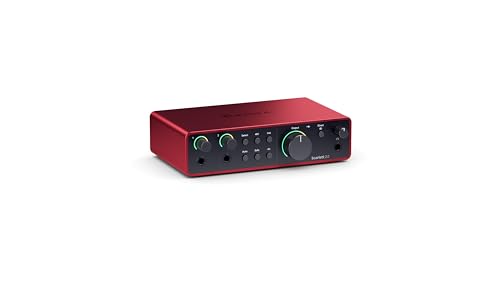
Focusrite Scarlett 2i2 4th Gen USB-C Audio Interface

Our verdict: The artist's interface in Focusrite's fourth generation, with room for two sources over USB-C.

The 2i2 name tells you the layout: two inputs and two outputs, connected over USB-C. Focusrite's listing calls it the artist's interface, which is a way of saying it handles a vocalist plus a guitar, or two microphones for an interview.

It ranks first because two inputs future-proof the purchase. The Solo 4th Gen costs less but caps you at one source, and the M-Track Duo matches the input count at a lower tier without Focusrite's brand weight on drivers and support. The cost is the $200 to $500 bucket, the highest here.

Best for a podcast pair, a singer-guitarist or a creator who will add a second mic. The caveat is price: if you will only ever record one voice, the Solo covers it for less.

I/O
2 in, 2 out
Connection
USB-C
Generation
4th Gen
Price bucket
$200 to $500

What we like

  • +Two input channels
  • +USB-C connection
  • +Trusted brand and drivers
  • +Room to add a second mic

Watch out for

  • −Highest price tier here
  • −Overkill for one voice

Buy it if: Podcast pairs, singer-guitarists and growing home studios.

Skip it if: You only record a single microphone.

2

Best for One Microphone

Focusrite Scarlett Solo 4th Gen USB-C Audio Interface

Our verdict: The songwriter's interface, built around one voice or instrument with studio-quality sound.

Focusrite pitches the Solo 4th Gen as the songwriter's interface, a compact USB-C box for recording one voice and perhaps a guitar. The fourth generation updates the third with newer drivers and a refreshed front panel. Expect a price bucket of $100 to $200.

It ranks second because the 2i2 gives you a second input for a higher tier, and because for solo creators the Solo does everything needed. It beats the 3rd Gen on current USB-C support and ongoing driver attention, though the older unit often costs less.

The right choice for a streamer, voiceover artist or songwriter with one mic. The caveat is the ceiling: add a second guest or instrument later and you will outgrow it.

Use
Songwriter, single source
Connection
USB-C
Generation
4th Gen
Price bucket
$100 to $200

What we like

  • +Compact USB-C design
  • +Built for vocal recording
  • +Current generation drivers
  • +Cheaper than the 2i2

Watch out for

  • −One-source ceiling
  • −Costs more than budget rivals

Buy it if: Solo streamers, voiceover artists and songwriters.

Skip it if: You will record two people at once.

3

Best Mid-Price Two Input

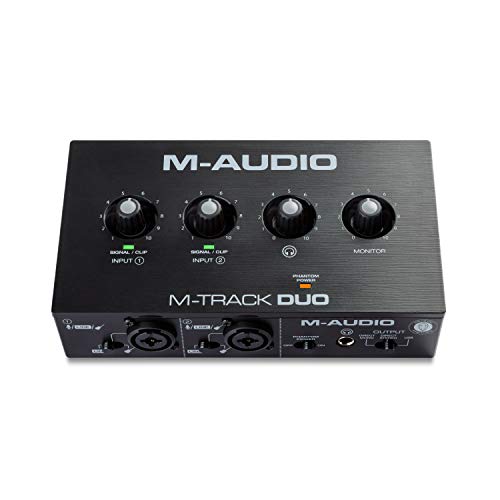
M-AUDIO M-Track Duo USB Audio Interface

Our verdict: A portable two-input box for podcast, record and live stream at a mid-range tier.

The M-Track Duo is a portable interface pitched for podcasting, recording and live streaming, handling guitar, vocals or line-level signals. The Duo suffix indicates two channels, which lets it cover a guest or a stereo source.

It ranks third because it matches the 2i2's input count for a much lower tier, in the $50 to $100 bucket, but trades Focusrite's reputation for driver stability. It beats the M-Track Solo on sheer input count, and the BOMGE on brand support.

Good for a two-person podcast on a budget. The caveat is the listing's generic copy, so confirm phantom power and sample rate on the product page if you use a condenser.

Channels
Duo, two inputs
Sources
Guitar, vocals, line
Use
Podcast and live stream
Price bucket
$50 to $100

What we like

  • +Two-input layout
  • +Portable body
  • +Handles guitar and line input
  • +Mid-range price tier

Watch out for

  • −Phantom power not in summary
  • −Less polished software support

Buy it if: Two-person podcasts on a modest budget.

Skip it if: You want brand-leading drivers and support.

4

Best High Sample Rate Claim

PIYONE Audio Interface

Our verdict: Plug-and-play USB-C with 24-bit and 192kHz fidelity and an illuminated control.

PIYONE's interface is a plug-and-play USB-C box with a stated 24-bit, 192kHz conversion and an illuminated control. The numbers describe bit depth and sample rate, the detail with which the converter captures your voice.

It ranks fourth because 192kHz is more than a spoken-word microphone needs; most podcasts and streams use 44.1 or 48kHz. The headline spec therefore adds marketing value more than audible gain, and the brand lacks the long driver history of Focusrite and M-Audio.

A reasonable pick for a first home setup in the $50 to $100 bucket. The caveat is support: lesser-known brands can leave you hunting for drivers and firmware if something misbehaves.

Resolution
24-bit / 192kHz
Connection
USB-C plug and play
Control
Illuminated
Price bucket
$50 to $100

What we like

  • +24-bit 192kHz stated
  • +Plug-and-play USB-C
  • +Illuminated control
  • +Mid-low price tier

Watch out for

  • −Little brand track record
  • −192kHz rarely needed for voice

Buy it if: First-time recorders who want a stated spec sheet.

Skip it if: You value long-term driver support.

5

Best Previous-Generation Value

Focusrite Scarlett Solo 3rd Gen USB-C Audio Interface

Our verdict: The older Solo, with pro-grade preamps for guitar and vocal takes.

The 3rd Gen Solo is the earlier version of Focusrite's single-source interface, and its listing credits great preamps for guitar and vocal takes. The preamp is the circuit that boosts a quiet microphone signal, so its quality sets your noise floor.

It ranks fifth because the 4th Gen Solo carries the same role with current drivers, while this model can be cheaper but is older. It still outranks the less established brands because Focusrite's preamps and software are a known quantity.

Sensible if you find it discounted. The caveat is shelf life: older generations eventually receive fewer driver updates, so compare the price gap with the 4th Gen before buying.

Role
Single-source interface
Connection
USB-C
Generation
3rd Gen
Price bucket
$100 to $200

What we like

  • +Well-regarded preamps
  • +Compact single-source design
  • +Focusrite software ecosystem
  • +Often cheaper than new

Watch out for

  • −Older than the 4th Gen
  • −Single input only

Buy it if: Bargain hunters recording one vocal at a time.

Skip it if: You want the newest driver support.

6

Best Simple Starter

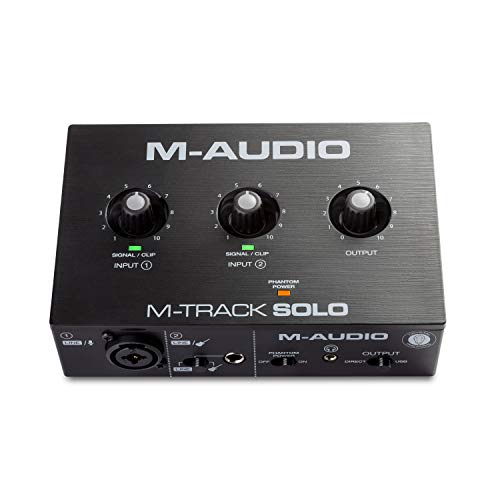
M-AUDIO M-Track Solo USB Audio Interface

Our verdict: A portable single-channel starter for podcast, record and stream use.

The M-Track Solo shares the Duo's pitch of portable podcast, record and live stream use, with guitar, vocals or line-level input. As the Solo, it targets a single source.

It ranks sixth because it overlaps with the Scarlett Solo while offering less brand support, and because the Duo adds a second input for the same bucket of $50 to $100. It is a fine budget starter, but it is rarely the best use of that money.

Pick it if you want the smallest possible box for one voice. The caveat is that with a spec summary this short you should confirm phantom power before pairing it with a condenser mic.

Channels
Solo, single source
Sources
Guitar, vocals, line
Use
Podcast and live stream
Price bucket
$50 to $100

What we like

  • +Small portable body
  • +Handles vocals and guitar
  • +Budget price tier
  • +Simple setup

Watch out for

  • −Single input only
  • −Phantom power not in summary

Buy it if: Minimal setups with one dynamic mic.

Skip it if: You may need a second input soon.

7

Best Budget Phantom Power

BOMGE mini 2 Channel USB Audio Interface for Recording

Our verdict: A tiny 2 in 2 out box that states 48V phantom power for under $50.

The BOMGE mini is a 2 in, 2 out USB interface that explicitly lists 48V phantom power. That is the number a condenser microphone needs, and it is the one spec many budget listings forget to mention.

It finishes seventh because the preamps and converters are not described, and because the brand has little record. It remains valuable since it is the cheapest way here to get two inputs with stated phantom power, at $25 to $50.

A workable pick for a student or a first condenser mic. The caveat is quality: budget preamps can add hiss at low gain, so pair it with a reasonably sensitive microphone.

I/O
2 in, 2 out
Phantom power
48V
Connection
USB
Price bucket
$25 to $50

What we like

  • +48V phantom power stated
  • +Two inputs and outputs
  • +Lowest price tier here
  • +Very compact

Watch out for

  • −Preamp quality not described
  • −Little brand support history

Buy it if: Students pairing a first condenser mic on a budget.

Skip it if: You need low-noise preamps for quiet sources.

Methodology

How We Ranked These

Input count

How many microphone or instrument sources the interface handles at once, and whether that fits the buyer's use.

Phantom power

Whether 48V is stated, since condenser microphones will not work without it.

Converter specs

Stated bit depth and sample rate, weighed against what voice recording actually needs.

Brand support

Driver history, software ecosystem and the odds of long-term updates.

Value by tier

Features delivered for each price bucket from $25 to $500.

Every Primea Score uses the same weights: Performance 30% · Build & Materials 20% · Everyday Usability 20% · Value 20% · Owner Satisfaction 10%. Full scoring rules

Buyer's guide

How to Pick the Right One for You

By Number of Inputs

Count the sources you record at once.

InputsOur pick
One microphone, current genFocusrite Scarlett Solo 4th Gen
One microphone, older genFocusrite Scarlett Solo 3rd Gen
Two inputs, premiumFocusrite Scarlett 2i2 4th Gen
Two inputs, budgetM-AUDIO M-Track Duo

By Budget

SpendOur pick
$25 to $50BOMGE mini 2 Channel USB Audio Interface
$50 to $100, two inputsM-AUDIO M-Track Duo
$100 to $200Focusrite Scarlett Solo 4th Gen
$200 to $500Focusrite Scarlett 2i2 4th Gen

Dynamic vs Condenser Microphones

Dynamic mic

Needs gain, not phantom power. Any pick here works, and the Scarlett Solo is the cleanest way to feed one.

Condenser mic

Requires 48V. The BOMGE states it outright, and Focusrite models are the dependable choice for condenser work.

Confirm 48V on the product page for any interface whose summary does not state it.

By Brand Confidence

PriorityOur pick
Best driver supportFocusrite Scarlett 2i2 4th Gen
Portable and popularM-AUDIO M-Track Duo
Highest stated sample ratePIYONE Audio Interface
Cheapest phantom powerBOMGE mini 2 Channel USB Audio Interface

For Podcasting Specifically

Look for

Two inputs for a guest, clean gain for dynamic mics and stable drivers so a recording never drops mid-episode.

In this ranking

The Scarlett 2i2 is the reliable choice, and the M-Track Duo does the same job on a smaller budget.

When to Spend More

Spend more if

You record paid work or add instruments. The Scarlett 2i2 buys cleaner preamps and a platform you will not outgrow quickly.

Save if

You record one voice for streaming. The BOMGE or M-Track Solo is enough.

Questions

Frequently Asked Questions

Will a condenser mic work with these interfaces?+

Only if the interface supplies 48V phantom power. The BOMGE mini lists it directly. For the Scarlett and M-Track models, confirm the phantom switch on the product page before pairing a condenser microphone.

What mistake should I avoid when buying?+

Chasing 192kHz. The PIYONE quotes it, but voice recording works at 48kHz, and preamp quality matters more. Spend the difference on an extra input, such as the M-Track Duo, rather than a bigger number.

Is the Scarlett 2i2 worth more than the Solo?+

Only if you record two things at once. For a single voice, the Solo 4th Gen delivers the same brand and drivers for less. The 2i2 is future-proofing for guests, guitars and a second mic.

How do I set one up?+

Plug the USB cable into your computer, install the manufacturer's driver if needed, set the interface as your input in your recording software, then raise the gain until your voice peaks around two thirds. Add 48V only for condenser mics.

How should I look after an interface?+

Keep it dry and dust-free, and avoid pulling cables by the cord. Update drivers occasionally, and turn phantom power off before connecting or disconnecting a microphone, which prevents pops that can stress the preamp.

Can I use these with headphones?+

Yes, most have a headphone output for direct monitoring, which removes the delay you hear when monitoring through the computer. Check the PIYONE and BOMGE specs for a dedicated monitor knob if you record vocals.

Final take

The Focusrite Scarlett 2i2 4th Gen is the best audio interface for microphones here because two inputs and trusted drivers cover most home studios. The Scarlett Solo 4th Gen is the smarter spend for one voice, the M-Track Duo is the budget two-input answer, and the BOMGE is the cheap route to phantom power.

More Ranked & Reviewed Guides