
Primea ReviewsAll Reviews

Primea Reviews is reader-supported. When you buy through our Amazon links we may earn a commission, at no extra cost to you. Rankings are set by our editors and never sold. Learn more

Ranked & Reviewed by Primea Reviews

The 8 Best E-Ink Digital Notebooks of 2026, Ranked & Reviewed

By the Primea Editorial TeamUpdated November 1, 202611 min read8 products ranked
The 8 Best E-Ink Digital Notebooks of 2026, Ranked & Reviewed

The short answer

The reMarkable 2 with Marker Plus is the best overall: single-purpose, black and white, with weeks of battery. The reMarkable Paper Pro adds a colour panel and glare-free daylight readability. BOOX offers Android flexibility on a 10.3 inch screen, and the Kindle Scribe Colorsoft suits Kindle readers. Bundled folios and generic Android units fill the lower ranks.

The Primea Scoreboard

Ranked & Reviewed

  1. A black and white paper-like notebook with weeks of battery and a Marker Plus included.

    95Outstanding
    Check price
  2. The reMarkable concept with a color e-paper display, readable in daylight.

    93Outstanding
    Check price
  3. A 10.3 inch color e-ink tablet with 6GB RAM, 64GB storage and Android app support.

    91Excellent
    Check price
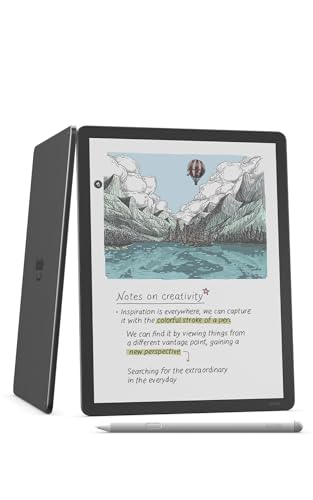
  4. An 11 inch paper-like color screen with a front light and a pen in the box.

    89Excellent
    Check price
  5. The reMarkable 2 as a ready-to-use kit with a Basalt Book Folio.

    87Excellent
    Check price
  6. The Paper Pro color notebook with Marker Plus and a folio. The most expensive here.

    85Excellent
    Check price
  7. An older 10.3 inch Android e-ink tablet with a front light and G-sensor.

    83Very Good
    Check price
  8. A lower-cost Android e-ink tablet with a stylus and case. Less polish than the name brands.

    81Very Good
    Check price

An e-ink notebook is a very particular purchase. You are paying for a screen that looks like paper, runs for weeks between charges and never interrupts you with a notification. If what you really want is a tablet that does everything, you are shopping in the wrong aisle, and the price tags here will feel steep. The category splits cleanly into focused writing devices and Android machines that happen to use e-paper.

We reviewed eight devices that sit in this niche, from black and white writing tablets to colour panels and Android units, and ranked them on the Primea framework. Writing focus, display type, what is in the box, battery claims and price tier carried the most weight. We worked from listings and spec sheets, not from long-term use.

Before you buy

What Actually Matters

01

Decide writing-only or apps

A reMarkable is a single-purpose notebook with no app store, which is the point. A BOOX or generic Android unit installs apps, which adds flexibility and distraction. Pick based on whether you want focus or a flexible reader. Check the listing for the operating system: Android means apps and notifications, while reMarkable means writing and reading only.

02

Color is a premium feature

Colour e-paper costs noticeably more than black and white. If you annotate in several colours, it earns its place. If you write and read mostly in black, a black and white panel does the same job for less money. The reMarkable Paper Pro and BOOX Note Air 5 C are colour. Check the display line before paying the premium.

03

Check what the box includes

Some bundles include a Marker Plus, some add a folio, and some only a basic stylus. Compare the bundle contents before comparing prices, because a case bought later can erase the savings. The reMarkable 2 and Paper Pro appear with and without the Basalt Book Folio. Read the title for the words folio, Marker Plus and case.

04

Expect weeks of battery

E-ink uses power only when the image changes, so standby battery life is measured in weeks. Look for the claim on the listing, and remember that heavy front light use will shorten it. The BOOX and Kindle models add a front light, so expect shorter runs if you read in bed every night.

05

Mind the screen size

A 10.3 inch or 11 inch screen fits a full page of notes. Smaller screens feel cramped for PDFs and sketches. The BOOX models are 10.3 inch and the Kindle Scribe Colorsoft is 11 inch. Check the size on the listing and make sure it matches how you plan to use the device.

In-depth reviews

Our Ranked Picks, Reviewed

1

Best Overall

reMarkable 2 with Marker Plus

Our verdict: A black and white paper-like notebook with weeks of battery and a Marker Plus included.

The reMarkable 2 with Marker Plus is the benchmark for this niche because it does one thing. It has a black and white e-paper display, ships with the Marker Plus stylus, runs for weeks per charge and has no app store to pull you away from the page. Single-purpose is the feature, not a limit.

It ranks first because the colour models cost far more for a benefit that only matters if you annotate in colour. The Paper Pro below it is $500 plus, while this one sits in the $200 to $500 bracket. Against the BOOX Note Air 5 C, it is simpler and less distracting.

Buy it for note-taking, meeting notes and reading PDFs with minimal temptation. The caveat is that black and white only: highlight colours in a PDF all render as grey tones.

Display
Black and white e-paper
Stylus
Marker Plus included
Battery
Weeks per charge
Focus
Single-purpose writing

What we like

  • +Weeks of battery life
  • +Glare-free, paper-like display
  • +Marker Plus included
  • +Clean, focused interface

Watch out for

  • −Black and white only
  • −No app store

Buy it if: Writers and students who want a distraction-free notebook.

Skip it if: You want color or Android apps.

2

Best Color Notebook

reMarkable Paper Pro with Marker Plus

Our verdict: The reMarkable concept with a color e-paper display, readable in daylight.

The reMarkable Paper Pro is the colour version of the same idea. It uses a colour e-paper display that stays glare-free in daylight, and the Marker Plus stylus is included. The folio is not. It sits in the $500 plus bracket.

It ranks second because colour is a real step up for colour-coded notes and highlighted PDFs, but it costs more than the reMarkable 2 for the same core writing feel. The BOOX 10.3 inch below offers colour and Android apps at a similar tier. The Paper Pro keeps the focus, which is why it sits above the BOOX.

Choose it if you work in colour, such as designers, students with highlighters or planners. The caveat is that price: without colour needs, the reMarkable 2 does the job for less.

Display
Color e-paper
Stylus
Marker Plus included
Daylight
Glare-free
Folio
Not included

What we like

  • +Color e-paper display
  • +Marker Plus included
  • +Readable in daylight
  • +Long e-ink battery life

Watch out for

  • −Costs far more than the reMarkable 2
  • −No folio in this bundle

Buy it if: People who annotate in color.

Skip it if: Black and white is fine for you.

3

Best Android Color Notebook

BOOX Tablet 10.3in Note Air 5 C, 6G 64G E Ink Tablet Color ePaper Notebook

Our verdict: A 10.3 inch color e-ink tablet with 6GB RAM, 64GB storage and Android app support.

The BOOX Note Air 5 C is the Android option with a colour panel. It has a 10.3 inch colour ePaper display, 6GB RAM and 64GB of storage, and runs Android with weeks of standby battery. The Android system lets it install reading and note apps beyond the built-in tools.

It ranks third because flexibility cuts against the main reason to buy e-ink: focus. An Android tablet can pull you into feeds and notifications, even on e-paper. It sits in the $500 plus bracket, the same as the Paper Pro, so you choose between focus and apps rather than price.

Buy it if you want to run Kindle, Google Drive or other apps on an e-ink screen. The caveat is discipline: apps help, and also distract.

Display
10.3 inch color ePaper
Memory
6GB RAM, 64GB storage
System
Android
Battery
Weeks of standby

What we like

  • +Color ePaper display
  • +Android app support
  • +6GB RAM, 64GB storage
  • +Long standby battery life

Watch out for

  • −Less focused than a reMarkable
  • −Android adds complexity

Buy it if: Readers who want notes plus apps on e-ink.

Skip it if: You want a pure writing device.

4

Best for Kindle Readers

Amazon Kindle Scribe Colorsoft 64GB, 11 inch paper-like color display with front light, Pen included, Graphite

Our verdict: An 11 inch paper-like color screen with a front light and a pen in the box.

The Kindle Scribe Colorsoft puts a colour, paper-like display on an 11 inch screen with a front light and a pen included, with 64GB of storage. The front light matters for reading in bed, which the reMarkable 2 does not list.

It ranks fourth because it is built around reading first and note-taking second. Kindle's library is its biggest draw, and the 11 inch panel is the largest here. It also costs $500 plus. Against the BOOX Note Air 5 C, it is more closed but easier to set up.

Buy it if you already buy Kindle books and want to write in the margins. The caveat is that the ecosystem is Amazon's, so exporting notes into other apps takes more steps.

Display
11 inch color, paper-like
Light
Front light
Storage
64GB
Pen
Included

What we like

  • +11 inch color display
  • +Front light for low light
  • +Pen included
  • +Long e-ink battery life

Watch out for

  • −Premium price
  • −Reading focus over pure writing

Buy it if: Kindle readers who also want to take notes.

Skip it if: You want a writing-first notebook.

5

Best Complete Kit

reMarkable 2 with Marker Plus and Basalt Book Folio

Our verdict: The reMarkable 2 as a ready-to-use kit with a Basalt Book Folio.

This bundle pairs the reMarkable 2 with Marker Plus and the Basalt Book Folio. It keeps the black and white e-paper display and the long standby battery, and adds a case that protects the screen in a bag.

It ranks fifth because the device is identical to the model at the top, and the folio is the only addition. The bundle price tier is not stated in our data. A folio can be bought later, so you pay for convenience. It outranks the Paper Pro bundle because it avoids the colour premium.

Buy it if you carry the device daily and want protection from day one. The caveat is the cost of the extra case. If you work at a desk, skip the folio and buy the base model.

Display
Black and white e-paper
Stylus
Marker Plus included
Case
Basalt Book Folio
Battery
Weeks of standby

What we like

  • +Folio included
  • +Weeks of battery
  • +Paper-like writing surface
  • +Marker Plus included

Watch out for

  • −Costs more than the base kit
  • −Still black and white

Buy it if: Buyers who want the case in the same box.

Skip it if: You already have a case.

6

Premium Bundle

reMarkable Paper Pro with Marker Plus and Basalt Book Folio

Our verdict: The Paper Pro color notebook with Marker Plus and a folio. The most expensive here.

The Paper Pro bundle adds the Basalt Book Folio to the colour reMarkable. It lists the glare-free colour e-paper display, the Marker Plus stylus and a screen larger than the reMarkable 2. It sits in the $500 plus bracket.

It ranks sixth because it combines the highest cost with the narrowest benefit: you pay for colour and a case. The standalone Paper Pro ranks higher because you can buy a folio later, or not at all. The bundle makes sense only if you already know you need both.

Buy it for a professional who carries the notebook everywhere and works in colour. The caveat is price. The base Paper Pro and a separate case may cost less, and the reMarkable 2 does the writing for far less.

Display
Color e-paper
Stylus
Marker Plus included
Case
Basalt Book Folio
Screen
Larger than the reMarkable 2

What we like

  • +Color e-paper display
  • +Folio and Marker Plus included
  • +Larger screen than the reMarkable 2
  • +E-ink battery efficiency

Watch out for

  • −Highest price in the guide
  • −Folio adds cost

Buy it if: Buyers who want the premium kit.

Skip it if: You do not need color or a bundled case.

7

Best Older Android Pick

BOOX Note Air 10.3 E Ink Tablet, ePaper, Android 10, Front Light, G-Sensor, Digital Paper, E Ink Notepad

Our verdict: An older 10.3 inch Android e-ink tablet with a front light and G-sensor.

The BOOX Note Air with Android 10 is the older Android unit. It uses a 10.3 inch ePaper display with a front light and a G-sensor that rotates the screen. The front light helps in dim rooms, and the sensor handles both landscape and portrait.

It ranks seventh because Android 10 is an older system, and the listing shows no colour display, unlike the Note Air 5 C. Its price tier is not stated in our data. The Note Air 5 C is the better buy for the same screen size, with more RAM and a colour panel.

Buy it if you find it discounted and want an Android notebook in black and white. The caveat is software age: Android 10 can limit app support over time.

Display
10.3 inch ePaper
System
Android 10
Light
Front light
Sensor
G-sensor rotation

What we like

  • +Android app flexibility
  • +Front light for dim rooms
  • +G-sensor auto-rotation
  • +Established product line

Watch out for

  • −Older generation
  • −No color panel

Buy it if: Android users who want e-ink on a budget.

Skip it if: You want a newer or color device.

8

Cheapest Alternative

Android E-Ink ePaper Tablet, Paperwhite eBook Reader Digital Notebook for Notes, with Stylus and Case, Cloud Sync

Our verdict: A lower-cost Android e-ink tablet with a stylus and case. Less polish than the name brands.

This generic Android e-ink tablet is the cheapest way into the category. It lists a paper-white e-paper display, a stylus and case in the box, cloud sync and screen casting. The included accessories mean no extra spend to start writing.

It ranks last because it comes without a recognised brand, support record or clear spec sheet. Compared with the reMarkable 2 or the BOOX units, you have less certainty about stylus feel, software updates and long-term service. Its price tier is not stated in our data.

Buy it as a trial, or for a casual reader who wants to try e-ink before spending more. The caveat is confidence: weigh the saving against the risk that the brand will not be around for updates.

Display
Paper-white e-paper
Included
Stylus and case
Extras
Cloud sync, screen casting
System
Android

What we like

  • +Stylus and case included
  • +Cloud sync stated on the listing
  • +Glare-free e-ink display
  • +Cheaper than premium brands

Watch out for

  • −Unproven brand
  • −Thin hardware details

Buy it if: Budget shoppers who want to try e-ink.

Skip it if: You want a well-known brand.

Methodology

How We Ranked These

Writing focus

We ranked how well each device serves handwriting and annotation, since that is the reason to buy an e-ink notebook.

Display type

Black and white and color panels were compared by what they add and what they cost.

Battery behavior

E-ink devices run for weeks between charges, so we compared what each listing promises.

What is in the box

Stylus, folio and case matter because they change the real cost of a device.

Value in the field

Each device was weighed against its price tier relative to the other seven.

Every Primea Score uses the same weights: Performance 30% · Build & Materials 20% · Everyday Usability 20% · Value 20% · Owner Satisfaction 10%. Full scoring rules

Buyer's guide

How to Pick the Right One for You

By Main Use

Be honest about what you will do with it most days.

Your main useOur pick
Handwriting and PDF notesreMarkable 2 with Marker Plus
Color annotationreMarkable Paper Pro with Marker Plus
Notes plus reading appsBOOX Tablet 10.3in Note Air 5 C, 6G 64G E Ink Tablet Color ePaper Notebook
Reading Kindle books and margin notesAmazon Kindle Scribe Colorsoft 64GB, 11 inch paper-like color display with front light, Pen included, Graphite
Trying e-ink cheaplyAndroid E-Ink ePaper Tablet, Paperwhite eBook Reader Digital Notebook for Notes, with Stylus and Case, Cloud Sync

By Budget

SpendOur pick
Lowest costAndroid E-Ink ePaper Tablet, Paperwhite eBook Reader Digital Notebook for Notes, with Stylus and Case, Cloud Sync
$400 to $500reMarkable 2 with Marker Plus
$500 to $600BOOX Tablet 10.3in Note Air 5 C, 6G 64G E Ink Tablet Color ePaper Notebook
$650 and upreMarkable Paper Pro with Marker Plus

Writing-First vs Android-First

Writing-first

Fewer features, fewer distractions, a cleaner experience. Picks: reMarkable 2, reMarkable 2 with folio, both Paper Pro bundles.

Android-first

Install your own apps but accept some complexity. Picks: BOOX Note Air 5 C, BOOX Note Air 10.3, the generic Android e-ink tablet.

Most buyers who mainly write should default to writing-first.

By Display

You wantOur pick
Black and white, lowest costreMarkable 2 with Marker Plus
Color with a folioreMarkable Paper Pro with Marker Plus and Basalt Book Folio
Color with AndroidBOOX Tablet 10.3in Note Air 5 C, 6G 64G E Ink Tablet Color ePaper Notebook
Front light for dim roomsBOOX Note Air 10.3 E Ink Tablet, ePaper, Android 10, Front Light, G-Sensor, Digital Paper, E Ink Notepad

For Students Specifically

Look for

A stylus in the box, weeks of battery and a paper-like feel that suits long note-taking sessions.

In this comparison

The reMarkable 2 with Marker Plus includes the stylus and offers a focused interface.

When to Spend More

Spend more if

You annotate in color. The reMarkable Paper Pro with Marker Plus is the color e-paper option.

Save if

Black and white is fine. The reMarkable 2 with Marker Plus costs far less and writes just as well.

Questions

Frequently Asked Questions

Is an e-ink notebook better than a tablet?+

For writing and reading with fewer distractions, yes: the reMarkable 2 shows how a focused device helps. For video, apps and colour work, a regular tablet wins, and it costs less than the colour e-ink models here.

Do I need a color e-ink display?+

Only if you annotate in colour and will use it daily. The reMarkable 2 does the writing job in black and white for less, while the Paper Pro and Kindle Scribe Colorsoft carry the colour premium.

How long does an e-ink notebook battery last?+

Listings describe weeks of standby, because e-ink only draws power when the page changes. Heavy front light use on the BOOX or Kindle shortens that, so expect shorter runs with a lit screen and charge more often if you read nightly.

Is the reMarkable Paper Pro worth it over the reMarkable 2?+

If colour matters, yes. If not, the reMarkable 2 gives the same core writing feel for less, and its $200 to $500 bracket sits well below the Paper Pro's $500 plus.

Can a BOOX replace a reMarkable?+

It can for note-taking, and it adds Android apps. It is less focused, though, so you may find distractions creep in. A reMarkable keeps the screen clear of everything but the page, which is why many writers prefer it.

Do I need the folio?+

It protects the screen, but you can buy a case later. The Basalt Book Folio bundles cost more up front, so skip them if the device stays on a desk, and spend the difference on a second stylus tip instead.

Final take

Buy the reMarkable 2 if you want a distraction-free writing tool. Step up to the Paper Pro only if you annotate in colour. Choose a BOOX when you want Android apps and can handle the distraction, and the Kindle Scribe Colorsoft if your library lives on Kindle. Compare what each bundle includes before comparing prices, because a case bought later erases the saving.

More Ranked & Reviewed Guides