
Primea ReviewsAll Reviews

Primea Reviews is reader-supported. When you buy through our Amazon links we may earn a commission, at no extra cost to you. Rankings are set by our editors and never sold. Learn more

Ranked & Reviewed by Primea Reviews

The 6 Best Drawing Tablets With Pens Under $70 of 2026, Ranked & Reviewed

By the Primea Editorial TeamUpdated November 4, 202610 min read6 products ranked
The 6 Best Drawing Tablets With Pens Under $70 of 2026, Ranked & Reviewed

The short answer

The Wacom Intuos Small is the safest first tablet: it works in all software and carries the name professionals trust. The HUION Inspiroy H640P is the better value for a 6x4 inch workspace with 8192 pen pressure levels. For more room, the UGEE M708 offers a large active area and 16384 passive stylus technology. The XOPPOX and Ugee 6.5x4 add shortcut keys at the budget end.

The Primea Scoreboard

Ranked & Reviewed

  1. 01
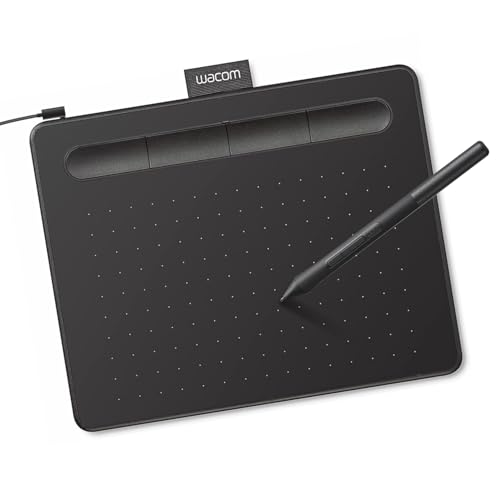
    Wacom Intuos Small

    Best Overall

    Wacom Intuos Small

    The small graphics tablet that works with all software and sets the standard.

    93Outstanding
    Check price
  2. A 6x4 inch tablet with 8192 pen pressure levels and a portable body.

    91Excellent
    Check price
  3. 03
    UGEE M708 Drawing Tablet

    Large active area and 16384 passive stylus technology for the price of a small tablet.

    89Excellent
    Check price
  4. 04
    Graphics Drawing Tablet

    Best 10x6 Workspace

    Graphics Drawing Tablet

    A 10x6 inch active area with 8192 pressure levels and universal compatibility.

    86Excellent
    Check price
  5. 05
    XOPPOX Graphics Drawing Tablet

    A battery-free pen tablet with shortcut keys and broad compatibility.

    84Very Good
    Check price
  6. A 6.5x4 inch tablet with 10 hot keys for an affordable price.

    82Very Good
    Check price

Anyone who has bought a first drawing tablet knows the awkward moment: you move the pen and the cursor moves on a screen you are not looking at. A pen tablet has no display, so the hand-eye gap is part of the product, and every model under $70 shares it. What separates them is pen pressure, workspace size and how well the driver behaves with your software.

We reviewed six tablets, all with a battery-free pen and all in the $25 to $50 range. Each was ranked on the Primea framework, with most of the weight on pen performance and pressure levels, active drawing area, and software compatibility. Because there is no screen, we also looked at how many shortcut keys each model adds to speed up sketching and photo retouching.

Before you buy

What Actually Matters

01

Pressure levels and pen type

Pressure levels describe how many steps of pen force the tablet can detect, from 8192 upward on this list. More levels give smoother thick-to-thin strokes. A battery-free passive pen never needs charging. Look for the pressure figure and a battery-free pen on the listing, and expect sketching to feel natural either way.

02

Active area size

The active area is the part of the tablet that responds to the pen, and it maps to your whole screen. A small 6x4 inch area is portable and needs little arm movement. A 10x6 inch area suits larger strokes. Measure your desk space, and pick the bigger area only if you sketch with your whole arm.

03

Shortcut keys

Express keys let you assign undo, brush size, zoom or eraser to a button, so your free hand never leaves the tablet. The XOPPOX lists shortcut keys, and the Ugee 6.5x4 has 10 hot keys. If you work in photo editing or digital painting, those keys save hundreds of keystrokes a session.

04

Software and operating system support

Most tablets work with Windows and Mac, and some with Chromebook and Android. Check that your drawing app is supported and that a driver exists for your operating system. Wacom states it works with all software, while the UGEE lists multiple systems. Download the driver from the maker, not the listing disc.

05

Learning the hand-eye gap

A pen tablet without a screen takes a few days to learn, because you look at the monitor while your hand moves on the tablet. Expect wobbly lines at first. Start with simple lines and circles, and use a smaller active area if your strokes feel unsteady.

In-depth reviews

Our Ranked Picks, Reviewed

1

Best Overall

Wacom Intuos Small

Our verdict: The small graphics tablet that works with all software and sets the standard.

The Wacom Intuos Small is a compact graphics drawing tablet that works with all software, and the listing calls it what the professionals use. It falls in the $25 to $50 range.

It leads because driver support is the thing cheap tablets fumble, and Wacom's is the benchmark. Against the HUION H640P, you get the same 6x4-class footprint, but with brand backing for longer-term driver updates. The UGEE M708 offers more space and pressure levels on paper, though a bigger tablet is not an easier first tablet.

Buy it for first-time artists, photo editors and teachers. The caveat is that the listing publishes few numbers, so there is no pressure-level figure to compare with the rivals.

Size
Small
Software
Works with all software
Brand
Wacom
Price
$25 to $50

What we like

  • +Works with all software
  • +Trusted brand
  • +Compact and light
  • +Dependable drivers

Watch out for

  • −No pressure figure listed
  • −Small workspace

Buy it if: First tablets and everyday photo editing.

Skip it if: You want a large drawing area.

2

Best Compact Value

HUION Inspiroy H640P 6x4 inch Drawing Tablet 8192 Pen Pressure

Our verdict: A 6x4 inch tablet with 8192 pen pressure levels and a portable body.

The HUION Inspiroy H640P is a 6x4 inch drawing tablet with 8192 levels of pen pressure. The listing highlights a workflow you can customize, professional pen performance and a compact, portable body. Street price is $25 to $50.

Second place is earned because it pairs real specifications with a familiar footprint. Against the Wacom Intuos Small, the HUION states its pressure figure and its customization, while Wacom wins on brand and software reputation. Against the Ugee 6.5x4, the HUION is the cleaner choice because 8192 levels are stated up front.

Buy it for a small desk or traveling. The caveat is that 6x4 inches is limited if you draw with large arm movements.

Active area
6 x 4 in
Pressure
8192 levels
Workflow
Customizable
Price
$25 to $50

What we like

  • +8192 pressure levels
  • +Compact and portable
  • +Customizable workflow
  • +Professional pen performance

Watch out for

  • −Small drawing area
  • −Brand less proven than Wacom

Buy it if: Small desks and travel sketching.

Skip it if: You prefer large, sweeping strokes.

3

Best Large Area

UGEE M708 Drawing Tablet

Our verdict: Large active area and 16384 passive stylus technology for the price of a small tablet.

The UGEE M708 offers a large active drawing space and 16384 passive stylus technology, which the listing calls a more affordable approach. It is compatible with multiple systems and software, and costs $25 to $50.

It places third because a bigger workspace is a real advantage, but it is less forgiving for beginners. Against the HUION H640P, the M708 gives you room to move your arm and a higher stated figure than the HUION's 8192 levels. The Graphics Drawing Tablet 10x6 offers similar space at a lower stated pressure.

Buy it if you already have drawing experience and want more room. The caveat is that the listing does not state exact dimensions, so check the active area before ordering.

Active area
Large
Pen
16384 passive stylus technology
Systems
Multiple operating systems
Price
$25 to $50

What we like

  • +Large drawing space
  • +16384 stylus technology
  • +Multi-system compatibility
  • +Low price

Watch out for

  • −Active area size not stated
  • −Takes more desk space

Buy it if: Artists who want a roomier workspace.

Skip it if: You need a pocketable tablet.

4

Best 10x6 Workspace

Graphics Drawing Tablet

Our verdict: A 10x6 inch active area with 8192 pressure levels and universal compatibility.

This graphics drawing tablet has a 10x6 inch active drawing space, 8192 levels of pressure sensitivity and universal compatibility. You pay $25 to $50 for it.

Fourth place follows from the fact that the big workspace is its main selling point and the listing gives little else. The UGEE M708 offers 16384 passive stylus technology, and the Wacom brings driver trust. Here you get the one concrete spec buyers want, the exact size, which the M708 does not state. That clarity makes it easy to plan desk space around.

Buy it if you want to know exactly how much room you are getting. The caveat is that the maker is unnamed, so driver updates and support are less certain.

Active area
10 x 6 in
Pressure
8192 levels
Compatibility
Universal
Price
$25 to $50

What we like

  • +10x6 inch workspace
  • +8192 pressure levels
  • +Universal compatibility
  • +Stated size is clear

Watch out for

  • −Maker not named
  • −Less support certainty

Buy it if: Artists who want a known, large area.

Skip it if: You want brand-backed drivers.

5

Best Shortcut Keys

XOPPOX Graphics Drawing Tablet

Our verdict: A battery-free pen tablet with shortcut keys and broad compatibility.

The XOPPOX graphics tablet has a no-battery pen, convenient shortcut keys and broad compatibility. Expect to spend $25 to $50.

Fifth place is down to the fact that the listing offers no pressure figure or size, the two specs you most want. Against the HUION H640P, which states 8192 levels and 6x4 inches, the XOPPOX gives less to compare. What it does state is practical: a pen that never needs charging, and shortcut keys that speed up sketching.

Buy it if shortcut keys matter more than specifications. The caveat is the sparse listing, so confirm the active area and pressure before buying.

Pen
No battery
Controls
Shortcut keys
Compatibility
Broad
Price
$25 to $50

What we like

  • +No-battery pen
  • +Shortcut keys
  • +Broad compatibility
  • +Low price

Watch out for

  • −No pressure figure
  • −Size not stated

Buy it if: Beginners who want express keys.

Skip it if: You need clear specifications.

6

Best Hot-Key Count

Ugee Drawing Tablet 6.5x4 Inches Computer Graphics Tablets with 10 Hot

Our verdict: A 6.5x4 inch tablet with 10 hot keys for an affordable price.

The Ugee 6.5x4 is a 6.5 by 4 inch computer graphics tablet with 10 hot keys. The listing talks about wide application and system requirements, and it costs $25 to $50.

It finishes last because the listing is mostly marketing. Against the HUION H640P, the Ugee gives you a slightly wider 6.5-inch area and 10 hot keys, but no stated pressure level. That is a fair trade for someone who values shortcuts and a wider surface.

Buy it if you want the most hot keys here. The caveat is that nothing in the listing confirms pen pressure, so pressure sensitivity is an unknown.

Active area
6.5 x 4 in
Keys
10 hot keys
Price
$25 to $50
Type
Graphics tablet

What we like

  • +10 hot keys
  • +Slightly wider 6.5 inch area
  • +Low price
  • +Compact

Watch out for

  • −No pressure figure
  • −Vague listing

Buy it if: Shortcut-heavy photo editing.

Skip it if: You need a stated pressure figure.

Methodology

How We Ranked These

Pen pressure

We compared the stated pressure levels and passive stylus technology, since more levels mean finer control over line weight and opacity.

Active area

Workspace size from 6x4 inches up to 10x6 inches was compared against portability and arm movement.

Shortcut keys

Express keys speed up undo, brush size and tool changes, so models with them were ranked above bare tablets.

Software compatibility

Windows, Mac and creative-app support were checked, as a tablet is only useful if it works in your app.

Value within the field

Features and brand backing were weighed against each tablet's price bracket relative to the others in this guide.

Every Primea Score uses the same weights: Performance 30% · Build & Materials 20% · Everyday Usability 20% · Value 20% · Owner Satisfaction 10%. Full scoring rules

Buyer's guide

How to Pick the Right One for You

By Workspace Size

Start with how much desk and arm movement you want.

Your preferenceOur pick
Compact, portableHUION Inspiroy H640P 6x4 inch Drawing Tablet 8192 Pen Pressure
Small and trusted brandWacom Intuos Small
Large active areaUGEE M708 Drawing Tablet
10x6 inch workspaceGraphics Drawing Tablet
Small with hot keysUgee Drawing Tablet 6.5x4 Inches Computer Graphics Tablets with 10 Hot

By Budget

SpendOur pick
$25 to $50, best brandWacom Intuos Small
$25 to $50, best valueHUION Inspiroy H640P 6x4 inch Drawing Tablet 8192 Pen Pressure
$25 to $50, big areaUGEE M708 Drawing Tablet
$25 to $50, shortcut keysXOPPOX Graphics Drawing Tablet
$25 to $50, 10x6Graphics Drawing Tablet

Small vs Large Active Area

Small

Needs less desk space, travels well and suits wrist-based sketching or note-taking. Picks: Wacom Intuos Small, HUION H640P, Ugee 6.5x4.

Large

Gives room for arm-sized strokes and detailed digital painting. Picks: UGEE M708, Graphics Drawing Tablet 10x6.

Default to a small tablet if you are new, because it is easier to control.

By Shortcut Keys

What you needOur pick
Minimal keys, simple layoutWacom Intuos Small
Convenient shortcut keysXOPPOX Graphics Drawing Tablet
10 hot keysUgee Drawing Tablet 6.5x4 Inches Computer Graphics Tablets with 10 Hot
Custom workflow buttonsHUION Inspiroy H640P 6x4 inch Drawing Tablet 8192 Pen Pressure

For a Beginner Specifically

Look for

A battery-free pen, a small active area you can control, broad software support and a maker with good driver updates.

In this ranking

The Wacom Intuos Small for its software support, and the HUION H640P for an equally compact workspace with 8192 pressure levels.

When to Spend More

Spend more if

You want a screen so you draw directly on the image. None of these have one, so look beyond $70 for a pen display.

Save if

You just need a pen for notes and photo editing. The XOPPOX or Ugee 6.5x4 cover it with shortcut keys.

Questions

Frequently Asked Questions

Do these tablets work with Photoshop and Procreate?+

The Wacom Intuos Small says it works with all software, and the UGEE M708 lists multiple systems and software. Procreate is iPad-only and none of these tablets are iPad drawing displays. Check the listing for your app and operating system.

What is the most common beginner mistake?+

Buying the largest tablet first. A 10x6 inch Graphics Drawing Tablet needs big arm movement, while the HUION H640P or Wacom Intuos Small are easier to control. Start small, then upgrade once you know your style.

Is the Wacom worth it over the HUION?+

If you want brand backing and trusted drivers, yes. The HUION H640P gives you 8192 pressure levels and a 6x4 inch area for the same $25 to $50 bracket, so it is a strong value if you do not care about the brand.

How do I set up a pen tablet?+

Download the driver from the maker's site, plug the tablet in by USB, and map the active area to your screen. On the UGEE M708 or XOPPOX, set shortcut keys to undo and brush size first.

Do I need to charge the pen?+

No for the XOPPOX, which lists a no-battery pen, and the UGEE M708, which uses a passive stylus. Passive pens draw power from the tablet. You only replace the nib over time.

Can I use a pen tablet for photo editing or notes?+

Yes. Any tablet here works as a mouse replacement, and the Wacom Intuos Small is a common choice for retouching and signing documents. The Ugee 6.5x4's 10 hot keys help for repetitive editing tasks.

Final take

The Wacom Intuos Small is the safest first buy: it works in all software and you can trust its drivers. If you want more numbers for the same $25 to $50, the HUION Inspiroy H640P gives you 8192 pressure levels in a portable body. The UGEE M708 and the 10x6 Graphics Drawing Tablet are the large-area picks, and the XOPPOX and Ugee 6.5x4 are the shortcut-key options. None include a screen, so budget for the learning curve.

More Ranked & Reviewed Guides