
Primea ReviewsAll Reviews

Primea Reviews is reader-supported. When you buy through our Amazon links we may earn a commission, at no extra cost to you. Rankings are set by our editors and never sold. Learn more

Ranked & Reviewed by Primea Reviews

The 6 Best Drawing Tablets Under $500 of 2026, Ranked & Reviewed

By the Primea Editorial TeamUpdated November 4, 20269 min read6 products ranked
The 6 Best Drawing Tablets Under $500 of 2026, Ranked & Reviewed

The short answer

The Wacom Intuos Small is our top pick because its listing leans on the brand's professional pedigree and works with all software. The UGEE M708 is the larger-area value pick, the HUION Inspiroy H640P is the compact 6 by 4 inch tablet, and the HUION H420X is the thinnest and cheapest way into digital drawing.

The Primea Scoreboard

Ranked & Reviewed

  1. 01
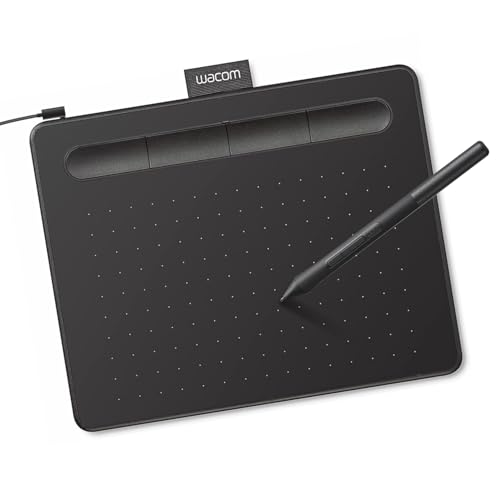
    Wacom Intuos Small

    Best Overall

    Wacom Intuos Small

    A compact Wacom pen tablet that works with all software, from the brand pros use.

    94Outstanding
    Check price
  2. 02
    UGEE M708 Drawing Tablet

    Best Large Area Value

    UGEE M708 Drawing Tablet

    A large active drawing space with 16384 pressure levels on a passive stylus.

    91Excellent
    Check price
  3. A compact 6 by 4 inch tablet with 8192 pen pressure levels and customizable keys.

    89Excellent
    Check price
  4. 04
    Graphics Drawing Tablet

    Best Mid-Size Area

    Graphics Drawing Tablet

    A 10 by 6 inch active area with 8192 pressure levels and universal compatibility.

    87Excellent
    Check price
  5. 05
    XOPPOX Graphics Drawing Tablet

    Best Battery-Free Pen

    XOPPOX Graphics Drawing Tablet

    A tablet with broad compatibility, a no-battery pen and shortcut keys.

    85Excellent
    Check price
  6. A 7mm thin tablet with 8192 pressure levels and the lowest price tier.

    83Very Good
    Check price

A drawing tablet under $500 is almost always a pen tablet, not a screen tablet. The surface is blank, you draw while looking at your monitor, and your brain needs a week to adapt. That learning curve scares off beginners who assume a display is better, but at this price a pen tablet gets you accurate pressure and a large drawing area for a fraction of what a screen costs.

Every tablet here is far below $500, with buckets running from under $25 to $50. We ranked six on active area, pressure levels, whether the pen needs a battery, shortcut keys and operating system support, using only the specifications on each listing. Where a listing is silent about tilt support or driver quality, we say so, because those details decide long-term satisfaction more than headline pressure numbers.

Before you buy

What Actually Matters

01

Active area

The active area is the part of the surface that registers the pen. A 6 by 4 inch tablet maps to your whole monitor, so a tiny hand movement becomes a big cursor move. Larger areas like 10 by 6 feel more natural for drawing. Check the listed inches, not the overall tablet size.

02

Pressure levels

Pressure levels such as 8192 or 16384 describe how many steps the tablet reports. In practice, 2048 or more feels smooth, and higher numbers are marketing. What matters is how the driver maps pressure to brush size. Look for pressure and the tilt support in the listing, and read about the driver.

03

Battery-free pen

A passive pen draws power from the tablet, so it never needs charging or batteries. It is also lighter. Battery pens add weight but can offer extra features. Check for the words battery-free or passive, and keep a spare nib in case the first wears down.

04

Software compatibility

A tablet needs a driver on Windows and macOS, and some work on Android. Compatibility with Photoshop, Krita and Clip Studio is standard, but older listings mention Windows 7. Check that the operating system you use is named, and download the driver before your first session.

05

Shortcut keys

Express keys let you map undo, brush size and eraser to the tablet, so you rarely touch the keyboard. Some tablets have none. Look for key counts, and map them in the driver to your most-used commands, since they turn a small tablet into a workflow tool.

In-depth reviews

Our Ranked Picks, Reviewed

1

Best Overall

Wacom Intuos Small

Our verdict: A compact Wacom pen tablet that works with all software, from the brand pros use.

The Intuos Small is Wacom's entry-level graphics tablet, pitched as working with all software and as the brand that professionals use. Wacom's pen technology and driver software are the reference that rivals copy.

It ranks first because driver reliability matters more than a spec-sheet number, and Wacom's support is the most established in the group. The UGEE M708 offers a larger active area and a higher stated pressure figure, but it trails on software maturity.

Best for beginners, photo editors and anyone who wants a tablet that just works. The caveat is the small active area, so drawing large strokes means more wrist movement.

Size class
Small
Compatibility
Works with all software
Brand
Wacom
Price bucket
$25 to $50

What we like

  • +Trusted Wacom drivers
  • +Works with all software
  • +Compact for small desks
  • +Pen technology pros know

Watch out for

  • −Small active area
  • −Pressure figure not in summary

Buy it if: Beginners and editors who want reliable software.

Skip it if: You draw large and want more working area.

2

Best Large Area Value

UGEE M708 Drawing Tablet

Our verdict: A large active drawing space with 16384 pressure levels on a passive stylus.

UGEE's M708 offers a large active drawing space, 16384 levels of passive stylus pressure and compatibility with multiple systems and software. A passive stylus needs no battery, which removes one thing to charge.

It ranks second because its working area and stated pressure range exceed the Wacom Small, but the Wacom's driver record keeps it ahead. Against the HUION H640P it gives far more room to draw.

Good for illustrators who want to sketch freely. The caveat is that a higher pressure number does not guarantee a better feel, and the driver experience varies by operating system.

Active area
Large
Pressure
16384 levels
Pen
Passive, no battery
Price bucket
$25 to $50

What we like

  • +Large drawing space
  • +16384 pressure levels
  • +Battery-free stylus
  • +Multiple OS support

Watch out for

  • −Driver quality varies
  • −Brand less established

Buy it if: Illustrators who want room for broad strokes.

Skip it if: You want the most established driver support.

3

Best Compact Portable

HUION Inspiroy H640P 6x4 inch Drawing Tablet 8192 Pen Pressure

Our verdict: A compact 6 by 4 inch tablet with 8192 pen pressure levels and customizable keys.

The Inspiroy H640P has a 6 by 4 inch active area, 8192 levels of pen pressure and a compact, portable body. The listing also emphasises workflow customization and professional pen performance.

It ranks third because the area is small, much like the Wacom Small, but it is portable enough for a laptop bag. It beats the thinner H420X on area, though the H420X costs less.

Best for students and travel sketchers. The caveat is that 6 by 4 inches demands small, precise strokes, so it can feel cramped on a large monitor.

Active area
6 x 4 in
Pressure
8192 levels
Format
Compact, portable
Price bucket
$25 to $50

What we like

  • +6 by 4 inch active area
  • +8192 pressure levels
  • +Portable body
  • +Customizable workflow

Watch out for

  • −Small working area
  • −Cramped on large monitors

Buy it if: Students and travelers who sketch on a laptop.

Skip it if: You prefer large sweeping strokes.

4

Best Mid-Size Area

Graphics Drawing Tablet

Our verdict: A 10 by 6 inch active area with 8192 pressure levels and universal compatibility.

This unbranded tablet offers a 10 by 6 inch active drawing space, 8192 levels of pressure sensitivity and universal compatibility. The 10 by 6 area is a mid-size format that suits most monitors.

It ranks fourth because the area matches the UGEE class but the listing gives fewer extras and the brand has little reputation. It beats the compact tablets on working area.

Good for a hobbyist who wants space on a budget. The caveat is the unknown brand, so check the driver availability for your operating system.

Active area
10 x 6 in
Pressure
8192 levels
Compatibility
Universal
Price bucket
$25 to $50

What we like

  • +10 by 6 inch area
  • +8192 pressure levels
  • +Universal compatibility claim
  • +Mid-size footprint

Watch out for

  • −Unknown brand
  • −Few listed extras

Buy it if: Hobbyists who want room for a low price.

Skip it if: Driver reputation matters to you.

5

Best Battery-Free Pen

XOPPOX Graphics Drawing Tablet

Our verdict: A tablet with broad compatibility, a no-battery pen and shortcut keys.

XOPPOX lists broad compatibility, a no-battery pen and convenient shortcut keys. A battery-free pen draws power from the tablet's field, which means it never needs charging.

It ranks fifth because the listing gives no area or pressure figure, and the others state at least one. It does include shortcut keys, which speed up undo and brush changes, something the plain Wacom Small lacks.

A reasonable pick for a beginner who wants shortcuts. The caveat is the missing numbers, so check the active area before ordering.

Pen
No battery
Keys
Shortcut keys
Compatibility
Broad
Price bucket
$25 to $50

What we like

  • +Battery-free pen
  • +Shortcut keys
  • +Broad compatibility
  • +Simple setup

Watch out for

  • −Area not stated
  • −Pressure figure missing

Buy it if: Beginners who want shortcut keys.

Skip it if: You need verified area and pressure.

6

Best Ultra-Thin Budget

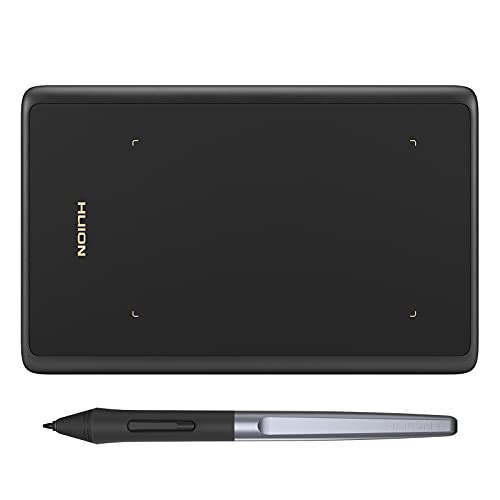
HUION Drawing Tablet H420X Graphics Tablet with 8192 Level Pen Pressure

Our verdict: A 7mm thin tablet with 8192 pressure levels and the lowest price tier.

The H420X is an upgraded version of HUION's small tablet, only 7mm thin, with 8192 pen pressure levels and broad compatibility. Seven millimetres makes it easy to slip into a laptop sleeve.

It ranks last because the drawing area is the smallest, and the 640P offers a better balance. It wins as the cheapest tablet here, in the under $25 bucket.

The pick for a first tablet or signing documents. The caveat is that a small tablet forces tiny strokes, and long drawing sessions feel cramped.

Thickness
7mm
Pressure
8192 levels
Class
Small
Price bucket
Under $25

What we like

  • +Only 7mm thick
  • +8192 pressure levels
  • +Lowest price tier
  • +Fits in a laptop bag

Watch out for

  • −Smallest working area
  • −Cramped for long sessions

Buy it if: First tablets, notes and signatures.

Skip it if: You plan to illustrate seriously.

Methodology

How We Ranked These

Active area

Stated drawing area, since it decides how big your strokes can be.

Pressure and pen

Pressure levels and whether the pen needs a battery.

Software and drivers

Brand maturity and compatibility claims.

Portability

Thickness, size and suitability for travel.

Value by tier

Features delivered at under $25 and $25 to $50 price buckets.

Every Primea Score uses the same weights: Performance 30% · Build & Materials 20% · Everyday Usability 20% · Value 20% · Owner Satisfaction 10%. Full scoring rules

Buyer's guide

How to Pick the Right One for You

By Active Area

Area is the biggest comfort factor.

AreaOur pick
6 x 4 inHUION Inspiroy H640P
10 x 6 inGraphics Drawing Tablet
Large areaUGEE M708 Drawing Tablet
Small, pro brandWacom Intuos Small

By Budget

SpendOur pick
Under $25HUION H420X
$25 to $50, reliableWacom Intuos Small
$25 to $50, big areaUGEE M708 Drawing Tablet
$25 to $50, shortcutsXOPPOX Graphics Drawing Tablet

Pen Tablet vs Screen Tablet

Pen tablet

Blank surface, cheaper, needs hand-eye adaptation. All six picks here are pen tablets.

Screen tablet

You draw on the image, but costs more. Consider it only after you outgrow a pen tablet.

Start with a pen tablet like the Wacom Intuos Small, and upgrade if you stick with it.

By Portability

NeedOur pick
ThinnestHUION H420X
Compact and capableHUION Inspiroy H640P
Pro brand, smallWacom Intuos Small
Desk-bound largeUGEE M708 Drawing Tablet

For Beginners Specifically

Look for

A reliable driver, a battery-free pen and enough area to draw comfortably without cramping.

In this ranking

The Wacom Intuos Small gives trusted software, and the UGEE M708 adds extra area for the same bucket.

When to Spend More

Spend more if

You want a screen, tilt support or a larger pro-grade surface. Look above this group.

Save if

You are testing the hobby. The HUION H420X costs under $25.

Questions

Frequently Asked Questions

Will these work with Photoshop and Krita?+

Yes. The Wacom Intuos Small is listed as working with all software, and HUION and UGEE drivers support the major painting and editing programs. Install the driver first and restart the app.

What mistake do beginners make?+

Judging by pressure numbers. The UGEE M708 lists 16384 levels, but a driver that handles pressure poorly feels worse than a Wacom at fewer levels. Prioritize drivers and active area over big numbers.

Is the Wacom worth more than the HUION?+

Often yes for beginners, because the Wacom Intuos Small has dependable drivers and support. The HUION H640P gives a similar area and 8192 pressure levels, and it can cost less.

How do I set up a drawing tablet?+

Install the driver, plug in the USB cable, map the tablet to your main monitor and set pen pressure in the driver. Practice basic lines for a week, since hand-eye separation takes time.

How do I look after the pen?+

Replace the nib when it flattens, keep the pen in its holder and wipe the surface with a dry microfibre cloth. The battery-free pens on the UGEE and XOPPOX have no charging to manage.

Can I use one with a phone?+

Some HUION models list Android support, but check the specific model. The H640P and H420X are marketed for broad compatibility, so confirm that your phone supports pen tablets before buying.

Final take

The Wacom Intuos Small is the best drawing tablet under $500 for most people because its drivers and software support are the most proven. The UGEE M708 is the larger-area value, the HUION H640P is the portable one, and the H420X is the cheapest entry. Prioritize area and drivers over pressure numbers.

More Ranked & Reviewed Guides