
Primea ReviewsAll Reviews

Primea Reviews is reader-supported. When you buy through our Amazon links we may earn a commission, at no extra cost to you. Rankings are set by our editors and never sold. Learn more

Ranked & Reviewed by Primea Reviews

The 6 Best Document Scanners with OCR of 2026, Ranked & Reviewed

By the Primea Editorial TeamUpdated November 1, 202610 min read6 products ranked
The 6 Best Document Scanners with OCR of 2026, Ranked & Reviewed

The short answer

The ScanSnap iX2500 is the best OCR scanner here because its software names and sorts files after recognition, on a 100-sheet feeder at 45 ppm. The Epson ES-400 II is the pick for editable Word and Excel output. The iX1300 suits small desks, the DS-640 is the cheap single-sheet option and the Canon R10 travels.

The Primea Scoreboard

Ranked & Reviewed

  1. OCR that also names and sorts your files.

    95Outstanding
    Check price
  2. Scans straight to editable Word and Excel.

    91Excellent
    Check price
  3. Searchable PDFs and Word or Excel via ScanSmart.

    88Excellent
    Check price
  4. ScanSnap OCR in a small body.

    85Excellent
    Check price
  5. Bundled OCR software at the lowest price tier.

    82Very Good
    Check price
  6. Portable OCR with a real feeder.

    79Very Good
    Check price

Every scanner here claims OCR, which tells you almost nothing. The useful question is what you get after the text is recognized. One machine names and files the result for you, another hands back an editable Word or Excel document, and the cheapest simply produces a searchable PDF. Pick the wrong output and you spend your evenings retyping or renaming files by hand.

We ranked six OCR scanners on the specs and software each listing names: feeder format, speed, connection and the bundled app. Scan speed matters less than people think, because a fast scanner feeding a clumsy filing workflow still leaves you with a pile of PDFs called Scan_0042. Decide what you want done with the paper, then choose the scanner that does it.

Before you buy

What Actually Matters

01

OCR output format

OCR turns a picture of text into real, searchable text, but the output varies. Some scanners give a searchable PDF, others convert to editable Word or Excel files. Decide what you do with scans afterward, then read the listing for the exact format it names. The Epson ES-400 II lists Word and Excel conversion.

02

Auto-naming and sorting

Auto-naming and sorting put each scan in the right folder with a sensible title, which saves the manual filing that eats most digitizing time. The ScanSnap iX2500 lists this in ScanSnap Home. Look for it in the software description, because many scanners stop at recognition and leave the filing to you, which is slow for archives.

03

Feeder type

An automatic feeder scans a stack, while a single-sheet feed needs you to insert every page. That decides how long you spend beside the machine. Hopper size varies from the Canon R10's 20 sheets to the iX2500's 100. Check the sheet count on the listing and whether the feeder is duplex, since a one-sided feeder doubles your handling time.

04

Connectivity

Wi-Fi lets a scanner sit on a shelf and send files without a cable, while USB is simpler and avoids network setup. The iX2500 offers both, with Wi-Fi 6 plus USB-C. Decide where the scanner will live, then check the listing for the ports and wireless standard it names, since older Wi-Fi can slow big transfers.

05

Daily duty rating

Lighter scanners carry a daily cap. The Canon R10 lists 500 scans per day, a limit that matters if you digitize an archive in one weekend. Estimate your biggest batch, divide by the duty rating, and check the listing for a stated daily figure. Missing ratings are a reason to ask the seller.

In-depth reviews

Our Ranked Picks, Reviewed

1

Best Overall

ScanSnap iX2500 Wireless or USB High-Speed Document Scanner

Our verdict: OCR that also names and sorts your files.

The iX2500 pairs a 100-sheet feeder at 45 ppm with ScanSnap Home, which runs OCR and then names and sorts each file. That second step is what separates it from the field. A stack of receipts, letters and contracts comes out already filed, instead of a folder of identical scan names you must open one by one. A touchscreen holds personalized profiles, and Wi-Fi 6 plus USB-C covers both cable and wireless use.

It beats the Epson pair because they stop at recognition. The ES-400 II offers Word and Excel conversion, but half the feeder at 50 sheets and no auto-sorting. If your problem is volume and filing, the iX2500 wins on both.

Buy it for large mixed batches. The caveat is lock-in: you live inside ScanSnap Home, and the price bucket is not confirmed in our data.

Speed
45 ppm
Feeder
100 sheets
Connection
Wi-Fi 6 + USB-C
Interface
Touchscreen profiles

What we like

  • +Auto-naming and sorting
  • +100-sheet feeder
  • +Touchscreen profiles
  • +Wi-Fi 6 and USB-C

Watch out for

  • −Price bucket unconfirmed
  • −Tied to ScanSnap Home

Buy it if: Anyone digitizing mixed paper at volume.

Skip it if: You want a low-cost entry scanner.

2

Best for Editable Files

Epson Workforce ES-400 II High-Speed Color Duplex Desktop Document Scanner

Our verdict: Scans straight to editable Word and Excel.

The ES-400 II is the scanner for people who want to edit what they scan. Its software outputs searchable PDF, or converts to Word and Excel, so a printed statement or table becomes something you can change rather than a picture of text. A 50-sheet duplex feeder, auto crop and blank-page removal handle double-sided stacks without manual cleanup.

It sits behind the iX2500 for two concrete reasons: the feeder holds half as many sheets, and nothing sorts the files afterward. It stays ahead of the ES-580W because it is the wired model with the clearest feeder spec, 50 sheets, where the ES-580W listing gives no figure.

Buy it if conversion to Word or Excel is the point. Skip it for hundreds of pages per batch. The $200 to $500 price is the other thing to weigh against the ScanSnap iX1300.

Feeder
50 sheets, duplex
OCR
Searchable PDF
Export
Word and Excel
Price bucket
$200-500

What we like

  • +Word and Excel conversion
  • +50-sheet duplex feeder
  • +Auto crop
  • +Blank-page removal

Watch out for

  • −Smaller feeder than iX2500
  • −$200-500 bucket

Buy it if: People converting paper into editable documents.

Skip it if: You need to scan hundreds of pages per batch.

3

Best Wireless Epson

Epson Workforce ES-580W Wireless Color Duplex Desktop Document Scanner

Our verdict: Searchable PDFs and Word or Excel via ScanSmart.

The ES-580W is the wireless Epson, built around ScanSmart software that produces searchable PDFs and converts to Word and Excel. Duplex desktop scanning means double-sided pages go through in one pass, and the wireless connection lets the scanner sit on a shelf instead of beside your computer.

It ranks third because the listing is thin where it counts. No feeder capacity appears, and capacity is the spec that decides whether you scan a lease or a filing box. The ES-400 II offers the same software features with a stated 50-sheet duplex feeder, so the missing number costs it a place. The wireless convenience is the trade.

Buy it if cables are the dealbreaker and your scanning is moderate. Skip it if you need documented feeder capacity. It sits in the $200 to $500 range, the same as the wired ES-400 II.

Software
ScanSmart
OCR
Searchable PDF
Export
Word and Excel
Price bucket
$200-500

What we like

  • +Wireless desktop scanner
  • +ScanSmart software
  • +Word and Excel export
  • +Duplex scanning

Watch out for

  • −Feeder size not listed
  • −$200-500 bucket

Buy it if: Wireless users wanting searchable PDFs.

Skip it if: You need documented feeder capacity.

4

Best Compact

ScanSnap iX1300 Wireless or USB Double-Sided Color Document Scanner, White

Our verdict: ScanSnap OCR in a small body.

The iX1300 shrinks the ScanSnap idea into a compact body: ScanSnap Home OCR, auto color optimization, 30 ppm duplex scanning and cloud service support, from a small ADF hopper. Auto color optimization matters for mixed paper, since a faded receipt and a glossy brochure need different treatment, and it handles that without manual tweaks.

It ranks fourth because it gives up what makes the iX2500 special at the top: 100 sheets and 45 ppm become a small hopper and 30 ppm. It does keep the ScanSnap software, which the Epsons lack, so it beats them for people who want a tidy filing workflow rather than Word conversion.

Buy it for a home office with little desk space and modest volume. The caveat is batch size: a thick stack means refilling the hopper repeatedly. It sits in the $200 to $500 range.

Speed
30 ppm duplex
OCR
ScanSnap Home
Hopper
Compact ADF
Price bucket
$200-500

What we like

  • +Compact body
  • +ScanSnap Home OCR
  • +Auto color optimization
  • +Cloud support

Watch out for

  • −Small hopper
  • −Slower than iX2500

Buy it if: Home offices with little desk space.

Skip it if: You scan big stacks regularly.

5

Best Budget

Brother DS-640 Compact Mobile Document Scanner

Our verdict: Bundled OCR software at the lowest price tier.

The DS-640 is the entry point, a compact mobile scanner that feeds one sheet at a time and bundles OCR and document management software. Broad OS driver support is a quiet strength, because older or unusual computers often lack drivers for competing models. Expect the $100 to $200 tier.

It ranks fifth because single-sheet feeding changes how the machine feels. Each page needs your hand, so a ten-page contract takes ten insertions, while every other scanner here takes a stack. It beats the Canon R10 only on price and software bundling, since the R10 adds a real hopper.

Buy it for occasional scans of a receipt, a form or a signed page. Skip it if you digitize anything in volume. The honest limit is time: its low price is paid for in your own minutes at the feeder.

Feed
Single sheet
Software
OCR bundled
OS support
Broad drivers
Price bucket
$100-200

What we like

  • +Bundled OCR software
  • +Compact and mobile
  • +Broad OS support
  • +Lower price bucket

Watch out for

  • −Single-sheet feed
  • −Slow for batches

Buy it if: Budget buyers with occasional scans.

Skip it if: You scan multi-page stacks.

6

Best Portable

Canon imageFORMULA R10 Portable Document Scanner, USB Powered, Duplex

Our verdict: Portable OCR with a real feeder.

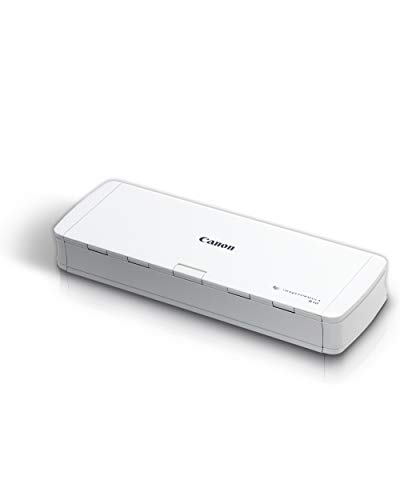
The Canon imageFORMULA R10 weighs 1.7 lb, runs on USB power and carries a 20-sheet duplex hopper with built-in OCR to searchable PDF. USB power is the feature that matters on the road, since there is no brick or outlet to find. It is rated for 500 scans per day.

It ranks last because that daily rating and the 20-sheet hopper cap its usefulness at an office desk. Against the Brother DS-640, which feeds one sheet at a time, the R10 is the better machine, since a hopper beats hand-feeding. Against the ScanSnap iX1300, it lacks the filing software and the speed.

Buy it for travel or light home scanning. Skip it if your daily load approaches the 500 scan limit.

Hopper
20 sheets, duplex
Rating
500 scans/day
Weight
1.7 lb
Price bucket
$100-200

What we like

  • +20-sheet duplex hopper
  • +1.7 lb
  • +USB powered
  • +Built-in OCR

Watch out for

  • −500 scans per day cap
  • −Small hopper

Buy it if: Travelers and light scanners.

Skip it if: You do heavy daily volume.

Methodology

How We Ranked These

OCR output

We weighed what the software does with recognized text, from search to Word export.

Feeder and speed

Hopper size and listed ppm decided batch suitability.

Software workflow

Filing and naming features scored above plain text recognition.

Portability

Weight and power source mattered for mobile use.

Price bucket

Value was compared within the listed buckets.

Every Primea Score uses the same weights: Performance 30% · Build & Materials 20% · Everyday Usability 20% · Value 20% · Owner Satisfaction 10%. Full scoring rules

Buyer's guide

How to Pick the Right One for You

By OCR Output

Decide what you need the scanned text to become.

NeedOur pick
Auto-named and sorted filesScanSnap iX2500 Wireless or USB High-Speed Document Scanner
Editable Word or ExcelEpson Workforce ES-400 II High-Speed Color Duplex Desktop Document Scanner
Searchable PDF via ScanSmartEpson Workforce ES-580W Wireless Color Duplex Desktop Document Scanner

By Budget

SpendOur pick
$100-200Brother DS-640 Compact Mobile Document Scanner
$100-200, portable duplexCanon imageFORMULA R10 Portable Document Scanner, USB Powered, Duplex
$200-500Epson Workforce ES-400 II High-Speed Color Duplex Desktop Document Scanner

Automatic Feeder vs Single-Sheet

Automatic feeder

The ScanSnap iX2500, Epson ES-400 II and Canon R10 scan stacks hands-free.

Single-sheet

The Brother DS-640 feeds one page at a time, which suits occasional scanning.

Most buyers should default to an automatic feeder unless scanning is rare.

By Desk Space

SpaceOur pick
Tiny deskScanSnap iX1300 Wireless or USB Double-Sided Color Document Scanner, White
Bag or travelCanon imageFORMULA R10 Portable Document Scanner, USB Powered, Duplex
Full desktopScanSnap iX2500 Wireless or USB High-Speed Document Scanner

For Paperless Home Offices Specifically

Look for

Auto-naming, sorting and cloud support.

In this ranking

The ScanSnap iX2500 auto-names and sorts, and the iX1300 supports cloud services.

When to Spend More

Spend more if

You digitize a lot, so the iX2500 saves filing time.

Save if

Scanning is occasional, so the Brother DS-640 does the job.

Questions

Frequently Asked Questions

Is OCR included with these scanners?+

All six list OCR, either built in or in bundled software. The iX2500 and iX1300 use ScanSnap Home, the ES-400 II and ES-580W use ScanSmart, and the Canon R10 converts to searchable PDF itself.

What is the most common mistake?+

Assuming all OCR is the same. Output varies from a searchable PDF on the Canon R10 to editable Word and Excel on the Epson ES-400 II, so choose by what you need to do with the text afterward.

Is the iX2500 worth over the Epson ES-400 II?+

If you want auto-naming and a 100-sheet feeder, yes. The iX2500 files documents for you at 45 ppm. If your priority is converting scans to Word or Excel, the Epson ES-400 II is the better fit.

Do I need Wi-Fi?+

Not necessarily. The ES-400 II and Canon R10 work over a cable, while Wi-Fi comes with the iX2500 and ES-580W. Wireless helps if the scanner sits away from your computer, but a USB link is simpler to set up.

How do I keep a scanner working?+

Clean the rollers per the manual and stay under the daily rating, such as the Canon R10's 500 scans. Paper dust builds up in any feeder, so the iX2500 and Epsons benefit from regular cleaning as volume grows.

Can the Brother DS-640 scan a stack?+

No. The Brother DS-640 feeds a single sheet at a time, so a stack means repeated insertions. For batches, the Canon R10 with its 20-sheet hopper or the iX2500 with 100 sheets is the realistic choice.

Final take

Buy the ScanSnap iX2500 if you digitize mixed paper in volume and want filing handled for you. Choose the Epson ES-400 II when the goal is editable documents. Small desks suit the iX1300, light budgets the Brother DS-640, and the Canon R10 covers travel. Match the output format and feeder to your workload before you look at price.

More Ranked & Reviewed Guides