
Primea ReviewsAll Reviews

Primea Reviews is reader-supported. When you buy through our Amazon links we may earn a commission, at no extra cost to you. Rankings are set by our editors and never sold. Learn more

Ranked & Reviewed by Primea Reviews

The 5 Best Document Scanners for Accountants of 2026, Ranked & Reviewed

By the Primea Editorial TeamUpdated November 4, 202610 min read5 products ranked
The 5 Best Document Scanners for Accountants of 2026, Ranked & Reviewed

The short answer

The Epson Workforce ES-400 II is the best scanner for accountants: a 50-sheet duplex feeder, a TWAIN driver for practice software and searchable PDF OCR. The ScanSnap iX2400 is the faster, bigger-feeder pick with a 100-sheet hopper and up to 45 ppm. The Canon R40II suits offices that scan straight to cloud services, the ScanSnap iX1300 handles receipts and cards, and the Canon R10 is the portable option.

The Primea Scoreboard

Ranked & Reviewed

  1. A 50-sheet duplex feeder with a TWAIN driver for practice management software.

    94Outstanding
    Check price
  2. A 100-sheet feeder at up to 45 ppm, driven by one button.

    92Outstanding
    Check price
  3. An office-class duplex scanner that sends directly to cloud services.

    88Excellent
    Check price
  4. A compact 30 ppm duplex scanner that handles thick items and cards.

    86Excellent
    Check price
  5. A 1.7 lb USB-powered duplex scanner rated for 500 scans a day.

    83Very Good
    Check price

Tax season does not break a scanner with volume. It breaks it with variety: a thick client folder, three crumpled receipts, a stapled bank statement and a half-sheet 1099 in one pile. A scanner that does 30 clean pages of identical paper can still jam on the first torn receipt, and every jam costs billable minutes. Buyers shop on speed and discover too late that the feeder, not the motor, sets the pace.

So we ranked scanners for the way accountants actually feed them: feeder size, duplex handling, how files reach the practice software, and how they cope with mixed paper. We reviewed spec sheets and owner feedback for five models and scored each on the Primea framework. A scanner that sits on a desk for daily use earns different points than a portable one for client sites.

Before you buy

What Actually Matters

01

Feeder size

The feeder sets how often you stop to reload. The iX2400 holds 100 sheets, the Epson ES-400 II holds 50 and the Canon R10 holds 20. For client folders, pick a hopper big enough for a typical file. Check the sheet count in the listing, not just pages per minute.

02

TWAIN driver

TWAIN is the interface many accounting and document-management programs use to pull a scan in directly. Without it, you save files and import them by hand. The Epson ES-400 II lists TWAIN. Check your practice software's scanner requirements before buying a scanner that uses only its own app.

03

OCR output

Optical character recognition turns a scanned page into searchable text, so you can find a client's figure later. The Epson lists searchable PDF OCR. Look for the phrase in the bullets, and check whether it is built in or needs extra software.

04

Mixed paper handling

Receipts curl, statements are stapled and cards are stiff. A scanner that takes thick items and cards, like the iX1300, copes where others jam. Look for the words thick, card or plastic in the listing, and for blank-page removal that does not discard faint pages.

05

Duty cycle

A scanner rated for a few hundred pages a day will wear out in a busy practice. The Canon R10 states 500 scans per day. Most listings omit the number. If none is given, assume light use and ask the maker before buying for heavy tax-season loads.

In-depth reviews

Our Ranked Picks, Reviewed

1

Best Overall

Epson Workforce ES-400 II High-Speed Color Duplex Desktop Document Scanner

Our verdict: A 50-sheet duplex feeder with a TWAIN driver for practice management software.

The ES-400 II pairs a 50-sheet automatic document feeder and duplex scanning with a TWAIN driver. TWAIN is the standard that many accounting and document-management packages use to pull images directly, so scans land in a client file without a manual import.

It leads because compatibility matters more than raw speed in a practice. The ScanSnap iX2400 feeds more paper, but its software is a closed one-touch workflow, while the Epson's driver plugs into other programs. Auto crop and blank-page removal are listed, and the listing itself advises verifying them against real client sets, which is sound advice for mixed paper. Searchable PDF OCR turns statements into text you can search.

Buy it for a desk-based practice with specialist software. The caveat is the 50-sheet hopper, half the iX2400's.

Feeder
50-sheet ADF, duplex
Driver
TWAIN
Software
Searchable PDF OCR
Cleanup
Auto crop, blank-page removal

What we like

  • +TWAIN driver for practice software
  • +50-sheet duplex feeder
  • +Searchable PDF OCR
  • +Auto crop and blank removal

Watch out for

  • −Half the iX2400's hopper
  • −Cleanup needs checking on odd paper
  • −Higher price bracket

Buy it if: Desk-based practices that import scans into accounting software.

Skip it if: You want the biggest hopper or a one-touch cloud workflow.

2

Best High Volume

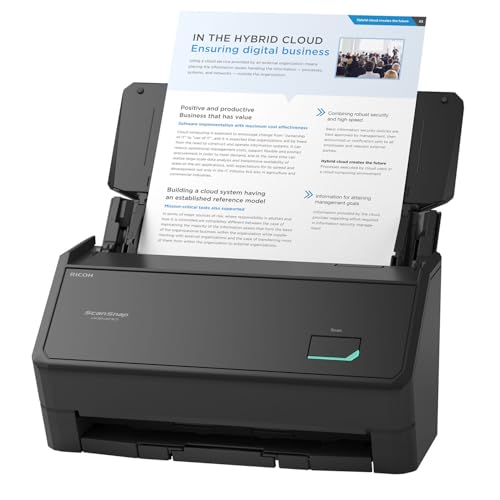
ScanSnap iX2400 High-Speed One-Touch Button Color Document Scanner

Our verdict: A 100-sheet feeder at up to 45 ppm, driven by one button.

The iX2400 has a 100-sheet feeder and scans up to 45 ppm over a wired USB connection. One-touch scanning with ScanSnap Home software lets you press a button and drag-drop the result, and it adds auto de-skew and blank-page removal.

It ranks second because its strength is throughput rather than integration. At 100 sheets, it clears a tax-season stack in half as many loads as the Epson ES-400 II. But the ScanSnap Home workflow is built around its own software rather than a TWAIN driver, which matters if your practice tool wants direct import. Against the iX1300, the iX2400 adds speed and hopper size but loses the wireless option.

Buy it for a high-volume office. The caveat is that it is wired USB only.

Feeder
100 sheets
Speed
Up to 45 ppm
Connection
Wired USB
Software
ScanSnap Home, one-touch

What we like

  • +100-sheet feeder
  • +Up to 45 ppm
  • +One-touch scan and drag-drop
  • +Auto de-skew and blank removal

Watch out for

  • −Wired USB only
  • −TWAIN support not listed
  • −Closed software workflow

Buy it if: High-volume offices clearing large client stacks.

Skip it if: Your practice software needs a TWAIN driver or wireless scanning.

3

Best for Cloud Scanning

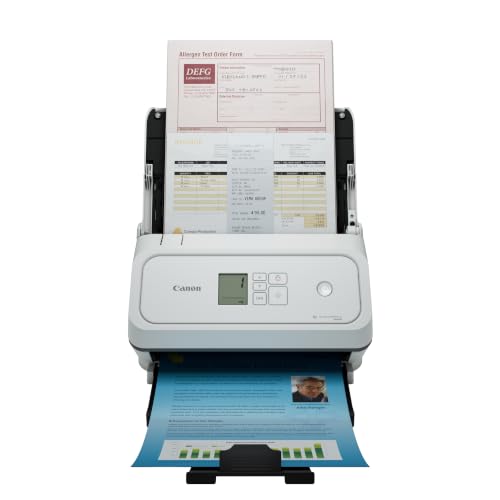
Canon imageFORMULA R40II Office Document Scanner

Our verdict: An office-class duplex scanner that sends directly to cloud services.

The Canon R40II is an office-class duplex scanner with direct scanning to cloud services and easy setup. The listing is a newer one, and says little else.

It ranks third because the details are thin. Against the Epson ES-400 II, which names a 50-sheet feeder, a TWAIN driver and OCR, the Canon states none of those. What it offers is a cloud-first route, which suits a practice storing client files online rather than on a server. Against the iX1300, it targets desk use rather than compact scanning.

Buy it if your files live in cloud storage and you want to skip the PC. The caveat is exactly the sparse listing: verify the feeder size, speed and driver support on Canon's page before you order for a busy practice.

Type
Office-class duplex
Cloud
Direct cloud service scanning
Setup
Easy setup
Price bracket
$200 to $500

What we like

  • +Direct cloud scanning
  • +Duplex scanning
  • +Easy setup
  • +Office-class design

Watch out for

  • −Feeder size not stated
  • −Speed and driver not stated
  • −Newer listing, little detail

Buy it if: Cloud-first offices that want to scan without a PC.

Skip it if: You need confirmed speed, feeder size or TWAIN support.

4

Best Compact

ScanSnap iX1300 Wireless or USB Double-Sided Color Document Scanner, White

Our verdict: A compact 30 ppm duplex scanner that handles thick items and cards.

The iX1300 scans at 30 ppm duplex over wireless or USB, with a compact feeder hopper, standalone scan-to-cloud and the ability to handle thick items and cards. Auto de-skew and color optimization are included.

It ranks fourth because the hopper is small and the speed is 15 ppm below the iX2400. Where it earns its place is range: it takes business cards, IDs and thicker receipts that sheet-only scanners reject, which suits an accountant who collects client paperwork from a lot of sources. Against the Canon R10, it is a desk scanner that can also go wireless.

Buy it for a small practice that needs to scan odd paper. The caveat is the compact hopper, which makes a thick client file a multi-load job.

Speed
30 ppm duplex
Connection
Wireless or USB
Media
Thick items and cards
Cloud
Standalone scan-to-cloud

What we like

  • +Handles cards and thick items
  • +Wireless or USB
  • +Standalone scan-to-cloud
  • +Color optimization

Watch out for

  • −Compact feeder hopper
  • −Slower than the iX2400
  • −Many loads for thick files

Buy it if: Small practices scanning receipts, IDs and cards alongside paper.

Skip it if: You scan thick folders daily and need a large hopper.

5

Best Portable

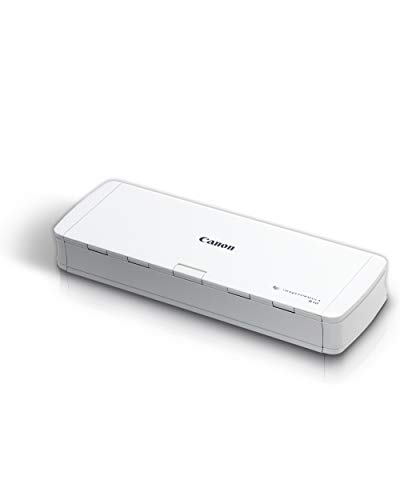
Canon imageFORMULA R10 Portable Document Scanner, USB Powered, Duplex

Our verdict: A 1.7 lb USB-powered duplex scanner rated for 500 scans a day.

The R10 is a USB-powered portable with a 20-sheet duplex hopper, weighing 1.7 lb, and carries an explicit 500 scans per day rating. It is the scanner you can put in a laptop bag for client visits.

It ranks last because 20 sheets and 500 scans per day suit field work, not a tax-season desk. Against the Epson ES-400 II, you give up the 50-sheet feeder and the TWAIN driver; against the iX1300, you give up the thick-item handling. What the R10 offers is portability, and a stated daily duty cycle that most portables never publish.

Buy it for visiting clients on site. The caveat is the small hopper, which makes a full folder a repeated chore.

Feeder
20-sheet ADF, duplex
Duty
500 scans per day
Weight
1.7 lb
Power
USB powered

What we like

  • +Light, 1.7 lb body
  • +USB powered
  • +Stated 500 scans per day
  • +Duplex scanning

Watch out for

  • −Only 20-sheet hopper
  • −Not for tax-season volume
  • −No TWAIN listed

Buy it if: Accountants who scan documents at client sites.

Skip it if: You scan large folders at a desk every day.

Methodology

How We Ranked These

Feeder and duplex

Hopper size from 20 to 100 sheets and duplex capability set how many passes a client folder needs.

Software integration

TWAIN drivers, scan-to-cloud and proprietary software were compared on how well files reach practice systems.

Mixed paper handling

Cards, thick items, auto de-skew and blank-page removal matter for the receipts and statements accountants scan.

Speed and duty cycle

Stated pages per minute and daily scan ratings were weighed against tax-season workloads.

Value

We compared confirmed capabilities across the $100 to $500 price brackets.

Every Primea Score uses the same weights: Performance 30% · Build & Materials 20% · Everyday Usability 20% · Value 20% · Owner Satisfaction 10%. Full scoring rules

Buyer's guide

How to Pick the Right One for You

By Daily Volume

Match the feeder to the biggest stack you scan.

VolumeOur pick
Heavy, over 100 pagesScanSnap iX2400 High-Speed One-Touch Button Color Document Scanner
Daily desk workEpson Workforce ES-400 II High-Speed Color Duplex Desktop Document Scanner
Moderate, mixed paperScanSnap iX1300 Wireless or USB Double-Sided Color Document Scanner, White
Cloud-first officeCanon imageFORMULA R40II Office Document Scanner
Light, on the moveCanon imageFORMULA R10 Portable Document Scanner, USB Powered, Duplex

By Budget

SpendOur pick
$100 to $200Canon imageFORMULA R10 Portable Document Scanner, USB Powered, Duplex
$200 to $500 (practice software)Epson Workforce ES-400 II High-Speed Color Duplex Desktop Document Scanner
$200 to $500 (volume)ScanSnap iX2400 High-Speed One-Touch Button Color Document Scanner
$200 to $500 (odd paper)ScanSnap iX1300 Wireless or USB Double-Sided Color Document Scanner, White
$200 to $500 (cloud)Canon imageFORMULA R40II Office Document Scanner

TWAIN vs One-Touch

TWAIN driver

Imports scans into accounting and document software directly, with settings controlled by that program. Pick: Epson ES-400 II.

One-touch

Press a button and files route to folders or cloud with minimal setup. Picks: ScanSnap iX2400, iX1300 and Canon R40II.

Default to TWAIN if your practice software supports it, and one-touch if you use folders and cloud.

By Connection

SetupOur pick
Wired USB deskScanSnap iX2400 High-Speed One-Touch Button Color Document Scanner
Wireless or USBScanSnap iX1300 Wireless or USB Double-Sided Color Document Scanner, White
Direct to cloudCanon imageFORMULA R40II Office Document Scanner
USB bus poweredCanon imageFORMULA R10 Portable Document Scanner, USB Powered, Duplex

For Tax Season Specifically

Look for

A big hopper, duplex scanning, blank-page removal and a stated daily duty rating, so peak weeks do not stall the office.

In this ranking

The ScanSnap iX2400 offers 100 sheets at 45 ppm, and the Epson ES-400 II offers a 50-sheet duplex feeder with TWAIN.

When to Spend More

Spend more if

Your practice scans every day and imports to specialist software. The Epson ES-400 II or ScanSnap iX2400 pay back in saved minutes.

Save if

You scan occasionally or at client sites. The Canon R10 stays in the $100 to $200 bracket.

Questions

Frequently Asked Questions

Will the Epson ES-400 II work with my accounting software?+

It lists a TWAIN driver, which many practice and document-management packages use, but check that your program accepts TWAIN scanners. If it only imports files, the ScanSnap iX2400 workflow is simpler.

What mistake do accountants make buying scanners?+

They buy on pages per minute and ignore the hopper. A 45 ppm scanner with a 20-sheet feeder, like a portable, stops constantly. The iX2400's 100-sheet hopper and the Epson's 50 sheets are the real productivity numbers.

Is the iX2400 worth it over the iX1300?+

Yes for volume: it feeds 100 sheets at up to 45 ppm against the iX1300's compact hopper and 30 ppm. The iX1300 wins on wireless scanning and thick items and cards, so pick by paper type.

How do I set up searchable PDFs?+

Enable OCR in the scanner's software before the first batch. On the Epson, searchable PDF output is listed. Always spot-check a few scanned bank statements for misread digits, since OCR on numbers needs verification.

How should I maintain the rollers?+

Clean the feed rollers with a lint-free cloth and the maker's cleaner on a schedule, especially after receipts and carbon-heavy paper. Dust and paper residue cause double feeds on the iX2400 and Epson alike.

Can these scanners handle receipts?+

The iX1300 handles thick items and cards, so crumpled or thick receipts are less risky there. The Canon R10 and Epson work with standard paper; fold-prone thermal receipts are best fed individually or in a carrier sheet.

Final take

For most accounting practices the Epson Workforce ES-400 II is the scanner to buy: a 50-sheet duplex feeder, a TWAIN driver and searchable PDF OCR. For heavy volume, the ScanSnap iX2400 adds a 100-sheet hopper and up to 45 ppm. The ScanSnap iX1300 suits mixed paper and cards, the Canon R40II suits cloud-first offices, and the Canon R10 travels to client sites.

More Ranked & Reviewed Guides